Minecraft version
Back to mods 
Modrinth · Minecraft mod
Coordinate Bar
Displays your current coordinates in the action bar.
Choose a version Pick your version below, then grab the matching file.
Quick answer
Which Coordinate Bar release should I use?
Latest stable file 1.2
Game version 1.21, 1.21.1, 1.21.10
Loader Fabric, Forge, NeoForge
Coordinate Bar 1.2 targets 1.21, 1.21.1, 1.21.10 with Fabric, Forge, NeoForge. Installation on the client is optional. Installation on the dedicated server is optional. No extra mods listed for this file.
Where it goes
Is Coordinate Bar required on the client, server, or both?
Installation on the client is optional. Installation on the dedicated server is optional.
Client Optional
Dedicated server Optional
Loader for this release Fabric, Forge, NeoForge
Required install it here Optional supported, not mandatory Not supported do not install here Source doesn’t say do not assume
The source marks this as usable on both the client and server.
What else does Coordinate Bar 1.2 need?
1.2. Change the file and its required mods may change too.
This file does not list any required mods. Do not add a library just because a different file uses it.
This file does not list any required or optional mods.
Before you install it
Add Coordinate Bar without breaking your instance.
Built for Coordinate Bar 1.2. Pick another file and the loader, install side or required mods may change.
- 01
Stick to this file
Use 1.2. It targets 1.21, 1.21.1, 1.21.10 with Fabric, Forge, NeoForge; another release may have different loader, side or dependency requirements.
- 02
Bring the mods it needs
This file does not list any required mods. Do not add a library just because a different file uses it.
- 03
Put it on the correct side
Installation on the client is optional. Installation on the dedicated server is optional.
- 04
Pick the file you checked
Use the “Get this file” button beside 1.2. It opens that exact file at the source.
About this project
What does Coordinate Bar add?
📍 Coordinate Bar
Coordinate Bar is a simple Minecraft datapack that shows your current coordinates (X, Y, Z) in the action bar.
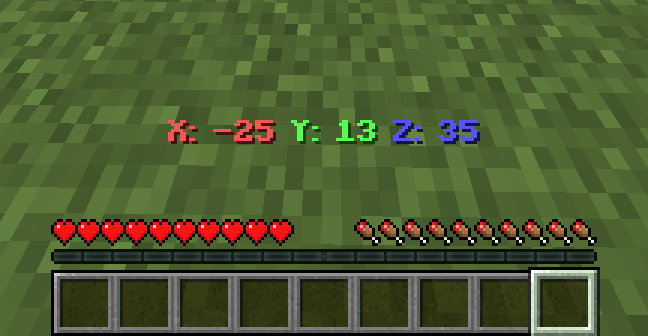
✨ Features
- Shows coordinates in real-time.
- Works in singleplayer and multiplayer.
- Supports Smithed Actionbar Libary.
📦 Optional Library Support – Actionbar
This datapack allows the actionbar to be shared across multiple datapacks on a server, preventing conflicts and ensuring compatibility.
🔗 Download: Smithed – Actionbar Library
Enable support with the following command:
scoreboard players set .library thirstbar 1Disable support with the following command:
scoreboard players set .library thirstbar 0
📦 Installation
- Download the datapack
.zipfile. - Place it in your world's
datapacksfolder. - Use
/reloadafter joining the world. - You're all set! Move around and see your coordinates at the bottom of your screen.
🧱 Compatibility
- Minecraft Java Edition 1.20.2+
- No external resource packs needed
🌐 ITITAN Hosting

💬 Feedback and Request
If you have a request or feedback, please write them in to my discord 3geetr.
Project description from Modrinth.
Pick your setup
Coordinate Bar by Minecraft version and loader
Choose the version and loader you play, then open the matching release.
Minecraft version
26.2
5 loader buildsMinecraft version
26.1.2
5 loader buildsMinecraft version
26.1.1
5 loader buildsMinecraft version
26.1
5 loader buildsMinecraft version
1.21.11
5 loader buildsMinecraft version
1.21.10
5 loader buildsMinecraft version
1.21.9
5 loader buildsMinecraft version
1.21.8
5 loader buildsMinecraft version
1.21.7
5 loader buildsMinecraft version
1.21.6
5 loader buildsMinecraft version
1.21.5
5 loader buildsShowing the newest 12 of 17 game versions. Older files are in the list below.
Check the dependencies, then try the file in a copied instance before changing a world you care about.
Recent files
Coordinate Bar versions and loaders
1.2
coordinate-bar-dp-1.5.jar
20 Aug 2025
Client Optional Server Optional Dependencies No extras listed Listed on Release listing
Check the 26.3 · Fabric setup 1.211.21.11.21.101.21.11 release
1.2
Coordinate Bar.zip
20 Aug 2025
Client Optional Server Optional Dependencies No extras listed Listed on Release listing
Check the 26.3 · datapack setup 1.211.21.11.21.101.21.11 release
1.1
coordinate-bar-dp-1.1.jar
24 Jul 2025
Client Optional Server Optional Dependencies No extras listed Listed on Release listing
Check the 1.21.8 · Fabric setup 1.211.21.11.21.21.21.3 release
1.1
Coordinate Bar.zip
24 Jul 2025
Client Optional Server Optional Dependencies No extras listed Listed on Release listing
Check the 1.21.8 · datapack setup 1.211.21.11.21.21.21.3 release
1.0
coordinate-bar-dp-1.0.jar
2 Jun 2025
Client Optional Server Optional Dependencies No extras listed Listed on Release listing
Check the 1.21.8 · Fabric setup 1.211.21.11.21.21.21.3 release
1.0
Coordinate Bar.zip
1 Jun 2025
Client Optional Server Optional Dependencies No extras listed Listed on Release listing
Check the 1.21.8 · datapack setup 1.211.21.11.21.21.21.3 release
Looking for an older file? The official Modrinth project page is in Resources.
 mod
CurseForge + Modrinth · Minecraft
Maid Restaurant
A addon mod for Touhou Little Maid that enables maids to cook and serve food automactically.
 mod
CurseForge + Modrinth · Minecraft
Cobblemon Pasture Extractor
Collects items from Pokémon in nearby Pasture Blocks in Cobblemon.
 mod
Modrinth · Minecraft
ConfigGuard
Automatic snapshots of your config folder with a line-by-line diff and one-click restore. Undo any config change, on the client or on a server.