GeckoLib Needed by The Clone 1.0.0
requiredMatching file found Matched file: geckolib-forge-1.19-3.1.40.jar

Modrinth · Minecraft mod
I'm on singleplayer, right? Why is there another player?
Quick answer
The Clone 1.0.0 targets 1.19.2 with Forge. Installation on the client is optional. Installation on the dedicated server is optional. All 1 required mods have matching files.
Where it goes
Installation on the client is optional. Installation on the dedicated server is optional.
The source marks this as usable on both the client and server.
1.0.0. Change the file and its required mods may change too.
Install GeckoLib first. We found matching files for this game-version and loader setup.
We only count dependency files that match this setup. A file for another loader does not fill the gap.
Before you install it
Built for The Clone 1.0.0. Pick another file and the loader, install side or required mods may change.
Use 1.0.0. It targets 1.19.2 with Forge; another release may have different loader, side or dependency requirements.
Install GeckoLib first. We found matching files for this game-version and loader setup.
Installation on the client is optional. Installation on the dedicated server is optional.
Use the “Get this file” button beside 1.0.0. It opens that exact file at the source.
About this project
The Clone adds a terrifying new monster. A strange creature lurks in the world, one that looks exactly like a player but darker with glowing eyes. It watches silently from a distance, always appearing nearby with an eerie sound. If you lock at it, it may simply vanish… or turning into a monster. You may think you’re alone, but when you hear that sound… you’ll know it’s watching.
● Visit my Discord Server!
https://discord.gg/akP56NtmVQ
● Important FaQ
► [OLD] What is my console spaming?
Most mobs use special spawning conditions, which means that these mobs can only appear under certain conditions. If the spawning conditions work, this spam is created in the console.
► [OLD] Why can't I summon a mob?
Spawning Conditions determine which conditions must be met in order to spawn certain mobs. Some mobs only spawn above Y level 60. Some below. Most mobs can only spawn in the overworld than in other dimensions.
► Why are features missing in different versions?
It is recommended to play the newest versions of higher minecraft versions.
Not all features of MCreator available or the same in different versions.
For example: Version 1.19.2 doesn't have the feature of shield, better structure generation or custom villagers, but Version 1.20.1 does have them.
► How does the Phases work?
Through the phases that increase up to phase 3, The Clone becomes more aggressive.
Phase 0
Spawns far from the player and vanishes when looked at.
Phase 1
Spawns closer. If looked at, it transforms into a monster but does not attack.
Phase 2
Spawns even closer. The monster can now attack the player.
Phase 3
Spawns very close. The monster can emerge from the ground.
► How to change phases?
Phases are reset to 0 if The Clone kills a player.
Alternatively, you can use the command "clone_add_phases" to increase the phase by one.
The phases are reset to 0 with the command “clone_reset_phases”.
► How can I disable other skins?
Other skins from the clone can be disabled when setting the gamerule "EnableMultipleCloneSkins" to false.
If set to false, only belon and unnamed skins will be used.
► How does he changes skins?
The Clone can change his skin from 13 different opions when he spawns and the gamerule "EnableMultipleCloneSkins" is set to true. When the clone spawns as a player, it will randomly pick a number from 0 to 12 which determinds his skin.
Number 0 or anything above 12 = Belon
Number 1 = Unnamed
Number 2 = Paul
Number 3 = Chaos
Number 4 = Hannes
Number 5 = Steve (Buddy)
Number 6 = Kerjoc
Number 7 = Diggazuspät
Number 8 = Slime_HD5800
Number 9 = Lilly
Number 10 = Slimmy
Number 11 = Zcoper
Number 12 = Ash
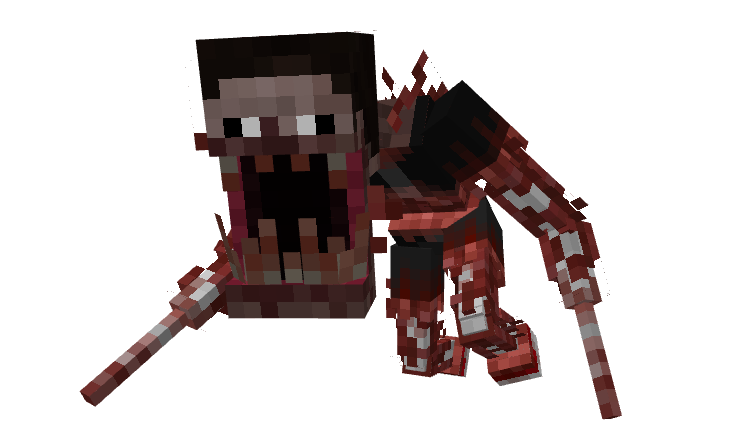
At first glance, The Clone appears as a normal player that stalks the player. Its arrival is marked by a distant sound, a warning that it has spawned nearby, silently watching its target. If you look directly at the Clone, it either vanishes or reveals its true form. When this happens, you’ll be blinded for a brief moment, just enough time for it to disappear. But don’t be fooled, it’s still there, lurking, waiting to strike from a random direction. The Clone moves quickly, can destroy blocks, climb up to four blocks high, and break shields. It can even burrow underground, resurfacing beneath unsuspecting players. Sometimes, it disappears entirely, leaving behind only an eerie silence.
Project description from Modrinth.
Pick your setup
Choose the version and loader you play, then open the matching release.
Check the dependencies, then try the file in a copied instance before changing a world you care about.
Recent files
TheClone-forge-1.19.2-1.4.jar
7 Jun 2026
TheClone-forge-1.19.4-1.4.jar
7 Jun 2026
TheClone-forge-1.20.1-1.4.jar
7 Jun 2026
Looking for an older file? The official Modrinth project page is in Resources.
 mod
ArPhEx horror mod - realistic, intricate, phobia-inducing entities and supernatural bosses
 mod
Yandere horror companion mod: someone is watching you. Footsteps behind you, a figure at the edge of sight, break-ins, chases and jumpscares. Or he falls in love: guards you, brings flowers, builds by your home. Story mode included.
 mod
A pirate adventure mod: eat a Devil Fruit, awaken Haki, master fighting styles and sail the East Blue. Early access, the story runs from Dawn Island to Loguetown.