Minecraft version
Back to mods 
Modrinth · Minecraft mod
No Friendly Fire
Prevent Accidentally Damaging Your Friend.
Choose a version Pick your version below, then grab the matching file.
Quick answer
Which No Friendly Fire release should I use?
Latest stable file 2.2.2
Game version 1.21.11
Loader Fabric
No Friendly Fire 2.2.2 targets 1.21.11 with Fabric. It must be installed on the client. Do not install it on the dedicated server. No extra mods listed for this file.
Where it goes
Is No Friendly Fire required on the client, server, or both?
It must be installed on the client. Do not install it on the dedicated server.
Client Required
Dedicated server Not supported
Loader for this release Fabric
Required install it here Optional supported, not mandatory Not supported do not install here Source doesn’t say do not assume
This file is marked client-only.
What else does No Friendly Fire 2.2.2 need?
2.2.2. Change the file and its required mods may change too.
This file does not list any required mods. Do not add a library just because a different file uses it.
This file does not list any required or optional mods.
Before you install it
Add No Friendly Fire without breaking your instance.
Built for No Friendly Fire 2.2.2. Pick another file and the loader, install side or required mods may change.
- 01
Stick to this file
Use 2.2.2. It targets 1.21.11 with Fabric; another release may have different loader, side or dependency requirements.
- 02
Bring the mods it needs
This file does not list any required mods. Do not add a library just because a different file uses it.
- 03
Put it on the correct side
It must be installed on the client. Do not install it on the dedicated server.
- 04
Pick the file you checked
Use the “Get this file” button beside 2.2.2. It opens that exact file at the source.
About this project
What does No Friendly Fire add?



Friend Guard: Don't Damage to Your Friend
Friend Guard is a client-side Minecraft mod for Fabric. With Friend Guard, you can add players to your 'protected players' list to prevent accidentally damaging your friends! In the heat of battle, ensure you don’t mistakenly hit your allies with the 'protected players' list. Additionally, you’ll have a compass system that makes sure no enemy player hiding from you goes unnoticed. Discover where players are, know how many are around you, and find hidden foes as if you had placed them there yourself!
For issues and feedback: (Email) lyki@lyki.dev or (Discord) https://go.lyki.dev/dc
Near-tracking compass
Preview

Compass that shows the location of the nearest player around you! You can see the names of players nearby and find out if there are any players from your 'protected players' list in the vicinity. The compass always points to the nearest player!
Preview

When there are many players around, your compass will show you the name and location of the closest player. Additionally, it will provide the count of how many more enemy players are in the vicinity.
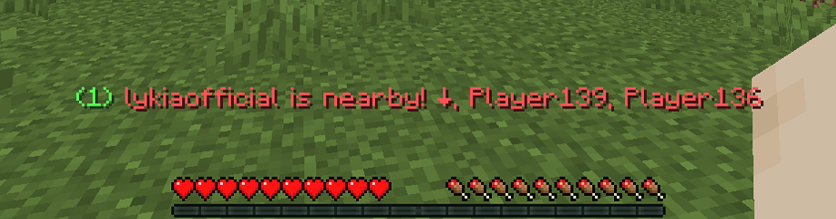
The number indicated in green shows the count of players in your 'protected players' list around you. You won't deal damage to these players, and the compass won't show their locations.
Preview

Multilingual support: Customized messages for 8 different languages. Works seamlessly with your client language. Here are the supported languages:
- Turkish (Türkçe)
- English (US)
- Français (France)
- Español (España)
- Deutsch (German)
- Portuguese (Português)
- Russian (Русский)
- Chinese Simplified
There may be errors in the localizations; please report any issues for corrections.
Config Settings | Mod Menu Support
Preview

With mod menu support, you can add desired players to the list, easily remove them, or clear the entire list. You can disable the mod without uninstalling it, and activate it again whenever needed.
Config Settings | Keybind
Spoiler

Even without using a mod menu, you can add or remove players by looking at the player you want to interact with and using custom keys set in the Settings.
Built by lyki.dev
No Friendly Fire is developed by lyki.dev — an independent software studio focused on custom Minecraft mods, plugins, backend systems and reverse-engineering work.
Need a custom system, private mod or server infrastructure?
Project description from Modrinth.
Pick your setup
No Friendly Fire by Minecraft version and loader
Choose the version and loader you play, then open the matching release.
Minecraft version
26.1
1 loader buildMinecraft version
1.21.11
1 loader buildMinecraft version
1.21.10
1 loader buildMinecraft version
1.21.9
1 loader buildMinecraft version
1.21.8
1 loader buildMinecraft version
1.21.7
1 loader buildMinecraft version
1.21.6
1 loader buildMinecraft version
1.21.5
1 loader buildMinecraft version
1.21.4
1 loader buildMinecraft version
1.21.3
1 loader buildMinecraft version
1.21.2
1 loader buildShowing the newest 12 of 27 game versions. Older files are in the list below.
Check the dependencies, then try the file in a copied instance before changing a world you care about.
Recent files
No Friendly Fire versions and loaders
2.2.2
friendguard-2.2.2-mc1.21.11.jar
19 May 2026
Client Required Server Not supported Dependencies No extras listed Listed on Release listing
Check the 1.21.11 · Fabric setup 1.21.11Fabric release
2.2.1
friendguard-2.2.1-mc26.1.1.jar
9 Apr 2026
Client Required Server Not supported Dependencies No extras listed Listed on Release listing
Check the 26.1.1 · Fabric setup 26.1.1Fabric release
2.2.1
friendguard-2.2.1-mc26.1.jar
9 Apr 2026
Client Required Server Not supported Dependencies No extras listed Listed on Release listing
Check the 26.1 · Fabric setup 26.1Fabric release
2.2.0
friendguard-1.21.10-2.2.0.jar
22 Nov 2025
Client Required Server Not supported Dependencies No extras listed Listed on Release listing
Check the 1.21.10 · Fabric setup 1.21.10Fabric release
2.2.0
friendguard-1.21.9-2.2.0.jar
22 Nov 2025
Client Required Server Not supported Dependencies No extras listed Listed on Release listing
Check the 1.21.9 · Fabric setup 1.21.9Fabric release
2.2.0
friendguard-1.21.8-2.2.0.jar
1 Oct 2025
Client Required Server Not supported Dependencies No extras listed Listed on Release listing
Check the 1.21.8 · Fabric setup 1.21.8Fabric release
2.2.0
friendguard-1.21.7-2.2.0.jar
1 Oct 2025
Client Required Server Not supported Dependencies No extras listed Listed on Release listing
Check the 1.21.7 · Fabric setup 1.21.7Fabric release
2.2.0
friendguard-1.21.6-2.2.0.jar
1 Oct 2025
Client Required Server Not supported Dependencies No extras listed Listed on Release listing
Check the 1.21.6 · Fabric setup 1.21.6Fabric release
2.2.0
friendguard-1.21.5-2.2.0.jar
1 Oct 2025
Client Required Server Not supported Dependencies No extras listed Listed on Release listing
Check the 1.21.5 · Fabric setup 1.21.5Fabric release
2.1.6
friendguard-1.21.4-2.1.6.jar
23 Dec 2024
Client Required Server Not supported Dependencies No extras listed Listed on Release listing
Check the 1.21.4 · Fabric setup 1.21.4Fabric release
2.1.5
friendguard-1.21.4-2.1.5.jar
3 Dec 2024
Client Required Server Not supported Dependencies No extras listed Listed on Release listing
Check the 1.21.4 · Fabric setup 1.21.4Fabric release
2.1.5
friendguard-1.21.3-2.1.5.jar
27 Oct 2024
Client Required Server Not supported Dependencies No extras listed Listed on Release listing
Check the 1.21.3 · Fabric setup 1.21.3Fabric release
Looking for an older file? The official Modrinth project page is in Resources.
 mod
CurseForge + Modrinth · Minecraft
Reactions!
A mod that adds dynamic expressions and facial personality to players.
 mod
CurseForge + Modrinth · Minecraft
Dungeon Train: A Lore-Rich Roguelite RPG Adventure
Adventure time inspired dungeon crawler on a train. Procedurally generated carriages on a infinite sable physics train. Rich narrative, with custom made mods for a completely unique experience.
 mod
Modrinth · Minecraft
World Portal
Create custom world portal to travel between dimensions.