Minecraft version
Back to mods 
Modrinth · Minecraft mod
Distant Horizons
Massively increase render distance without harming performance.
Choose a version Pick your version below, then grab the matching file.
Quick answer
Which Distant Horizons release should I use?
beta file 3.2.0-b-26.2
Game version 26.2
Loader Fabric, NeoForge
Distant Horizons 3.2.0-b-26.2 targets 26.2 with Fabric, NeoForge. Installation on the client is optional. Installation on the dedicated server is optional. No extra mods listed for this file.
Where it goes
Is Distant Horizons required on the client, server, or both?
Installation on the client is optional. Installation on the dedicated server is optional.
Client Optional
Dedicated server Optional
Loader for this release Fabric, NeoForge
Required install it here Optional supported, not mandatory Not supported do not install here Source doesn’t say do not assume
The source marks this as usable on both the client and server.
What else does Distant Horizons 3.2.0-b-26.2 need?
3.2.0-b-26.2. Change the file and its required mods may change too.
This file does not list any required mods. Do not add a library just because a different file uses it.
This file does not list any required or optional mods.
Before you install it
Add Distant Horizons without breaking your instance.
Built for Distant Horizons 3.2.0-b-26.2. Pick another file and the loader, install side or required mods may change.
- 01
Stick to this file
Use 3.2.0-b-26.2. It targets 26.2 with Fabric, NeoForge; another release may have different loader, side or dependency requirements.
- 02
Bring the mods it needs
This file does not list any required mods. Do not add a library just because a different file uses it.
- 03
Put it on the correct side
Installation on the client is optional. Installation on the dedicated server is optional.
- 04
Pick the file you checked
Use the “Get this file” button beside 3.2.0-b-26.2. It opens that exact file at the source.
About this project
What does Distant Horizons add?

Distant Horizons allows you to achieve extreme (256+) chunk render distances at a low performance cost.
Now you can finally enjoy that mountain top lookout tower.
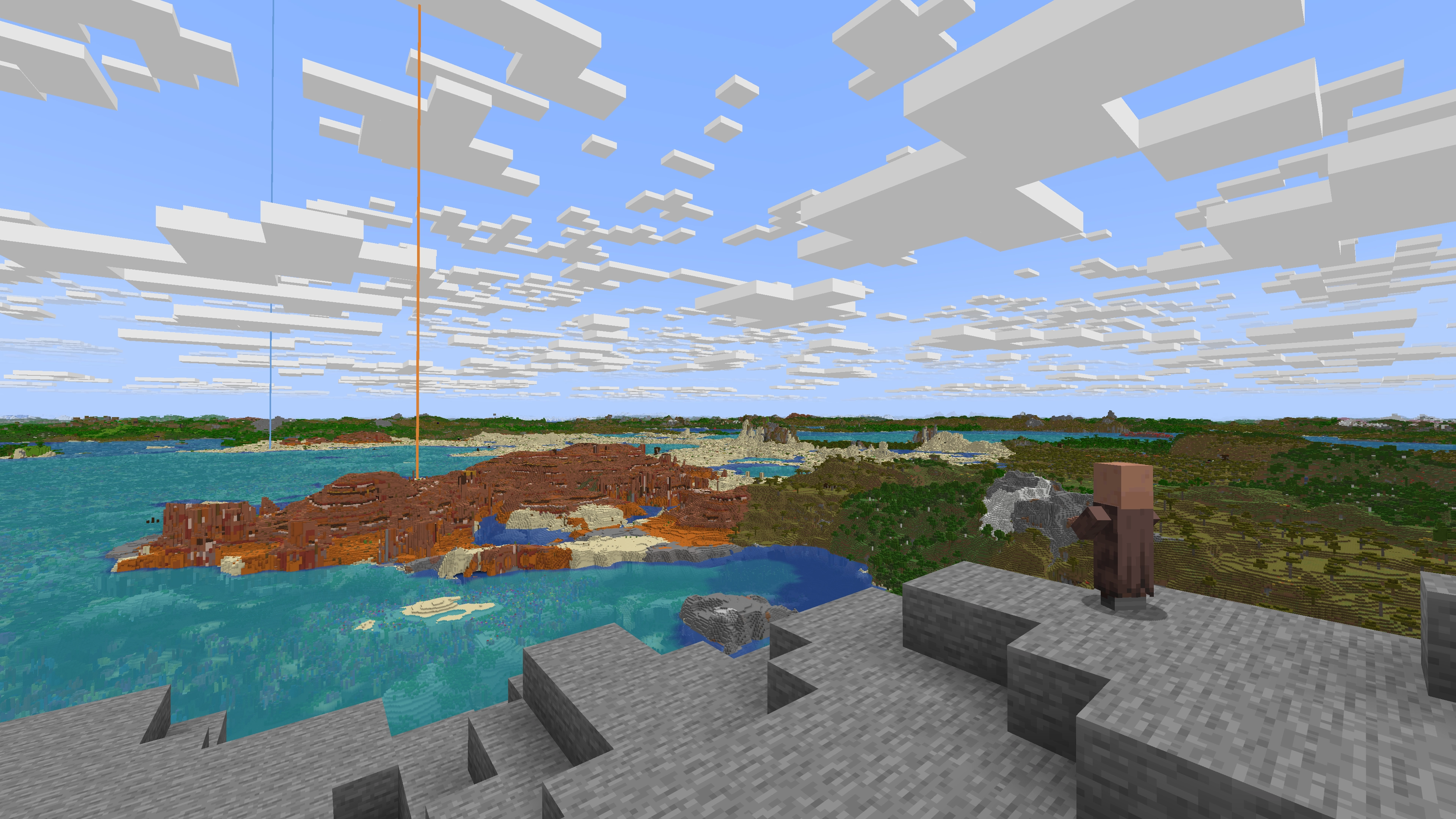
This photo was taken with a Minecraft render distance of 8 and a mod distance of 512.
FAQ:
Q: Forge or Fabric?
A: MC 1.20.6 and newer - NeoForge and Fabric are both in the same jar.
MC 1.20.4 and older - Forge and Fabric are both in the same jar.
Q: Shaders?
A: Yes, but only with certain shaders.
- Optifine: DH partially works with forward rendered shaders.
- Iris (and equivalent ports): DH 2.1.0+ only works with Iris 1.7+ and only with shaders built with DH support in mind.
- DH 2.0 and older don't work with Iris.
Q: Does this work with player created structures?
A: Yes.
Q: Does this render using my GPU?
A: Yes.
Distant Horizons uses OpenGL or Vulkan for graphics rendering.
Q: Is there multiplayer support?
A: Yes
client side only:
If you only have DH installed on your client LODs will be saved between sessions, although you have to explore the world to load them.
Server and Client:
If DH is installed on the server and client, LODs will automatically be sent to each connected user that has DH installed and has Distant Generation Enabled set to true, disabling distant generation on the server will prevent LODs from being sent to the users.
Q: My game is stuttering, help!
A: Try each of the following steps:
- Use a concurrent garbage collector like ZGC for Java 21+ or Shenandoah for Java 8-17
- This can be done via your JVM arguments (args)
- Increase Minecraft's allocated RAM
- For CPUs with 4-8 cores: try allocating 6-8 GB
- For CPUs with 10+ cores: try allocating 12-16 GB
- Lower DH's CPU load in the DH config menu
- Disabling DH's "Distant Generation" in the DH config menu
- Lower DH's "Graphics Preset" in the DH config menu
Q: Where can I download the Bukkit plugin?
A: The bukkit plugin has its own separate download page:
https://modrinth.com/plugin/distant-horizons-support
Extended FAQ:



Discord:
Join our Discord for news, updates, and help:
discord.com/invite/xAB8G4cENx
Support us:
If you want to help with development, join our discord and let us know!
Otherwise, if you can't help with development but still want to support Distant Horizons, check out our donation page:
ko-fi.com/distanthorizons
Project description from Modrinth.
Pick your setup
Distant Horizons by Minecraft version and loader
Choose the version and loader you play, then open the matching release.
Minecraft version
26.1.2
2 loader buildsMinecraft version
26.1.1
2 loader buildsMinecraft version
26.1
2 loader buildsMinecraft version
1.21.11
2 loader buildsMinecraft version
1.21.10
2 loader buildsMinecraft version
1.21.9
2 loader buildsMinecraft version
1.21.8
2 loader buildsMinecraft version
1.21.6
2 loader buildsMinecraft version
1.21.5
2 loader buildsCheck the dependencies, then try the file in a copied instance before changing a world you care about.
Recent files
Distant Horizons versions and loaders
3.2.0-b-26.2
DistantHorizons-3.2.0-b-26.2-fabric-neoforge.jar
7 Jul 2026
Client Optional Server Optional Dependencies No extras listed Listed on Release listing
Check the 26.2 · Fabric setup 26.2FabricNeoForge beta
3.2.0-b-26.1.2
DistantHorizons-3.2.0-b-26.1.2-fabric-neoforge.jar
7 Jul 2026
Client Optional Server Optional Dependencies No extras listed Listed on Release listing
Check the 26.1.2 · Fabric setup 26.126.1.126.1.2Fabric beta
3.2.0-b-1.21.11
DistantHorizons-3.2.0-b-1.21.11-fabric-neoforge.jar
7 Jul 2026
Client Optional Server Optional Dependencies No extras listed Listed on Release listing
Check the 1.21.11 · Fabric setup 1.21.11FabricNeoForge beta
3.2.0-b-1.21.10
DistantHorizons-3.2.0-b-1.21.10-fabric-neoforge.jar
7 Jul 2026
Client Optional Server Optional Dependencies No extras listed Listed on Release listing
Check the 1.21.10 · Fabric setup 1.21.10FabricNeoForge beta
3.2.0-b-1.21.9
DistantHorizons-3.2.0-b-1.21.9-fabric-neoforge.jar
7 Jul 2026
Client Optional Server Optional Dependencies No extras listed Listed on Release listing
Check the 1.21.9 · Fabric setup 1.21.9FabricNeoForge beta
3.2.0-b-1.21.8
DistantHorizons-3.2.0-b-1.21.8-fabric-neoforge.jar
7 Jul 2026
Client Optional Server Optional Dependencies No extras listed Listed on Release listing
Check the 1.21.8 · Fabric setup 1.21.8FabricNeoForge beta
3.2.0-b-1.21.6
DistantHorizons-3.2.0-b-1.21.6-fabric-neoforge.jar
7 Jul 2026
Client Optional Server Optional Dependencies No extras listed Listed on Release listing
Check the 1.21.6 · Fabric setup 1.21.6FabricNeoForge beta
3.2.0-b-1.21.5
DistantHorizons-3.2.0-b-1.21.5-fabric-neoforge.jar
7 Jul 2026
Client Optional Server Optional Dependencies No extras listed Listed on Release listing
Check the 1.21.5 · Fabric setup 1.21.5FabricNeoForge beta
3.1.2-b-26.1.2
DistantHorizons-3.1.2-b-26.1.2-fabric-neoforge.jar
20 Jun 2026
Client Optional Server Optional Dependencies No extras listed Listed on Release listing
Check the 26.1.2 · Fabric setup 26.126.1.126.1.2Fabric beta
Looking for an older file? The official Modrinth project page is in Resources.
 mod
mod CurseForge + Modrinth · Minecraft
Create: Biotech
A Create addon that brings living creatures into the factory. | 一个把活体生物接进工厂里的机械动力附属模组。
 mod
mod CurseForge + Modrinth · Minecraft
IamZombieq
Play as the zombie: beds explode, you sleep in coffins, villagers flee.
 mod
mod CurseForge + Modrinth · Minecraft
Fruitful Fun 🍊
Introduces insightful content featuring fruits and beekeeping