Minecraft version
Back to mods 
Modrinth · Minecraft mod
EvetLight
lightweight, and customizable Fullbright / Night Vision mod
Choose a version Pick your version below, then grab the matching file.
Quick answer
Which EvetLight release matches 26.2?
Best match for your filters 1.0.0-neoforge-mc26.2
Game version 26.2
Loader NeoForge
EvetLight 1.0.0-neoforge-mc26.2 targets 26.2 with NeoForge. It must be installed on the client. Do not install it on the dedicated server. No extra mods listed for this file.
Where it goes
Is EvetLight required on the client, server, or both?
It must be installed on the client. Do not install it on the dedicated server.
Client Required
Dedicated server Not supported
Loader for this release NeoForge
Required install it here Optional supported, not mandatory Not supported do not install here Source doesn’t say do not assume
This file is marked client-only.
What else does EvetLight 1.0.0-neoforge-mc26.2 need?
1.0.0-neoforge-mc26.2 on 26.2. Every mod below is checked against that same setup.
This file does not list any required mods. Do not add a library just because a different file uses it.
This file does not list any required or optional mods.
Before you install it
Add EvetLight without breaking your instance.
Built for EvetLight 1.0.0-neoforge-mc26.2 on 26.2. Pick another file and the loader, install side or required mods may change.
- 01
Stick to this file
Use 1.0.0-neoforge-mc26.2. It targets 26.2 with NeoForge; another release may have different loader, side or dependency requirements.
- 02
Bring the mods it needs
This file does not list any required mods. Do not add a library just because a different file uses it.
- 03
Put it on the correct side
It must be installed on the client. Do not install it on the dedicated server.
- 04
Pick the file you checked
Use the “Get this file” button beside 1.0.0-neoforge-mc26.2. It opens that exact file at the source.
About this project
What does EvetLight add?
EverLight (エバーライト)
EverLight は、明暗調整・暗視(Fullbright)Mod です。
✨ 主な機能
- 💡 ワンタッチ視界全開 (Fullbright): 洞窟や夜間、水中でもワンキーで即座に昼間同様の明瞭な視界を確保。
- 🎚️ 明るさレベルの自由調整 (1.0 〜 10.0):
- スライドバー + 数値入力ボックス による直感的な設定 GUI。
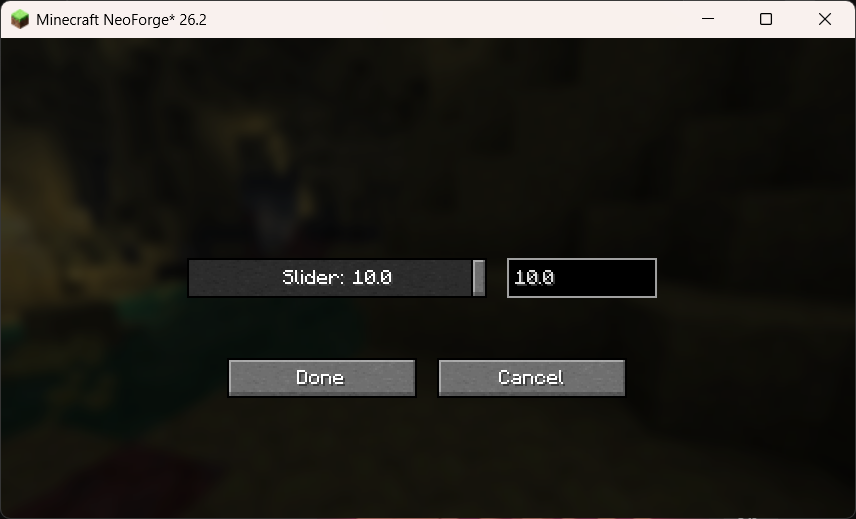
- 🔌 ローダー標準設定メニューとの統合:
- NeoForge: 組み込み Mod リスト画面の「設定 / Config」ボタンから遷移。
- Fabric: ModMenu の GUI メニューから遷移。
- 💾 設定の自動永続化: 変更した設定は
config/mc_ever_light.propertiesへ自動保存されます。
⌨️ 操作方法・キー割り当て
| 操作 | デフォルトキー | 説明 |
|---|---|---|
| ライト ON / OFF 切替 | G |
ゲーム中に EverLight の有効・無効を切り替えます(HUDメッセージ表示)。 |
| 設定画面表示 | 各Modメニュー | スライダーで明るさレベル(1.0 〜 10.0)を調整する設定画面を開きます。 |
※キー割り当てはバニラの「操作設定 (Key Binds)」から自由に変更できます。
⚙️ 設定 GUI メニュー
EverLight の設定画面は、スライダーと数値入力ボックスが双方向に連動します:
- スライダー操作: マウスドラッグで数値を連続変更。
- 数値入力: キーボードで
1.0〜10.0の数値を直接入力すると、スライダー位置が即座に同期。 - Done (完了) ボタン押下で即座にゲーム内に反映され、設定ファイルへ保存されます。
📄 ライセンス
本 Mod は MIT License の下で公開されています。Modpack への組み込みや再配布は自由に行っていただけます。
(English)
EverLight is a clean, lightweight, and customizable Fullbright / Night Vision mod for Minecraft .
✨ Features
- 💡 Instant Fullbright Toggle: Toggle full daylight visibility in caves, underwater, and night with a single keypress.
- 🎚️ Customizable Brightness Level (1.0 - 10.0):
- Interactive Slider + Numeric Input Box configuration GUI.
- Adjust brightness dynamically from subtle enhancement to full illumination.
- 🔌 Seamless Mod Loader Integration:
- NeoForge: Configurable directly from the built-in Mod List option screen.
- Fabric: Fully integrated with ModMenu GUI.
- 💾 Persistent Settings: Automatically saved to
config/mc_ever_light.properties.
⌨️ Controls & Usage
| Action | Default Key | Description |
|---|---|---|
| Toggle Light | G |
Toggles EverLight ON or OFF with an in-game HUD message. |
| Config Screen | Mod Menu / Mods List | Opens the interactive brightness slider settings screen. |
⚙️ Configuration GUI
EverLight features a bi-directionally synchronized Slider + Numeric Input Box:
- Move the slider to update the numeric value in real time.
- Type any precise number between
1.0and10.0to set the slider position automatically. - Changes are applied live in game and saved upon pressing Done.
📄 License
This mod is available under the MIT License. Feel free to include it in your modpacks!
Project description from Modrinth.
Pick your setup
EvetLight by Minecraft version and loader
Choose the version and loader you play, then open the matching release.
Check the dependencies, then try the file in a copied instance before changing a world you care about.
Recent files
EvetLight versions and loaders
1.0.0-neoforge-mc26.2
mc_ever_light-1.0.0-neoforge-mc26.2.jar
26 Jul 2026
Client Required Server Not supported Dependencies No extras listed Listed on Release listing
Check the 26.2 · NeoForge setup 26.2NeoForge release
1.0.0-fabric-mc26.2
mc_ever_light-1.0.0-fabric-mc26.2.jar
26 Jul 2026
Client Required Server Not supported Dependencies No extras listed Listed on Release listing
Check the 26.2 · Fabric setup 26.2Fabric release
Looking for an older file? The official Modrinth project page is in Resources.
 mod
mod CurseForge + Modrinth · Minecraft
Better Snowball
A simple mod add more species snowball.
 mod
mod Modrinth · Minecraft
Mosaik Quality of Life Improvements for Infinitum
Vanilla Client Enhancements - Made for Infinitum (Window-borderless fix, window-theme fix, xaero mini-map and world map reset from main menu)
 mod
mod Modrinth · Minecraft
Villager Phrases
Adds immersive phrases to villagers when you interact with or walk near them.