Minecraft version
Back to mods 
Modrinth · Minecraft mod
Congratulations?
Every so often, an achievement toast pops up for something you never did. It's not real — but it looked exactly like one that was.
Choose a version Pick your version below, then grab the matching file.
Quick answer
Which Congratulations? release matches 1.19.2?
Best match for your filters 1.0.1
Game version 1.19.2
Loader Forge
Congratulations? 1.0.1 targets 1.19.2 with Forge. Installation on the client is optional. Installation on the dedicated server is optional. No extra mods listed for this file.
Where it goes
Is Congratulations? required on the client, server, or both?
Installation on the client is optional. Installation on the dedicated server is optional.
Client Optional
Dedicated server Optional
Loader for this release Forge
Required install it here Optional supported, not mandatory Not supported do not install here Source doesn’t say do not assume
The source marks this as usable on both the client and server.
What else does Congratulations? 1.0.1 need?
1.0.1 on 1.19.2. Every mod below is checked against that same setup.
This file does not list any required mods. Do not add a library just because a different file uses it.
This file does not list any required or optional mods.
Before you install it
Add Congratulations? without breaking your instance.
Built for Congratulations? 1.0.1 on 1.19.2. Pick another file and the loader, install side or required mods may change.
- 01
Stick to this file
Use 1.0.1. It targets 1.19.2 with Forge; another release may have different loader, side or dependency requirements.
- 02
Bring the mods it needs
This file does not list any required mods. Do not add a library just because a different file uses it.
- 03
Put it on the correct side
Installation on the client is optional. Installation on the dedicated server is optional.
- 04
Pick the file you checked
Use the “Get this file” button beside 1.0.1. It opens that exact file at the source.
About this project
What does Congratulations? add?
Congratulations?
Every so often, an achievement toast pops up in the corner of your screen —
same look, same sound, same place a real one would appear. For something
you never did.
Features
Uses Minecraft's own achievement toast display, so it looks completely
authentic — but it's purely visual. Nothing is actually unlocked, nothing
is added to your real advancement progress or stats.
Titles and descriptions come from an original set written for this mod —
not generic congratulations, each one implying something noticed more than
it should have.
Here's an example:
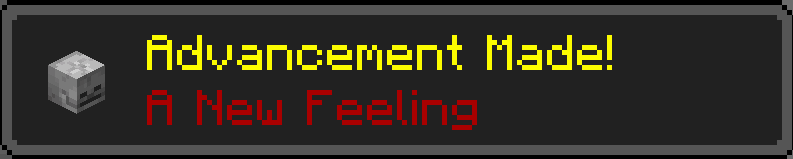
...and another one:

Optional Features (Config Options)
- Whether the mod is enabled
- How often it can trigger (minimum/maximum interval)
Project description from Modrinth.
Pick your setup
Congratulations? by Minecraft version and loader
Choose the version and loader you play, then open the matching release.
Minecraft version
1.20.1
1 loader buildMinecraft version
1.19.2
1 loader buildCheck the dependencies, then try the file in a copied instance before changing a world you care about.
Recent files
Congratulations? versions and loaders
1.0.1
fakeachievementtoast-1.0.1.jar
5 Sept 2026
Client Optional Server Optional Dependencies No extras listed Listed on Release listing
Check the 1.19.2 · Forge setup 1.19.2Forge release
Looking for an older file? The official Modrinth project page is in Resources.
 mod
CurseForge + Modrinth · Minecraft
Stock Market
StockMarket is a Minecraft mod that brings a better way for trading to the game. It enables players to trade items on a virtual stock market, making it ideal for multiplayer servers with active economies.
 mod
CurseForge + Modrinth · Minecraft
Doggy Talents Next
The Art of Minecraft Wolf
 mod
Modrinth · Minecraft
Hardcore Lite - You Die You Lose a Heart (LifeDrain)
Lose hearts when dying, gain a heart when eating enchanted golden apples (similar to LifeDrain LifeSteal)