Minecraft version
Back to mods 
Modrinth · Minecraft mod
Advanced Inventory
Upgradable Inventory, Bigger Stacks, All Things Stackable, and More!
Choose a version Pick your version below, then grab the matching file.
Quick answer
Which Advanced Inventory release matches 1.20.4 Forge?
Best match for your filters 1.1.3
Game version 1.20.1, 1.20.2, 1.20.3
Loader Forge
Advanced Inventory 1.1.3 targets 1.20.1, 1.20.2, 1.20.3 with Forge. Installation on the client is optional. Installation on the dedicated server is optional. No extra mods listed for this file.
Where it goes
Is Advanced Inventory required on the client, server, or both?
Installation on the client is optional. Installation on the dedicated server is optional.
Client Optional
Dedicated server Optional
Loader for this release Forge
Required install it here Optional supported, not mandatory Not supported do not install here Source doesn’t say do not assume
The source marks this as usable on both the client and server.
What else does Advanced Inventory 1.1.3 need?
1.1.3 on 1.20.4 Forge. Every mod below is checked against that same setup.
This file does not list any required mods. Do not add a library just because a different file uses it.
This file does not list any required or optional mods.
Before you install it
Add Advanced Inventory without breaking your instance.
Built for Advanced Inventory 1.1.3 on 1.20.4 Forge. Pick another file and the loader, install side or required mods may change.
- 01
Stick to this file
Use 1.1.3. It targets 1.20.1, 1.20.2, 1.20.3 with Forge; another release may have different loader, side or dependency requirements.
- 02
Bring the mods it needs
This file does not list any required mods. Do not add a library just because a different file uses it.
- 03
Put it on the correct side
Installation on the client is optional. Installation on the dedicated server is optional.
- 04
Pick the file you checked
Use the “Get this file” button beside 1.1.3. It opens that exact file at the source.
About this project
What does Advanced Inventory add?
Ever gotten annoyed with how pathetically small the Minecraft inventory is, and how stupid stacks of just 64 is, and gotten tired of your inventory filling up SO fast you can't even play the game in larger modpacks?
Then this is the mod for you!
For Minecraft Forge 1.20.1
The mod code was done for me by Zanckor through Arcane Studios as a commission, so while I am not a coder, this was fully funded by me and the concept created by me.
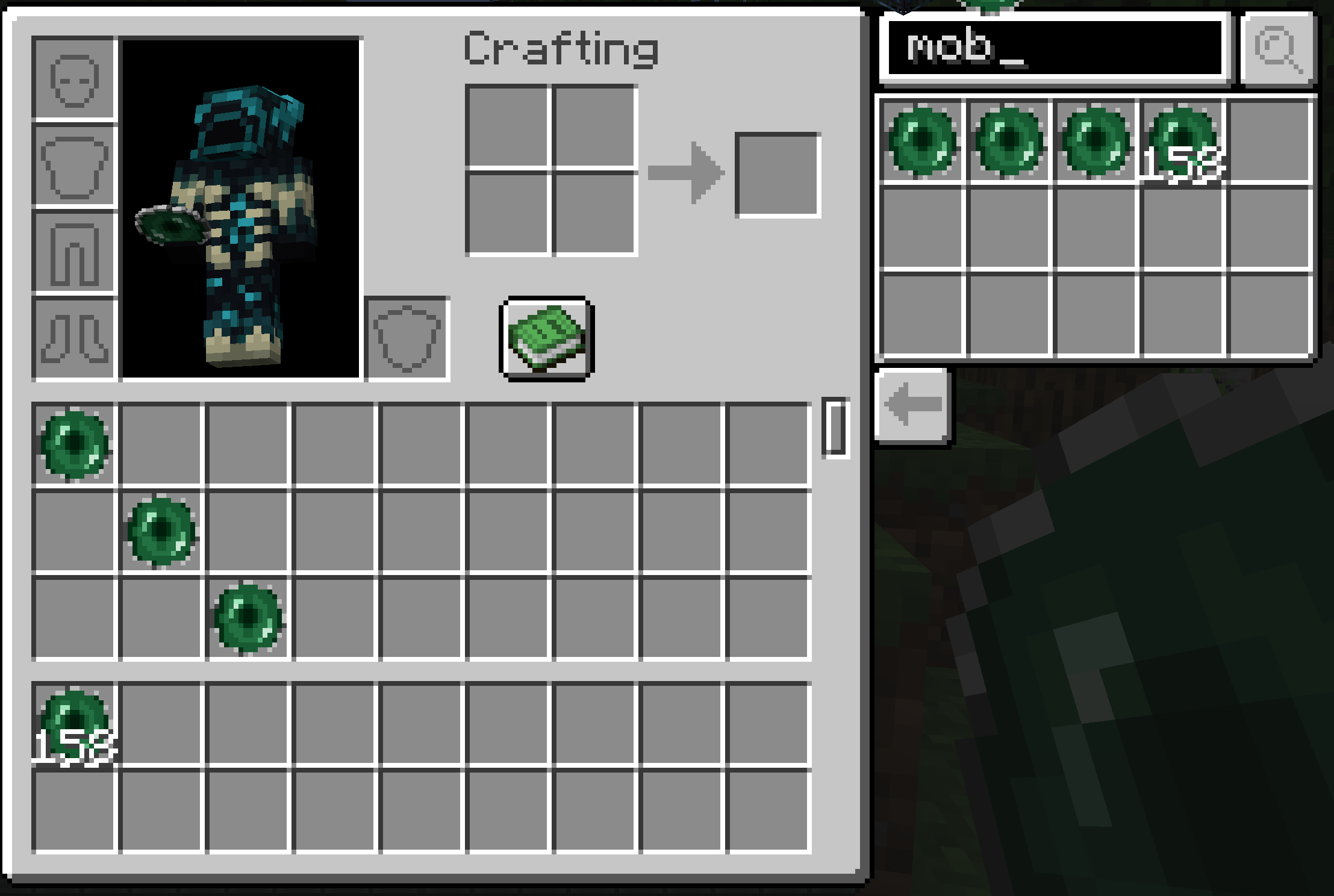
The above screenshot shows a few things.
1 - Stacks are larger than 64! By default, the mod is set to a stack size of 50,000 items. Note that the stacks of 64 do not automatically turn into a single stack, and you have to combine them by moving them or using an inventory sorter. This is a known bug, and may be fixed if we can figure out a waye. Also note stacks bigger than 64 are bugged in Creative mode, and may disappear or not work so in creative just pick a single block instead of the whole stack. This, however, isn't a problem since, in creative, you only need one of a block to place it anyway.
To increase or decrease this possible this stack size, close your world, open your save file, go to ServerConfig and find the field that says limitStackSize and set it to whatever you want, and save. You can then re open your world, and that'll be whatever you want it to be.
2 - A new item! The Capture Mob. It's designed to look like an ender pearl surrounded by iron. Left click the mob to capture it, right click to spawn it back in. This works on any entity so you can even use this device on a boat or a mine cart if you want! Note that the crafting recipe is not coded in yet, and I may add a texture change when it has a mob in it to make it more clear that there is.
3 - Search Field
With a big inventory, finding items may be hard! So, you can type in the thing you want, and as you scroll it will appear in that side thing for you to grab and put in your hot bar!
4 - Secondary Hot Bar
While this does not show when you are in an item with an inventory like a chest, this is where you can put items you do not want to lose track of! They will not be effected by scrolling, and are right there for ease of grabbing. This can also be used as some extra inventory slots, but is insanely useful for sorting your big inventory or when you are building or if there are tools you use frequently but not enough that you don't mind them not clogging your inventory. No items go into this second hot bar automatically.
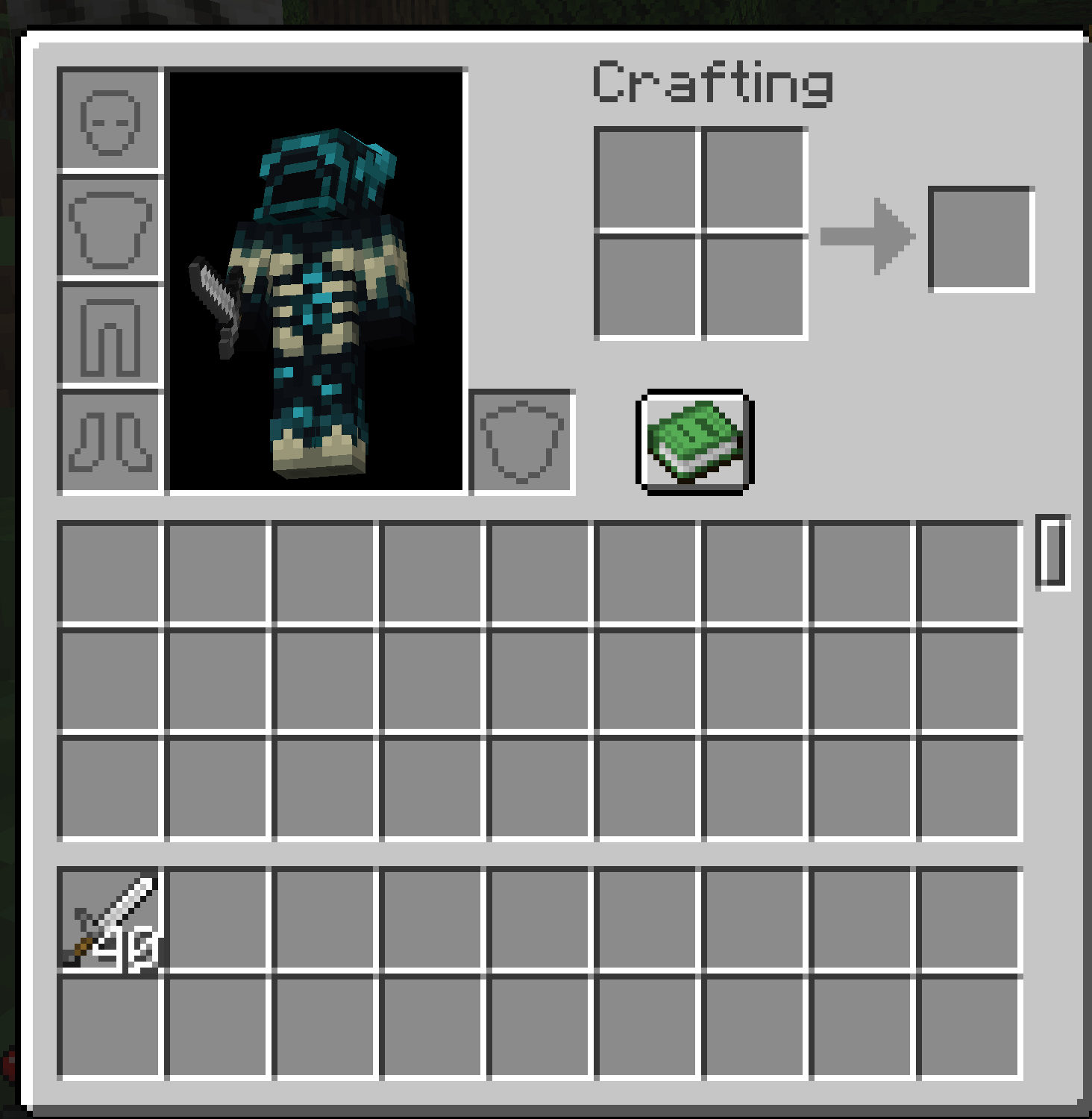
This next screenshot displays something extremely useful this mod does with tools and weapons! Weapons of the same type will now stack! But that isn't the best thing. When one tool in your stack breaks, the stack goes down by one! So if you have a stack of 40 swords, like shown above, and you break one against a zombie's skull, you now have a stack of 39 swords, and can keep hacking away at those pesky zombies to your heart's content! This works for all tools! Armor can stack like this as well, however, it does not stack in the armor slot, but you can still have a few sets of armor stacked for replacing when armor breaks in your inventory without using up too much space!
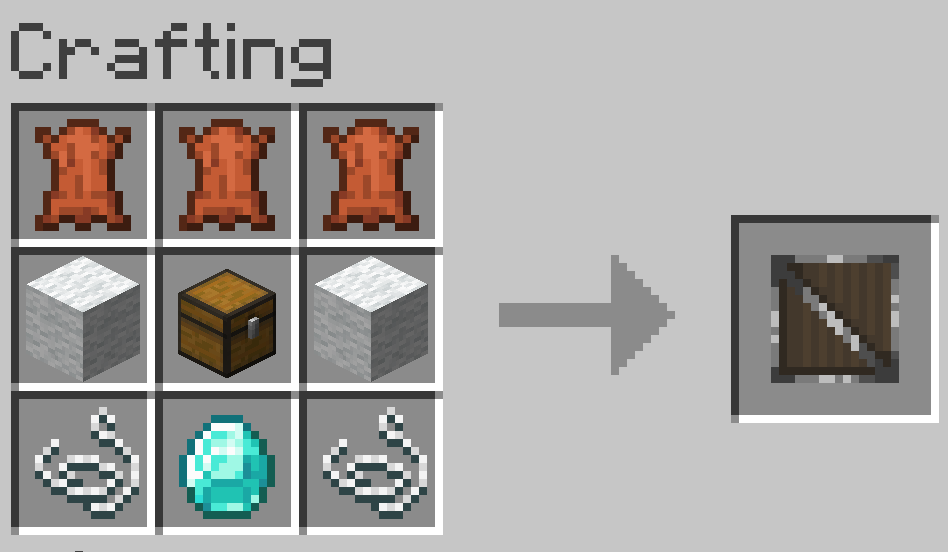
And finally, there is an item you can find in chests, buy from villagers, or craft yourself that allows you to add more slots to your inventory! The crafting recipe is seen below:
*Note that the crafting recipe for the Capture Mob item will be added once that is in the mod fully
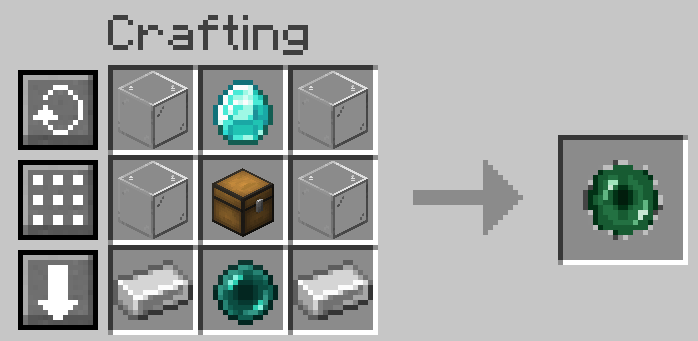
Feel free to comment any bugs to me, or even suggestions for improvements!
You MAY use this in your modpacks, even if the modpack itself is not on CurseForge (This mod will be on Modrinth too)
Known Issues
-Crashes due to a mod conflict in the newest version, have not figured out which mod yet
-The previous version sometimes deletes torches if you have over a stack, but the update has a conflict with a mod (Still working out which mod)
Project description from Modrinth.
Pick your setup
Advanced Inventory by Minecraft version and loader
Choose the version and loader you play, then open the matching release.
Minecraft version
1.20.3
1 loader buildMinecraft version
1.20.2
1 loader buildMinecraft version
1.20.1
1 loader buildCheck the dependencies, then try the file in a copied instance before changing a world you care about.
Recent files
Advanced Inventory versions and loaders
1.1.3
advancedinventory-1.1.3.jar
11 Feb 2024
Client Optional Server Optional Dependencies No extras listed Listed on Release listing
Check the 1.20.4 · Forge setup 1.20.11.20.21.20.31.20.4 release
1.1.2
advancedinventory-1.1.2b.jar
1 Feb 2024
Client Optional Server Optional Dependencies No extras listed Listed on Release listing
Check the 1.20.4 · Forge setup 1.20.11.20.21.20.31.20.4 release
1.1.2
advancedinventory-1.1.2.jar
1 Feb 2024
Client Optional Server Optional Dependencies No extras listed Listed on Release listing
Check the 1.20.4 · Forge setup 1.20.11.20.21.20.31.20.4 release
1.1.1
advancedinventory-1.1.1.jar
24 Jan 2024
Client Optional Server Optional Dependencies No extras listed Listed on Release listing
Check the 1.20.4 · Forge setup 1.20.11.20.21.20.31.20.4 release
1.1.0
advancedinventory-1.0.1.jar
17 Jan 2024
Client Optional Server Optional Dependencies No extras listed Listed on Release listing
Check the 1.20.4 · Forge setup 1.20.11.20.21.20.31.20.4 release
Looking for an older file? The official Modrinth project page is in Resources.