Minecraft version
Back to mods 
Modrinth · Minecraft mod
QoMC
Auto-generated config commands for mods using Kaleido Config.
Choose a version Pick your version below, then grab the matching file.
Quick answer
Which QoMC release should I use?
Latest stable file 1.1.0+26.1-neoforge
Game version 26.1, 26.1.1, 26.1.2
Loader NeoForge
QoMC 1.1.0+26.1-neoforge targets 26.1, 26.1.1, 26.1.2 with NeoForge. Do not install it on the client. It must be installed on the dedicated server. No extra mods listed for this file.
Where it goes
Is QoMC required on the client, server, or both?
Do not install it on the client. It must be installed on the dedicated server.
Client Not supported
Dedicated server Required
Loader for this release NeoForge
Required install it here Optional supported, not mandatory Not supported do not install here Source doesn’t say do not assume
This file is marked server-only.
What else does QoMC 1.1.0+26.1-neoforge need?
1.1.0+26.1-neoforge. Change the file and its required mods may change too.
This file does not list any required mods. Do not add a library just because a different file uses it.
This file does not list any required or optional mods.
Before you install it
Add QoMC without breaking your instance.
Built for QoMC 1.1.0+26.1-neoforge. Pick another file and the loader, install side or required mods may change.
- 01
Stick to this file
Use 1.1.0+26.1-neoforge. It targets 26.1, 26.1.1, 26.1.2 with NeoForge; another release may have different loader, side or dependency requirements.
- 02
Bring the mods it needs
This file does not list any required mods. Do not add a library just because a different file uses it.
- 03
Put it on the correct side
Do not install it on the client. It must be installed on the dedicated server.
- 04
Pick the file you checked
Use the “Get this file” button beside 1.1.0+26.1-neoforge. It opens that exact file at the source.
About this project
What does QoMC add?
Qconf Over Minecraft Commands (QoMC)
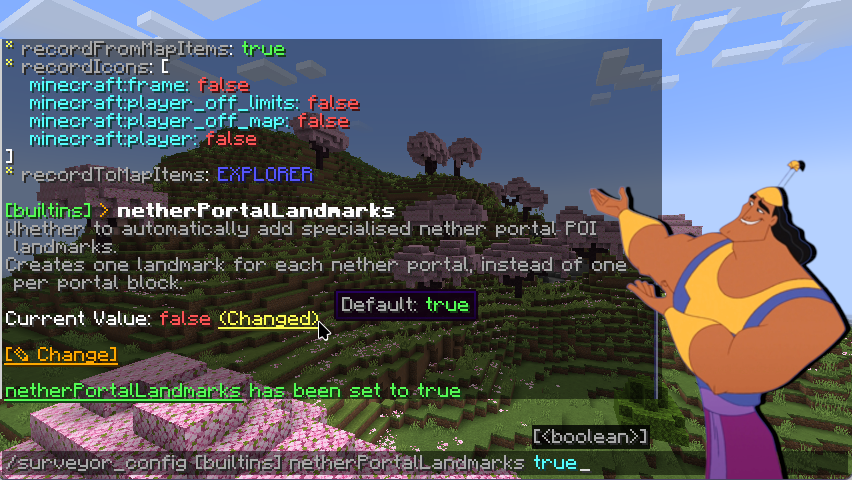
pull the lever, qomc!
QoMC automatically generates config commands for Minecraft mods utilizing Kaleido Config (JiJ-safe implementation of Quilt Config)
THE POISON CHOSEN ESPECIALLY FOR KALEIDO. KALEIDO'S POISON.
A number of mods utilize the config library Kaleido Config, which is convenient as it works on all loaders and minecraft versions.
Kaleido-based configurations generates .toml files in the game's config directory, but these can't be changed while the game is running.
McQoy solves this by auto-generating client-side configuration GUIs which allow you to edit the configs in-game.
This is good for singleplayer and client-side mods, but unhelpful for servers, or other situations where you need to see the before/after effect without going into the GUI. QoMC addresses this by generating config commands instead!
...RIGHT.
After installation, QoMC will detect mods making use of Kaleido on startup, and auto generate a command for them.
By default, the commands is generated as /<Mod ID>_config, e.g. /qomc_config.
For client-side config, they are generated as /<MOD ID>_config_client.
For mods with multiple config files, QoMC will split the commands by config, e.g. /qomc_config demo and /qomc_config main.
IN MY DEFENSE, YOUR POISONS ALL LOOK ALIKE
For devs, QoMC integration is implicit - just use Kaleido Config for configuration, and relevant commands will appear when QoMC is installed.
QoMC is a purely optional runtime dependency, so don't depend on QoMC in your buildscripts or mod metadata - only on modrinth / curseforge.
If you've implemented your own config commands, you can disable discovery of your configs using a metadata key:
In fabric.mod.json:
  "custom": {
    "qomc:hidden": true
  }
Or in neoforge.mods.toml:
  [modproperties.qomc]
  hidden=true
To make QoMC recognize a config as client-side, simply name your config as client.
HOW ABOUT DESSERT?
This project is licensed under the LGPL 3.0
QoMC takes direct inspiration from McQoy, its client-side GUI counterpart!
Project description from Modrinth.
Pick your setup
QoMC by Minecraft version and loader
Choose the version and loader you play, then open the matching release.
Minecraft version
26.1.2
2 loader buildsMinecraft version
26.1.1
2 loader buildsMinecraft version
26.1
2 loader buildsMinecraft version
1.21.11
1 loader buildMinecraft version
1.21.10
1 loader buildMinecraft version
1.21.9
1 loader buildMinecraft version
1.21.8
1 loader buildMinecraft version
1.21.7
1 loader buildMinecraft version
1.21.6
1 loader buildMinecraft version
1.21.5
1 loader buildMinecraft version
1.21.4
2 loader buildsShowing the newest 12 of 39 game versions. Older files are in the list below.
Check the dependencies, then try the file in a copied instance before changing a world you care about.
Recent files
QoMC versions and loaders
1.1.0+26.1-neoforge
qomc-1.1.0+26.1-neoforge.jar
5 Jul 2026
Client Not supported Server Required Dependencies No extras listed Listed on Release listing
Check the 26.1.2 · NeoForge setup 26.126.1.126.1.2NeoForge release
1.1.0+26.1-fabric
qomc-1.1.0+26.1-fabric.jar
31 May 2026
Client Not supported Server Required Dependencies 1 required · 1 unchecked Listed on Release listing
Check the 26.2 · Fabric setup 26.126.1.126.1.226.2 release
1.1.0+1.21.11-fabric
qomc-1.1.0+1.21.11-fabric.jar
31 May 2026
Client Not supported Server Required Dependencies 1 required · 1 unchecked Listed on Release listing
Check the 1.21.11 · Fabric setup 1.21.11Fabric release
1.1.0+1.21.5-fabric
qomc-1.1.0+1.21.5-fabric.jar
31 May 2026
Client Not supported Server Required Dependencies 1 required · 1 unchecked Listed on Release listing
Check the 1.21.10 · Fabric setup 1.21.51.21.61.21.71.21.8 release
1.1.0+1.21.1-neoforge
qomc-1.1.0+1.21.1-neoforge.jar
31 May 2026
Client Not supported Server Required Dependencies No extras listed Listed on Release listing
Check the 1.21.4 · NeoForge setup 1.21.11.21.21.21.31.21.4 release
1.1.0+1.21.1-fabric
qomc-1.1.0+1.21.1-fabric.jar
31 May 2026
Client Not supported Server Required Dependencies 1 required · 1 unchecked Listed on Release listing
Check the 1.21.1 · Fabric setup 1.201.20.11.20.21.20.3 release
1.1.0+1.20.1-forge
qomc-1.1.0+1.20.1-forge.jar
31 May 2026
Client Not supported Server Required Dependencies No extras listed Listed on Release listing
Check the 1.20.1 · Forge setup 1.20.1ForgeNeoForge release
1.1.0+1.19.4-fabric
qomc-1.1.0+1.19.4-fabric.jar
31 May 2026
Client Not supported Server Required Dependencies 1 required · 1 unchecked Listed on Release listing
Check the 1.19.4 · Fabric setup 1.191.19.11.19.21.19.3 release
1.1.0+1.18.2-fabric
qomc-1.1.0+1.18.2-fabric.jar
31 May 2026
Client Not supported Server Required Dependencies 1 required · 1 unchecked Listed on Release listing
Check the 1.18.2 · Fabric setup 1.171.17.11.181.18.1 release
1.1.0+1.16.5-fabric
qomc-1.1.0+1.16.5-fabric.jar
31 May 2026
Client Not supported Server Required Dependencies 1 required · 1 unchecked Listed on Release listing
Check the 1.16.5 · Fabric setup 1.161.16.11.16.21.16.3 release
1.0.0+26.1-fabric
qomc-1.0.0+26.1-fabric.jar
25 Mar 2026
Client Not supported Server Required Dependencies 1 required · 1 unchecked Listed on Release listing
Check the 26.1.2 · Fabric setup 26.126.1.126.1.2Fabric release
1.0.0+1.20.1-forge
qomc-1.0.0+1.20.1-forge.jar
28 Jan 2026
Client Not supported Server Required Dependencies No extras listed Listed on Release listing
Check the 1.20.1 · Forge setup 1.20.1ForgeNeoForge release
Looking for an older file? The official Modrinth project page is in Resources.