Minecraft version
Back to mods 
Modrinth · Minecraft mod
MusicDisplay
This mod displays the currently playing music on Spotify. You can easily adjust the volume, pause the song, and more.
Choose a version Pick your version below, then grab the matching file.
Quick answer
Which MusicDisplay release should I use?
Latest stable file 2.6.1
Game version 26.2
Loader Fabric
MusicDisplay 2.6.1 targets 26.2 with Fabric. It must be installed on the client. Do not install it on the dedicated server. No extra mods listed for this file.
Where it goes
Is MusicDisplay required on the client, server, or both?
It must be installed on the client. Do not install it on the dedicated server.
Client Required
Dedicated server Not supported
Loader for this release Fabric
Required install it here Optional supported, not mandatory Not supported do not install here Source doesn’t say do not assume
This file is marked client-only.
What else does MusicDisplay 2.6.1 need?
2.6.1. Change the file and its required mods may change too.
This file does not list any required mods. Do not add a library just because a different file uses it.
This file does not list any required or optional mods.
Before you install it
Add MusicDisplay without breaking your instance.
Built for MusicDisplay 2.6.1. Pick another file and the loader, install side or required mods may change.
- 01
Stick to this file
Use 2.6.1. It targets 26.2 with Fabric; another release may have different loader, side or dependency requirements.
- 02
Bring the mods it needs
This file does not list any required mods. Do not add a library just because a different file uses it.
- 03
Put it on the correct side
It must be installed on the client. Do not install it on the dedicated server.
- 04
Pick the file you checked
Use the “Get this file” button beside 2.6.1. It opens that exact file at the source.
About this project
What does MusicDisplay add?
MusicDisplay
Version 2.5 is now available, supporting Minecraft version 26.1.x! Check the changelog here.
Take full control of your music without ever leaving the game! This mod seamlessly integrates Spotify into your Minecraft client, offering a sleek overlay and easy access to playback controls.
Features
- Full Playback Control: Pause, resume, skip, or rewind tracks directly from the game.
- Live Overlay: Displays the current song title, artist, album art, and a real-time progress bar.
- Search Spotify: You can search for your song or playlist directly from the GUI!
- Volume Management: Adjust Spotify volume instantly without Alt-Tabbing.
- Interactive Controls:
- Play/Pause
- Previous / Next Track
- Shuffle Toggle
- Loop Toggle
- Like/Save Songs
- State Synchronization: Automatically syncs with changes made on other devices (e.g., your phone).
- Custom API Keys: Use your own Spotify Client ID and Secret for full privacy and control.
How to Use
1. Initial Setup
To connect the mod to your Spotify account:
- Open the client GUI in the game (default key: Right Shift).
- Click the Setup Spotify button at the bottom of the panel. This will launch a local setup server and automatically open the setup page in your web browser (
http://127.0.0.1:8888/setup). - Follow the instructions on the web page:
- Log in to the Spotify Developer Dashboard.
- Create a new application.
- Edit the app settings and add
http://127.0.0.1:8888/callbackas a Redirect URI. - Copy your Client ID and Client Secret.
- Enter your Client ID and Client Secret in the web form and click Connect Spotify Account.
- Approve the authorization in your browser. Once completed, you can close the browser tab and return to the game!
2. State & Control
Enable the Spotify module in your client's GUI. Your music will start syncing instantly!
Configuration
Configuration files are stored locally at: .minecraft/config/spotify-config.json
Keybinds
- Right Shift - Opens the Client GUI
Requirements
- Spotify Account (Premium is required).
- Minecraft Java Edition (Fabric).
- Java 25 or higher.
Preview

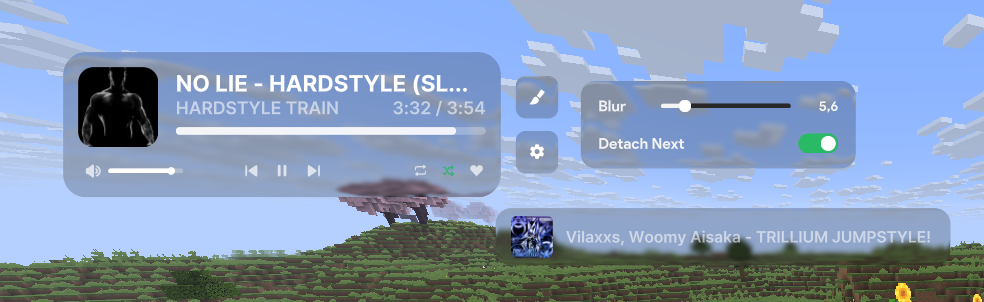
Showcase
Project description from Modrinth.
Pick your setup
MusicDisplay by Minecraft version and loader
Choose the version and loader you play, then open the matching release.
Minecraft version
26.1.2
1 loader buildMinecraft version
26.1.1
1 loader buildMinecraft version
26.1
1 loader buildMinecraft version
1.21.5
1 loader buildMinecraft version
1.21.4
1 loader buildCheck the dependencies, then try the file in a copied instance before changing a world you care about.
Recent files
MusicDisplay versions and loaders
2.6.1
musicdisplay-2.6.1.jar
13 Oct 2026
Client Required Server Not supported Dependencies No extras listed Listed on Release listing
Check the 26.2 · Fabric setup 26.2Fabric release
2.6.1
musicdisplay-2.6.1.jar
24 Aug 2026
Client Required Server Not supported Dependencies No extras listed Listed on Release listing
Check the 26.1.2 · Fabric setup 26.126.1.126.1.2Fabric release
2.6
musicdisplay-2.6.jar
19 Jul 2026
Client Required Server Not supported Dependencies No extras listed Listed on Release listing
Check the 26.1.2 · Fabric setup 26.126.1.126.1.2Fabric release
2.5
musicdisplay-2.5.jar
13 Jul 2026
Client Required Server Not supported Dependencies No extras listed Listed on Release listing
Check the 26.1.2 · Fabric setup 26.126.1.126.1.2Fabric release
2.4
musicdisplay-2.4.jar
11 Jul 2026
Client Required Server Not supported Dependencies No extras listed Listed on Release listing
Check the 1.21.5 · Fabric setup 1.21.5Fabric release
2.4
musicdisplay-2.4.jar
11 Jul 2026
Client Required Server Not supported Dependencies No extras listed Listed on Release listing
Check the 1.21.4 · Fabric setup 1.21.4Fabric release
2.4
musicdisplay-2.4.jar
8 Jul 2026
Client Required Server Not supported Dependencies No extras listed Listed on Release listing
Check the 26.1.2 · Fabric setup 26.1.2Fabric release
2.4
musicdisplay-2.4.jar
8 Jul 2026
Client Required Server Not supported Dependencies No extras listed Listed on Release listing
Check the 26.1 · Fabric setup 26.1Fabric release
2.4
musicdisplay-2.4.jar
8 Jul 2026
Client Required Server Not supported Dependencies No extras listed Listed on Release listing
Check the 26.1.1 · Fabric setup 26.1.1Fabric release
2.3
musicdisplay-2.3.jar
8 Jul 2026
Client Required Server Not supported Dependencies No extras listed Listed on Release listing
Check the 26.1 · Fabric setup 26.1Fabric release
2.3
musicdisplay-2.3.jar
8 Jul 2026
Client Required Server Not supported Dependencies No extras listed Listed on Release listing
Check the 26.1.2 · Fabric setup 26.1.2Fabric release
2.3
musicdisplay-2.3.jar
7 Jul 2026
Client Required Server Not supported Dependencies No extras listed Listed on Release listing
Check the 26.1.1 · Fabric setup 26.1.1Fabric release
Looking for an older file? The official Modrinth project page is in Resources.
 mod
mod CurseForge + Modrinth · Minecraft
Sodium/Embeddium LeafCulling
A continuation of SodiumLeafCulling for Sodium/Embeddium. (Old: SodiumLeafCulling-Unofficial)
 mod
mod Modrinth · Minecraft
Girlfriend Mod
A cute, loyal girlfriend companion for Minecraft. She follows you, protects you, picks you flowers, chats with you and grows closer every day. Fabric 26.3.
 mod
mod Modrinth · Minecraft
Fast Furnaces
Makes smelting recipes 5x faster for vanilla and over 30 mods.