Fabric Language Kotlin Needed by Roleplay Status 2.0.3+1.21.1
requiredMatching file found Matched file: 1.14.2+kotlin.2.4.21

Modrinth · Minecraft mod
An standalone Status mod to add more roleplay friendly statuses. With Dice Rolls.
Quick answer
Roleplay Status 2.0.3+1.21.1 targets 1.21.1 with Fabric. Installation on the client is optional. Installation on the dedicated server is optional. All 3 required mods have matching files.
Where it goes
Installation on the client is optional. Installation on the dedicated server is optional.
The source marks this as usable on both the client and server.
2.0.3+1.21.1 on Fabric. Every mod below is checked against that same setup.
Install Fabric Language Kotlin, Fzzy Config, Fabric API first. We found matching files for this game-version and loader setup.
We only count dependency files that match this setup. A file for another loader does not fill the gap.
Before you install it
Built for Roleplay Status 2.0.3+1.21.1 on Fabric. Pick another file and the loader, install side or required mods may change.
Use 2.0.3+1.21.1. It targets 1.21.1 with Fabric; another release may have different loader, side or dependency requirements.
Install Fabric Language Kotlin, Fzzy Config, Fabric API first. We found matching files for this game-version and loader setup.
Installation on the client is optional. Installation on the dedicated server is optional.
Use the “Get this file” button beside 2.0.3+1.21.1. It opens that exact file at the source.
About this project
Minecraft 1.21.1 · Fabric & NeoForge · Java 21 · Client & Server
Source ·
Issues ·
Configuration ·
Discord
Let other players know whether you are in character, available for roleplay, or taking a break. Choose your status, customize its appearance, and roll dice with nearby players.
Created by pokesmells / Bare Minimum Studios. Previously named Andromeda Status.
Version 2 is standalone. Status by Max Henkel is no longer required.
Press U by default (rebindable) to open the status screen. Your selection appears beside your name in the Tab player list.
| Status | Default indicator |
|---|---|
| In Character | Green square |
| Out of Character | Red square |
| Open to RP | Gold square |
| Busy / AFK | Gray square |
| Event | Purple square |
| New | Cyan square |
| Recording | Orange half-square |
| Streaming | Blue half-square |
Selections persist across server restarts. Out of Character is the default until you choose another status. A join reminder highlights your bound status key in green.
The No Sleep toggle excludes you from the players required to skip the night, respecting the server’s sleeping percentage rule.
Roll directly in chat, with an optional reason:
| Command | What it does |
|---|---|
/roll or /roll d20 |
Roll a twenty-sided die |
/roll 2d6 |
Roll two six-sided dice |
/roll 1d20+3 Stealth check |
Add a modifier and a reason |
Supported dice: d2, d4, d6, d8, d10, d12, d20, and d100. Roll up to 20 dice at once, with modifiers from −1000 to +1000.
The server generates every result and shares the total, individual rolls, modifier, and optional reason in chat. Results reach players within 25 blocks, including the roller, in the same dimension. Operators can change the range through Fzzy Config.
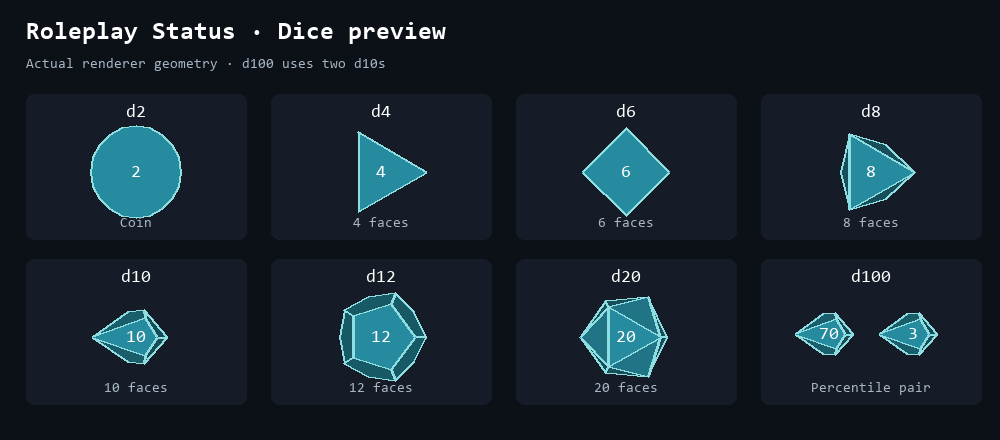
Renderer preview, not an in-game screenshot. A d2 is a coin; d100 uses two percentile d10s.
Nearby rolls can display a short animated dice panel on your HUD, using the matching polyhedral shapes.
Disable it through U → Configure → Accessibility → Dice animations. Animations are enabled by default, never affect the result, and can be turned off without hiding chat results.
For larger rolls, the overlay previews a limited number of dice; chat includes every individual result.
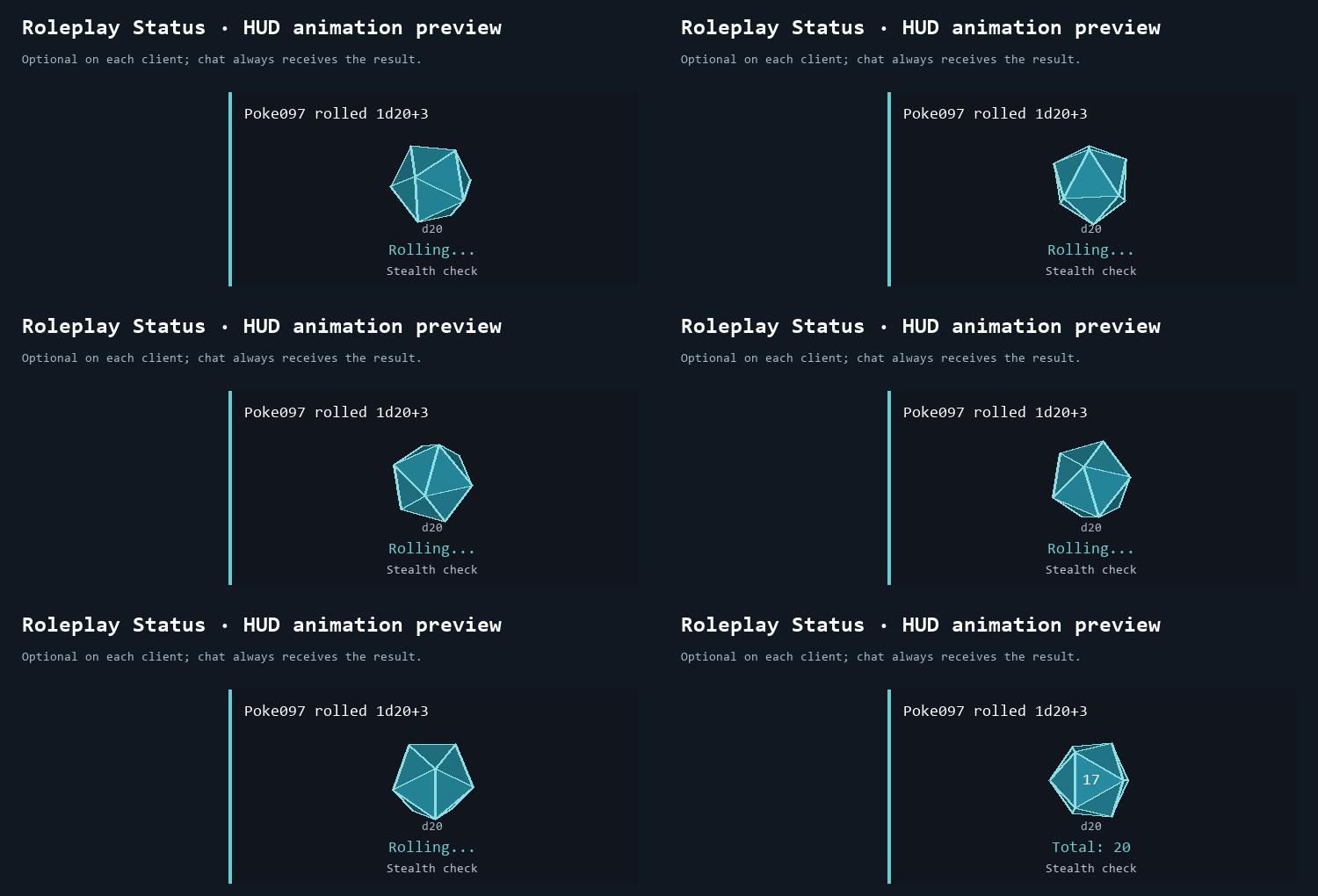
Animation preview generated from the renderer geometry, not a recording of Minecraft. Position and size are customizable.
Keep the dice panel clear of your minimap and other HUD elements:
Cancel or Escape discards your edits. Reset restores the preview to the top-left corner at 100% size; choose Save to keep it.
Position and size are personal settings, also available under Configure → Accessibility. They save locally and adapt to resolution and GUI scale changes. The panel automatically fits within your screen.
The default position is top-left to avoid common top-right minimaps. Moving or resizing the panel does not change chat results or anyone else’s HUD.
Enable Colorblind mode on the U screen or through Configure → Accessibility. Each status gets a distinct shape, so color is not the only way to identify it.
| Status | Colorblind shape |
|---|---|
| In Character | Solid square |
| Out of Character | Outline square |
| Open to RP | Plus |
| Busy / AFK | Dash |
| Event | Diamond |
| New | Triangle |
| Recording | Right half-square |
| Streaming | Left half-square |
Show status labels adds a gray status name beside players in Tab. It works independently of colorblind mode and is off by default.
These display preferences apply immediately, save locally, and are available to every player. They do not change other players’ settings.
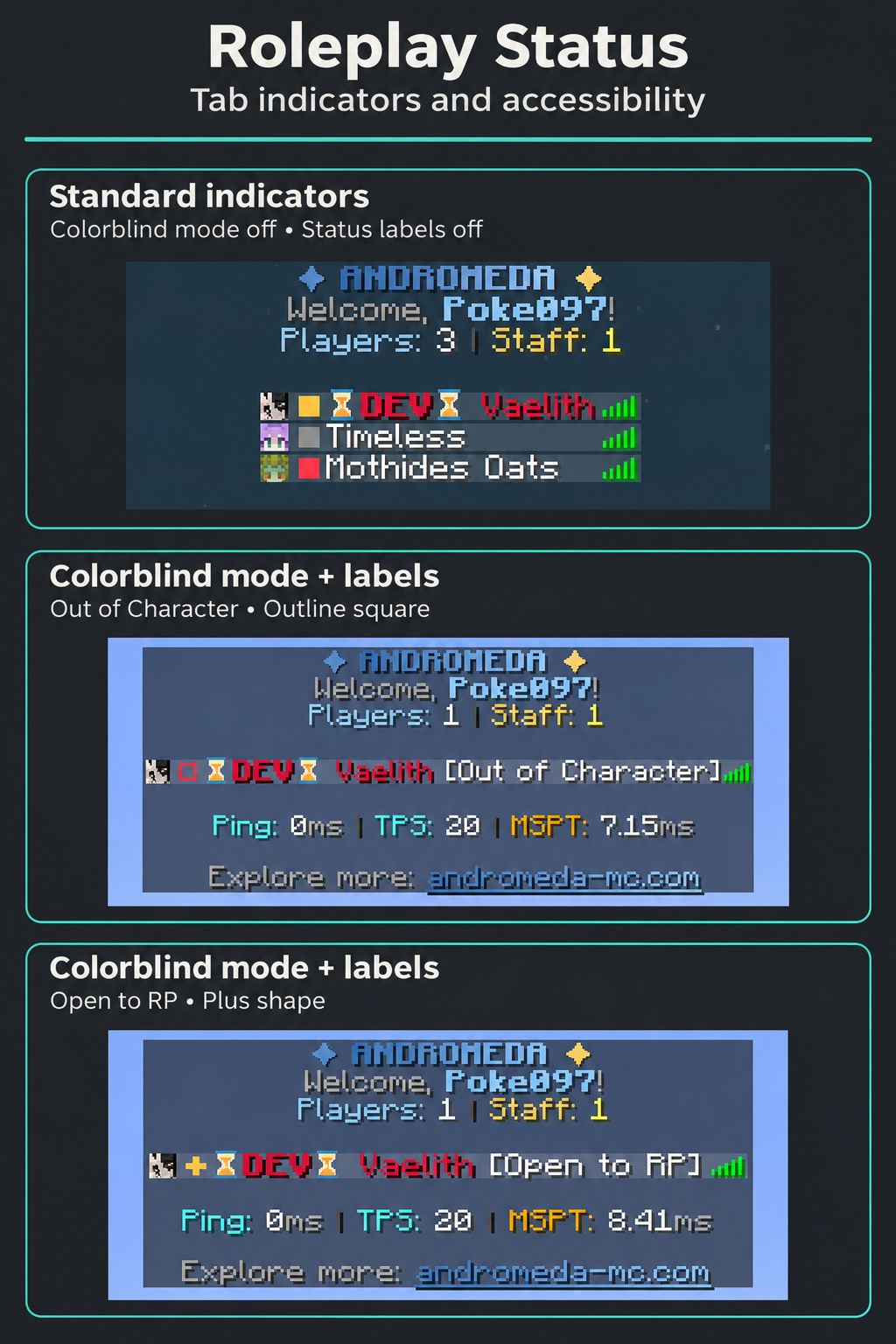
Designed comparison based on user-provided Minecraft screenshots: standard indicators, an Out of Character outline, and an Open to RP plus shape. Both colorblind examples also have optional status labels enabled.
Unedited in-game captures: Standard indicators · Colorblind: Out of Character · Colorblind: Open to RP
Open U → Configure to access Fzzy Config. Server operators with permission level 2 can:
Accepted in-game changes apply live. Existing saved colors are preserved when updating.
Every player can adjust their own colorblind mode, status labels, dice animations, and dice panel position and size.
| File | Settings |
|---|---|
config/roleplay_status/statuses.json |
Status labels and colors |
config/roleplay_status/dice.json |
Server dice settings |
config/roleplay_status/accessibility.json |
Personal display preferences, including dice position and size |
Stop the server before manually editing its JSON files, then restart to load your changes.
Use Minecraft 1.21.1 and Java 21. Install the matching build and dependencies on the server and every participating client.
Use matching client and server loaders. Cross-loader connections are not supported.
When upgrading from the old addon, remove Status, Andromeda Status, and older Roleplay Status JARs. Keep your configuration files. Old Status player selections start fresh; standalone selections persist afterward.
Roleplay Status began as an addon for Status by Max Henkel. Version 2 uses its own implementation and does not bundle or require Status.
Fzzy Config provides the configuration editor and synchronization.
Code and artwork use the Bare Minimum License v1.0. Dependencies retain their own licenses.
Use code bareminimum for 25% off your first month.
Project description from Modrinth.
Pick your setup
Choose the version and loader you play, then open the matching release.
Check the dependencies, then try the file in a copied instance before changing a world you care about.
Recent files
roleplay-status-fabric-2.0.3+1.21.1.jar
20 Nov 2026
roleplay-status-fabric-2.0.2+1.21.1.jar
20 Nov 2026
roleplay-status-fabric-2.0.1+1.21.1.jar
16 Nov 2026
roleplay-status-fabric-2.0.0+1.21.1.jar
16 Nov 2026
roleplay-status-1.0.7+1.21.1.jar
11 Oct 2026
roleplay-status-1.0.6+1.21.1.jar
11 Oct 2026
andromeda-status-1.0.5.jar
18 Sept 2026
andromeda-status-1.0.4.jar
7 Sept 2026
Looking for an older file? The official Modrinth project page is in Resources.
 mod
Choose your enchantment: a Rune Altar that inscribes one of eight runes for a fixed price, with no lottery.
 mod
LDLib is a libarary mod for custom rendering, modular gui.
 mod
Actively maintained fork of FastLogin with continuous updates and feature enhancements.