Minecraft version
Back to mods 
Modrinth · Minecraft mod
Max Level Info
See enchantment & potion level — Sharpness II / V, or Bad Omen I / V
Choose a version Pick your version below, then grab the matching file.
Quick answer
Which Max Level Info release matches 1.21.2?
Best match for your filters 1.1.3
Game version 1.21.10, 1.21.11, 1.21.2
Loader Fabric
Max Level Info 1.1.3 targets 1.21.10, 1.21.11, 1.21.2 with Fabric. It must be installed on the client. Do not install it on the dedicated server. No extra mods listed for this file.
Where it goes
Is Max Level Info required on the client, server, or both?
It must be installed on the client. Do not install it on the dedicated server.
Client Required
Dedicated server Not supported
Loader for this release Fabric
Required install it here Optional supported, not mandatory Not supported do not install here Source doesn’t say do not assume
This file is marked client-only.
What else does Max Level Info 1.1.3 need?
1.1.3 on 1.21.2. Every mod below is checked against that same setup.
This file does not list any required mods. Do not add a library just because a different file uses it.
This file does not list any required or optional mods.
Before you install it
Add Max Level Info without breaking your instance.
Built for Max Level Info 1.1.3 on 1.21.2. Pick another file and the loader, install side or required mods may change.
- 01
Stick to this file
Use 1.1.3. It targets 1.21.10, 1.21.11, 1.21.2 with Fabric; another release may have different loader, side or dependency requirements.
- 02
Bring the mods it needs
This file does not list any required mods. Do not add a library just because a different file uses it.
- 03
Put it on the correct side
It must be installed on the client. Do not install it on the dedicated server.
- 04
Pick the file you checked
Use the “Get this file” button beside 1.1.3. It opens that exact file at the source.
About this project
What does Max Level Info add?
Instantly know how good an enchantment is.
Instead of "Sharpness II" in the item or the enchanting table tooltip, you'll see "Sharpness II / V".
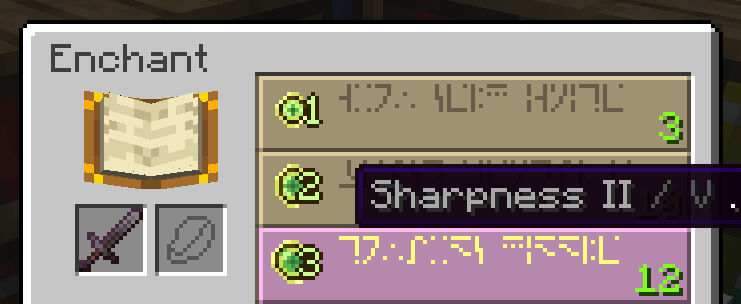
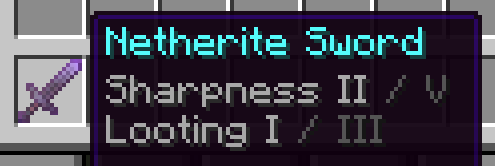
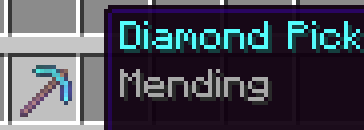
"Sharpness V" or "Mending", however, are left alone since they're the max level. Simple, intuitive, and IMO should have been built-in.
It also works with potion effects in a really clean way (I'll add screenshots later).
Why?
"Why would this have to be built-in?": For people who don't like to rely on memory when it comes to numbers.
What's different about this mod implementation from the other ones is that it intentionally provides no configuration and is designed to be a subtle vanilla-feeling drop-in-and-forget.
I'm not sure that the dark gray color is the perfect choice for preserving the Vanilla feel. If this mod gets enough downloads, we can make a poll to decide whether to leave it dark gray or the initial tooltip color.
Project description from Modrinth.
Pick your setup
Max Level Info by Minecraft version and loader
Choose the version and loader you play, then open the matching release.
Minecraft version
1.21.10
1 loader buildMinecraft version
1.21.9
1 loader buildMinecraft version
1.21.8
1 loader buildMinecraft version
1.21.7
1 loader buildMinecraft version
1.21.6
1 loader buildMinecraft version
1.21.5
1 loader buildMinecraft version
1.21.4
1 loader buildMinecraft version
1.21.3
1 loader buildMinecraft version
1.21.2
1 loader buildCheck the dependencies, then try the file in a copied instance before changing a world you care about.
Recent files
Max Level Info versions and loaders
1.1.3
max-level-info-1.1.3.jar
17 May 2025
Client Required Server Not supported Dependencies No extras listed Listed on Release listing
Check the 1.21.2 · Fabric setup 1.21.101.21.111.21.21.21.3 release
Looking for an older file? The official Modrinth project page is in Resources.
 mod
CurseForge + Modrinth · Minecraft
Carpet PRY Addition
A Carpet Mod (fabric-carpet) extension that contains some useful functions for Improve the experience
 mod
Modrinth · Minecraft
Croptopia Delight
This mod adds the integration of Croptopia recipes with Farmer's Delight and their addons.
 mod
Modrinth · Minecraft
Cobblemon Relics
Adds Pokémon-related items.