Mod Menu Optional for Auto Logout 4.2.1
optionalMatching file found Matched file: 18.0.2

Modrinth · Minecraft mod
Automatically disconnects if your life drops below a certain threshold.
Quick answer
Auto Logout 4.2.1 targets 26.1, 26.1.1, 26.1.2 with Fabric, Quilt. It must be installed on the client. Do not install it on the dedicated server. All 1 required mods have matching files.
Where it goes
It must be installed on the client. Do not install it on the dedicated server.
This file is marked client-only.
4.2.1 on 26.1.2. Every mod below is checked against that same setup.
Install Fabric API first. We found matching files for this game-version and loader setup. 1 comes through another mod in the chain.
1 extra mod was pulled in by another dependency. Indented rows show who needs each one. We only count dependency files that match this setup. A file for another loader does not fill the gap.
Before you install it
Built for Auto Logout 4.2.1 on 26.1.2. Pick another file and the loader, install side or required mods may change.
Use 4.2.1. It targets 26.1, 26.1.1, 26.1.2 with Fabric, Quilt; another release may have different loader, side or dependency requirements.
Install Fabric API first. We found matching files for this game-version and loader setup. 1 comes through another mod in the chain.
It must be installed on the client. Do not install it on the dedicated server.
Use the “Get this file” button beside 4.2.1. It opens that exact file at the source.
About this project

Auto Logout saves you when having low life. When enabled it automatically disconnects you from the sever or world if your lifes drop below the set threshold.
To use it on Quilt you need to manually install Fabric API on your Quilt profile:Browse Content → Loader (on the right) → Unlock Filter → Search for "Fabric API" → Install
Then select your Profiles Minecraft Version.
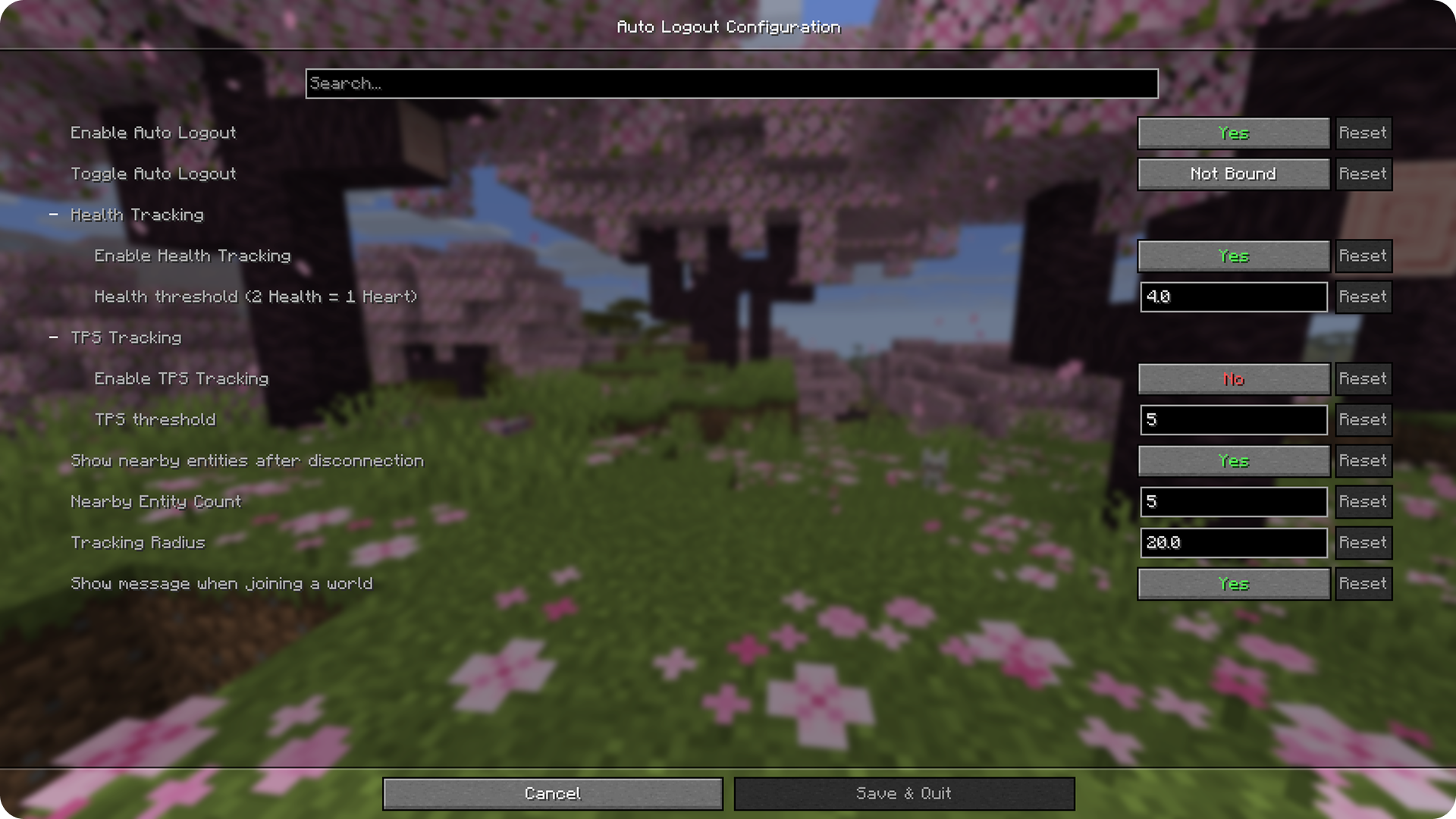
Use Commands or the Mod Menu Integration to change the settings to fit your wishes.
⚠️ From v2.0.0 (Minecraft 1.21.9+) Auto Logout works without any other Mods except FabricAPI and can be controlled using the commands.
But for using the Settings GUI you need Mod Menu and Cloth Config API, which also enables the Keybinding option. ⚠️
/auto-logout help
/auto-logout enable
/auto-logout disable

/auto-logout health-tracking enable
/auto-logout health-tracking disable
/auto-logout health-tracking threshold
/auto-logout health-tracking threshold <value>

/auto-logout tps-tracking enable
/auto-logout tps-tracking disable
/auto-logout tps-tracking threshold
/auto-logout tps-tracking threshold <value>

/auto-logout entity-scanning enable
/auto-logout entity-scanning disable
/auto-logout entity-scanning entity-count
/auto-logout entity-scanning entity-count <value>
/auto-logout entity-scanning radius
/auto-logout entity-scanning radius <value>

/auto-logout join-message enable
/auto-logout join-message disable
Health/TPS Threshold value has to be between 0 and 20.
Entity Count value has to be between 1 and 10.
Radius value has to be between 1 and 64.
Requires Mod Menu and Cloth Config API
Creator Website: 🔗myownbrain.de
Project description from Modrinth.
Pick your setup
Choose the version and loader you play, then open the matching release.
Showing the newest 12 of 17 game versions. Older files are in the list below.
Check the dependencies, then try the file in a copied instance before changing a world you care about.
Recent files
auto-logout-4.2.1.jar
23 Jun 2026
auto-logout-4.2.0.jar
17 Jun 2026
auto-logout-4.1.0.jar
6 May 2026
auto-logout-4.0.0.jar
28 Mar 2026
Looking for an older file? The official Modrinth project page is in Resources.
 mod
This mod increases damage to moving minecarts; the faster they move, the higher the damage, with virtually no damage limit!
 mod
Adds a survival thirst bar, drinking, and water purity to Minecraft.
 mod
A vanilla enhancing mod that aims to expand the food system with dynamic meals, while also adding stamina.