Forge Config API Port Needed by Clean Tooltips 1.1
requiredMatching file found Matched file: 21.10.1
Modrinth · Minecraft mod
Improving Tooltips by creating a clean and consistent look! Durability Tooltip & more!
Quick answer
Clean Tooltips 1.1 targets 1.21.10 with Fabric. It must be installed on the client. Do not install it on the dedicated server. 1 required mod needs a matching file.
Where it goes
It must be installed on the client. Do not install it on the dedicated server.
This file is marked client-only.
1.1. Change the file and its required mods may change too.
Install Forge Config API Port, Fabric API first, but 1 required mod has no matching file for this setup. Do not mix loader builds to force a match. 1 comes through another mod in the chain.
1 extra mod was pulled in by another dependency. Indented rows show who needs each one. We only count dependency files that match this setup. A file for another loader does not fill the gap.
Before you install it
Built for Clean Tooltips 1.1. Pick another file and the loader, install side or required mods may change.
Use 1.1. It targets 1.21.10 with Fabric; another release may have different loader, side or dependency requirements.
Install Forge Config API Port, Fabric API first, but 1 required mod has no matching file for this setup. Do not mix loader builds to force a match. 1 comes through another mod in the chain.
It must be installed on the client. Do not install it on the dedicated server.
Use the “Get this file” button beside 1.1. It opens that exact file at the source.
About this project

Ever felt like the default tooltips could be fancied up a bit? Then this is exactly what you're looking for.
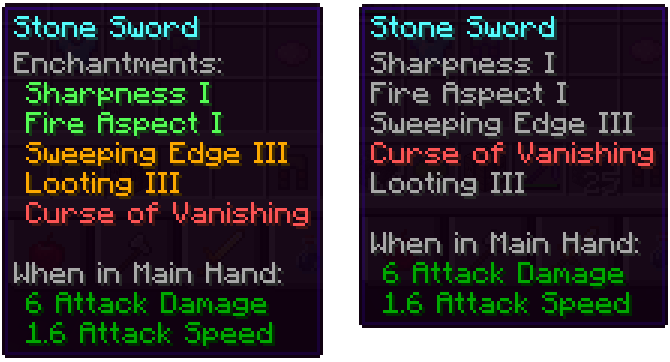
Mainly the mod overhauls the way enchantments get displayed in the tooltip:
With the mod installed: Without the mod installed (Vanila):
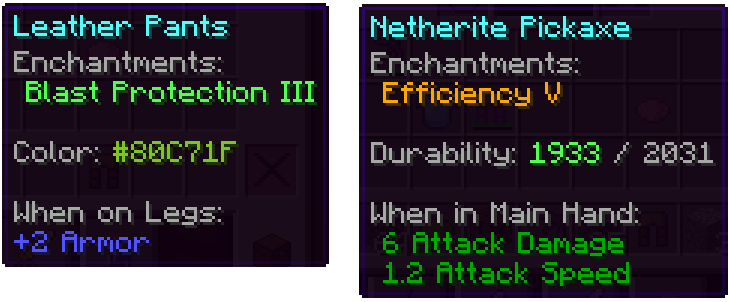
Besides that, other parts got also improved:
We have many more ideas on how tooltips could be improved for future updates. Besides adding new features, the next updates will also add many configurability options.


Project description from Modrinth.
Pick your setup
Choose the version and loader you play, then open the matching release.
Check the dependencies, then try the file in a copied instance before changing a world you care about.
Recent files
clean_tooltips-1.1-fabric-1.21.10.jar
7 Nov 2025
clean_tooltips-1.1-neoforge-1.21.10.jar
7 Nov 2025
clean_tooltips-1.1-neoforge-1.21.7.jar
29 Oct 2025
clean_tooltips-1.1-fabric-1.21.7.jar
29 Oct 2025
clean_tooltips-1.1-fabric-1.21.1.jar
3 Nov 2024
clean_tooltips-1.1-neoforge-1.21.1.jar
31 Oct 2024
clean_tooltips-1.0-fabric-1.21.1.jar
4 Oct 2024
clean_tooltips-1.0-neoforge-1.21.1.jar
2 Oct 2024
clean_tooltips-1.0-fabric-1.21.jar
4 Aug 2024
clean_tooltips-1.0-neoforge-1.21.jar
4 Aug 2024
clean_tooltips-1.0-fabric-1.20.6.jar
29 May 2024
clean_tooltips-1.0-neoforge-1.20.6.jar
29 May 2024
Looking for an older file? The official Modrinth project page is in Resources.
 mod
modAdds tactical weapon presentation to the TaCZ mod.
 mod
modThis is an unofficial add-on for DragonMine Z that will allow you to automatically complete the training minigames to make the TP grind much easier.
 mod
modA Jojo's Bizarre Adventure mod that interprets the world and power system of the anime into the world of Minecraft. ( JJBA )
