Minecraft version
Back to mods
Modrinth · Minecraft mod
FPS to the Trash
Throw away display updates your monitor can't process for more FPS
Choose a version Pick your version below, then grab the matching file.
Quick answer
Which FPS to the Trash release should I use?
Latest stable file 1.0.2+1
Game version 1.15, 1.15.1, 1.15.2
Loader Fabric
FPS to the Trash 1.0.2+1 targets 1.15, 1.15.1, 1.15.2 with Fabric. It must be installed on the client. Do not install it on the dedicated server. No extra mods listed for this file.
Where it goes
Is FPS to the Trash required on the client, server, or both?
It must be installed on the client. Do not install it on the dedicated server.
Client Required
Dedicated server Not supported
Loader for this release Fabric
Required install it here Optional supported, not mandatory Not supported do not install here Source doesn’t say do not assume
This file is marked client-only.
What else does FPS to the Trash 1.0.2+1 need?
1.0.2+1. Change the file and its required mods may change too.
This file does not list any required mods. Do not add a library just because a different file uses it.
This file does not list any required or optional mods.
Before you install it
Add FPS to the Trash without breaking your instance.
Built for FPS to the Trash 1.0.2+1. Pick another file and the loader, install side or required mods may change.
- 01
Stick to this file
Use 1.0.2+1. It targets 1.15, 1.15.1, 1.15.2 with Fabric; another release may have different loader, side or dependency requirements.
- 02
Bring the mods it needs
This file does not list any required mods. Do not add a library just because a different file uses it.
- 03
Put it on the correct side
It must be installed on the client. Do not install it on the dedicated server.
- 04
Pick the file you checked
Use the “Get this file” button beside 1.0.2+1. It opens that exact file at the source.
About this project
What does FPS to the Trash add?
FPS to the Trash
Disclaimer: This is technically NOT an optimization mod.
Upcoming: Legacy Fabric support!
Here's a glimpse of the pre-release version: 26000 FPS on a 4800H (w/ OptiFabric)! That's 38 microseconds frametime on average!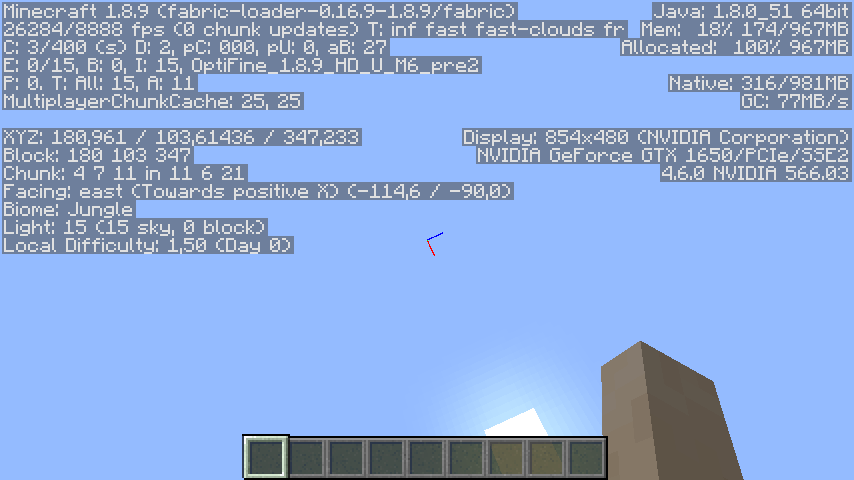
"FPS to the Trash" is based on a simple philosophy: Why bother updating the screen 1000 times per second, when your monitor's refresh rate is just 60 Hz? It turns out such updates are quite costly, and severely reduces the FPS.
This mod fixes that problem by decoupling the display updates from the frame rate. The update rate can be configured separately in the mod menu.
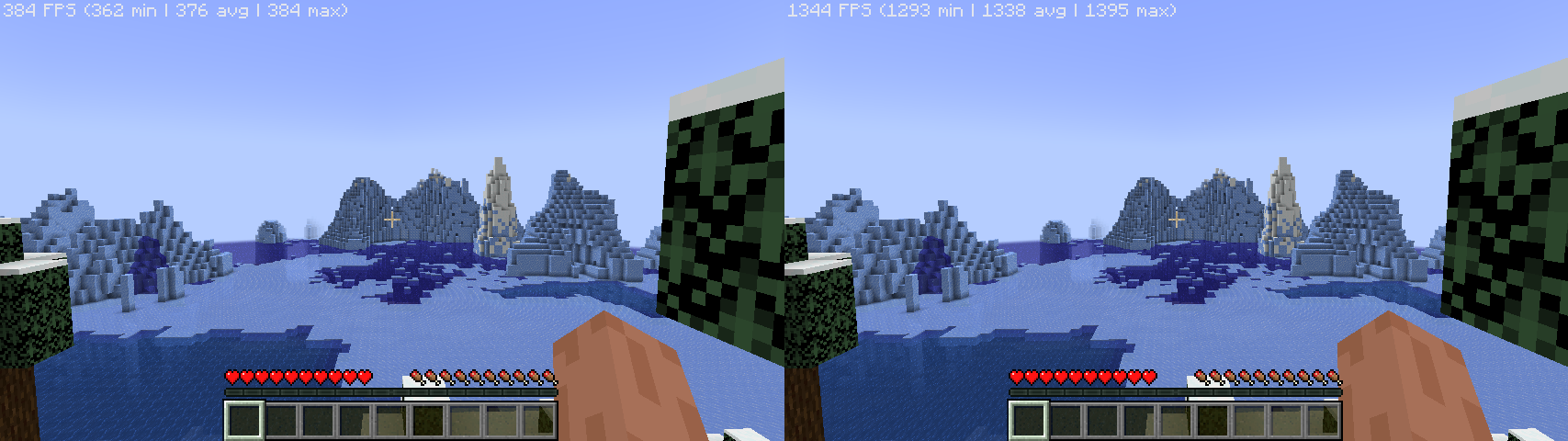
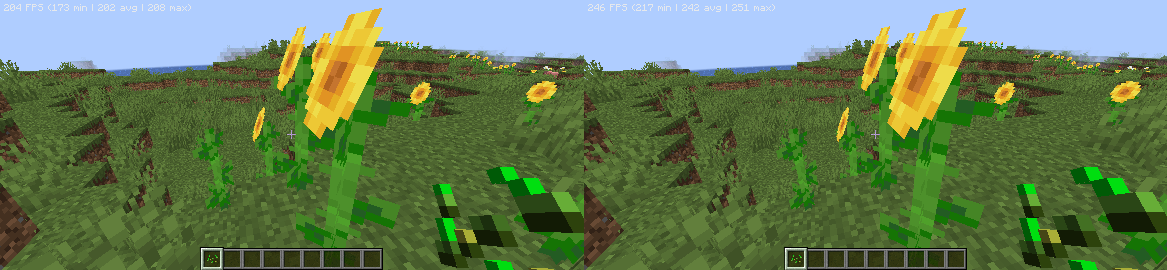
Generally, better hardware yields higher FPS uplift, and in many cases, the bottleneck is the GPU. Here are the benchmarks done by myself, with several other optimization mods:
- Ryzen 7 4800H, GeForce GTX 1650M: 384 -> 1395 FPS (3.6x uplift)
- Snapdragon 680 (4*A73 + 4*A53, Adreno 610): 208 -> 251 FPS (20.7% uplift)
Known issues:
- Removing FPS cap can cause the game to stutter badly when the GPU is fully utilized. A known workaround is to enable VSync. (Please note that VSync will not cap your frame rate as it's decoupled from the display updates. To cap the frame rate, use the frame cap slider.)
Mod compatibility (still updating...)
This mod does NOT work with:
- VulkanMod
Why is this mod named "FPS to the Trash"?
FPS to the moon, but most of the frames are thrown away... you got the idea.
Project description from Modrinth.
Pick your setup
FPS to the Trash by Minecraft version and loader
Choose the version and loader you play, then open the matching release.
Minecraft version
1.21.6
1 loader buildMinecraft version
1.21.5
1 loader buildMinecraft version
1.21.4
1 loader buildMinecraft version
1.21.3
1 loader buildMinecraft version
1.21.2
1 loader buildMinecraft version
1.21.1
1 loader buildMinecraft version
1.21
1 loader buildMinecraft version
1.20.6
1 loader buildMinecraft version
1.20.5
1 loader buildMinecraft version
1.20.4
1 loader buildMinecraft version
1.20.3
1 loader buildShowing the newest 12 of 34 game versions. Older files are in the list below.
Check the dependencies, then try the file in a copied instance before changing a world you care about.
Recent files
FPS to the Trash versions and loaders
1.0.2+1
frametothetrash-1.0.2+1.jar
11 Nov 2024
Client Required Server Not supported Dependencies No extras listed Listed on Release listing
Check the 1.21.7 · Fabric setup 1.151.15.11.15.21.16 release
1.0.2
frametothetrash-e-1.0.2.jar
7 Nov 2024
Client Required Server Not supported Dependencies No extras listed Listed on Release listing
Check the 1.21.3 · Fabric setup 1.21.21.21.3Fabric release
1.0.2
frametothetrash-e-1.0.2.jar
30 Aug 2024
Client Required Server Not supported Dependencies No extras listed Listed on Release listing
Check the 1.21.1 · Fabric setup 1.191.19.11.19.21.19.3 release
1.0.1+1
frametothetrash-e-1.0.1+1.jar
23 Jul 2024
Client Required Server Not supported Dependencies No extras listed Listed on Release listing
Check the 1.21.1 · Fabric setup 1.191.19.11.19.21.19.3 release
1.0.1
frametothetrash-e-1.0.1.jar
21 Jul 2024
Client Required Server Not supported Dependencies No extras listed Listed on Release listing
Check the 1.21 · Fabric setup 1.191.19.11.19.21.19.3 beta
1.0.0
frametothetrash-e-1.0.0.jar
5 Jul 2024
Client Required Server Not supported Dependencies No extras listed Listed on Release listing
Check the 1.21 · Fabric setup 1.151.15.11.15.21.16 beta
1.0.0
frametothetrash-1.0.0.jar
4 Jul 2024
Client Required Server Not supported Dependencies No extras listed Listed on Release listing
Check the 1.21.1 · Fabric setup 1.151.15.11.15.21.16 release
Looking for an older file? The official Modrinth project page is in Resources.