


Minecraft version
Back to mods 
Modrinth · Minecraft mod
Brightness Aura
Darkness? Never heard of it
Choose a version Pick your version below, then grab the matching file.
Quick answer
Which Brightness Aura release should I use?
Latest stable file 1.6.6
Game version 26.2
Loader Fabric
Brightness Aura 1.6.6 targets 26.2 with Fabric. It must be installed on the client. Do not install it on the dedicated server. No extra mods listed for this file.
Where it goes
Is Brightness Aura required on the client, server, or both?
It must be installed on the client. Do not install it on the dedicated server.
Client Required
Dedicated server Not supported
Loader for this release Fabric
Required install it here Optional supported, not mandatory Not supported do not install here Source doesn’t say do not assume
This file is marked client-only.
What else does Brightness Aura 1.6.6 need?
1.6.6. Change the file and its required mods may change too.
This file does not list any required mods. Do not add a library just because a different file uses it.
This file does not list any required or optional mods.
Before you install it
Add Brightness Aura without breaking your instance.
Built for Brightness Aura 1.6.6. Pick another file and the loader, install side or required mods may change.
- 01
Stick to this file
Use 1.6.6. It targets 26.2 with Fabric; another release may have different loader, side or dependency requirements.
- 02
Bring the mods it needs
This file does not list any required mods. Do not add a library just because a different file uses it.
- 03
Put it on the correct side
It must be installed on the client. Do not install it on the dedicated server.
- 04
Pick the file you checked
Use the “Get this file” button beside 1.6.6. It opens that exact file at the source.
About this project
What does Brightness Aura add?
NOTE: Please prefer downloading Anemos instead for more features.
📗 DESCRIPTION
This mod gives you true fullbright by overriding Minecraft’s brightness cap (raised from 100 to 1500). It removes all darkness and shadows, making everything fully lit — regardless of time, biome, or dimension.
🧩 USAGE
- Press
Bto toggle between max brightness and previous brightness.
To configure transitions, use the
/brightauracommand:
/brightaura transition <true|false>— enable or disable transition/brightaura transition_duration <ticks>— set the duration of the transition in ticks (e.g. 20 = 1 second)
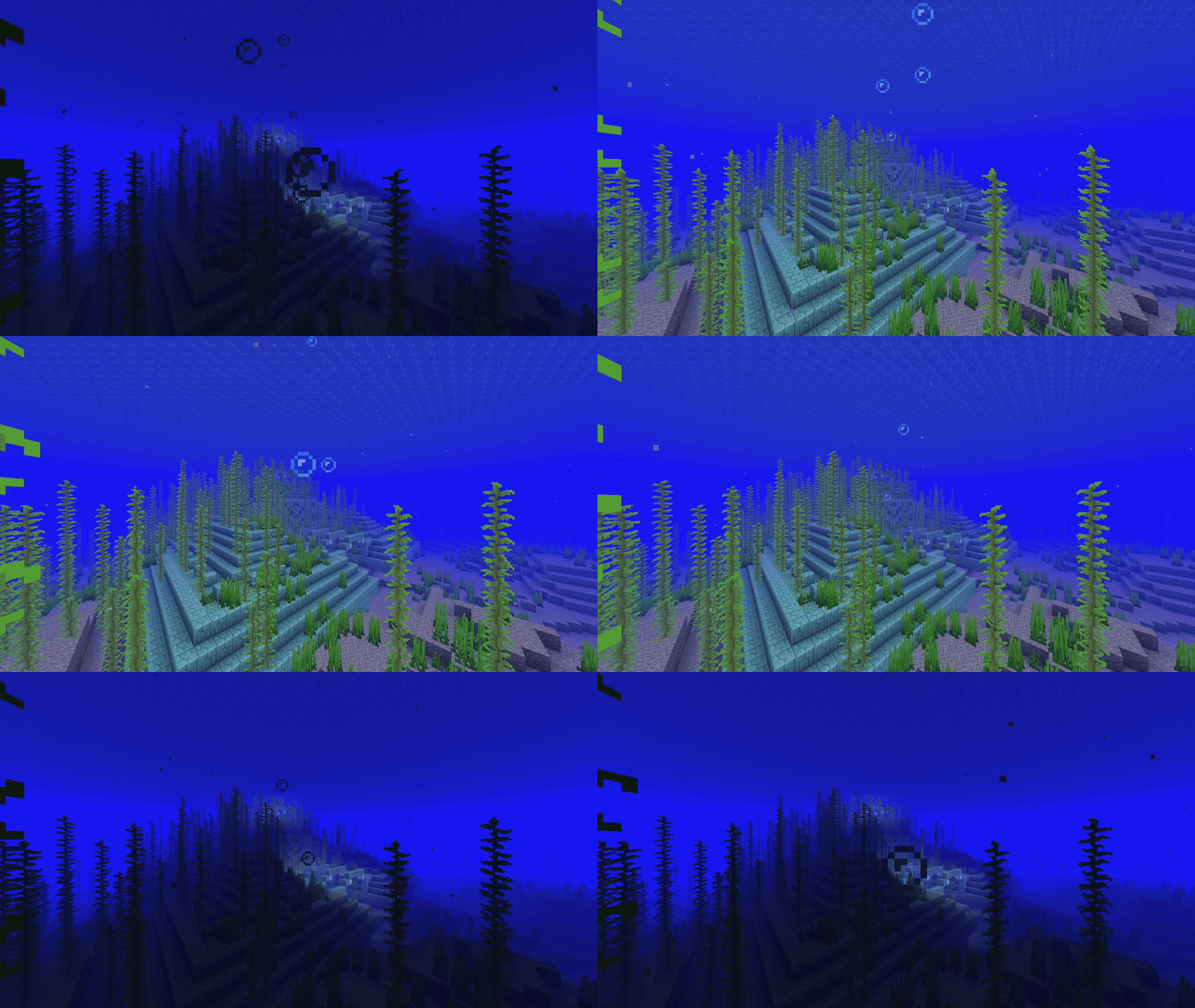
Project description from Modrinth.
Pick your setup
Brightness Aura by Minecraft version and loader
Choose the version and loader you play, then open the matching release.
Minecraft version
26.1.2
2 loader buildsMinecraft version
26.1.1
2 loader buildsMinecraft version
26.1
2 loader buildsMinecraft version
1.21.11
1 loader buildMinecraft version
1.21.10
1 loader buildMinecraft version
1.21.8
1 loader buildMinecraft version
1.21.7
1 loader buildMinecraft version
1.21.6
1 loader buildMinecraft version
1.21.5
1 loader buildMinecraft version
1.21.4
1 loader buildMinecraft version
1.21.3
1 loader buildShowing the newest 12 of 15 game versions. Older files are in the list below.
Check the dependencies, then try the file in a copied instance before changing a world you care about.
Recent files
Brightness Aura versions and loaders
1.6.6
brightness_aura-1.6.6+26.2-fabric.jar
9 Jul 2026
Client Required Server Not supported Dependencies No extras listed Listed on Release listing
Check the 26.2 · Fabric setup 26.2Fabric release
1.6.6
brightness_aura-1.6.6+26.2-neoforge.jar
9 Jul 2026
Client Required Server Not supported Dependencies No extras listed Listed on Release listing
Check the 26.2 · NeoForge setup 26.2NeoForge release
1.6.5
brightness_aura-1.6.5+26.2-fabric.jar
25 Jun 2026
Client Required Server Not supported Dependencies No extras listed Listed on Release listing
Check the 26.2 · Fabric setup 26.2Fabric release
1.6.5
brightness_aura-1.6.5+26.2-neoforge.jar
25 Jun 2026
Client Required Server Not supported Dependencies No extras listed Listed on Release listing
Check the 26.2 · NeoForge setup 26.2NeoForge release
1.6.4
brightness_aura-1.6.4+26.1-fabric.jar
7 May 2026
Client Required Server Not supported Dependencies No extras listed Listed on Release listing
Check the 26.1.2 · Fabric setup 26.126.1.126.1.2Fabric release
1.6.4
brightness_aura-1.6.4+26.1-neoforge.jar
7 May 2026
Client Required Server Not supported Dependencies No extras listed Listed on Release listing
Check the 26.1.2 · NeoForge setup 26.126.1.126.1.2NeoForge release
1.6.3
brightness-aura-1.6.3+26.1.x.jar
14 Apr 2026
Client Required Server Not supported Dependencies No extras listed Listed on Release listing
Check the 26.1.2 · Fabric setup 26.126.1.126.1.2Fabric release
1.6.2
brightness-aura-1.6.2+26.1.jar
31 Mar 2026
Client Required Server Not supported Dependencies No extras listed Listed on Release listing
Check the 26.1 · Fabric setup 26.1Fabric release
1.6.1
brightness-aura-1.6.1+26.1.jar
29 Mar 2026
Client Required Server Not supported Dependencies No extras listed Listed on Release listing
Check the 26.1 · Fabric setup 26.1Fabric release
1.6.0
brightness-aura-1.6.0+26.1.jar
29 Mar 2026
Client Required Server Not supported Dependencies No extras listed Listed on Release listing
Check the 26.1 · Fabric setup 26.1Fabric release
1.5.2
brightness-aura-1.5.2+1.21.11.jar
16 Dec 2025
Client Required Server Not supported Dependencies No extras listed Listed on Release listing
Check the 1.21.11 · Fabric setup 1.21.11Fabric release
1.5.1
brightness-aura-1.5.1+1.21.11.jar
14 Dec 2025
Client Required Server Not supported Dependencies No extras listed Listed on Release listing
Check the 1.21.11 · Fabric setup 1.21.11Fabric release
Looking for an older file? The official Modrinth project page is in Resources.
 mod
CurseForge · Minecraft
Botania Revived
Unofficial NeoForge Port Of Botania(Botania is a mod that adds nature magic to Minecraft).
 mod
GitHub · Minecraft
modpacks-ch-github-test
Disposable public fixture for testing the Modpacks.ch GitHub catalogue flow
 mod
Modrinth · Minecraft
Mcqueen's Heropack
A Palladium add-on packed with heroes and villains from The Incredibles, DC, and beyond — each with fully-realized powers, skill trees, and custom gear.