Minecraft version
Back to mods 
Modrinth · Minecraft mod
MobHealthBar
This mod adds classic Minecraft health bars above mobs, showing their remaining life.
Choose a version Pick your version below, then grab the matching file.
Quick answer
Which MobHealthBar release should I use?
Latest stable file 1.1.0+26.2-neoforge
Game version 26.2
Loader NeoForge
MobHealthBar 1.1.0+26.2-neoforge targets 26.2 with NeoForge. It must be installed on the client. Do not install it on the dedicated server. No extra mods listed for this file.
Where it goes
Is MobHealthBar required on the client, server, or both?
It must be installed on the client. Do not install it on the dedicated server.
Client Required
Dedicated server Not supported
Loader for this release NeoForge
Required install it here Optional supported, not mandatory Not supported do not install here Source doesn’t say do not assume
This file is marked client-only.
What else does MobHealthBar 1.1.0+26.2-neoforge need?
1.1.0+26.2-neoforge. Change the file and its required mods may change too.
This file does not list any required mods. Do not add a library just because a different file uses it.
This file does not list any required or optional mods.
Before you install it
Add MobHealthBar without breaking your instance.
Built for MobHealthBar 1.1.0+26.2-neoforge. Pick another file and the loader, install side or required mods may change.
- 01
Stick to this file
Use 1.1.0+26.2-neoforge. It targets 26.2 with NeoForge; another release may have different loader, side or dependency requirements.
- 02
Bring the mods it needs
This file does not list any required mods. Do not add a library just because a different file uses it.
- 03
Put it on the correct side
It must be installed on the client. Do not install it on the dedicated server.
- 04
Pick the file you checked
Use the “Get this file” button beside 1.1.0+26.2-neoforge. It opens that exact file at the source.
About this project
What does MobHealthBar add?
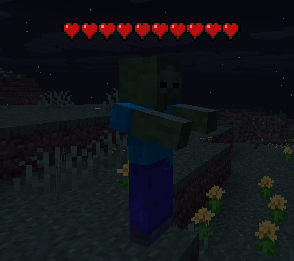
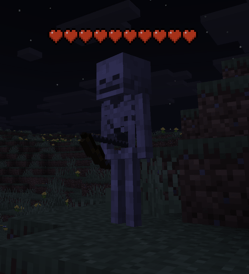
✨Features ✨
Vanilla Hearts in 3D
Full, half, and empty hearts rendered above mob heads using the actual vanilla heart sprites. Poison, wither, and absorption variants all included.
Smooth Fade-In & Fade-Out
Health bars don't pop in or vanish. They ease in and fade out for a polished, natural feel.
Smart Visibility
Hearts appear when you damage any entity or look at a hostile mob. Hostile mobs stay visible for ~20 seconds, friendly entities for ~7 seconds.
Damage Flash & Shake
When a mob takes a hit, hearts flash and shake just like vanilla.
Always Faces You
Billboard rendering keeps the hearts oriented toward the camera at all times, no matter what angle you're viewing from.
Works on Everything
Zombies, cows, bosses, villagers — if it has health, it gets hearts.
Pixel-Perfect Vanilla Logic
Heart fill matches vanilla's HUD exactly. A mob with 0.1 HP still shows a half heart.
🎮 How It Works 🎮
Hit a mob — hearts fade in above its head showing current health
Look at a hostile mob — hearts appear automatically, no hit needed
Watch them update — hearts reflect real-time health changes with damage flash on each hit
Hearts fade away — after the timer expires, they smoothly disappearNo keybinds, no config screens to open, no setup. Install and play.
❓ FAQ❓
Does this need to be installed on the server?
No, this is a purely client side mod. Install it on your client for use on any server.
Does it conflict with other health bar mods?
It shouldn't. This mod uses a render layer on entities, not a HUD overlay.
Can I include this in my modpack?
Yes.
Where do I report bugs?
Open an issue on the GitHub repository. Please include your loader, MC version, and a latest.log
Project description from Modrinth.
Pick your setup
MobHealthBar by Minecraft version and loader
Choose the version and loader you play, then open the matching release.
Minecraft version
26.1.2
3 loader buildsMinecraft version
26.1.1
3 loader buildsMinecraft version
26.1
3 loader buildsMinecraft version
1.21.11
3 loader buildsMinecraft version
1.21.10
3 loader buildsMinecraft version
1.21.9
3 loader buildsMinecraft version
1.21.8
3 loader buildsMinecraft version
1.21.7
3 loader buildsMinecraft version
1.21.6
3 loader buildsMinecraft version
1.21.5
3 loader buildsMinecraft version
1.21.4
3 loader buildsShowing the newest 12 of 47 game versions. Older files are in the list below.
Check the dependencies, then try the file in a copied instance before changing a world you care about.
Recent files
MobHealthBar versions and loaders
1.1.0+26.2-neoforge
mobhealthbar-neoforge-26.2-1.1.0.jar
10 Sept 2026
Client Required Server Not supported Dependencies No extras listed Listed on Release listing
Check the 26.2 · NeoForge setup 26.2NeoForge release
1.1.0+26.2-forge
mobhealthbar-forge-26.2-1.1.0.jar
10 Sept 2026
Client Required Server Not supported Dependencies No extras listed Listed on Release listing
Check the 26.2 · Forge setup 26.2Forge release
1.1.0+26.2-fabric
mobhealthbar-fabric-26.2-1.1.0.jar
10 Sept 2026
Client Required Server Not supported Dependencies 1 required · 1 unchecked Listed on Release listing
Check the 26.2 · Fabric setup 26.2Fabric release
1.1.0+26.1.2-neoforge
mobhealthbar-neoforge-26.1.2-1.1.0.jar
10 Sept 2026
Client Required Server Not supported Dependencies No extras listed Listed on Release listing
Check the 26.1.2 · NeoForge setup 26.1.2NeoForge release
1.1.0+26.1.2-forge
mobhealthbar-forge-26.1.2-1.1.0.jar
10 Sept 2026
Client Required Server Not supported Dependencies No extras listed Listed on Release listing
Check the 26.1.2 · Forge setup 26.1.2Forge release
1.1.0+26.1.2-fabric
mobhealthbar-fabric-26.1.2-1.1.0.jar
10 Sept 2026
Client Required Server Not supported Dependencies 1 required · 1 unchecked Listed on Release listing
Check the 26.1.2 · Fabric setup 26.1.2Fabric release
1.1.0+26.1.1-neoforge
mobhealthbar-neoforge-26.1.1-1.1.0.jar
10 Sept 2026
Client Required Server Not supported Dependencies No extras listed Listed on Release listing
Check the 26.1.1 · NeoForge setup 26.1.1NeoForge release
1.1.0+26.1.1-forge
mobhealthbar-forge-26.1.1-1.1.0.jar
10 Sept 2026
Client Required Server Not supported Dependencies No extras listed Listed on Release listing
Check the 26.1.1 · Forge setup 26.1.1Forge release
1.1.0+26.1.1-fabric
mobhealthbar-fabric-26.1.1-1.1.0.jar
10 Sept 2026
Client Required Server Not supported Dependencies 1 required · 1 unchecked Listed on Release listing
Check the 26.1.1 · Fabric setup 26.1.1Fabric release
1.1.0+26.1-neoforge
mobhealthbar-neoforge-26.1-1.1.0.jar
10 Sept 2026
Client Required Server Not supported Dependencies No extras listed Listed on Release listing
Check the 26.1 · NeoForge setup 26.1NeoForge release
1.1.0+26.1-forge
mobhealthbar-forge-26.1-1.1.0.jar
10 Sept 2026
Client Required Server Not supported Dependencies No extras listed Listed on Release listing
Check the 26.1 · Forge setup 26.1Forge release
1.1.0+26.1-fabric
mobhealthbar-fabric-26.1-1.1.0.jar
10 Sept 2026
Client Required Server Not supported Dependencies 1 required · 1 unchecked Listed on Release listing
Check the 26.1 · Fabric setup 26.1Fabric release
Looking for an older file? The official Modrinth project page is in Resources.
 mod
mod CurseForge + Modrinth · Minecraft
GUI Scaler
Automatically adjusts Minecraft GUI scale based on window resolution. Smart scaling for optimal readability on any screen size.
 mod
mod CurseForge + Modrinth · Minecraft
AE2 Fluid Crafting Terminal
Craft with fluids directly without buckets. A specialized AE2 terminal for seamless fluid
 mod
mod Modrinth · Minecraft
rescale aspect ratio
Rescale Aspect Ratio is a lightweight client-side mod that lets you change Minecraft’s aspect ratio without changing your monitor resolution. Perfect for stretched and ultrawide gameplay.