Quick answer
Which Overpacked release matches 1.20.6 Forge?
Best match for your filters 2.0.1-1.20.1
Game version 1.20, 1.20.1, 1.20.2
Loader Forge
Overpacked 2.0.1-1.20.1 targets 1.20, 1.20.1, 1.20.2 with Forge. Installation on the client is optional. Installation on the dedicated server is optional. All 2 required mods have matching files.
Where it goes
Is Overpacked required on the client, server, or both?
Installation on the client is optional. Installation on the dedicated server is optional.
Client Optional
Dedicated server Optional
Loader for this release Forge
Required install it here Optional supported, not mandatory Not supported do not install here Source doesn’t say do not assume
The source marks this as usable on both the client and server.
What else does Overpacked 2.0.1-1.20.1 need?
2.0.1-1.20.1 on 1.20.6 Forge. Every mod below is checked against that same setup.
Install Bobo Lib, Curios API first. We found matching files for this game-version and loader setup.
Bobo Lib Needed by Overpacked 2.0.1-1.20.1 requiredMatching file found Matched file: 1.1-1.20.1
Matching file found Matched file: 8.1.0+1.20.6
We only count dependency files that match this setup. A file for another loader does not fill the gap.
Before you install it
Add Overpacked without breaking your instance.
Built for Overpacked 2.0.1-1.20.1 on 1.20.6 Forge. Pick another file and the loader, install side or required mods may change.
- 01
Stick to this file
Use 2.0.1-1.20.1. It targets 1.20, 1.20.1, 1.20.2 with Forge; another release may have different loader, side or dependency requirements.
- 02
Bring the mods it needs
Install Bobo Lib, Curios API first. We found matching files for this game-version and loader setup.
- 03
Put it on the correct side
Installation on the client is optional. Installation on the dedicated server is optional.
- 04
Pick the file you checked
Use the “Get this file” button beside 2.0.1-1.20.1. It opens that exact file at the source.
About this project
What does Overpacked add?
Overpacked adds huge backpacks with a capacity roughly equal to four chests, allowing you to carry many more items on your adventures. The backpack helps you store loot and organize it into different sections, making inventory management more convenient and well-structured.




• To obtain a giant backpack, you need to purchase it from a Wandering Trader.
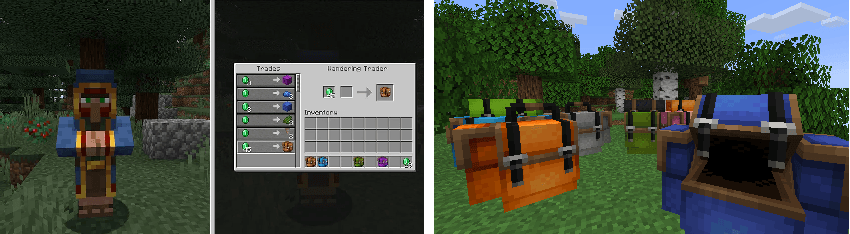
• Customization: You can recolor the backpack in any of the Vanilla and Dye Depot  colors or decorate it with a sleeping bag by clicking on it with a bed or a sleeping bag from the Comforts
 or Upgrade Aquatic
 mods.
• Beautiful animations: Animations are played while walking and when opening the backpack.
• Roomy inventory: Each backpack consists of three sections: one large section with 54 slots and two smaller sections with 27 slots each (these are crafted on a workbench by placing a chest in the center and surrounding it with eight pieces of leather). All sections represents a separate inventory.
• Balance: The backpack will start to slow you down if you fill it with too many items. The slowdown depends on the number of occupied slots: for every 27 filled slots, you lose 10% of your speed.
• Funny mechanics: You can stand on the backpack, and if you sit in a boat with a mob and then put the backpack on, the mob will be pushed out of the boat.

• Are there any backports? Fabric support?
Support for ports and other bootloaders is planned for a later time.
• Can I use Overpacked in a modpack or other content?
Yes! Just don’t forget to credit us properly.
• Can I use Overpacked textures or other assets?
Only in certain cases — please contact us via our Discord server.

Project description from Modrinth.
Pick your setup
Overpacked by Minecraft version and loader
Choose the version and loader you play, then open the matching release.
Minecraft version
1.21.1
1
loader build Minecraft version
1.20.6
1
loader build Minecraft version
1.20.4
1
loader build Minecraft version
1.20.3
1
loader build Minecraft version
1.20.2
1
loader build Minecraft version
1.20.1
1
loader build Minecraft version
1.20
1
loader build Check the dependencies, then try the file in a copied instance before changing a world you care about.
Recent files
Overpacked versions and loaders
overpacked-2.0.1-1.20.1-forge.jar
22 Jun 2026
Client Optional Server Optional Dependencies 2 required · matched Listed on Release listing
Check the 1.20.6 · Forge setup → 1.201.20.11.20.21.20.3 release
overpacked-2.0-1.20.1-forge.jar
17 Jun 2026
Client Optional Server Optional Dependencies 2 required · 2 unchecked Listed on Release listing
Check the 1.20.6 · Forge setup → 1.201.20.11.20.21.20.3 release
overpacked-1.2-1.20.1-forge.jar
1 Apr 2026
Client Optional Server Optional Dependencies 1 required · 1 unchecked Listed on Release listing
Check the 1.20.6 · Forge setup → 1.201.20.11.20.21.20.3 release
overpacked-1.1-1.20.1-forge.jar
18 Jan 2026
Client Optional Server Optional Dependencies 1 required · 1 unchecked Listed on Release listing
Check the 1.20.6 · Forge setup → 1.201.20.11.20.21.20.3 release

 mod
 mod
 mod