Fabric API Needed by InvSearch 3.4.0+mc26.3-snapshot-1
requiredMatching file found Matched file: 0.153.1+26.3

Modrinth · Minecraft mod
Find items across your inventory and known storage locations with a clean in-game search.
Quick answer
InvSearch 3.4.0+mc26.3-snapshot-1 targets 26.3-snapshot-1 with Fabric. Installation on the client is optional. Installation on the dedicated server is optional. All 1 required mods have matching files.
Where it goes
Installation on the client is optional. Installation on the dedicated server is optional.
The source marks this as usable on both the client and server.
3.4.0+mc26.3-snapshot-1. Change the file and its required mods may change too.
Install Fabric API first. We found matching files for this game-version and loader setup.
We only count dependency files that match this setup. A file for another loader does not fill the gap.
Before you install it
Built for InvSearch 3.4.0+mc26.3-snapshot-1. Pick another file and the loader, install side or required mods may change.
Use 3.4.0+mc26.3-snapshot-1. It targets 26.3-snapshot-1 with Fabric; another release may have different loader, side or dependency requirements.
Install Fabric API first. We found matching files for this game-version and loader setup.
Installation on the client is optional. Installation on the dedicated server is optional.
Use the “Get this file” button beside 3.4.0+mc26.3-snapshot-1. It opens that exact file at the source.
About this project
InvSearch is a lightweight Fabric client mod that adds fast item search to
Minecraft. It helps you find what your client has seen in your inventory and
tracked storage, so you can stop opening every chest in the room just to find
one missing stack.
It works as a practical storage memory aid: open containers as you play, then
search later to see known-current item locations and counts. Use it on its own,
or alongside InvSort and InvCatalogue as part of the wider inventory management
suite.
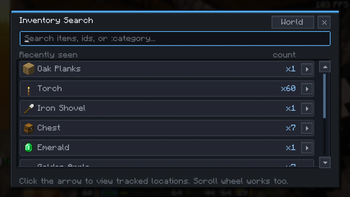
Open the search modal from the in-game Search button on supported screens. Type
an item name or id to filter the known item list, then select an item to see
where it was last seen and how much is available.
InvSearch now also understands category queries. Start a search with : to
match practical item groups from the shared sorting vocabulary, such as:wood, :stone, :tools, :food, :gear, or :storage.
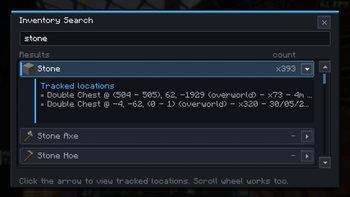
:category searches for broad groups such as wood, stone, tools, food, gear,InvSearch does not require a server install. Install Fabric Loader, Fabric API,
and the InvSearch jar for your Minecraft version.
It remembers what your client has seen. If another player moves items while you
are away, reopen that storage so InvSearch can refresh its known location data.
Project description from Modrinth.
Pick your setup
Choose the version and loader you play, then open the matching release.
Showing the newest 12 of 25 game versions. Older files are in the list below.
Check the dependencies, then try the file in a copied instance before changing a world you care about.
Recent files
inventory-search-3.4.0.jar
24 Jun 2026
inventory-search-3.4.0.jar
24 Jun 2026
inventory-search-3.4.0.jar
24 Jun 2026
inventory-search-3.4.0.jar
24 Jun 2026
inventory-search-3.4.0.jar
24 Jun 2026
inventory-search-3.4.0.jar
24 Jun 2026
inventory-search-3.4.0.jar
24 Jun 2026
inventory-search-3.4.0.jar
24 Jun 2026
inventory-search-3.3.0.jar
21 Jun 2026
inventory-search-3.3.0.jar
21 Jun 2026
inventory-search-3.3.0.jar
21 Jun 2026
inventory-search-3.3.0.jar
21 Jun 2026
Looking for an older file? The official Modrinth project page is in Resources.
 mod
Take to the skies with a Create jetpack, or wear it with an elytra to boost your glide!
 mod
A volcanic tech, mythology, and industrial automation mod for Minecraft 1.21 (Fabric) featuring obsidian alloys, multiblock reactors, particle colliders, and cryo-thermic engines.
 mod
Disposable public fixture for testing the Modpacks.ch GitHub catalogue flow