Quick answer
Which Improved Maps release matches 26.2?
beta file 0.7
Game version 26.2
Loader Fabric
Improved Maps 0.7 targets 26.2 with Fabric. Installation on the client is optional. Installation on the dedicated server is optional. All 2 required mods have matching files.
Where it goes
Is Improved Maps required on the client, server, or both?
Installation on the client is optional. Installation on the dedicated server is optional.
Client Optional
Dedicated server Optional
Loader for this release Fabric
Required install it here Optional supported, not mandatory Not supported do not install here Source doesn’t say do not assume
The source marks this as usable on both the client and server.
What else does Improved Maps 0.7 need?
0.7 on 26.2. Every mod below is checked against that same setup.
Install Fabric API, Polymer first. We found matching files for this game-version and loader setup. 1 comes through another mod in the chain.
4 listed on this file 1 pulled in by one of those mods
Matching file found Matched file: 20.0.1
Matching file found Matched file: 3.9.6+26.2-fabric
Matching file found Matched file: 0.156.0+26.2
Polymer Needed by Improved Maps 0.7 requiredMatching file found Matched file: 0.17.3+26.2
Matching file found Matched file: 3.1.0-beta.1+26.2
1
extra mod was pulled in by another dependency.
Indented rows show who needs each one. We only count dependency files that match this setup. A file for another loader does not fill the gap.
Before you install it
Add Improved Maps without breaking your instance.
Built for Improved Maps 0.7 on 26.2. Pick another file and the loader, install side or required mods may change.
- 01
Stick to this file
Use 0.7. It targets 26.2 with Fabric; another release may have different loader, side or dependency requirements.
- 02
Bring the mods it needs
Install Fabric API, Polymer first. We found matching files for this game-version and loader setup. 1 comes through another mod in the chain.
- 03
Put it on the correct side
Installation on the client is optional. Installation on the dedicated server is optional.
- 04
Pick the file you checked
Use the “Get this file” button beside 0.7. It opens that exact file at the source.
About this project
What does Improved Maps add?
Improved Maps 
This mod is only for Fabric Servers(or Single-Player) and requires Fabric API. Works with Vanilla clients thanks to Polymer!
Server-side Features
- Atlas - A combination between a bundle and a map.
- Fill it with empty maps and it will automatically create new maps as you explore off the edge of your current map.
- Automatically switch to the relevant map when returning to previous areas.
- Make a copy of the entire Atlas. Great for map walls!
- Fits up to 512 filled maps(configurable), and any number of empty maps
- Map Information Tooltips - See the map scale and center coordinates right from the tooltip
- Biome Map Colours - Records which biome each map pixel came from, so maps tint grass, leaves
and water per biome instead of drawing every biome the same flat green
- Only players with the mod installed see the difference - a vanilla client see vanilla maps/atlases
(Optional) Client-side Features
- Minimap - Your last selected Atlas can be displayed as a minimap if you install the mod client-side.
- Atlas View - Press
M (rebindable in Controls) to see every map in your Atlas stitched into one big map. Opens centred on you; scroll to zoom and drag to pan.
- Biome Map Colours - Draws the tint biome tint for grass, leaves and water on maps and atlases
- Proper display of Atlas' fullness bar
How to use Atlases
- Craft one by combining a filled map and a book in a crafting bench
- An Atlas is specific to a dimension
- All maps in an Atlas must have the same scale
- Atlases behave like bundles, but can only take filled and empty maps
- Copy an Atlas by combining an Atlas and a book, either in a crafting bench or a cartography table
- You must have enough empty maps in the Atlas to copy it, otherwise it won't craft
- You'll get 2 identical Atlases, each containing half the remaining empty maps
- You can take maps out like you would take items out of a bundle. To take out the empty maps you can either place the Atlas in a cartography table, or take out all the filled maps then right-click the empty Atlas in your inventory
(Optional) Custom Icons
- Installing the mod client-side will show custom icons for the Atlas item and fix some UI issues
- Icons can also be used by providing the Polymer resource pack to your vanilla clients
Known Issues
- Bundle tooltip on Atlas will show full once it hits 64 maps. You can still keep adding maps
- Installing the mod client-side will fix this
Shout-outs
Project description from Modrinth.
Pick your setup
Improved Maps by Minecraft version and loader
Choose the version and loader you play, then open the matching release.
Minecraft version
26.2
1
loader build Minecraft version
26.1.2
1
loader build Minecraft version
1.21.11
1
loader build Minecraft version
1.21.10
1
loader build Minecraft version
1.21.9
1
loader build Minecraft version
1.21.8
1
loader build Minecraft version
1.21.7
1
loader build Minecraft version
1.21.6
1
loader build Minecraft version
1.21.5
1
loader build Check the dependencies, then try the file in a copied instance before changing a world you care about.
Recent files
Improved Maps versions and loaders
improved-maps-0.7+mc26.2.jar
6 Aug 2026
Client Optional Server Optional Dependencies 2 required · matched Listed on Release listing
Check the 26.2 · Fabric setup → improved-maps-0.6+mc26.2.jar
4 Aug 2026
Client Optional Server Optional Dependencies 2 required · 2 unchecked Listed on Release listing
Check the 26.2 · Fabric setup → improved-maps-0.5+mc26.2.jar
2 Aug 2026
Client Optional Server Optional Dependencies 1 required · 1 unchecked Listed on Release listing
Check the 26.2 · Fabric setup → improved-maps-0.4.5+mc26.2.jar
21 Jun 2026
Client Optional Server Optional Dependencies 1 required · 1 unchecked Listed on Release listing
Check the 26.2 · Fabric setup → 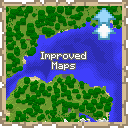
 mod
mod mod
mod mod
mod