Minecraft version
Back to mods 
Modrinth · Minecraft mod
Player Sculk Sensor
This Minecraft mod introduces a new variant of the sculk sensor, specifically designed to detect only players. It also adds a recipe to craft the sensor
Choose a version Pick your version below, then grab the matching file.
Quick answer
Which Player Sculk Sensor release should I use?
Latest stable file 1.18.2-0.0.2
Game version 1.18.2
Loader Forge
Player Sculk Sensor 1.18.2-0.0.2 targets 1.18.2 with Forge. Installation on the client is optional. Installation on the dedicated server is optional. No extra mods listed for this file.
Where it goes
Is Player Sculk Sensor required on the client, server, or both?
Installation on the client is optional. Installation on the dedicated server is optional.
Client Optional
Dedicated server Optional
Loader for this release Forge
Required install it here Optional supported, not mandatory Not supported do not install here Source doesn’t say do not assume
The source marks this as usable on both the client and server.
What else does Player Sculk Sensor 1.18.2-0.0.2 need?
1.18.2-0.0.2. Change the file and its required mods may change too.
This file does not list any required mods. Do not add a library just because a different file uses it.
This file does not list any required or optional mods.
Before you install it
Add Player Sculk Sensor without breaking your instance.
Built for Player Sculk Sensor 1.18.2-0.0.2. Pick another file and the loader, install side or required mods may change.
- 01
Stick to this file
Use 1.18.2-0.0.2. It targets 1.18.2 with Forge; another release may have different loader, side or dependency requirements.
- 02
Bring the mods it needs
This file does not list any required mods. Do not add a library just because a different file uses it.
- 03
Put it on the correct side
Installation on the client is optional. Installation on the dedicated server is optional.
- 04
Pick the file you checked
Use the “Get this file” button beside 1.18.2-0.0.2. It opens that exact file at the source.
About this project
What does Player Sculk Sensor add?
Minecraft Mod: Player-Specific Sculk Sensor
Overview
This mod introduces a specialized variant of the sculk sensor designed to exclusively detect player actions within Minecraft. Unlike the conventional sculk sensor, this version is tailored to sense only specific types of player interactions.
Crafting Recipe
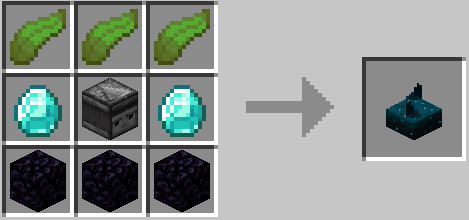
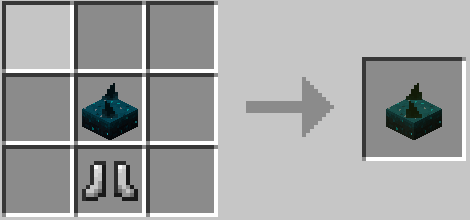
Functionality
- Range: The sensor's detection range is configurable from 1 to 15 blocks. By default, the range is set to 7 blocks.
- Player-Specific Detection: The sensor is engineered to react solely to player-generated actions.
- Event Sensitivity: The sensor is designed to detect specific player-related events, which can be configured. Each assigned a particular sensitivity level.
Config
Change the sensor range or trigger events in the config file:
%USERPROFILE%\AppData\Roaming\.minecraft\config\playersculksensormod-common.toml
Detection Capabilities
Below is a table outlining the possible events the sensor can detect, along with their default sensitivity levels. Note that these events and their sensitivity levels can be customized in the mod's configuration file:
| Event Type | Redstone Signal Strength | Description |
|---|---|---|
| STEP | 1 | Triggered when a player steps on a block. |
| SWIM | 3 | Triggered when a player swims in water or lava. |
| ELYTRA_FREE_FALL | 4 | Triggered when a player free falls with an Elytra. |
| HIT_GROUND | 6 | Triggered when a player hits the ground hard. |
| SPLASH | 6 | Triggered when a player splashes in water. |
| MINECART_MOVING | 6 | Triggered when a player moves a minecart. |
| RING_BELL | 6 | Triggered when a player rings a bell. |
| PROJECTILE_SHOOT | 7 | Triggered when a player shoots a projectile. |
| DRINKING_FINISH | 7 | Triggered when a player finishes drinking a potion. |
| PRIME_FUSE | 7 | Triggered when a player primes TNT. |
| PROJECTILE_LAND | 8 | Triggered when a player's thrown projectile lands. |
| EAT | 8 | Triggered when a player eats something. |
| MOB_INTERACT | 8 | Triggered when a player interacts with a mob. |
| ENTITY_DAMAGED | 8 | Triggered when a player damages an entity. |
| EQUIP | 9 | Triggered when a player equips an item. |
| SHEAR | 9 | Triggered when a player shears a sheep or similar. |
| BLOCK_CLOSE | 10 | Triggered when a player closes a block like a door or trapdoor. |
| BLOCK_UNSWITCH | 10 | Triggered when a player unpresses a button. |
| BLOCK_UNPRESS | 10 | Triggered when a player releases a pressure plate. |
| BLOCK_DETACH | 10 | Triggered when a player detaches a tripwire. |
| BLOCK_OPEN | 11 | Triggered when a player opens a block like a door or trapdoor. |
| BLOCK_SWITCH | 11 | Triggered when a player presses a button. |
| BLOCK_PRESS | 11 | Triggered when a player steps on a pressure plate. |
| BLOCK_ATTACH | 11 | Triggered when a player attaches a tripwire. |
| ENTITY_PLACE | 12 | Triggered when a player places an entity like a boat or minecart. |
| BLOCK_PLACE | 12 | Triggered when a player places a block. |
| FLUID_PLACE | 12 | Triggered when a player places a fluid. |
| BLOCK_DESTROY | 13 | Triggered when a player destroys a block. |
| ENTITY_KILLED | 13 | Triggered when a player kills any entity. |
| FLUID_PICKUP | 13 | Triggered when a player picks up fluid with a bucket. |
| FISHING_ROD_REEL_IN | 14 | Triggered when a player reels in a fishing rod. |
| CONTAINER_CLOSE | 14 | Triggered when a player closes a container. |
| CONTAINER_OPEN | 15 | Triggered when a player opens a container. |
| FISHING_ROD_CAST | 15 | Triggered when a player casts a fishing rod. |
| EXPLODE | 15 | Triggered when an explosion occurs near a player. |
| LIGHTNING_STRIKE | 15 | Triggered when lightning strikes near a player. |
| SHULKER_OPEN | 15 | Triggered when a player opens a Shulker Box. |
Project description from Modrinth.
Pick your setup
Player Sculk Sensor by Minecraft version and loader
Choose the version and loader you play, then open the matching release.
Check the dependencies, then try the file in a copied instance before changing a world you care about.
Recent files
Player Sculk Sensor versions and loaders
1.18.2-0.0.2
playersculksensor-1.18.2-0.0.2.jar
21 Mar 2024
Client Optional Server Optional Dependencies No extras listed Listed on Release listing
Check the 1.18.2 · Forge setup 1.18.2Forge release
1.18.2-0.0.1
playersculksensor-1.18.2-0.0.1.jar
9 Mar 2024
Client Optional Server Optional Dependencies No extras listed Listed on Release listing
Check the 1.18.2 · Forge setup 1.18.2Forge release
Looking for an older file? The official Modrinth project page is in Resources.