Fabric API Needed by Gamma Utils (Fullbright) [Fabric 26.2] Gamma-Utils-3.1.1
requiredMatching file found Matched file: [26.2] Fabric API 0.156.0+26.2

CurseForge · Minecraft mod
Fully client side Gamma / Brightness / Night Vision mod, making it easy to see in the dark. Basically Fullbright for Fabric and NeoForge.
Quick answer
Gamma Utils (Fullbright) [Fabric 26.2] Gamma-Utils-3.1.1 targets 26.2 with Fabric. The project page does not say whether this file belongs on the client, dedicated server, or both. All 3 required mods have matching files.
Where it goes
The project page does not say whether this file belongs on the client, dedicated server, or both.
The source does not explicitly classify this release as client-only or server-only.
[Fabric 26.2] Gamma-Utils-3.1.1. Change the file and its required mods may change too.
Install Fabric API, Cloth Config API (Fabric/Forge/NeoForge), Cloth Config API first. We found matching files for this game-version and loader setup. 2 come through another mod in the chain.
2 extra mods were pulled in by other dependencies. Indented rows show who needs each one. We only count dependency files that match this setup. A file for another loader does not fill the gap.
Before you install it
Built for Gamma Utils (Fullbright) [Fabric 26.2] Gamma-Utils-3.1.1. Pick another file and the loader, install side or required mods may change.
Use [Fabric 26.2] Gamma-Utils-3.1.1. It targets 26.2 with Fabric; another release may have different loader, side or dependency requirements.
Install Fabric API, Cloth Config API (Fabric/Forge/NeoForge), Cloth Config API first. We found matching files for this game-version and loader setup. 2 come through another mod in the chain.
The project page does not say whether this file belongs on the client, dedicated server, or both.
Use the “Get this file” button beside [Fabric 26.2] Gamma-Utils-3.1.1. It opens that exact file at the source.
About this project
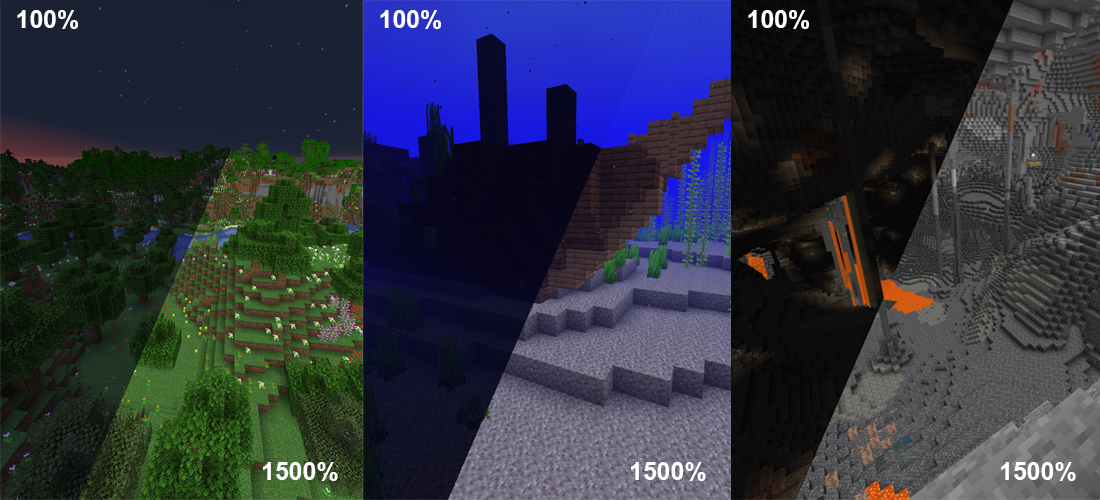

This is a fully configurable and client side Gamma / Brightness utility mod, making it much easier to see in the dark.
It's a really basic mod that allows you to change the gamma value in game way higher than the in game brightness setting allows.
Nights will look like day and caves will look like they're fully lit up. Basically Fullbright / Gammabright but for Fabric and NeoForge.
Press G to toggle between 100% and 1500% Gamma
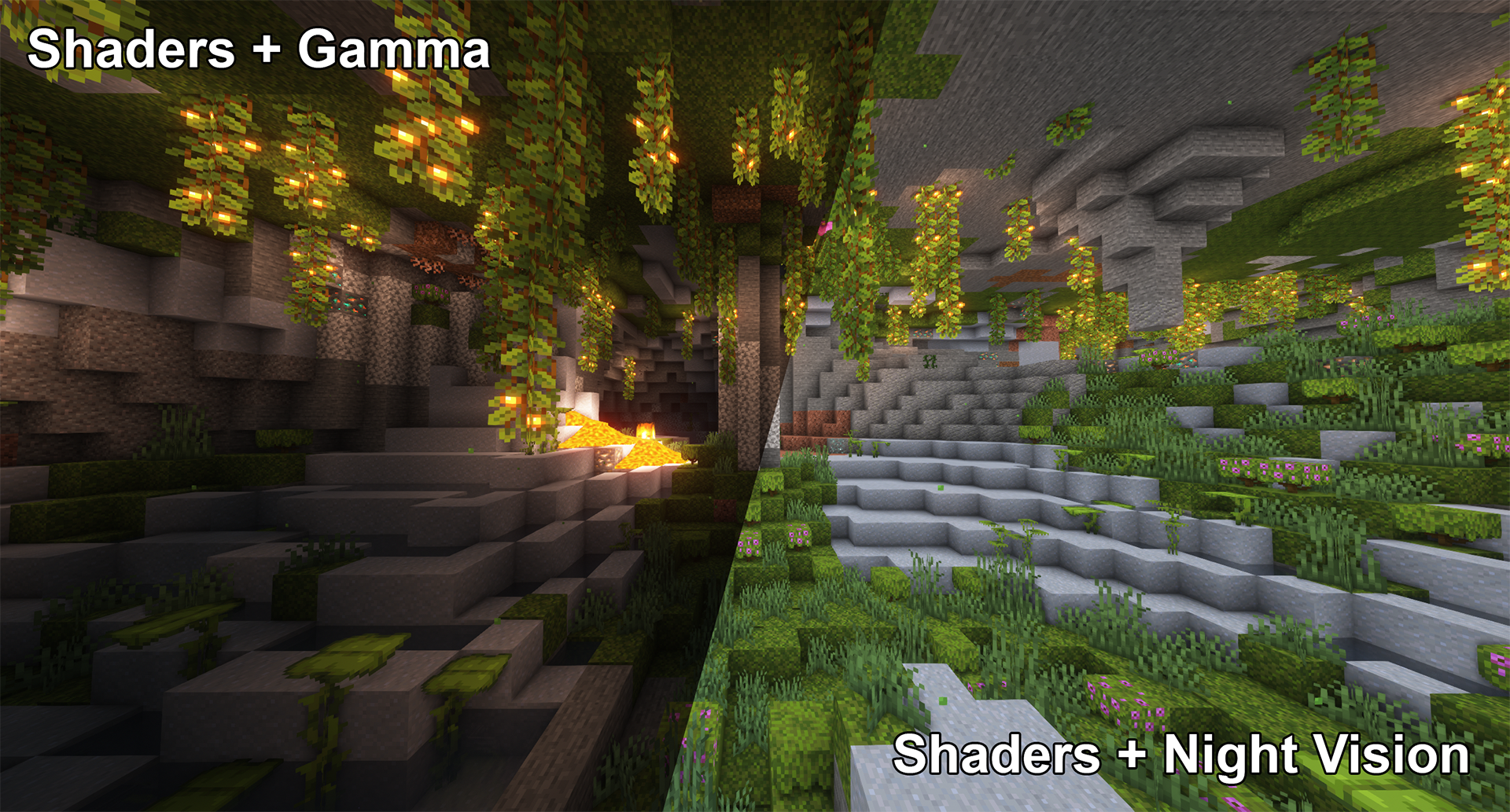
Press H to toggle client side Night Vision on or offThis works better in combination with shaders than gamma
To see everything that can be done and adjusted open the function and configuration spoilers below.
Here are some examples of what's possible though:
Mod overview video from BlackNinja745:
Toggle Night VisionHigh gamma won't work in combination with shaders, however, night vision will work with at least some shaders:
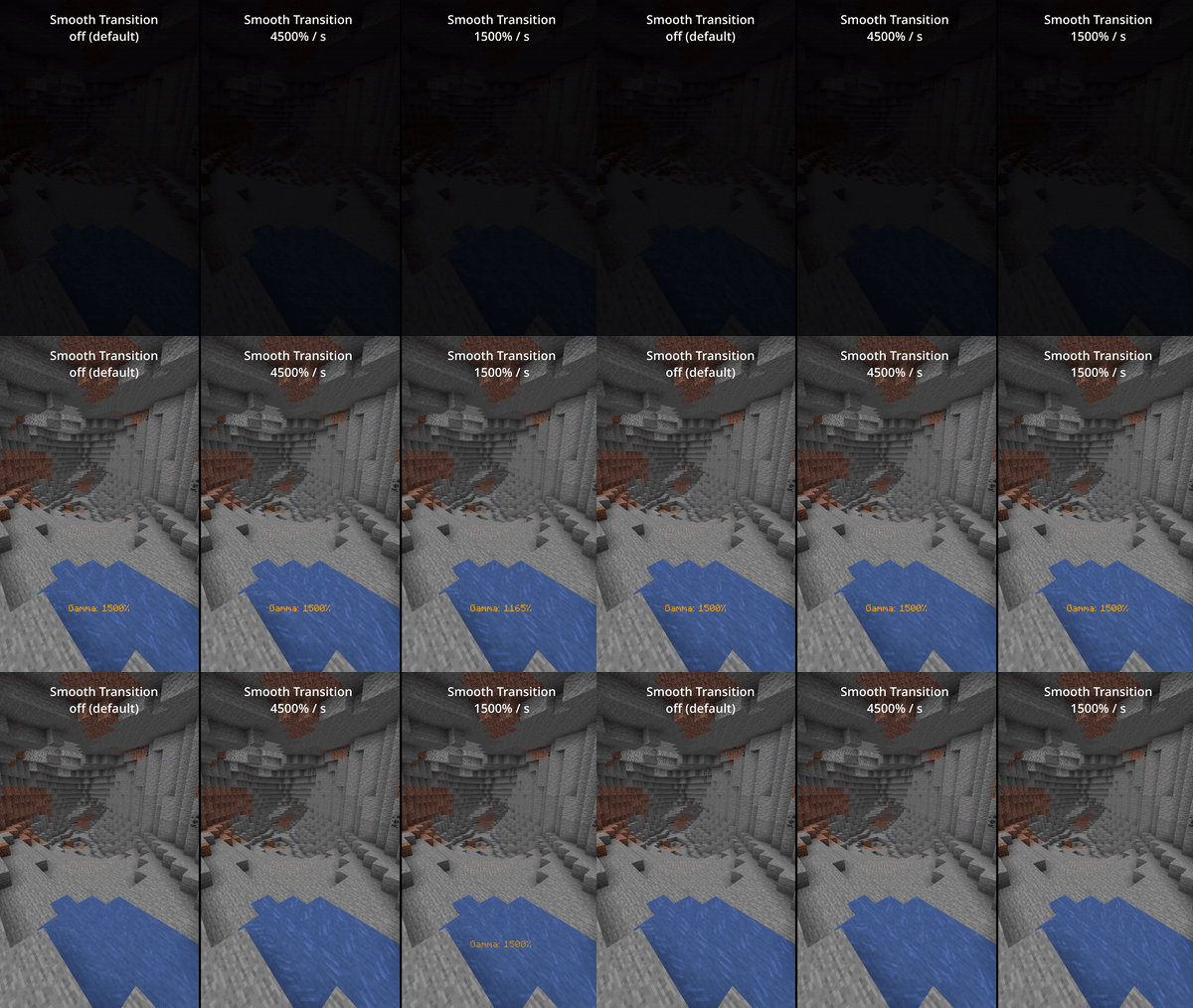
Smooth TransitionEnable smooth transition (off by default) for a less intense transition when toggling gamma:
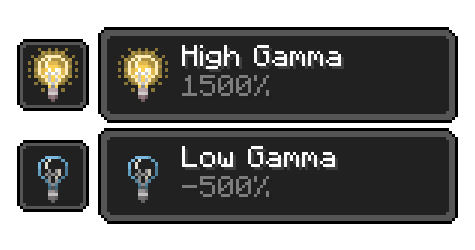
 Status EffectsEnable fully client side status effects (off by default) to keep you reminded that you've enabled gamma outside normal values:
KeybindingsAll keybindings can be changed in the default minecraft keybinding settings
Toggle GammaUsage: Keybind (default: G ) or /gamma toggle
Toggle between the default gamma percentage and the configured toggled percentage.
Increase GammaUsage: Keybind (default: arrow up) or /gamma increase <value> (value is optional)
Increase the gamma percentage by the configured step percentage or the given value.
Decrease GammaUsage: Keybind (default: arrow down) or /gamma decrease <value> (value is optional)
Decrease the gamma percentage by the configured step percentage or the given value.
Set GammaUsage: /gamma set <value>
Set the gamma to a specific percentage.
Max Gamma
Usage: Keybind or /gamma max
Sets the gamma to the configured maximum limit.
Min Gamma
Usage: Keybind or /gamma min
Sets the gamma to the configured minimum limit.
Toggle Night VisionUsage: Keybind (default: H ) or /gamma nightvision
Toggle night vision on or off.
Default Gamma PercentageDefault: 100%
Gamma percentage for when the mod is toggled off.
Toggled Gamma PercentageDefault: 1500%
Gamma percentage for when the mod is toggled on.
Update Toggle ValueDefault: false
Enabling this will make the toggle value remember the last non default value you've used.
Smooth Transition
Default: false
Make the transition when toggling gamma smoother.
Transition Speed
Default: 4500
Speed in gamma percentage per second.
Show Status Effect
Default: false
Show a client side status effect when the gamma percentage is outside normal range.
("Low Gamma" below 0% and "High Gamma" above 100%)
Limit Check
Default: true
Should the mod enforce the minimum and maximum gamma limits.
Minimum Gamma Limit
Default: -750%
Minimum gamma percentage the mod will allow if the Limit Check is enabled.
Maximum Gamma Limit
Default: 1500%
Maximum gamma percentage the mod will allow if the Limit Check is enabled.
Gamma Percentage StepDefault: 10%
Gamma percentage change for every increase or decrease.
Show Gamma Message
Default: true
Show a message with the new gamma value.
Reset on Close
Default: false
Reset the gamma value to default when Minecraft closes.
From 1.19 onwards this mod no longer includes Cloth Config
Required:
Optional:
Older Versions:
1.16 - 1.18
Required:
Optional:
Already included/embedded:
1.14 - 1.15
Required:
Optional:
Already included/embedded:
Please let me know if you experience any issues or have any suggestions
Project description from CurseForge.
Pick your setup
Choose the version and loader you play, then open the matching release.
Showing the newest 12 of 101 game versions. Older files are in the list below.
Check the dependencies, then try the file in a copied instance before changing a world you care about.
Recent files
Gamma-Utils-Fabric-3.1.1+mc26.2.jar
26 Jul 2026
Gamma-Utils-NeoForge-3.1.1+mc26.2.jar
26 Jul 2026
Gamma-Utils-Fabric-2.1.3+mc1.21.1.jar
26 Jul 2026
Gamma-Utils-Fabric-3.1.0+mc26.2-beta.jar
16 Jun 2026
Gamma-Utils-NeoForge-3.1.0+mc26.2-beta.jar
16 Jun 2026
Gamma-Utils-NeoForge-3.0.1+mc26.1.jar
30 Mar 2026
Gamma-Utils-NeoForge-3.0.0+mc26.1.jar
27 Mar 2026
Gamma-Utils-3.0.0+mc26.1.jar
27 Mar 2026
Gamma-Utils-2.5.10+mc1.21.11.jar
11 Dec 2025
Gamma-Utils-2.5.9+mc1.21.11.jar
9 Dec 2025
Gamma-Utils-2.4.9+mc1.21.10.jar
30 Nov 2025
Gamma-Utils-2.4.8+mc1.21.10.jar
15 Nov 2025
Looking for an older file? The official CurseForge project page is in Resources.
 mod
modAdd the “bag of seeds” from a certain gravestone mod.
 mod
modBlastScars — makes explosion aftermath more realistic, transforming ordinary craters into natural zones of destruction.
 mod
modDetails your Armour Durability and what's in your armour slot without manually opening your inventory.