Mod Menu Optional for Location Copy 1.3.0
optionalMatching file found Matched file: 20.0.1

Modrinth · Minecraft mod
Simple location copy tool
Quick answer
Location Copy 1.3.0 targets 26.2 with Fabric. It must be installed on the client. Do not install it on the dedicated server. All 1 required mods have matching files.
Where it goes
It must be installed on the client. Do not install it on the dedicated server.
This file is marked client-only.
1.3.0. Change the file and its required mods may change too.
Install Fabric API first. We found matching files for this game-version and loader setup. 1 comes through another mod in the chain.
1 extra mod was pulled in by another dependency. Indented rows show who needs each one. We only count dependency files that match this setup. A file for another loader does not fill the gap.
Before you install it
Built for Location Copy 1.3.0. Pick another file and the loader, install side or required mods may change.
Use 1.3.0. It targets 26.2 with Fabric; another release may have different loader, side or dependency requirements.
Install Fabric API first. We found matching files for this game-version and loader setup. 1 comes through another mod in the chain.
It must be installed on the client. Do not install it on the dedicated server.
Use the “Get this file” button beside 1.3.0. It opens that exact file at the source.
About this project
In Minecraft v1.21.6(LocationCopy v1.2.8), the default key for LocationCopy has been changed to 'G' -> 'B' because the new feature 'Quick Actions' uses the default key 'G'.
If you have used LocationCopy before, make sure that the key does not overlap in 'Options -> Controls -> Key Binds'.
This mod makes copying location in Minecraft much more convenient.

Simply press the "B" key(LocationCopy v1.2.8 or higher) to copy your current location and world.
(You can also customize the key to something else in the key bind settings.)
If you install ModMenu as an additional mod, it's convenient because you can easily adjust the settings from the main screen. (Optional)
You can set the mod by pressing the "I" key in the game or using the ModMenu interface. If you want a more precise configuration, you can adjust it in "config\LocationCopy.properties".
(v0.0.3 ~ v1.0.5 are available in "config\locationcopy\config.properties")
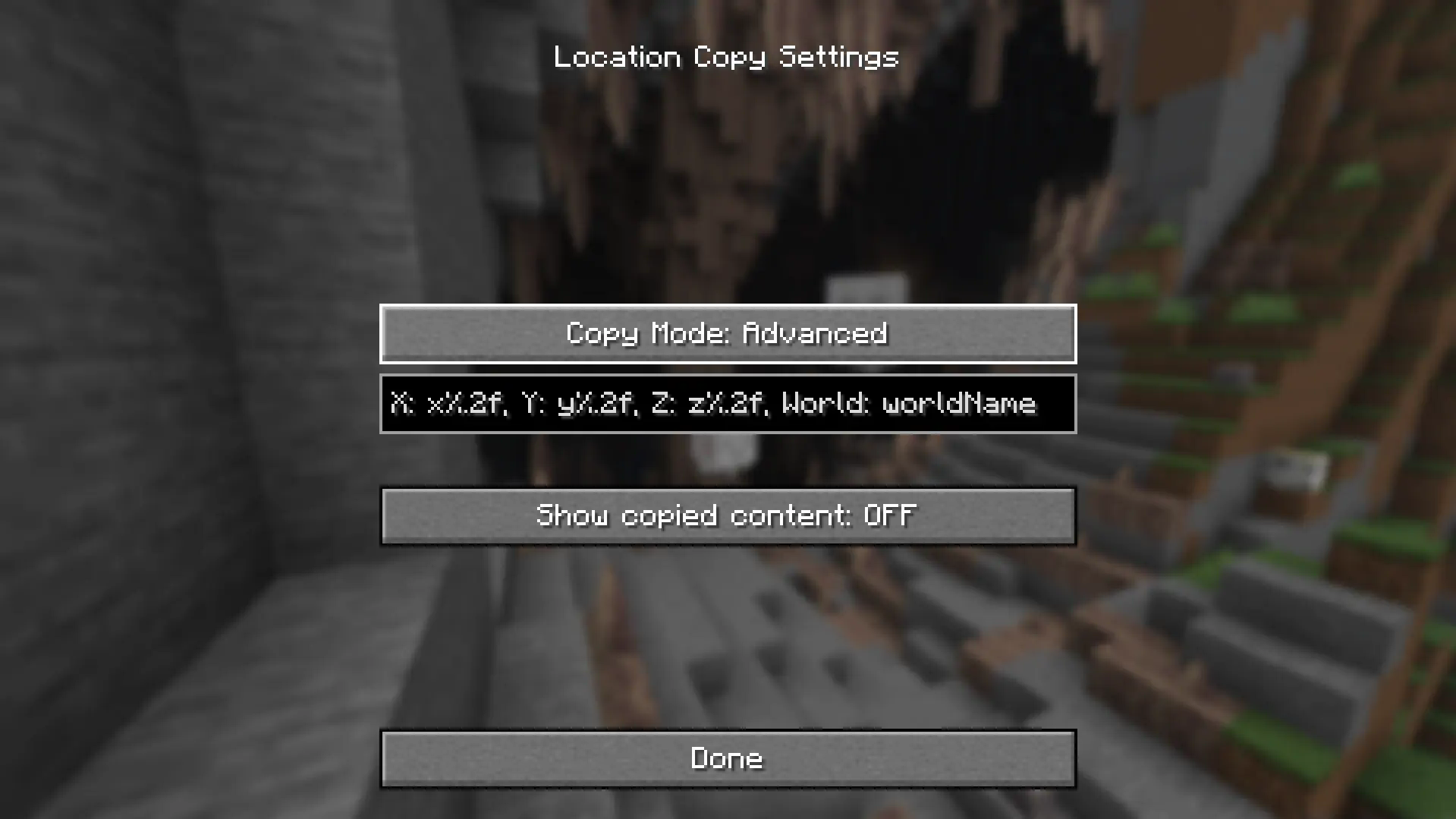
“%.nf” in advanced settings, "n" represents the number of decimal places. It is set to 2 by default and you can adjust this number. If you enter 0, only integer value will appear.
If you want to display only some of the three locations (e.g. Show only x and z locations), remove the location you want to clear (e.g. y%.2f). It will not be displayed.
x-value: x%.2f
y-value: y%.2f
z-value: z%.2f
World Name: worldName
"worldName" represents the world name. If you want to display the world name, use this. If you do not want the world name to be included in the copied field, remove "worldName".
“%.nf” in advanced settings, "n" represents the number of decimal places. It is set to 2 by default and you can adjust this number. If you enter 0, only integer value will appear.
"%s" represents the world name. If you want to display the world name, use this. If you do not want the world name to be included in the copied field, remove "%s".
But be careful. If incorrect values are entered in advanced mode, Minecraft may crash when copying the location!
If an incorrect value is assigned, it will be restored to its original state when switching to another mode and then setting it back to advanced mode.
You can avoid errors only by using a version that is compatible with your version of Minecraft.
If you find translation problems or mod issues, please report them to Issues.
Project description from Modrinth.
Pick your setup
Choose the version and loader you play, then open the matching release.
Showing the newest 12 of 22 game versions. Older files are in the list below.
Check the dependencies, then try the file in a copied instance before changing a world you care about.
Recent files
locationcopy-mc26.2-1.3.0.jar
10 Jul 2026
locationcopy-mc26.2-1.2.12.jar
9 Jul 2026
locationcopy-mc26.1-1.2.11.jar
9 Jul 2026
locationcopy-1.2.10.jar
10 Dec 2025
locationcopy-mc1.21.9-1.2.9.jar
4 Oct 2025
locationcopy-mc1.21.6-1.2.8.jar
20 Jun 2025
locationcopy-mc1.21.5-1.2.7.1.jar
30 Apr 2025
locationcopy-mc1.21.5-1.2.7.jar
26 Mar 2025
locationcopy-mc1.21.4-1.2.6.jar
5 Dec 2024
locationcopy-mc1.21.2-1.2.5.jar
16 Nov 2024
locationcopy-mc1.21-1.2.4.jar
16 Jul 2024
locationcopy-mc1.21-1.2.3.jar
5 Jul 2024
Looking for an older file? The official Modrinth project page is in Resources.
 mod
modMix of small optimizations for your Minecraft
 mod
modPhoton - Making mc effects as Unity.
 mod
modFixes VulkanMod + Create crashes on Fabric by remapping unsupported depth/stencil formats, framebuffer attachments and other things