Fabric API Needed by VoxelMap-Updated 26.3-1.16.13
requiredMatching file found Matched file: 0.165.0+26.3

Modrinth · Minecraft mod
Minimap and Worldmap. Have an overview of your surroundings, or view the entire world. Create waypoints.
Quick answer
VoxelMap-Updated 26.3-1.16.13 targets 26.3 with Fabric. It must be installed on the client. Do not install it on the dedicated server. All 1 required mods have matching files.
Where it goes
It must be installed on the client. Do not install it on the dedicated server.
This file is marked client-only.
26.3-1.16.13. Change the file and its required mods may change too.
Install Fabric API first. We found matching files for this game-version and loader setup.
We only count dependency files that match this setup. A file for another loader does not fill the gap.
Before you install it
Built for VoxelMap-Updated 26.3-1.16.13. Pick another file and the loader, install side or required mods may change.
Use 26.3-1.16.13. It targets 26.3 with Fabric; another release may have different loader, side or dependency requirements.
Install Fabric API first. We found matching files for this game-version and loader setup.
It must be installed on the client. Do not install it on the dedicated server.
Use the “Get this file” button beside 26.3-1.16.13. It opens that exact file at the source.
About this project
Minimap and world map for Minecraft. Clean, fast, no clutter.
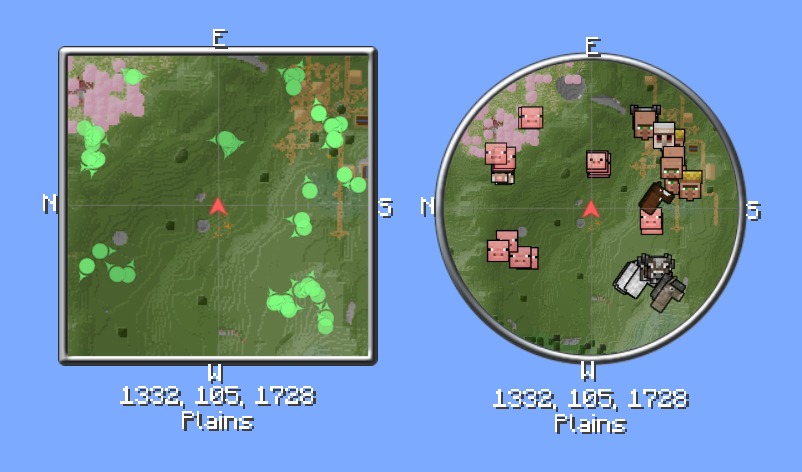



VoxelMap always shows you where you are. The minimap runs alongside the game, and the fullscreen world map shows everything you've explored so far. On top of that: waypoints, radar, and a few tools that make exploring and building easier.
Client-side only — no server installation required. An optional server-side component lets server owners restrict and configure the map for everyone.
Compact minimap in the corner, fullscreen world map with a keypress. Zoom levels are freely adjustable, rotation with the player is optional.
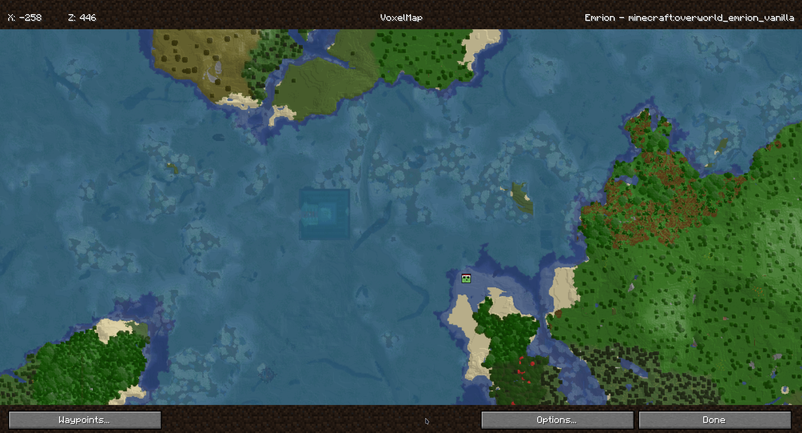
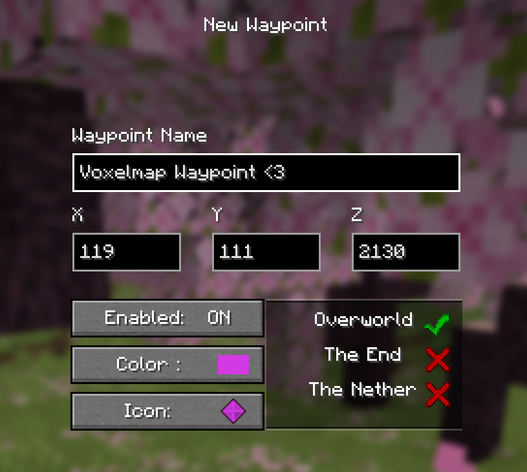
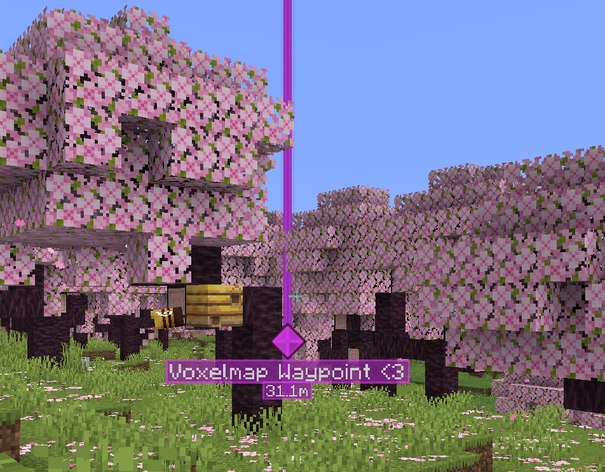
Set your own markers, give them an icon and color, and toggle visibility per dimension. Waypoints can be shared with other players in chat.
Underground, the map automatically switches to a cave view once the surface is blocked from view.
Shows nearby players and creatures. Names, helmets, and facing direction can be toggled individually, sneaking players can be hidden.
Biomes are color-coded on the map or shown as an overlay. Slime chunks can be made visible, on multiplayer servers with the correct seed.
A waypoint is automatically placed at your death location. Configurable to keep only the most recent one or all of them.
Networks with multiple addresses or proxies can send the client a fixed identity, so waypoints and map data stay the same across every address. Custom alias mappings can also be set manually.
VoxelMap can be restricted and configured server-side, without players needing to install anything extra. This is not Paper-only — the exact same server-side feature set is available on every platform:
| Server software | What to install |
|---|---|
| Fabric | The regular VoxelMap mod jar — it contains the server part |
| Forge | The regular VoxelMap mod jar — it contains the server part |
| NeoForge | The regular VoxelMap mod jar — it contains the server part |
| Paper / Spigot-based | The separate VoxelMap Paper plugin |
The mod jar for Fabric, Forge, and NeoForge works on both client and dedicated server. On a dedicated server it activates its server-side part and behaves exactly like the Paper plugin — same options, same config file, same behavior. The Paper plugin exists only because Paper servers can't load mod jars.
| Platform | Config file |
|---|---|
| Fabric / Forge / NeoForge | config/voxelmap.json |
| Paper | plugins/VoxelMap/voxelmap.json |
The file is created with defaults on first start. /voxelmap reload applies changes at runtime and pushes the new settings to all online players — on every platform.
{
  "defaultConfig": {
    "radarAllowed": true,
    "radarMobsAllowed": true,
    "radarPlayersAllowed": true,
    "cavesAllowed": true,
    "minimapAllowed": true,
    "worldmapAllowed": true,
    "waypointsAllowed": true,
    "deathWaypointAllowed": true,
    "teleportCommand": "tppos",
    "worldNameSuffix": "",
    "serverIdentity": "MyNetwork"
  },
  "worldOverrides": [
    {
      "worlds": ["world_the_end"],
      "settings": {
        "radarAllowed": false,
        "cavesAllowed": false
      }
    }
  ]
}
Runs on Fabric, Forge, and NeoForge. Client-side only — no server installation required to play. The server-side configuration is optional and only intended for server owners who want to restrict the map.


Project description from Modrinth.
Pick your setup
Choose the version and loader you play, then open the matching release.
Showing the newest 12 of 31 game versions. Older files are in the list below.
Check the dependencies, then try the file in a copied instance before changing a world you care about.
Recent files
voxelmap-fabric-26.3-1.16.13.jar
24 Sept 2026
voxelmap-neoforge-26.3-1.16.13.jar
24 Sept 2026
voxelmap-forge-26.3-1.16.13.jar
24 Sept 2026
voxelmap-fabric-26.3-1.16.12.jar
17 Sept 2026
voxelmap-neoforge-26.3-1.16.12.jar
17 Sept 2026
voxelmap-neoforge-26.3-1.16.11.jar
15 Sept 2026
voxelmap-fabric-26.3-1.16.11.jar
15 Sept 2026
voxelmap-fabric-26.2-1.16.10.jar
30 Aug 2026
voxelmap-neoforge-26.2-1.16.10.jar
30 Aug 2026
voxelmap-forge-26.2-1.16.10.jar
30 Aug 2026
voxelmap-fabric-26.2-1.16.9.jar
26 Aug 2026
voxelmap-neoforge-26.2-1.16.9.jar
26 Aug 2026
Looking for an older file? The official Modrinth project page is in Resources.
 mod
modMake vanilla food more diverse and fun
 mod
mod🇵🇱 Mod mający na celu urozmaicenie rozgrywki na serwerze SkyUP.pl | 🇬🇧 Client side mod aiming to enhance your gameplay on the SkyUP.pl server
 mod
modAnvilcraft's subsidiary mods add more alloys, weapons, tools, food, and more convenient recipes to help you play Anvilcraft better.