Minecraft version
Back to mods 
Modrinth · Minecraft mod
KurumaExampleCarPack
Example Car Pack for Kuruma Mod.
Choose a version Pick your version below, then grab the matching file.
Quick answer
Which KurumaExampleCarPack release should I use?
Latest stable file 1.1.0
Game version 1.20.1
Loader Forge
KurumaExampleCarPack 1.1.0 targets 1.20.1 with Forge. Installation on the client is optional. Installation on the dedicated server is optional. No extra mods listed for this file.
Where it goes
Is KurumaExampleCarPack required on the client, server, or both?
Installation on the client is optional. Installation on the dedicated server is optional.
Client Optional
Dedicated server Optional
Loader for this release Forge
Required install it here Optional supported, not mandatory Not supported do not install here Source doesn’t say do not assume
The source marks this as usable on both the client and server.
What else does KurumaExampleCarPack 1.1.0 need?
1.1.0. Change the file and its required mods may change too.
This file does not list any required mods. Do not add a library just because a different file uses it.
This file does not list any required or optional mods.
Before you install it
Add KurumaExampleCarPack without breaking your instance.
Built for KurumaExampleCarPack 1.1.0. Pick another file and the loader, install side or required mods may change.
- 01
Stick to this file
Use 1.1.0. It targets 1.20.1 with Forge; another release may have different loader, side or dependency requirements.
- 02
Bring the mods it needs
This file does not list any required mods. Do not add a library just because a different file uses it.
- 03
Put it on the correct side
Installation on the client is optional. Installation on the dedicated server is optional.
- 04
Pick the file you checked
Use the “Get this file” button beside 1.1.0. It opens that exact file at the source.
About this project
What does KurumaExampleCarPack add?
Kuruma - Sample Car Pack
Adds two cars to Kuruma.
⚠️ This is a car add-on pack. It also needs Kuruma.
On its own it does nothing. Install Kuruma first and run the two together.
A tall van and a big 4WD. Two completely different things to drive. Both can be tuned in-game, so the numbers are a starting point, not something fixed.
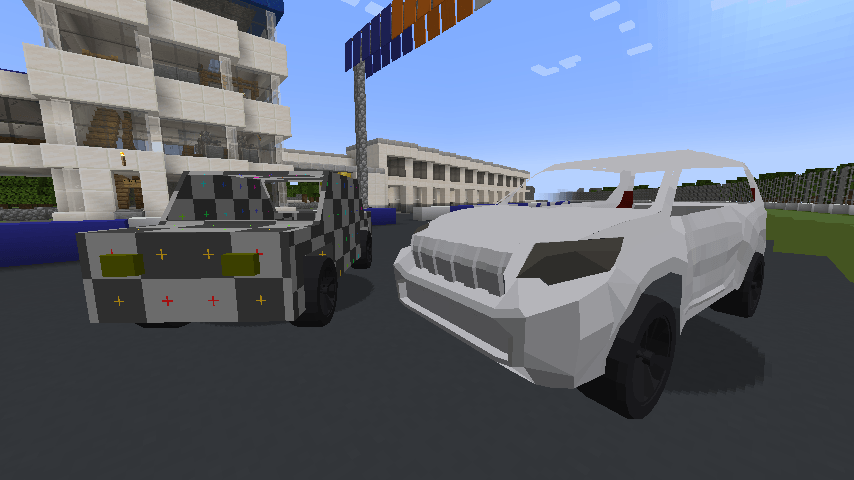
🚗 Cars in this pack
| Car | What it's like |
|---|---|
| Sample Car | A tall, boxy van. 1500 kg, torque low down, and it leans. Not fast — but hustling that weight through a corner is its own kind of fun. |
| Land Cruiser Prado | 2100 kg of diesel 4WD. Thick low-end torque, soft springs, and it is perfectly happy off the tarmac. |
📦 How to install
- Minecraft 1.20.1 with Forge 47.4.22+
- Kuruma — install it first
- This pack's
.jarinto yourmods/folder (the same place as Kuruma)
That's it. No extra libraries, no config files to edit.
Playing on a server? Put this pack on both the server and every player's client.
The server decides which cars exist; each client renders them.
🎮 How to drive them
The cars in this pack sit in the creative inventory alongside the standard car item. Right-click the ground to place one, right-click the car to get in.
Press G to change the setup. They come tuned the way the author liked them, but nothing is locked — springs, gears, diff and tyres can all be moved. If you don't like the way it turns in, change it.
❓ If something isn't working
| What you're seeing | Why |
|---|---|
| Nothing new in the creative inventory | Kuruma isn't installed, or this jar isn't in mods/ |
| The cars are there, but they all look like the standard car | The pack is only on the server. Install it on your client too |
| You can't join a server | The server doesn't have this pack. Ask the owner to add it |
📄 License
All rights reserved. Do not redistribute.
Kuruma itself is a separate project with a separate license (nothing in this pack changes it).
Kuruma - サンプルカーパック(日本語)
Kuruma に車を 2 台追加します。
⚠️ これは拡張車追加パックです。Kuruma が別に必要です。
これだけ入れても何も起きません。先に KurumaMod を入れて、一緒に動作させる必要があります。
背の高いバンと、大柄な 4WD。性格のまったく違う 2 台です。 どちらもゲーム内でいじれるので、 数字は「決められたもの」ではなく「初期値」です。
🚗 入っている車
| 車 | どんな車か |
|---|---|
| サンプルカー | 背の高い箱形のバン。1500kg、低回転から太く、よく傾きます。速くはありませんが、重い車体をコーナーへねじ込むのはこれはこれで楽しい。 |
| ランドクルーザー プラド | 2100kg のディーゼル 4WD。低速トルクが分厚く、足は柔らかめ。舗装路を外れても平気です。 |
📦 導入方法
- Minecraft 1.20.1 + Forge 47.4.22 以降
- Kuruma を先に入れる
- このパックの
.jarをmods/フォルダへ(KurumaMod と同じ場所)
以上です。追加のライブラリも、設定ファイルの編集も要りません。
サーバーで遊ぶときは、サーバーと参加者全員のクライアントの両方に入れてください。
どの車が存在するかはサーバーが決め、その姿をレンダリングするのは各クライアントだからです。
🎮 乗りかた
クリエイティブの車アイテムの中に、このパックの車も並んでいます。地面を右クリックで 車を出し、車を右クリックで乗車。
G キーでセッティングを変えられます。 作者が詰めた状態で入っていますが、固定ではありません。 バネもギアもデフもタイヤも全部動かせるので、曲がり方が気に入らなければ変えてください。
❓ うまくいかないとき
| 症状 | 原因 |
|---|---|
| クリエイティブに何も増えていない | Kuruma が入っていないか、この jar が mods/ に入っていない |
| 車は増えたが、全部いつもの車の姿で出てくる | パックがサーバーにしか入っていません。クライアントにも入れてください |
| サーバーに入れない | サーバーにこのパックが入っていません。管理者に入れてもらってください |
📄 ライセンス
無断転載を禁じます。
Kuruma 本体は別のプロジェクトで、ライセンスも別です(このパックが変えるものではありません)。
Project description from Modrinth.
Pick your setup
KurumaExampleCarPack by Minecraft version and loader
Choose the version and loader you play, then open the matching release.
Check the dependencies, then try the file in a copied instance before changing a world you care about.
Recent files
KurumaExampleCarPack versions and loaders
1.1.0
kurumamod_example_carpack-1.1.0.jar
30 Aug 2026
Client Optional Server Optional Dependencies No extras listed Listed on Release listing
Check the 1.20.1 · Forge setup 1.20.1Forge release
1.0.0
kurumamod_example_carpack-1.0.0.jar
14 Aug 2026
Client Optional Server Optional Dependencies No extras listed Listed on Release listing
Check the 1.20.1 · Forge setup 1.20.1Forge release
Looking for an older file? The official Modrinth project page is in Resources.
 mod
mod Modrinth · Minecraft
Kuruma
Realistic car physics and driving simulator — grip, weight transfer, suspension, drifting. Drive it, tune it mid-corner, race friends. Multiplayer racing, vehicle packs to add your own cars, wheel & gamepad support.
 mod
mod Modrinth · Minecraft
Neo Vitae
Spill blood for power. Altars that consume life, sigils that bend the world, custom demons in an endless dungeon, sentient armor that drinks souls, a shield that pays your damage in essentia. Datapack-driven from the ground up.
 mod
mod Modrinth · Minecraft
Exile Respawn
Adds a game rule that respawns players at distant locations upon death.