Minecraft version
Back to mods 
Modrinth · Minecraft mod
Simple Revive
Players get Downed instead of dying and others can revive them
Choose a version Pick your version below, then grab the matching file.
Quick answer
Which Simple Revive release matches 26.3 Forge?
Best match for your filters v3.3-mod
Game version 1.21, 1.21.1, 1.21.10
Loader Fabric, Forge, NeoForge
Simple Revive v3.3-mod targets 1.21, 1.21.1, 1.21.10 with Fabric, Forge, NeoForge. Installation on the client is optional. Installation on the dedicated server is optional. No extra mods listed for this file.
Where it goes
Is Simple Revive required on the client, server, or both?
Installation on the client is optional. Installation on the dedicated server is optional.
Client Optional
Dedicated server Optional
Loader for this release Fabric, Forge, NeoForge
Required install it here Optional supported, not mandatory Not supported do not install here Source doesn’t say do not assume
The source marks this as usable on both the client and server.
What else does Simple Revive v3.3-mod need?
v3.3-mod on 26.3 Forge. Every mod below is checked against that same setup.
This file does not list any required mods. Do not add a library just because a different file uses it.
This file does not list any required or optional mods.
Before you install it
Add Simple Revive without breaking your instance.
Built for Simple Revive v3.3-mod on 26.3 Forge. Pick another file and the loader, install side or required mods may change.
- 01
Stick to this file
Use v3.3-mod. It targets 1.21, 1.21.1, 1.21.10 with Fabric, Forge, NeoForge; another release may have different loader, side or dependency requirements.
- 02
Bring the mods it needs
This file does not list any required mods. Do not add a library just because a different file uses it.
- 03
Put it on the correct side
Installation on the client is optional. Installation on the dedicated server is optional.
- 04
Pick the file you checked
Use the “Get this file” button beside v3.3-mod. It opens that exact file at the source.
About this project
What does Simple Revive add?
You get Downed instead of Dying and other players can Revive you by Sneaking
In Game Config Menu
/function simplerevive:admin/config to access the Config Menu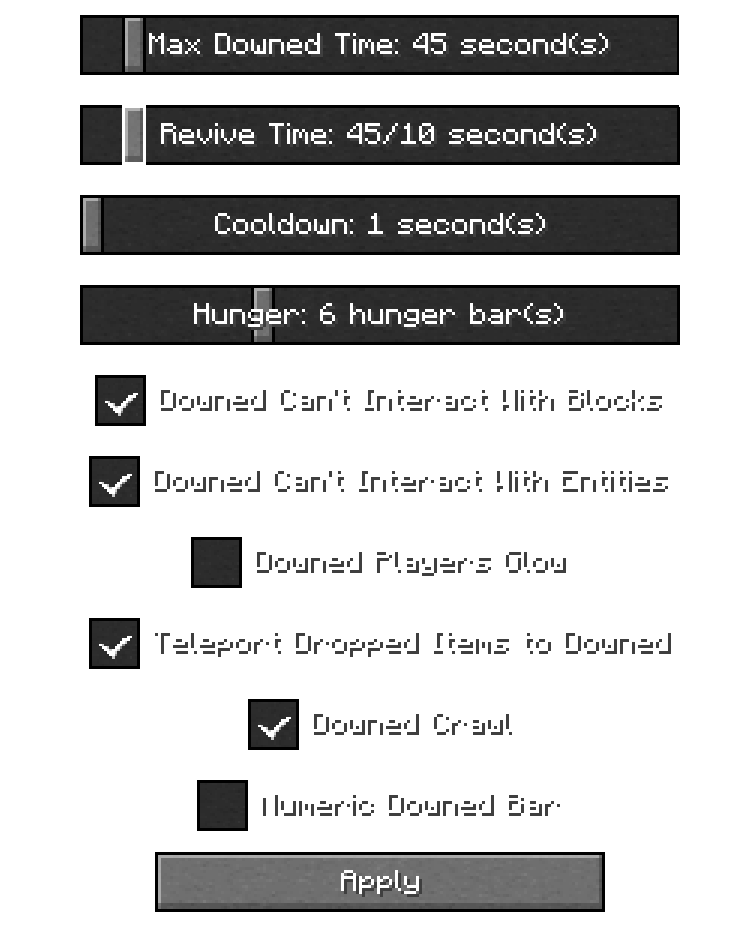
In Game Config Menu (for 1.21.1)
/function simplerevive:admin/config to access the Config Menu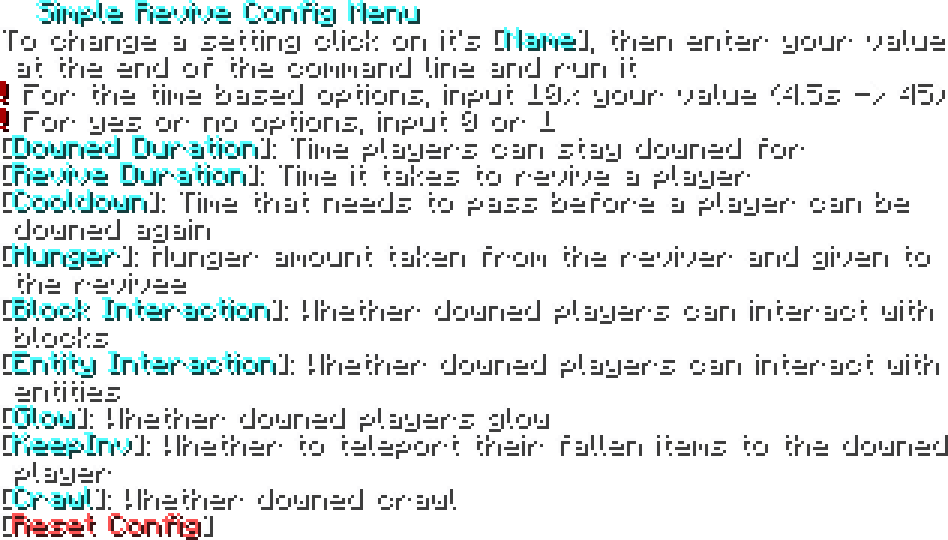
Troubleshooting
If you are having issues, try doing these
- Run
/reload - Run
/function simplerevive:admin/reset_config - Make sure you have the file on the proper directory:
*/[world]/datapacks/[.zip goes here]if you installed it as a datapack
*/mods/[.jar goes here]if you installed it as a mod
- The EssentialsX plugin might be messing with stuff
- Try restarting the server
Compatibility
- Compatible with Vanilla Tweaks Graves Datapack
- Incompatible with anything that requires the Immediate Respawn gamerule to be off
For Devs and Admins
- If you want to make a player unable to get downed, give them the tag
simplerevive.custom_disable
Contact me on Discord for any issues! @hexasan
Project description from Modrinth.
Pick your setup
Simple Revive by Minecraft version and loader
Choose the version and loader you play, then open the matching release.
Minecraft version
26.2
5 loader buildsMinecraft version
26.1.2
5 loader buildsMinecraft version
26.1.1
5 loader buildsMinecraft version
26.1
5 loader buildsMinecraft version
1.21.11
5 loader buildsMinecraft version
1.21.10
5 loader buildsMinecraft version
1.21.9
5 loader buildsMinecraft version
1.21.8
5 loader buildsForge 1.9+1.21.5-1.21.8+Mod 8
stable files
· 8 total · 9 Sept 2025Fabric 1.9+1.21.5-1.21.8+Mod 8
stable files
· 8 total · 9 Sept 2025Quilt 1.9+1.21.5-1.21.8+Mod 8
stable files
· 8 total · 9 Sept 2025NeoForge 1.9+1.21.5-1.21.8+Mod 8
stable files
· 8 total · 9 Sept 2025Loader not listed v1.5-plugin 9
stable files
· 13 total · 3 Nov 2026
Minecraft version
1.21.7
5 loader buildsForge 1.9+1.21.5-1.21.8+Mod 10
stable files
· 10 total · 9 Sept 2025Fabric 1.9+1.21.5-1.21.8+Mod 10
stable files
· 10 total · 9 Sept 2025Quilt 1.9+1.21.5-1.21.8+Mod 10
stable files
· 10 total · 9 Sept 2025NeoForge 1.9+1.21.5-1.21.8+Mod 10
stable files
· 10 total · 9 Sept 2025Loader not listed v1.5-plugin 11
stable files
· 15 total · 3 Nov 2026
Minecraft version
1.21.6
5 loader buildsForge 1.9+1.21.5-1.21.8+Mod 10
stable files
· 10 total · 9 Sept 2025Fabric 1.9+1.21.5-1.21.8+Mod 10
stable files
· 10 total · 9 Sept 2025Quilt 1.9+1.21.5-1.21.8+Mod 10
stable files
· 10 total · 9 Sept 2025NeoForge 1.9+1.21.5-1.21.8+Mod 10
stable files
· 10 total · 9 Sept 2025Loader not listed v1.5-plugin 11
stable files
· 15 total · 3 Nov 2026
Minecraft version
1.21.5
5 loader buildsForge 1.9+1.21.5-1.21.8+Mod 9
stable files
· 9 total · 9 Sept 2025Fabric 1.9+1.21.5-1.21.8+Mod 9
stable files
· 9 total · 9 Sept 2025Quilt 1.9+1.21.5-1.21.8+Mod 9
stable files
· 9 total · 9 Sept 2025NeoForge 1.9+1.21.5-1.21.8+Mod 9
stable files
· 9 total · 9 Sept 2025Loader not listed v1.5-plugin 10
stable files
· 14 total · 3 Nov 2026
Showing the newest 12 of 25 game versions. Older files are in the list below.
Check the dependencies, then try the file in a copied instance before changing a world you care about.
Recent files
Simple Revive versions and loaders
v3.3-mod
simple-revive-3.3.jar
1 Nov 2026
Client Optional Server Optional Dependencies No extras listed Listed on Release listing
Check the 26.3 · Forge setup 1.211.21.11.21.101.21.11 release
v3.2-mod
simple-revive-3.2.jar
30 Oct 2026
Client Optional Server Optional Dependencies No extras listed Listed on Release listing
Check the 26.3 · Forge setup 1.211.21.11.21.101.21.11 release
v3.0-mc26.3-mod
player-revive-v3.0-mc26.3.jar
15 Sept 2026
Client Optional Server Optional Dependencies No extras listed Listed on Release listing
Check the 26.3 · Forge setup 26.3FabricForgeNeoForge release
Looking for an older file? The official Modrinth project page is in Resources.
 mod
Modrinth · Minecraft
HCsCR
Remove your end crystals before the server even knows you hit 'em! (a "crystal optimizer")
 mod
CurseForge + Modrinth · Minecraft
Boosted Brightness Remastered
Allows you to set your brightness beyond default levels.
 mod
CurseForge + Modrinth · Minecraft
Maple's Chickens | Seasonal Variants
Seasonal chicken variants with custom textures that change with the seasons! 🐥