Minecraft version
Back to mods 
Modrinth · Minecraft mod
MacroGrid
A customizable GUI for command macros.
Choose a version Pick your version below, then grab the matching file.
Quick answer
Which MacroGrid release should I use?
Latest stable file 3.4
Game version 26.2
Loader Fabric
MacroGrid 3.4 targets 26.2 with Fabric. It must be installed on the client. Do not install it on the dedicated server. No extra mods listed for this file.
Where it goes
Is MacroGrid required on the client, server, or both?
It must be installed on the client. Do not install it on the dedicated server.
Client Required
Dedicated server Not supported
Loader for this release Fabric
Required install it here Optional supported, not mandatory Not supported do not install here Source doesn’t say do not assume
This file is marked client-only.
What else does MacroGrid 3.4 need?
3.4. Change the file and its required mods may change too.
This file does not list any required mods. Do not add a library just because a different file uses it.
This file does not list any required or optional mods.
Before you install it
Add MacroGrid without breaking your instance.
Built for MacroGrid 3.4. Pick another file and the loader, install side or required mods may change.
- 01
Stick to this file
Use 3.4. It targets 26.2 with Fabric; another release may have different loader, side or dependency requirements.
- 02
Bring the mods it needs
This file does not list any required mods. Do not add a library just because a different file uses it.
- 03
Put it on the correct side
It must be installed on the client. Do not install it on the dedicated server.
- 04
Pick the file you checked
Use the “Get this file” button beside 3.4. It opens that exact file at the source.
About this project
What does MacroGrid add?
MacroGrid
Command macros for Minecraft — one keypress away.
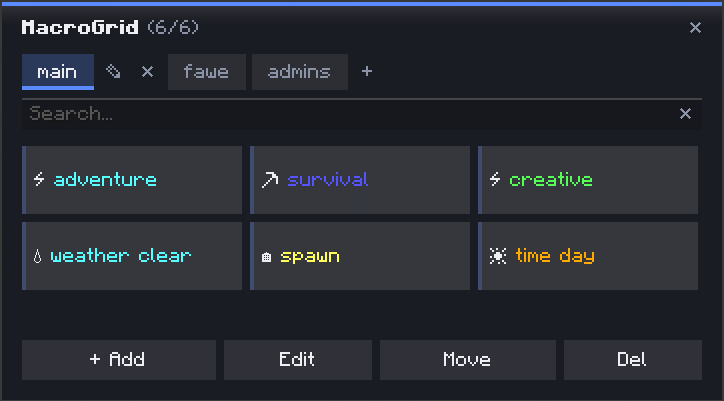
MacroGrid is a client-side Fabric mod that adds a customizable in-game button panel for running commands and chat messages instantly — no more retyping the same /tp, /gamemode or /time set over and over.
Press G. Click a button. (You can change this in the controls settings)
✨ Features
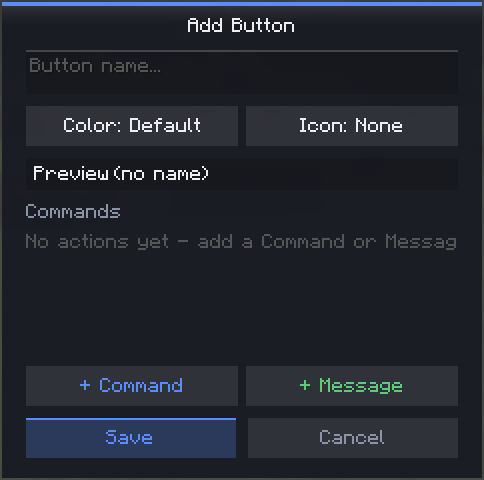
- ➕ Add — create a button in seconds: name, color, icon, done
- 🎨 Colors & icons — 10 colors and 35+ icons to tell your buttons apart at a glance
- 🧩 Multi-action buttons — chain multiple commands and chat messages on a single button, executed in order
- 📁 Tabs / profiles — organize buttons into separate tabs (e.g.
main,fawe,admins) — create, rename and delete tabs freely - 👁️ Live preview — see exactly how a button will look (color + icon + name) before saving
- ✏️ Edit / ✋ Move / ❌ Del — dedicated toolbar modes for managing your grid; Move swaps two buttons' positions, Delete requires a confirmation click so you don't lose a button by accident
- 🔍 Search bar — instantly filter buttons by name, even across a big grid
- 💾 Persistent — buttons are saved to a JSON config in your
.minecraft/configfolder, editable by hand if you want to bulk-edit
🚀 How to use
- Press
Gto open MacroGrid - Click + Add
- Give it a name, pick a color and icon, then add one or more commands/messages
- Hit Save — your button is ready to use
🔧 Managing buttons & tabs
| Action | How |
|---|---|
| Run a button | Click it (default mode) |
| Edit | Toolbar → Edit, then click a button |
| Move | Toolbar → Move, click one button, then another to swap positions |
| Delete | Toolbar → Del, click a button, click again to confirm |
| New tab | Click + next to the tabs |
| Rename tab | Click the pencil icon on the active tab |
| Delete tab | Click the ✕ next to the active tab (requires at least one other tab to exist) |
💻 Example — multiple actions on one button
A single button can run more than one thing, in order — for example a "Prep" button that sets gamemode and time together:
/gamemode creative
/time set day
📦 Requirements
- Fabric API
🔗 Links
Project description from Modrinth.
Pick your setup
MacroGrid by Minecraft version and loader
Choose the version and loader you play, then open the matching release.
Minecraft version
26.1.2
1 loader buildMinecraft version
26.1.1
1 loader buildMinecraft version
26.1
1 loader buildMinecraft version
1.21.11
1 loader buildCheck the dependencies, then try the file in a copied instance before changing a world you care about.
Recent files
MacroGrid versions and loaders
3.4
macrogrid-3.4.jar
9 Aug 2026
Client Required Server Not supported Dependencies No extras listed Listed on Release listing
Check the 26.2 · Fabric setup 26.2Fabric release
3.3
macrogrid-3.3.jar
3 Jun 2026
Client Required Server Not supported Dependencies No extras listed Listed on Release listing
Check the 26.1.2 · Fabric setup 26.126.1.126.1.2Fabric release
3.2
macrogrid-3.2.jar
4 Apr 2026
Client Required Server Not supported Dependencies No extras listed Listed on Release listing
Check the 26.1.1 · Fabric setup 26.126.1.1Fabric release
3.1
command-gui-buttons-3.1.jar
14 Mar 2026
Client Required Server Not supported Dependencies No extras listed Listed on Release listing
Check the 1.21.11 · Fabric setup 1.21.11Fabric release
3.0
command-gui-buttons-3.0.jar
14 Mar 2026
Client Required Server Not supported Dependencies No extras listed Listed on Release listing
Check the 1.21.11 · Fabric setup 1.21.11Fabric release
1.2.2
command-gui-buttons-1.2.2.jar
2 Feb 2026
Client Required Server Not supported Dependencies No extras listed Listed on Release listing
Check the 1.21.11 · Fabric setup 1.21.11Fabric release
1.2.1
command-gui-buttons-1.2.1.jar
1 Feb 2026
Client Required Server Not supported Dependencies No extras listed Listed on Release listing
Check the 1.21.11 · Fabric setup 1.21.11Fabric release
1.2.0
command-gui-buttons-1.2.0.jar
1 Feb 2026
Client Required Server Not supported Dependencies No extras listed Listed on Release listing
Check the 1.21.11 · Fabric setup 1.21.11Fabric release
1.0.1
command-gui-buttons-1.0.1.jar
1 Feb 2026
Client Required Server Not supported Dependencies No extras listed Listed on Release listing
Check the 1.21.11 · Fabric setup 1.21.11Fabric release
1.0.0
command-gui-buttons-1.0.0.jar
31 Jan 2026
Client Required Server Not supported Dependencies No extras listed Listed on Release listing
Check the 1.21.11 · Fabric setup 1.21.11Fabric release
Looking for an older file? The official Modrinth project page is in Resources.
 mod
mod CurseForge + Modrinth · Minecraft
Field Guide
Discover Plants, Animals and Monsters with a Spyglass. Collect them all and take notes in your personal Field Guide!
 mod
mod Modrinth · Minecraft
CrowBar
Adds skins and nametags to the player locator bar
 mod
mod Modrinth · Minecraft
CommandsSpy
Log commands and commands' arguments executed by Players, Server Console, and RCON to the server console and server logs file.