Fabric API Needed by Flowstone 6.7+26.3
requiredMatching file found Matched file: 0.161.0+26.3

Modrinth · Minecraft mod
A configurable mod that changes what happens when lava meets water or ice, allowing for the (re)generation of ores and other resources.
Quick answer
Flowstone 6.7+26.3 targets 26.3 with Fabric. Do not install it on the client. It must be installed on the dedicated server. All 1 required mods have matching files.
Where it goes
Do not install it on the client. It must be installed on the dedicated server.
This file is marked server-only.
6.7+26.3. Change the file and its required mods may change too.
Install Fabric API first. We found matching files for this game-version and loader setup.
We only count dependency files that match this setup. A file for another loader does not fill the gap.
Before you install it
Built for Flowstone 6.7+26.3. Pick another file and the loader, install side or required mods may change.
Use 6.7+26.3. It targets 26.3 with Fabric; another release may have different loader, side or dependency requirements.
Install Fabric API first. We found matching files for this game-version and loader setup.
Do not install it on the client. It must be installed on the dedicated server.
Use the “Get this file” button beside 6.7+26.3. It opens that exact file at the source.
About this project
Flowstone makes ores renewable resources by modifying what blocks Lava turns into whenever it meets Water (or, in some cases, a block of Blue Ice).
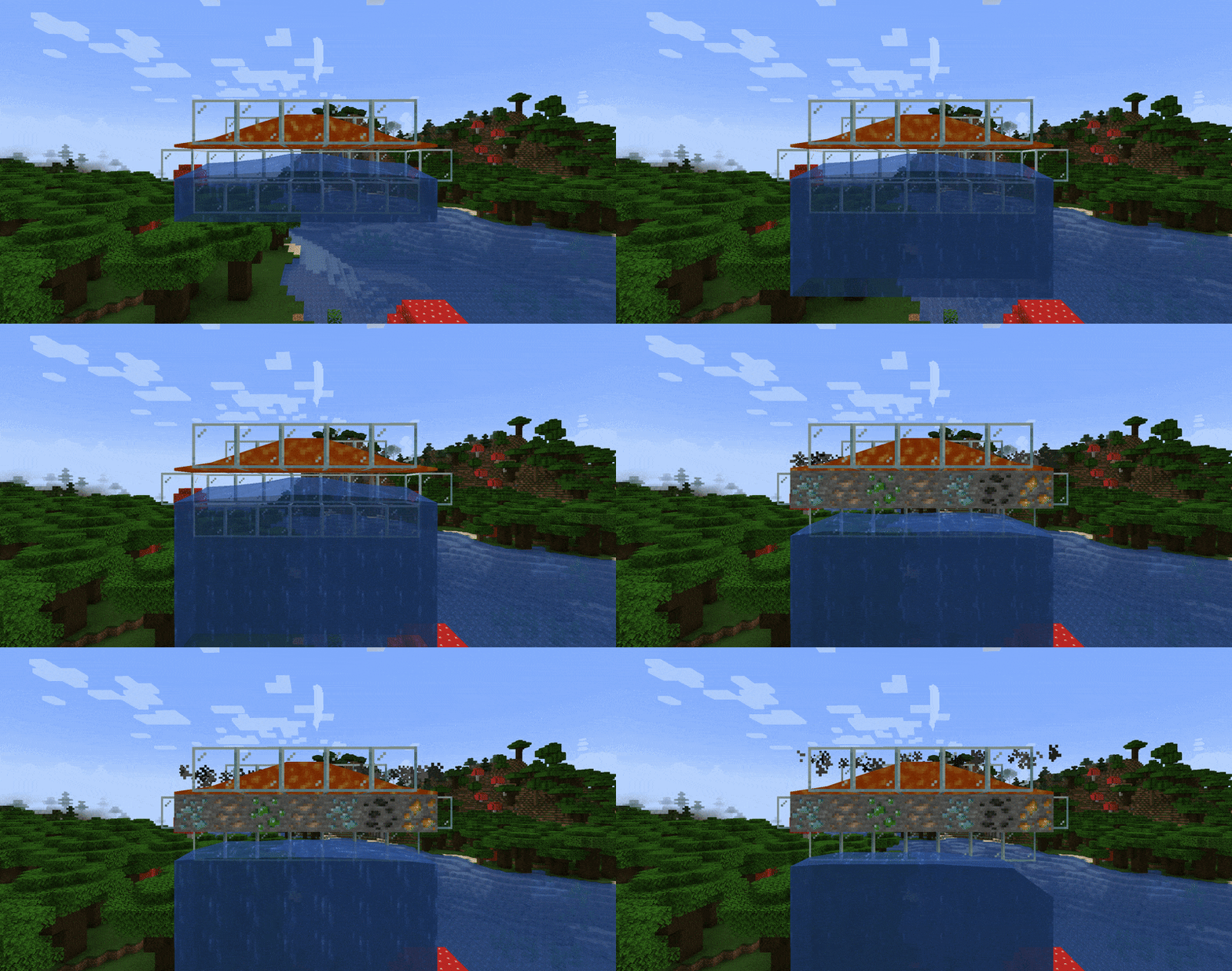
(In the GIF, I configured Flowstone to always generate some ore instead of Stone, for example purposes. See below for details.)
Since version 6.3, Flowstone offers several features you can enable or disable separately in the configuration file.
You can usually find Flowstone's configuration file at <your-minecraft-instance>/config/flowstone.json.
"allowDeepslateGenerators": true // enabled by default
With this feature enabled, trying to generate Stone or Cobblestone when deep enough underground (in most worlds, below $y=8$) will generate Deepslate and Cobbled Deepslate instead.
Note
This feature depends on the world generation options. So, if your world doesn't generate Deepslate (or generates it at a different y-level), this feature will mirror that configuration.
"allowWorldlyGenerators": true // enabled by default
With this feature enabled, whenever Stone, Deepslate (with the previous feature), or Netherrack (with one of the following features) is about to be generated, it might generate an appropriate ore block instead.
For each ore block (that is, each block under the c:ores tag), the probability of it being generated depends on the world generation configuration, so on a vanilla world it follows the same distribution documented on the wiki.
This feature should automatically be compatible with every mod that adds new ores under the c:ores tag.
Finally, note that only normal ore blocks (like Diamond Ore) can replace Stone, only deepslate ore blocks (like Deepslate Diamond Ore) can replace Deepslate, and only netherrack ore blocks (like Quartz Ore or Ancient Debris) can replace Netherrack.
"allowCustomGenerators": false // disabled by default
With this feature enabled, one can define custom generators through datapacks.
<datapack_name>.zip
├── data
│   └── <datapack_name>
│       └── flowstone
│           └── generators
│               ├── andesite.json
│               ├── diorite.json
│               ├── granite.json
│               └── tuff.json
└── pack.mcmeta
{
    // The block to be replaced
    "replace": "minecraft:cobbled_deepslate",
    // The block to replace the previous with
    "with": "minecraft:tuff",
    // The cache of replacement
    "chance": 0.3
}
The rest of this example is on the project source page on GitHub, under the examples folder.
"enableBasaltGeneration": false // disabled by default
I know, I know, Basalt generation is already a vanilla Minecraft feature, but since I freaking hate Basalt for its uselessness, I added this feature to disable its generation. Simple as that.
"enableNetherrackGeneration": true // enabled by default
With this feature enabled, whenever Lava meets a block of Blue Ice in the Nether, and no Basalt would be generated, the Lava turns into a block of Netherrack.
"enableEndStoneGeneration": true // enabled by default
With this feature enabled, whenever Stone or Cobblestone is about to generate in The End, a block of End Stone generates instead.
Alas, this feature makes ores' regeneration impossible in The End. Nonetheless, I set it as enabled by default because I like the idea that The End is corrupted and, thus, that (almost) every block generated within it gets corrupted as well.
"debugMode": null // hidden and disabled by default
When enabled, this feature forces Flowstone to generate the alternative blocks instead of the default ones, as if setting the chances for those blocks to be generated to 100% (for instance, the GIF at the head of this page was generated with this feature enabled).
Use this feature only when you're testing which blocks Worldly or Custom generators can generate (it works only for those two features), since using it in a normal playthrough is practically cheating.
Project description from Modrinth.
Pick your setup
Choose the version and loader you play, then open the matching release.
Showing the newest 12 of 27 game versions. Older files are in the list below.
Check the dependencies, then try the file in a copied instance before changing a world you care about.
Recent files
flowstone-6.7+26.3.jar
18 Sept 2026
flowstone-6.7+26.2.jar
7 Sept 2026
flowstone-6.7+26.1.jar
31 May 2026
flowstone-6.6+26.1.jar
9 May 2026
flowstone-6.5+1.20.2.jar
24 Oct 2025
flowstone-6.4+1.20.2.jar
7 Sept 2024
flowstone-6.3+1.20.2.jar
13 Aug 2024
flowstone-6.2+1.20.2-5.jar
28 Apr 2024
flowstone-6.1+1.20.2-4.jar
24 Mar 2024
flowstone-6.0+1.20.2-4.jar
16 Mar 2024
flowstone-5.1+1.20.1.jar
16 Mar 2024
flowstone-5.0.0+1.20.1.jar
17 Nov 2023
Looking for an older file? The official Modrinth project page is in Resources.
 mod
modA mod adding many configurable features to EMI!
 mod
modStop mining blind. Brew a liquid from the ore you want, pour it into one attunable ore detector, and scan straight through stone for diamond, netherite, emerald and more. Trial Chamber gear, x-ray goggles, one detector for any ore.
 mod
modFarming automation mod. Planters and raised beds grow your crops and trees for you.