Minecraft version
Back to mods 
Modrinth · Minecraft mod
Scribble
Expertly edit your books with rich formatting options, page utilities and more!
Choose a version Pick your version below, then grab the matching file.
Quick answer
Which Scribble release should I use?
Latest stable file 2.0.2+mc26.1.2
Game version 26.1, 26.1.1, 26.1.2
Loader Fabric, NeoForge, Quilt
Scribble 2.0.2+mc26.1.2 targets 26.1, 26.1.1, 26.1.2 with Fabric, NeoForge, Quilt. It must be installed on the client. Do not install it on the dedicated server. No extra mods listed for this file.
Where it goes
Is Scribble required on the client, server, or both?
It must be installed on the client. Do not install it on the dedicated server.
Client Required
Dedicated server Not supported
Loader for this release Fabric, NeoForge, Quilt
Required install it here Optional supported, not mandatory Not supported do not install here Source doesn’t say do not assume
This file is marked client-only.
What else does Scribble 2.0.2+mc26.1.2 need?
2.0.2+mc26.1.2. Change the file and its required mods may change too.
This file does not list any required mods. Do not add a library just because a different file uses it.
This file does not list any required or optional mods.
Before you install it
Add Scribble without breaking your instance.
Built for Scribble 2.0.2+mc26.1.2. Pick another file and the loader, install side or required mods may change.
- 01
Stick to this file
Use 2.0.2+mc26.1.2. It targets 26.1, 26.1.1, 26.1.2 with Fabric, NeoForge, Quilt; another release may have different loader, side or dependency requirements.
- 02
Bring the mods it needs
This file does not list any required mods. Do not add a library just because a different file uses it.
- 03
Put it on the correct side
It must be installed on the client. Do not install it on the dedicated server.
- 04
Pick the file you checked
Use the “Get this file” button beside 2.0.2+mc26.1.2. It opens that exact file at the source.
About this project
What does Scribble add?
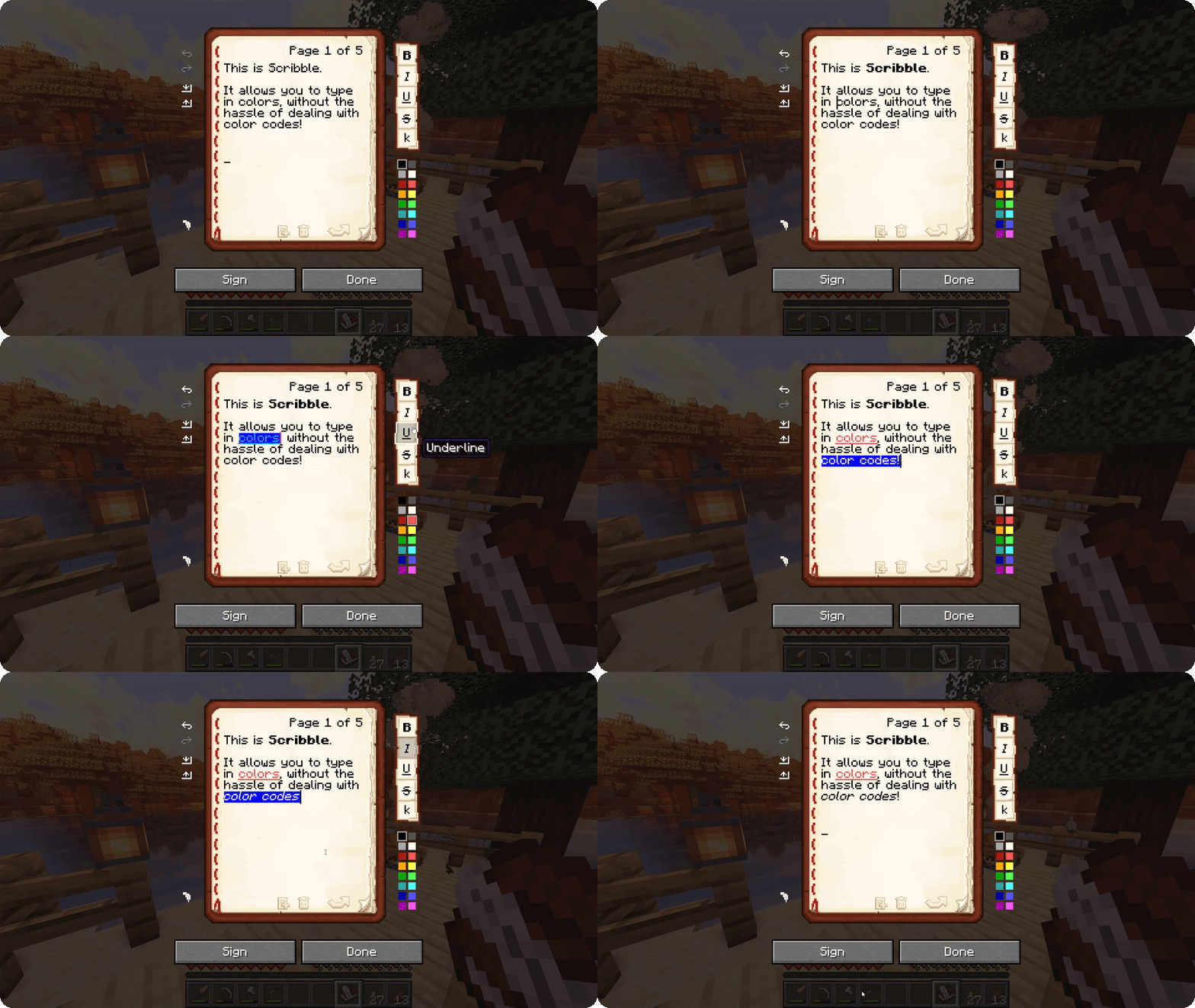
Scribble is a client-side mod to make editing books easier! It comes with a bunch of quality-of-life features,
allowing you to precisely manage pages in your book, format text using colors and various modifiers, save/load your
books to keep a backup, and much more! And the best thing is, everyone else on the server can see this, even if they
don't have the mod themselves!
By default, Scribble intentionally keeps very close to vanilla. It doesn't change any behaviour, but takes the intended
book experience, and just sprinkles some nice-to-haves on top. Every single feature is configurable, Scribble gives
you
options when you want it to, and stays out of your way when you need it to.
But there's more! Scribble comes with lots of little features here and there:
- See two pages at once! If you're jealous of Bedrock players being able to see two pages at once, you can now also
toggle this setting in Scribble! This still works seamlessly with every other feature (even lecterns!). - Insert or remove pages at any point, using the extra buttons below the page. No more shuffling around with
copy-pasting pages. - Skip to any page you want! You can click the page number and type in a page to jump to. Or, hold SHIFT while going
a page forward and go all the way to the end! - Center the book GUI! Minecraft places the book screen at the very top of your screen, which is inconsistent with
every other GUI in the game. Scribble fixes that! - Edit books with existing color codes easily! Scribble will seamlessly take over the color codes that are already
there, and allow you to edit them. - Don't lose your progress! If you're trying to close while you have unsaved work, Scribble will ask if you're sure.
- Undo or redo any action! Oops, accidentally deleted something? Don't worry, it's just a single Ctrl-Z away.
Project description from Modrinth.
Pick your setup
Scribble by Minecraft version and loader
Choose the version and loader you play, then open the matching release.
Minecraft version
26.2
3 loader buildsMinecraft version
26.1.2
3 loader buildsMinecraft version
26.1.1
3 loader buildsMinecraft version
26.1
3 loader buildsMinecraft version
1.21.11
3 loader buildsMinecraft version
1.21.10
3 loader buildsMinecraft version
1.21.9
3 loader buildsMinecraft version
1.21.8
3 loader buildsMinecraft version
1.21.7
3 loader buildsMinecraft version
1.21.6
3 loader buildsMinecraft version
1.21.5
3 loader buildsShowing the newest 12 of 23 game versions. Older files are in the list below.
Check the dependencies, then try the file in a copied instance before changing a world you care about.
Recent files
Scribble versions and loaders
2.1.0-beta1+mc26.3
scribble-2.1.0-beta1+mc26.3.jar
18 Sept 2026
Client Required Server Not supported Dependencies No extras listed Listed on Release listing
Check the 26.3 · Fabric setup 26.3FabricNeoForgeQuilt beta
2.1.0-beta1+mc26.2
scribble-2.1.0-beta1+mc26.2.jar
16 Jun 2026
Client Required Server Not supported Dependencies No extras listed Listed on Release listing
Check the 26.2 · Fabric setup 26.2FabricNeoForgeQuilt beta
2.1.0-beta1+mc26.1.2
scribble-2.1.0-beta1+mc26.1.2.jar
16 Jun 2026
Client Required Server Not supported Dependencies No extras listed Listed on Release listing
Check the 26.1.2 · Fabric setup 26.126.1.126.1.2Fabric beta
2.0.2+mc26.1.2
scribble-2.0.2+mc26.1.2.jar
30 Apr 2026
Client Required Server Not supported Dependencies No extras listed Listed on Release listing
Check the 26.1.2 · Fabric setup 26.126.1.126.1.2Fabric release
2.0.1+mc26.1.2
scribble-2.0.1+mc26.1.2.jar
11 Apr 2026
Client Required Server Not supported Dependencies No extras listed Listed on Release listing
Check the 26.1.2 · Fabric setup 26.126.1.126.1.2Fabric release
2.0.0+mc26.1.1
scribble-2.0.0+mc26.1.1.jar
3 Apr 2026
Client Required Server Not supported Dependencies No extras listed Listed on Release listing
Check the 26.1.1 · Fabric setup 26.126.1.1FabricNeoForge release
2.0.0+mc26.1
scribble-2.0.0+mc26.1.jar
24 Mar 2026
Client Required Server Not supported Dependencies No extras listed Listed on Release listing
Check the 26.1 · Fabric setup 26.1FabricNeoForgeQuilt release
2.0.0-beta2+mc1.21.11-fabric
Scribble-2.0.0-beta2+mc1.21.11-fabric.jar
24 Jan 2026
Client Required Server Not supported Dependencies No extras listed Listed on Release listing
Check the 1.21.11 · Fabric setup 1.21.11FabricQuilt beta
2.0.0-beta2+mc1.21.11-neoforge
Scribble-2.0.0-beta2+mc1.21.11-neoforge.jar
24 Jan 2026
Client Required Server Not supported Dependencies No extras listed Listed on Release listing
Check the 1.21.11 · NeoForge setup 1.21.11NeoForge beta
2.0.0-beta1+mc1.21.11-neoforge
Scribble-2.0.0-beta1+mc1.21.11-neoforge.jar
28 Dec 2025
Client Required Server Not supported Dependencies No extras listed Listed on Release listing
Check the 1.21.11 · NeoForge setup 1.21.11NeoForge beta
2.0.0-beta1+mc1.21.11-fabric
Scribble-2.0.0-beta1+mc1.21.11-fabric.jar
28 Dec 2025
Client Required Server Not supported Dependencies No extras listed Listed on Release listing
Check the 1.21.11 · Fabric setup 1.21.11FabricQuilt beta
1.6.7+mc1.21.11-fabric
Scribble-1.6.7+mc1.21.11-fabric.jar
10 Dec 2025
Client Required Server Not supported Dependencies No extras listed Listed on Release listing
Check the 1.21.11 · Fabric setup 1.21.11FabricQuilt release
Looking for an older file? The official Modrinth project page is in Resources.
 mod
mod CurseForge + Modrinth · Minecraft
Born In Configuration
An Unofficial Configuration for Born In Chaos
 mod
mod CurseForge + Modrinth · Minecraft
I don't want to kill them!!
Adds alternatives to leather, ink etc. without killing animals. Makes chicken drop feathers. Vegan and children-friendly mod.
 mod
mod Modrinth · Minecraft
Fals Beasts
Adding Extra-ordinary Beasts to Cobblemon, Ultra or otherwise.