Minecraft version
Back to mods 
Modrinth · Minecraft mod
Custom Elytra MOD
Show off any Elytra skin you want without having the cape. Just rename it in an anvil. Optifine NOT needed!
Choose a version Pick your version below, then grab the matching file.
Quick answer
Which Custom Elytra MOD release matches 26.1.2 Forge?
Best match for your filters 1.3
Game version 1.21.10, 1.21.11, 1.21.9
Loader Fabric, Forge, NeoForge
Custom Elytra MOD 1.3 targets 1.21.10, 1.21.11, 1.21.9 with Fabric, Forge, NeoForge. Installation on the client is optional. Installation on the dedicated server is optional. No extra mods listed for this file.
Where it goes
Is Custom Elytra MOD required on the client, server, or both?
Installation on the client is optional. Installation on the dedicated server is optional.
Client Optional
Dedicated server Optional
Loader for this release Fabric, Forge, NeoForge
Required install it here Optional supported, not mandatory Not supported do not install here Source doesn’t say do not assume
The source marks this as usable on both the client and server.
What else does Custom Elytra MOD 1.3 need?
1.3 on 26.1.2 Forge. Every mod below is checked against that same setup.
This file does not list any required mods. Do not add a library just because a different file uses it.
This file does not list any required or optional mods.
Before you install it
Add Custom Elytra MOD without breaking your instance.
Built for Custom Elytra MOD 1.3 on 26.1.2 Forge. Pick another file and the loader, install side or required mods may change.
- 01
Stick to this file
Use 1.3. It targets 1.21.10, 1.21.11, 1.21.9 with Fabric, Forge, NeoForge; another release may have different loader, side or dependency requirements.
- 02
Bring the mods it needs
This file does not list any required mods. Do not add a library just because a different file uses it.
- 03
Put it on the correct side
Installation on the client is optional. Installation on the dedicated server is optional.
- 04
Pick the file you checked
Use the “Get this file” button beside 1.3. It opens that exact file at the source.
About this project
What does Custom Elytra MOD add?
Show off any Elytra skin you want without having the cape. Just rename it in an anvil.
Optfine is NOT needed!
This MOD allows you to use any Elytra texture you want by renaming the item in an anvil.
Download:
Must be instaled server-side. Client-side installation is not required if the oficial Resource Pack (RP) is used.
Use:
Take any Elytra and rename it with any of the available options below.
It's very important you spell it identically.
Options available (more below):
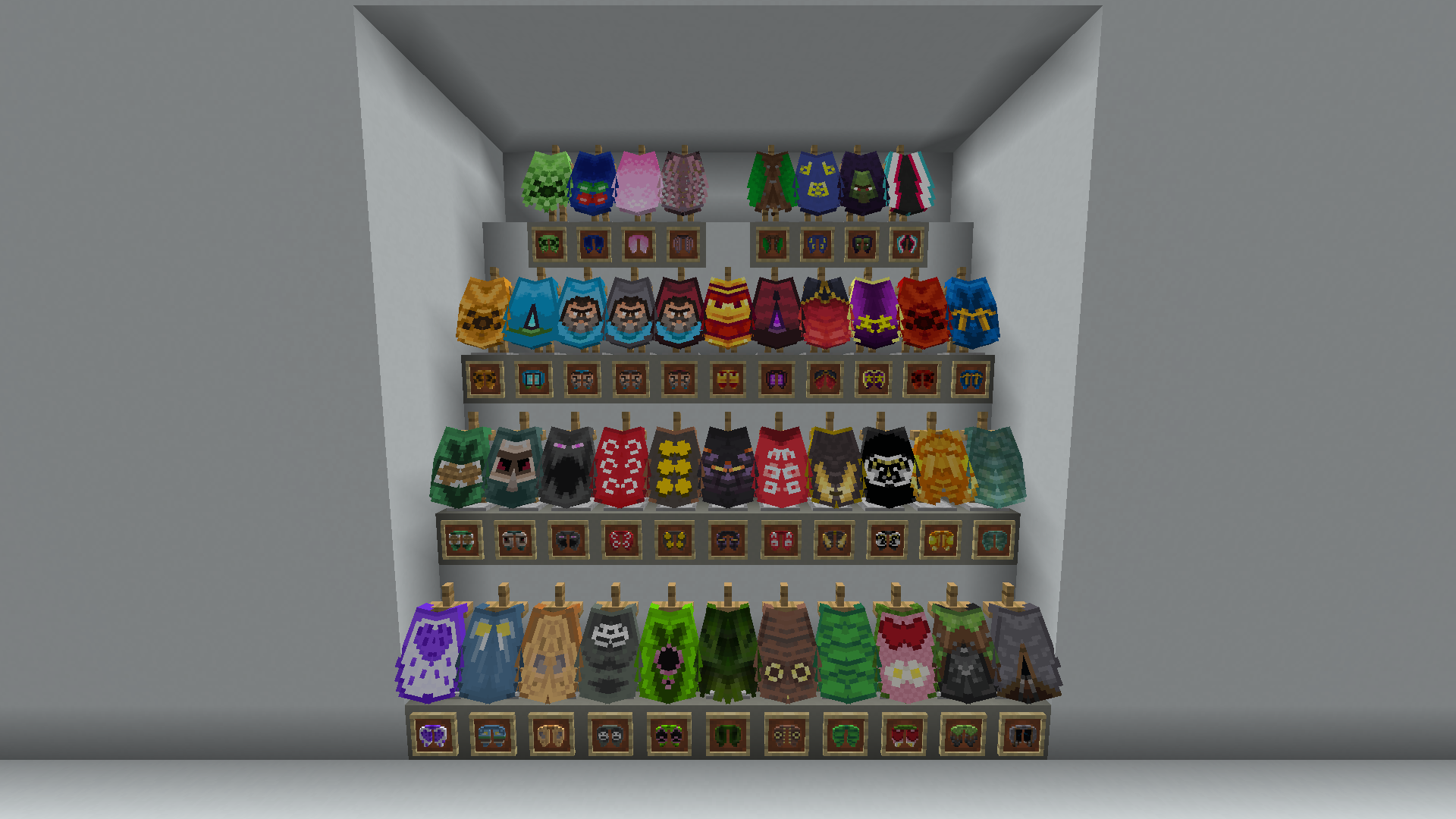
- Anniversary 15
- Birthday
- Cherry Blossom
- Cobalt
- Common
- dB
- Experience
- Followers
- Founders
- Home
- Jack Black Blue
- Jack Black Gray
- Jack Black Red
- MCC 15
- Menace
- Migration
- Millonth Customer
- Minecon 2011
- Minecon 2012
- Minecon 2013
- Minecon 2015
- Minecon 2016
- Mojang
- Mojang Classic
- Mojang Office
- Mojang Studios
- Mojira
- Oxeye
- Pan
- Prismarine
- Purple Heart
- Realms
- Scrolls
- Snowman
- Spade
- Test
- Translator
- Turtle
- Valentine
- Vanilla
- Yearn
Also available now:
- Blueprint
- Builder
- Copper
- Crafter
- Heroe
- Moonlight Trail
- Progress Pride
- Twisted
- Soul
- Special
- Zombie Horse
Back to normal:
You can turn back to normal a renamed Elytra by deleting its name in an anvil.
Default Elytra texture:
You can use the normal grayish Elytra texture by renaming it Default.
This will display its original texture even if you have a cape equipped.
Project description from Modrinth.
Pick your setup
Custom Elytra MOD by Minecraft version and loader
Choose the version and loader you play, then open the matching release.
Minecraft version
26.2
4 loader buildsMinecraft version
26.1.2
4 loader buildsMinecraft version
26.1.1
4 loader buildsMinecraft version
26.1
4 loader buildsMinecraft version
1.21.11
4 loader buildsMinecraft version
1.21.10
4 loader buildsMinecraft version
1.21.9
4 loader buildsCheck the dependencies, then try the file in a copied instance before changing a world you care about.
Recent files
Custom Elytra MOD versions and loaders
1.3
custom-elytra-dp-1.3.jar
17 Sept 2026
Client Optional Server Optional Dependencies No extras listed Listed on Release listing
Check the 26.1.2 · Forge setup 1.21.101.21.111.21.926.1 release
Looking for an older file? The official Modrinth project page is in Resources.
 mod
Modrinth · Minecraft
Footsteps Trail
Never get lost again! Fading footstep markers help you retrace your path through caves, forests, and beyond.
 mod
Modrinth · Minecraft
Redstone Additions
Best redstone&tech datapack, Super optimized, 59+ blocks (Block breaker, block placer, filters, conveyors, item pipes, breeder, generators, gates, chunk loader, wireless redstone, multiblocks, jetpacks and so much more ! )
 mod
Modrinth · Minecraft
Cleric Heal Villager
Clerics now take care of Villagers, helping them stay in life for trades. [1.21.9 - 26.3]