Collective Needed by Nether Portal Spread [Fabric/Forge/Neo] 26.3.0-8.8 | Nether Portal Spread
requiredMatching file found Matched file: [Fabric/Forge/Neo] 26.3.0-8.86 | Collective
CurseForge · Minecraft mod
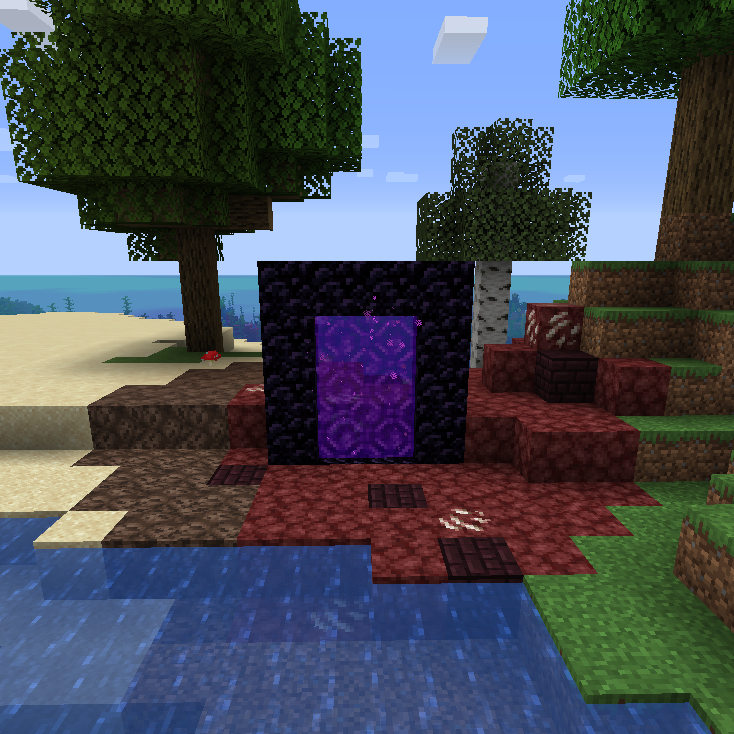
🔮 Spreads (nether) blocks to the overworld around nether portals in a configurable radius.
Quick answer
Nether Portal Spread [Fabric/Forge/Neo] 26.3.0-8.8 | Nether Portal Spread targets 26.3 with Fabric, Forge, NeoForge. The project page does not say whether this file belongs on the client, dedicated server, or both. All 1 required mods have matching files.
Where it goes
The project page does not say whether this file belongs on the client, dedicated server, or both.
The source does not explicitly classify this release as client-only or server-only.
[Fabric/Forge/Neo] 26.3.0-8.8 | Nether Portal Spread. Change the file and its required mods may change too.
Install Collective first. We found matching files for this game-version and loader setup.
We only count dependency files that match this setup. A file for another loader does not fill the gap.
Before you install it
Built for Nether Portal Spread [Fabric/Forge/Neo] 26.3.0-8.8 | Nether Portal Spread. Pick another file and the loader, install side or required mods may change.
Use [Fabric/Forge/Neo] 26.3.0-8.8 | Nether Portal Spread. It targets 26.3 with Fabric, Forge, NeoForge; another release may have different loader, side or dependency requirements.
Install Collective first. We found matching files for this game-version and loader setup.
The project page does not say whether this file belongs on the client, dedicated server, or both.
Use the “Get this file” button beside [Fabric/Forge/Neo] 26.3.0-8.8 | Nether Portal Spread. It opens that exact file at the source.
About this project


Nether portals spread (nether) blocks to the overworld around the portal in a configurable radius. By default you can stop the spread by placing four coal blocks within the portal's radius. This can however be changed in the config. Players around the portal will receive a message when the spread effect begins and when it is prevented.
The mod saves all portal locations to '../world-folder/data/netherportalspread/portals/'. A new portal is detected when it's created or when a player goes from the nether to the overworld. So for old worlds you'll have to go through it and back once to start the spread effect, or re-fire the portal. This makes it a lot more efficient than checking every block in the world for a portal.


All available config options:
sendMessageOnPortalCreation default true
When enabled, sends a message to players around the portal that the nether is spreading and that you can stop the spread with 'preventSpreadBlockAmountNeeded' of the 'preventSpreadBlockString' block.
messageOnPortalCreation default "You feel a corrupted energy coming from the portal. The nether will slowly spread into the overworld unless %preventSpreadBlockAmountNeeded% %preventSpreadBlockString% are placed within a %portalSpreadRadius% block radius around the portal."
The message sent on portal creation.
sendMessageOnPreventSpreadBlocksFound default true
When enabled, sends a message to players around the portal that the nether spread has stopped when the portal detects new 'preventSpreadBlockString' blocks.
messageOnPreventSpreadBlocksFound default "With enough %preventSpreadBlockString% placed, you feel the corrupted energy fade."
The message sent on preventspread blocks found.
sendMessageOnPortalBroken default true
When enabled, sends a message to players around the portal when it is broken.
messageOnPortalBroken default "With the nether portal broken, the corrupted energy is no longer able to enter the overworld."
The message sent when a portal is broken.
prefixPortalCoordsInMessage default true
When enabled, shows the portal coordinates in portal messages.
portalSpreadRadius default 30, min 1, max 100
The radius around the portal to which the nether blocks can spread.
spreadDelayTicks default 40, min 1, max 72000
The delay in ticks in between the spread around the nether portal. 20 ticks = 1 second.
instantConvertAmount default 50, min 0, max 1000
The amount of blocks that are instantly converted to a nether block around a portal when it is detected. If there are existing nether blocks within the radius, their count is substracted from this number.
preventSpreadWithBlock default true
When enabled, blocks the spread effect when there are n (defined) prevent-spread-blocks (defined) within the radius.
preventSpreadBlockAmountNeeded default 4, min 1, max 100
The amount of prevent-spread-blocks (defined) needed within the radius of the nether portal to prevent spread.
preventSpreadBlockString default "minecraft:coal_block"
The block which prevents the nether portal from spreading. By default a coal block (minecraft:coal_block is the namespace ID).
By default, the mod will send a message to players around the portal when:
A portal is created, and the spread starts:
Portal spread is stopped with the preventspread blocks (defined in config):
The message when a portal is broken:
Configurable spread blocks
You can define which blocks should spread to what and the chance of it happening in the "spreadsettings.txt" file located in "./config/serilum/netherportalspread/". It can also be edited in-game via Mods -> Nether Portal Spread -> Config, in the 'Extra Config Files' tab. By default it contains the following:
stone; [netherrack>10 + magma_block>2 + nether_quartz_ore>1],
grass_block; [netherrack>1],
dirt; [netherrack>1],
sand; [soul_sand>1],
gravel; [soul_sand>1],
stone_bricks; [nether_bricks>2 + red_nether_bricks>1],
sea_lantern; [glowstone>1],
farmland; [soul_sand>1],
wheat; [nether_wart>1]
The mod automatically adds "minecraft:" in front of the name values if it contains no ":" (colon).
The format is: FROMBLOCK; [TOBLOCK>WEIGHT (+ TOBLOCK>WEIGHT + TOBLOCK>WEIGHT) ]
The weight is automatically converted to chance values. This is calculated by: (1/total_weight)*weight.
So the default config file means:
Convert stone into 76.92% netherrack. 15.38% magma blocks and 7.7% quartz ore.
Convert grass blocks into 100% netherrack.
Convert dirt into 100% netherrack.
Convert sand into 100% soul sand.
Convert gravel into 100% soul sand.
Convert stone bricks into 66.67% nether bricks and 33.3% red nether bricks.
Convert sea lanterns into 100% glowstone.
Convert farmland into 100% soul sand.
Convert wheat into 100% netherwart.
Minecraft 1.16 and up has a different default config, using the new blocks:
stone; [netherrack>10 + magma_block>2 + nether_quartz_ore>1],
short_grass; [nether_sprouts>1],
cobblestone; [blackstone>1],
grass_block; [crimson_nylium>1],
dirt; [netherrack>1],
coarse_dirt; [soul_soil>1],
sand; [soul_sand>1 + soul_soil>1],
red_sand; [soul_soil>1 + soul_sand>1],
sandstone; [blackstone>1],
cut_sandstone; [polished_blackstone>1],
chiseled_sandstone; [chiseled_polished_blackstone>1],
smooth_sandstone; [basalt>1],
smooth_red_sandstone; [basalt>1],
gravel; [soul_soil>1],
stone_bricks; [nether_bricks>2 + red_nether_bricks>1],
sea_lantern; [glowstone>1],
farmland; [soul_sand>1],
wheat; [nether_wart>1],
gold_ore; [nether_gold_ore>1],
fern; [nether_sprouts>1],
oak_leaves; [nether_wart_block>1],
spruce_leaves; [nether_wart_block>1],
birch_leaves; [warped_wart_block>1],
jungle_leaves; [warped_wart_block>1],
acacia_leaves; [nether_wart_block>1],
dark_oak_leaves; [warped_wart_block>1],
oak_log; [crimson_stem>1],
spruce_log; [crimson_stem>1],
birch_log; [warped_stem>1],
jungle_log; [warped_stem>1],
acacia_log; [crimson_stem>1],
dark_oak_log; [warped_stem>1],

You can also spread blocks from other mods:
Example with Soulstone from Mystical Agriculture:

For modded blocks the format is [MODID:Blockname>weight]

(with old spread settings)


You may freely use this mod in any modpack, as long as the download remains hosted within the CurseForge or Modrinth ecosystem.
Serilum.com contains an overview and more information on all mods available.
Comments are disabled as I'm unable to keep track of them across so many separate mod pages.
For issues, ideas, suggestions or anything else there is the Github repo. Thanks!
Project description from CurseForge.
Pick your setup
Choose the version and loader you play, then open the matching release.
Showing the newest 12 of 29 game versions. Older files are in the list below.
Check the dependencies, then try the file in a copied instance before changing a world you care about.
Recent files
netherportalspread-26.3.0-8.8.jar
8 Nov 2026
netherportalspread-26.1.2-8.8.jar
8 Nov 2026
netherportalspread-1.21.1-8.8.jar
8 Nov 2026
netherportalspread-1.20.1-8.8.jar
8 Nov 2026
netherportalspread-26.3.0-8.7.jar
1 Nov 2026
netherportalspread-26.1.2-8.7.jar
1 Nov 2026
netherportalspread-1.21.1-8.7.jar
1 Nov 2026
netherportalspread-1.20.1-8.7.jar
1 Nov 2026
netherportalspread-26.1.2-8.6.jar
28 Oct 2026
netherportalspread-26.3.0-8.6.jar
17 Oct 2026
netherportalspread-26.2.0-8.6.jar
17 Oct 2026
netherportalspread-1.21.1-8.6.jar
17 Oct 2026
Looking for an older file? The official CurseForge project page is in Resources.
 mod
Sick of wasting time with Minecraft’s slow launcher just to change your skin? Quick Skin lets you swap skins instantly even on “offline” servers and gives you access to every official Minecraft cape.
 mod
More red add-on for programmable logical redstone controllers
 mod
A Jojo's Bizarre Adventure mod that interprets the world and power system of the anime into the world of Minecraft. ( JJBA )