Minecraft version
Back to mods 
Modrinth · Minecraft mod
Auto Torch
[1.7.10~26.3] Automatically places torches in selected areas or near the player, with a client-side light level overlay for identifying mob-spawnable blocks. 在选定区域或玩家附近自动放置火把,并提供客户端光照等级显示,快速定位可能刷怪的位置。(AutoTorch、自动插火把、自动火把)
Choose a version Pick your version below, then grab the matching file.
Quick answer
Which Auto Torch release should I use?
Latest stable file 1.10.1+mc26.3.forge
Game version 26.3
Loader Forge
Auto Torch 1.10.1+mc26.3.forge targets 26.3 with Forge. Installation on the client is optional. Installation on the dedicated server is optional. No extra mods listed for this file.
Where it goes
Is Auto Torch required on the client, server, or both?
Installation on the client is optional. Installation on the dedicated server is optional.
Client Optional
Dedicated server Optional
Loader for this release Forge
Required install it here Optional supported, not mandatory Not supported do not install here Source doesn’t say do not assume
The source marks this as usable on both the client and server.
What else does Auto Torch 1.10.1+mc26.3.forge need?
1.10.1+mc26.3.forge. Change the file and its required mods may change too.
This file does not list any required mods. Do not add a library just because a different file uses it.
This file does not list any required or optional mods.
Before you install it
Add Auto Torch without breaking your instance.
Built for Auto Torch 1.10.1+mc26.3.forge. Pick another file and the loader, install side or required mods may change.
- 01
Stick to this file
Use 1.10.1+mc26.3.forge. It targets 26.3 with Forge; another release may have different loader, side or dependency requirements.
- 02
Bring the mods it needs
This file does not list any required mods. Do not add a library just because a different file uses it.
- 03
Put it on the correct side
Installation on the client is optional. Installation on the dedicated server is optional.
- 04
Pick the file you checked
Use the “Get this file” button beside 1.10.1+mc26.3.forge. It opens that exact file at the source.
About this project
What does Auto Torch add?
Auto Torch
English | 简体中文
An automatic torch placement and light level overlay mod for Minecraft 1.7.10~26.3 on NeoForge, Forge, and Fabric.
Motivation
Digging out an area is tedious, and placing torches by hand makes it easy to miss spots. Existing light level overlays also do not handle the special spawning conditions of drowned and swamp slimes, which makes building swamp mob farms or lighting riverbeds inconvenient. That is why this mod was created.
Overview
- Press
Gby default to open the selection panel, where you can configure automatic torch placement within an area or near the player. - Press
F7by default to toggle the light level overlay, including special checks for drowned and swamp slimes.
| Nearby Torch Placement | Light Level Overlay | Area Torch Placement |
|---|---|---|
| Client-side only | Client-side only | Client and server |
Screenshots
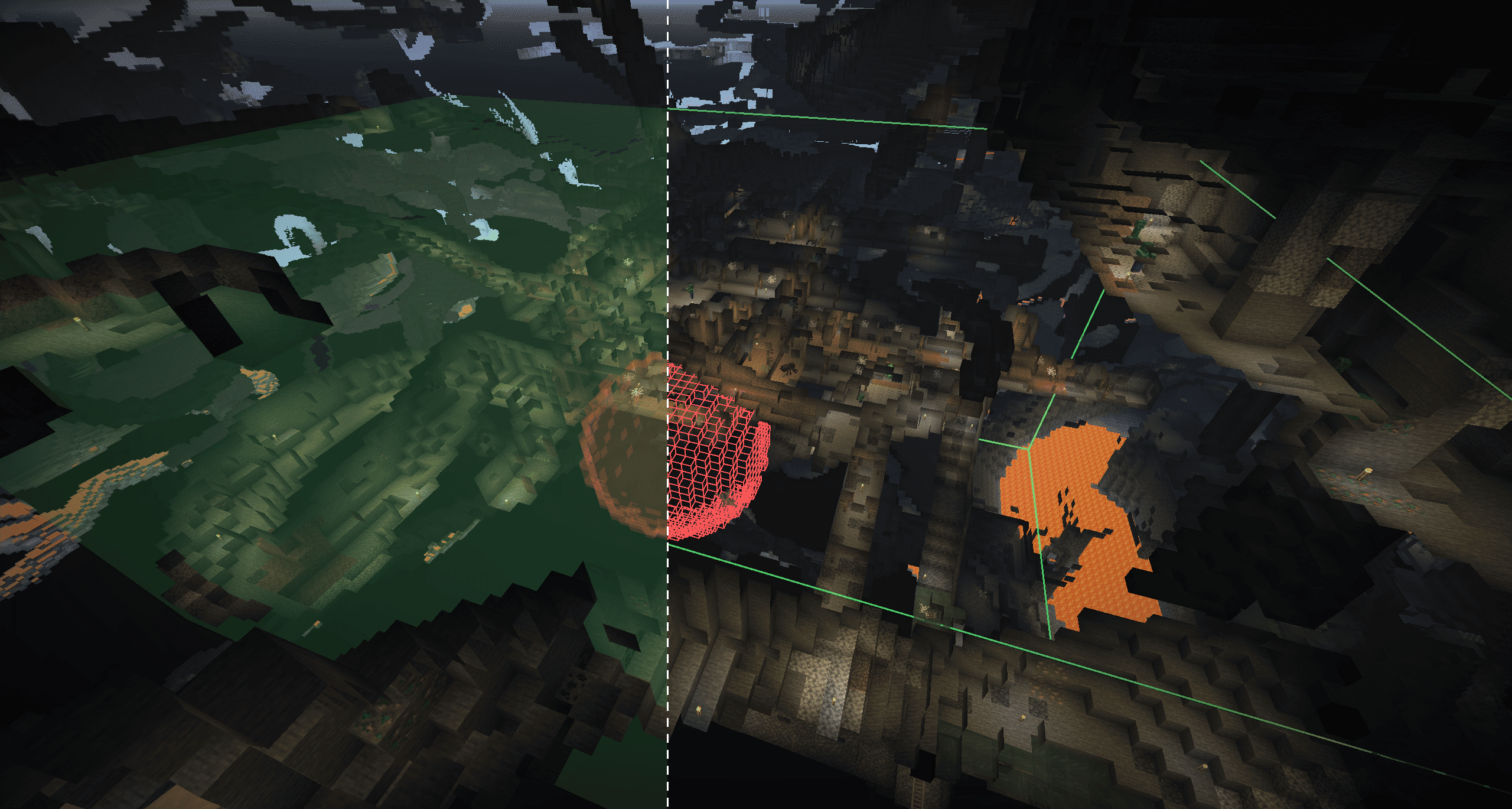
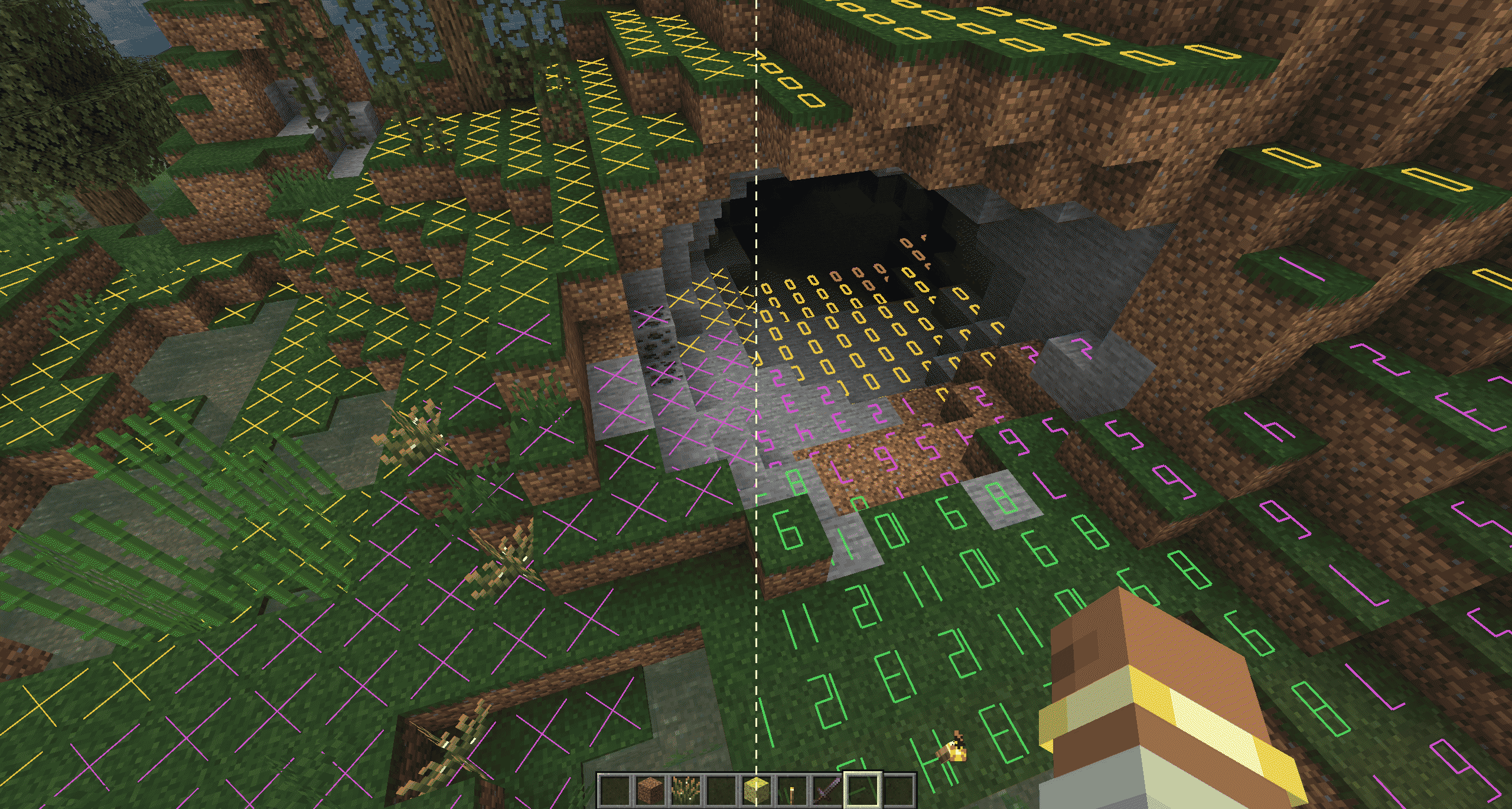

Usage
- Press
Gby default to open the selection panel andF7to toggle the light level overlay. Both key bindings can be changed. - Light level overlay:
SupportsXmarkers, numeric light levels, and boxed numeric light levels. The display range is 1-64 blocks horizontally and up to 64 blocks both above and below vertically (64 blocks maximum), with performance optimizations.Color Meaning Red Mobs can spawn at any time Yellow Mobs can spawn at night Green Mobs cannot spawn Purple Swamp slimes can spawn at night Cyan Drowned can spawn - Nearby automatic torch placement:
Searches for valid positions within two blocks of the player and uses right-click interaction to place torches from the inventory. A torch is placed only when the light level is below the threshold; you can choose whether sky light is included in the calculation. - Area automatic torch placement:
Select points A and B to define a cuboid (opposite corners) or sphere (center and radius), with selection-tool support. Set the selection as a lighting area (green) or exclusion area (red), adjust the block-light threshold, and clickStart Task. One lighting area and multiple exclusion areas are supported. - All features are available in the settings panel shown above.
Detailed Description
Nearby Automatic Torch Placement
- When enabled, the mod scans every 10 ticks (0.5 seconds) within a horizontal radius of 2 blocks and a vertical range of -2 to +1 blocks around the player. It places torches from near to far; a failed position is retried after 40 ticks (2 seconds).
- Torches are placed only in air blocks without fluid, where a torch can remain in place and will not collide with the player.
- A torch must be available in the hotbar or offhand.
- You can set the light level threshold that triggers placement (1-16) and choose whether sky light is included in the calculation.
Light Level Overlay
- Press
F7by default to toggle it, or configure it in theGpanel. - Centered on the current view, the horizontal display range can be set to 1-64 blocks. Vertically, up to 64 blocks can be selected in each direction (64 blocks maximum). Free-camera and similar mods are supported.
Xmarkers, numeric light levels, and boxed numeric light levels are supported.- See-through rendering is supported, and numbers can rotate with the view.
- Markers check whether mobs can spawn at the current position, including the special spawning conditions of swamp slimes and drowned, and use different colors to identify the results.
Area Automatic Torch Placement
- Enter coordinates or select two points by left- and right-clicking with the selection tool.
- A cuboid uses A and B as opposite corners. A sphere uses A as its center and the straight-line distance from A to B as its radius.
- You can configure one green lighting area and multiple red exclusion areas. Several display modes are available.
- Set the task's maximum block light (0-15). The task processes positions whose block light is at or below that value, with air at two blocks of height, a block that can be stood on, and block light 0 at the placement position. Positions with sky light can be skipped.
- The mod first prefers placing a torch beneath a dark position. If that is not possible, it randomly searches nearby for a valid position. Only loaded chunks are processed; chunks are never force-loaded.
- Scanning runs in two passes: the first uses the configured minimum spacing, and the second uses a smaller spacing to fill remaining gaps.
- You can limit the maximum number of torches placed by a task;
0means unlimited. You can also choose whether regular torches in the inventory are consumed. - Each player can have only one task at a time. A new task replaces the old one.
Configuration Files
Two types of configuration files are generated automatically after the first launch.
Boolean options in configuration files use true or false without quotation marks.
Client Configuration
File: config/autotorch-client.toml
[nearbyAutoTorch]
# Whether nearby automatic torch placement is enabled.
enabled = false
# Attempt to place a torch when the light level is below this value. Range: 1-16.
lightThreshold = 4
# true: use the greater of block light and sky light; false: use block light only.
includeSkyLight = true
# Scan interval: 1-40 ticks.
scanIntervalTicks = 10
# Continuous darkness confirmation: 5-40 ticks, step 5.
darkConfirmTicks = 10
# Retry delay for the same position: 10-100 ticks, step 10.
retryDelayTicks = 40
# Horizontal scan radius: 1-4 blocks; vertical range is fixed at -2 to +1.
horizontalRadius = 2
# Block item to place; keep it in your offhand or hotbar.
item = "minecraft:torch"

[lightOverlay]
# Whether the light level overlay is enabled.
enabled = false
# Whether see-through rendering is enabled so markers can be seen through blocks.
renderThrough = false
# true: numbers rotate with the view; false: numbers remain fixed.
numberRotation = true
# Horizontal display range centered on the current camera. Range: 1-64 blocks.
horizontalRange = 16
# Number of blocks scanned downward from the current camera. Range: 0-64; the sum with upRange must not exceed 64.
downRange = 16
# Number of blocks scanned upward from the current camera. Range: 0-64; the sum with downRange must not exceed 64.
upRange = 4
# Display style: 0 = X markers, 1 = numbers, 2 = boxed numbers.
mode = 0
# Whether to mark locations that meet the vanilla spawning conditions for swamp slimes.
detectSwampSlimes = false
# Whether to mark locations that meet the vanilla spawning conditions for drowned.
detectDrowned = false
# Scan budget per tick: 2000-48000, step 2000.
scanBudgetPerTick = 12000
# Periodic refresh interval: 20-400 ticks, step 20.
refreshIntervalTicks = 100
# Drowned occlusion checks per frame: 16-256, step 16; used on 26.2 and later.
drownedBudgetPerFrame = 64
# Near line width: 0.25-8.0; minimum far line width: 0.75-2.5.
nearLineWidth = 2.5
farLineWidth = 0.75
# Marker colors: six-digit hexadecimal RGB, without #.
alwaysRiskColor = "FF3030"
nightRiskColor = "FFD23C"
safeColor = "50E060"
swampSlimeColor = "E050E0"
drownedColor = "40D8E8"
# Marker opacity: 0-255.
markerAlpha = 224

[selectionOverlay]
# Whether to display the lighting area and exclusion areas.
enabled = true
# true: show outlines only; false: show translucent faces.
linesOnly = false
# Whether to use smoother rendering for spherical selections.
smoothSpheres = false
# Near line width: 0.25-8.0; minimum far line width: 0.75-3.0.
nearLineWidth = 3.0
farLineWidth = 0.75
# Draft, lighting area and exclusion colors: six-digit hexadecimal RGB.
draftColor = "70A0FF"
mainColor = "50FF70"
exclusionColor = "FF5050"
# Selection face and exclusion face opacity: 0-255.
faceAlpha = 40
exclusionFaceAlpha = 48
# Sphere longitude and latitude segments: 12-48, step 4.
sphereLongitudeSegments = 24
sphereLatitudeSegments = 12
# Selection tool: any valid non-air item ID.
toolItem = "minecraft:wooden_axe"
# Whether left- and right-clicking with the selection tool selects points A and B; when disabled, the item regains its normal interaction.
selectionToolEnabled = true
# Whether the convert and swap buttons in the interval screen use symbols; false shows text.
symbolButtons = false

[lightingTaskDefaults]
# Default maximum number of torches per task. Range: 0-4096, step 128; 0 means unlimited.
maxTorches = 0
# Default minimum spacing between torches. Range: 1-12 blocks.
minSpacing = 8
# Process positions whose block light is at or below this value. Range: 0-15; 0 means block light 0 only.
lightThreshold = 0
# Whether positions with sky light are included by default; false means only positions without sky light.
includeSkyLight = false
# Whether Creative mode consumes torches from the inventory by default.
creativeConsumeTorches = false
# Whether Survival mode consumes torches from the inventory by default in single-player.
# In multiplayer, the server's gameplay.survivalConsumesTorches setting takes precedence.
survivalConsumeTorches = true
# Progress update interval: 10-40 ticks, step 10.
progressIntervalTicks = 10
# Block item placed by area tasks.
placementItem = "minecraft:torch"
Server Configuration
File: <world directory>/serverconfig/autotorch-server.toml
Single-player location: config/autotorch-server.toml
26.3 renamed the configuration to
autotorch-synced.tomlin NeoForge.
[lightingTask]
# Allow area placement tasks; disabling this stops existing tasks and rejects new ones.
enabled = true

[limits]
# Maximum allowed length of any side of a cuboid. Range: 1-321 blocks.
maxBoxAxisLength = 321
# Maximum allowed radius of a spherical selection. Range: 1-160 blocks.
maxSphereRadius = 160
# Maximum number of exclusion areas allowed in a single task. Range: 0-32.
maxExclusions = 32
# Maximum number of torches that can be set for a single task. Range: 1-4096.
maxTorchesPerTask = 4096
# Whether clients may set the maximum torch count to 0 (unlimited).
allowUnlimitedTorches = true
# Lower and upper bounds for torch spacing configurable by clients. Both range from 1-12.
minSpacing = 1
maxSpacing = 12
# Maximum number of tasks that can run concurrently across the server. Range: 1-1024.
maxConcurrentTasks = 64

[gameplay]
# Whether Survival mode tasks must consume regular torches from the player's inventory.
survivalConsumesTorches = true

[performance]
# Maximum number of blocks scanned by each task per tick. Range: 1-120000.
scanBudgetPerTaskTick = 12000
# Maximum number of torches placed by each task per tick. Range: 1-64.
placeBudgetPerTaskTick = 8
# Maximum total number of blocks scanned by all tasks per server tick. Range: 1-240000.
globalScanBudgetPerTick = 24000
# Maximum total number of torches placed by all tasks per server tick. Range: 1-256.
globalPlaceBudgetPerTick = 16
# Maximum number of attempts to find a valid torch position near each dark position. Range: 1-128.
randomPlacementAttempts = 32
Other
- "Can spawn" uses conservative checks suitable for common vanilla hostile mobs and does not include special handling for other mods.
- Land-claim plugins are not supported. Placement uses the vanilla
/setblockcommand. - No practical use has been found for displaying sky light, so there are currently no plans to add it.
Project description from Modrinth.
Pick your setup
Auto Torch by Minecraft version and loader
Choose the version and loader you play, then open the matching release.
Minecraft version
26.2
3 loader buildsMinecraft version
26.1.2
3 loader buildsMinecraft version
1.21.11
3 loader buildsMinecraft version
1.21.1
3 loader buildsMinecraft version
1.20.6
3 loader buildsMinecraft version
1.20.1
2 loader buildsMinecraft version
1.19.4
2 loader buildsMinecraft version
1.19.2
2 loader buildsMinecraft version
1.18.2
2 loader buildsMinecraft version
1.17.1
2 loader buildsMinecraft version
1.16.5
2 loader buildsShowing the newest 12 of 21 game versions. Older files are in the list below.
Check the dependencies, then try the file in a copied instance before changing a world you care about.
Recent files
Auto Torch versions and loaders
1.10.1+mc26.3.forge
autotorch-v1.10.1-mc26.3-forge.jar
24 Oct 2026
Client Optional Server Optional Dependencies No extras listed Listed on Release listing
Check the 26.3 · Forge setup 26.3Forge release
1.10.0+mc26.3.neoforge
autotorch-v1.10.0-mc26.3-neoforge.jar
20 Oct 2026
Client Optional Server Optional Dependencies No extras listed Listed on Release listing
Check the 26.3 · NeoForge setup 26.3NeoForge release
1.10.0+mc26.3.forge
autotorch-v1.10.0-mc26.3-forge.jar
20 Oct 2026
Client Optional Server Optional Dependencies No extras listed Listed on Release listing
Check the 26.3 · Forge setup 26.3Forge release
1.10.0+mc26.3.fabric
autotorch-v1.10.0-mc26.3-fabric.jar
20 Oct 2026
Client Optional Server Optional Dependencies 1 required · 1 unchecked Listed on Release listing
Check the 26.3 · Fabric setup 26.3Fabric release
1.10.0+mc26.2.neoforge
autotorch-v1.10.0-mc26.2-neoforge.jar
20 Oct 2026
Client Optional Server Optional Dependencies No extras listed Listed on Release listing
Check the 26.2 · NeoForge setup 26.2NeoForge release
1.10.0+mc26.2.forge
autotorch-v1.10.0-mc26.2-forge.jar
20 Oct 2026
Client Optional Server Optional Dependencies No extras listed Listed on Release listing
Check the 26.2 · Forge setup 26.2Forge release
1.10.0+mc26.2.fabric
autotorch-v1.10.0-mc26.2-fabric.jar
20 Oct 2026
Client Optional Server Optional Dependencies 1 required · 1 unchecked Listed on Release listing
Check the 26.2 · Fabric setup 26.2Fabric release
1.10.0+mc26.1.2.neoforge
autotorch-v1.10.0-mc26.1.2-neoforge.jar
20 Oct 2026
Client Optional Server Optional Dependencies No extras listed Listed on Release listing
Check the 26.1.2 · NeoForge setup 26.1.2NeoForge release
1.10.0+mc26.1.2.forge
autotorch-v1.10.0-mc26.1.2-forge.jar
20 Oct 2026
Client Optional Server Optional Dependencies No extras listed Listed on Release listing
Check the 26.1.2 · Forge setup 26.1.2Forge release
1.10.0+mc26.1.2.fabric
autotorch-v1.10.0-mc26.1.2-fabric.jar
20 Oct 2026
Client Optional Server Optional Dependencies 1 required · 1 unchecked Listed on Release listing
Check the 26.1.2 · Fabric setup 26.1.2Fabric release
1.10.0+mc1.21.11.neoforge
autotorch-v1.10.0-mc1.21.11-neoforge.jar
20 Oct 2026
Client Optional Server Optional Dependencies No extras listed Listed on Release listing
Check the 1.21.11 · NeoForge setup 1.21.11NeoForge release
1.10.0+mc1.21.11.forge
autotorch-v1.10.0-mc1.21.11-forge.jar
20 Oct 2026
Client Optional Server Optional Dependencies No extras listed Listed on Release listing
Check the 1.21.11 · Forge setup 1.21.11Forge release
Looking for an older file? The official Modrinth project page is in Resources.
 mod
mod CurseForge + Modrinth · Minecraft
Easy NPC
Create easily NPCs with dialogs for your world or for your mods.
 mod
mod GitHub · Minecraft
modpacks-ch-github-test
Disposable public fixture for testing the Modpacks.ch GitHub catalogue flow
 mod
mod Modrinth · Minecraft
Custom Recipe
Create custom crafting recipes and custom crafts in-game with a Fabric recipe editor. Manage vanilla/modded recipes, worlds, recipe books, and servers. Now supports custom items (NBTs).