Minecraft version
Back to mods 
Modrinth · Minecraft mod
Exotic Blocks
Fancy and novel building blocks for Minecraft
Choose a version Pick your version below, then grab the matching file.
Quick answer
Which Exotic Blocks release matches 1.19.2?
Best match for your filters fabric-mc119-2.0.226
Game version 1.19.2
Loader Fabric
Exotic Blocks fabric-mc119-2.0.226 targets 1.19.2 with Fabric. Installation on the client is optional. Installation on the dedicated server is optional. No extra mods listed for this file.
Where it goes
Is Exotic Blocks required on the client, server, or both?
Installation on the client is optional. Installation on the dedicated server is optional.
Client Optional
Dedicated server Optional
Loader for this release Fabric
Required install it here Optional supported, not mandatory Not supported do not install here Source doesn’t say do not assume
The source marks this as usable on both the client and server.
What else does Exotic Blocks fabric-mc119-2.0.226 need?
fabric-mc119-2.0.226 on 1.19.2. Every mod below is checked against that same setup.
This file does not list any required mods. Do not add a library just because a different file uses it.
This file does not list any required or optional mods.
Before you install it
Add Exotic Blocks without breaking your instance.
Built for Exotic Blocks fabric-mc119-2.0.226 on 1.19.2. Pick another file and the loader, install side or required mods may change.
- 01
Stick to this file
Use fabric-mc119-2.0.226. It targets 1.19.2 with Fabric; another release may have different loader, side or dependency requirements.
- 02
Bring the mods it needs
This file does not list any required mods. Do not add a library just because a different file uses it.
- 03
Put it on the correct side
Installation on the client is optional. Installation on the dedicated server is optional.
- 04
Pick the file you checked
Use the “Get this file” button beside fabric-mc119-2.0.226. It opens that exact file at the source.
About this project
What does Exotic Blocks add?
Exotic Blocks
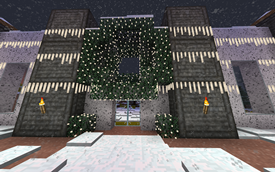
Exotic Blocks is a work-in-progress building mod. The mod is still in early stages, with many new blocks and other features still to be added.
REI is recommended to see recipes.
In version for 1.14 and 1.15 it requires Exotic Matter Library. Starting with 1.16, XM is included and you do not need to download it.
Mod ID and block names changed starting in the 1.16 version; Existing pre-1.16 worlds should convert, but please back up your world before trying and log an issue if you have problems.
Current Features
Connected glass and stained glass blocks.
- Crafted 1:1 from regular glass blocks and also crafted back.
Omni-Directional Stairs and Wedges.
- Included for all stone-type blocks that already have stairs, plus concrete and terracotta
- Inside and outside corners are separate blocks and can be placed independently of stairs/wedges
- Craft in a Stonecutter
- To place horizontally based on look direction, hold Windows/Command button while placing
- To place horizontally based on relative face position, hold Control button while placing
Stone columns
- Several round and square variants, some with illumination
- Craft in a Stonecutter
- Craft with glowstone dust or prismarine to create luminous or light-source variants
Illuminated panels
- Craft full blocks with glowstone dust or prismarine to create luminous or light-source variants
Portable Stonecutter
Project description from Modrinth.
Pick your setup
Exotic Blocks by Minecraft version and loader
Choose the version and loader you play, then open the matching release.
Minecraft version
1.19
1 loader buildMinecraft version
1.18.2
1 loader buildMinecraft version
1.18.1
1 loader buildCheck the dependencies, then try the file in a copied instance before changing a world you care about.
Recent files
Exotic Blocks versions and loaders
fabric-mc119-2.0.226
exotic-blocks-fabric-mc119-2.0.226.jar
7 Dec 2022
Client Optional Server Optional Dependencies No extras listed Listed on Release listing
Check the 1.19.2 · Fabric setup 1.19.2Fabric release
fabric-mc119-2.0.225
exotic-blocks-fabric-mc119-2.0.225.jar
19 Sept 2022
Client Optional Server Optional Dependencies No extras listed Listed on Release listing
Check the 1.19.2 · Fabric setup 1.19.2Fabric release
Looking for an older file? The official Modrinth project page is in Resources.
 mod
CurseForge + Modrinth · Minecraft
Frostiful
A Vanilla+ Snow & Frost Update Survival Experience for Minecraft - sister mod of Scorchful!
 mod
Modrinth · Minecraft
FangSu MTR Addon 方速MTR扩展
Added blocks such as OBJ-format ticket gates, and provided a set of interfaces to simplify the creation of MTR extensions. 添加了OBJ格式的检票闸机等方块,且添加了一系列接口使得你可以更方便的创建MTR扩展
 mod
CurseForge + Modrinth · Minecraft
MezzConfigGUI
Client-side config screen for Minecraft mods