Minecraft version
Back to mods 
Modrinth · Minecraft mod
ChatImage
Show Image In Chat Line
Choose a version Pick your version below, then grab the matching file.
Quick answer
Which ChatImage release should I use?
alpha file 1.4.7+1.21.6+neoforge
Game version 1.21.6
Loader NeoForge
ChatImage 1.4.7+1.21.6+neoforge targets 1.21.6 with NeoForge. Installation on the client is optional. Installation on the dedicated server is optional. No extra mods listed for this file.
Where it goes
Is ChatImage required on the client, server, or both?
Installation on the client is optional. Installation on the dedicated server is optional.
Client Optional
Dedicated server Optional
Loader for this release NeoForge
Required install it here Optional supported, not mandatory Not supported do not install here Source doesn’t say do not assume
The source marks this as usable on both the client and server.
What else does ChatImage 1.4.7+1.21.6+neoforge need?
1.4.7+1.21.6+neoforge. Change the file and its required mods may change too.
This file does not list any required mods. Do not add a library just because a different file uses it.
This file does not list any required or optional mods.
Before you install it
Add ChatImage without breaking your instance.
Built for ChatImage 1.4.7+1.21.6+neoforge. Pick another file and the loader, install side or required mods may change.
- 01
Stick to this file
Use 1.4.7+1.21.6+neoforge. It targets 1.21.6 with NeoForge; another release may have different loader, side or dependency requirements.
- 02
Bring the mods it needs
This file does not list any required mods. Do not add a library just because a different file uses it.
- 03
Put it on the correct side
Installation on the client is optional. Installation on the dedicated server is optional.
- 04
Pick the file you checked
Use the “Get this file” button beside 1.4.7+1.21.6+neoforge. It opens that exact file at the source.
About this project
What does ChatImage add?
ChatImage
✨ Show image in Minecraft chat ✨



📖Docs · 🐛Submit Suggestion/Bug . 📃Chinese . ⬇️CurseForge · ⬇️Modrinth
Quick Start
Enter [[CICode,url=https://blog.kituin.fun/img/bg.png,name=Image]] in the chat line
1.2.0 Could Transfer Http-Url To Image Directly
than it will transfer to image
Support display local image (need ServerSide Mod) and GIF
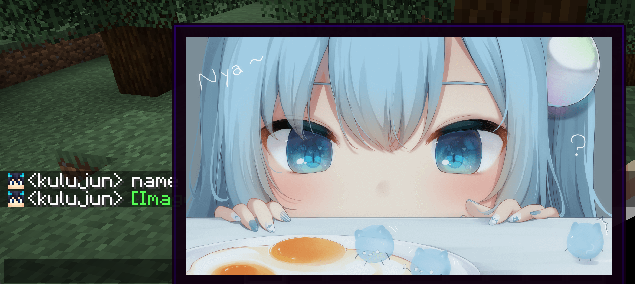
(image from 甘城なつき)
Compatibility
Support input method
- Manual Input
CICode - Send
CICodeWith Command - Drag Image Into Chat Screen
Specification
It use ChatImageCode ([[CICode,<arg>=<value>]])
| Arg | Require | Type | Remark |
|---|---|---|---|
| url | true | String | Image address (please use file:/// for local files) |
| nsfw | false | boolean | Is it an nsfw image |
| name | false | String | The name displayed in the chat |
| pre | false | String | prefix(default:[)(can't be,) |
| suf | false | String | suffix(default:])(can't be,) |
nsfw will determine whether to display the image directly
if it is set to true, you need to click to view it (or open the nsfw mode in the configuration file to view it directly)
Example:
Web Image
[[CICode,url=<Web Url>,name=Image]]- example:
[CICode,url=https://blog.kituin.fun/img/bg.png,name=Image]]
- example:
Local Image
[[CICode,url=file:///<absolute file path>,name=Image]]- example:
[[CICode,url=file:///C:\blog\kituin\fun\img\bg.png,name=Image]]
- example:
Use Command to send [[CICode]]
/chatimage send <display name> <url>
Send CICode with display name and url
/chatimage url <url>
Send CICode with url (use default display name)
Config Settings
- manual configure
- The configuration file is located at:
.minecraft/conifg/fabric/chatimageconfig.json - After modifying the configuration file, please use
/chatimage reloadto reload the configuration file
- The configuration file is located at:
- Use key binding (default
Endkey) - Use Mod Menu, click the configuration button to configure
Support Image Type
- png
- jpg/jpeg
- jfif
- gif
- ico
- bmp
Project description from Modrinth.
Pick your setup
ChatImage by Minecraft version and loader
Choose the version and loader you play, then open the matching release.
Minecraft version
1.21.9
2 loader buildsMinecraft version
1.21.8
2 loader buildsMinecraft version
1.21.7
2 loader buildsMinecraft version
1.21.6
3 loader buildsMinecraft version
1.21.5
3 loader buildsMinecraft version
1.21.4
3 loader buildsMinecraft version
1.21.3
3 loader buildsMinecraft version
1.21.2
3 loader buildsMinecraft version
1.21.1
3 loader buildsMinecraft version
1.21
3 loader buildsMinecraft version
1.20.6
3 loader buildsShowing the newest 12 of 27 game versions. Older files are in the list below.
Check the dependencies, then try the file in a copied instance before changing a world you care about.
Recent files
ChatImage versions and loaders
1.4.7+1.21.6+neoforge
ChatImage-1.4.7+1.21.6+neoforge.jar
27 Dec 2025
Client Optional Server Optional Dependencies No extras listed Listed on Release listing
Check the 1.21.6 · NeoForge setup 1.21.6NeoForge alpha
1.4.7+1.21.9+fabric
ChatImage-1.4.7+1.21.9+fabric.jar
27 Dec 2025
Client Optional Server Optional Dependencies No extras listed Listed on Release listing
Check the 1.21.10 · Fabric setup 1.21.91.21.10FabricQuilt alpha
1.4.7+1.21.6+fabric
ChatImage-1.4.7+1.21.6+fabric.jar
10 Dec 2025
Client Optional Server Optional Dependencies No extras listed Listed on Release listing
Check the 1.21.8 · Fabric setup 1.21.61.21.71.21.8Fabric alpha
1.4.7+1.20.4+neoforge
ChatImage-1.4.7+1.20.4+neoforge.jar
8 Apr 2025
Client Optional Server Optional Dependencies No extras listed Listed on Release listing
Check the 1.20.4 · NeoForge setup 1.20.4NeoForge beta
1.4.7+1.21.4+fabric
ChatImage-1.4.7+1.21.4+fabric.jar
8 Apr 2025
Client Optional Server Optional Dependencies No extras listed Listed on Release listing
Check the 1.21.4 · Fabric setup 1.21.4FabricQuilt beta
1.4.7+1.21.0+neoforge
ChatImage-1.4.7+1.21.0+neoforge.jar
8 Apr 2025
Client Optional Server Optional Dependencies No extras listed Listed on Release listing
Check the 1.21.1 · NeoForge setup 1.211.21.1NeoForge beta
1.4.7+1.20.2+forge
ChatImage-1.4.7+1.20.2+forge.jar
8 Apr 2025
Client Optional Server Optional Dependencies No extras listed Listed on Release listing
Check the 1.20.2 · Forge setup 1.20.2Forge beta
1.4.7+1.18.2+fabric
ChatImage-1.4.7+1.18.2+fabric.jar
8 Apr 2025
Client Optional Server Optional Dependencies No extras listed Listed on Release listing
Check the 1.18.2 · Fabric setup 1.18.2FabricQuilt beta
1.4.7+1.20.2+neoforge
ChatImage-1.4.7+1.20.2+neoforge.jar
8 Apr 2025
Client Optional Server Optional Dependencies No extras listed Listed on Release listing
Check the 1.20.2 · NeoForge setup 1.20.2NeoForge beta
1.4.7+1.19+forge
ChatImage-1.4.7+1.19+forge.jar
8 Apr 2025
Client Optional Server Optional Dependencies No extras listed Listed on Release listing
Check the 1.19.4 · Forge setup 1.191.19.11.19.21.19.3 beta
1.4.7+1.20.3+fabric
ChatImage-1.4.7+1.20.3+fabric.jar
8 Apr 2025
Client Optional Server Optional Dependencies No extras listed Listed on Release listing
Check the 1.20.4 · Fabric setup 1.20.31.20.4FabricQuilt beta
1.4.7+1.20.5+neoforge
ChatImage-1.4.7+1.20.5+neoforge.jar
8 Apr 2025
Client Optional Server Optional Dependencies No extras listed Listed on Release listing
Check the 1.20.6 · NeoForge setup 1.20.51.20.6NeoForge beta
Looking for an older file? The official Modrinth project page is in Resources.
 mod
mod CurseForge + Modrinth · Minecraft
WorldWeaver
A Fabric utility mod that aims to streamline common modding tasks, particularly those related to world creation. As a successor to BCLib, WoVer is intended to eventually take its place.
 mod
mod CurseForge + Modrinth · Minecraft
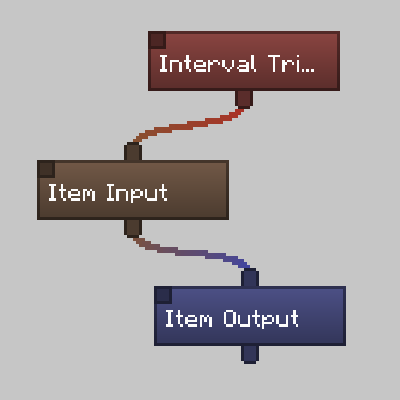
SFM-Flow
A Re-imagined SFM with Flowcharts
 mod
mod CurseForge + Modrinth · Minecraft
Pugmeowla's Infinity Stone Core
A fully reimagined and expanded Infinity Craft experience for Palladium, featuring the Infinity Gauntlet, all Infinity Stones, and extensively revamped content inspired by Lucraft Core.