Fabric API Needed by Transparent 5.1.2+1.19-fabric
requiredNo matching file
Modrinth · Minecraft mod
Allows resource packs to make certain entities support transparency.
Quick answer
Transparent 5.1.2+1.19-fabric targets 1.19, 1.19.1, 1.19.2 with Fabric. It must be installed on the client. Do not install it on the dedicated server. 1 required mod needs a matching file.
Where it goes
It must be installed on the client. Do not install it on the dedicated server.
This file is marked client-only.
5.1.2+1.19-fabric on 1.19. Every mod below is checked against that same setup.
Install Fabric API first, but 1 required mod has no matching file for this setup. Do not mix loader builds to force a match.
We only count dependency files that match this setup. A file for another loader does not fill the gap.
Before you install it
Built for Transparent 5.1.2+1.19-fabric on 1.19. Pick another file and the loader, install side or required mods may change.
Use 5.1.2+1.19-fabric. It targets 1.19, 1.19.1, 1.19.2 with Fabric; another release may have different loader, side or dependency requirements.
Install Fabric API first, but 1 required mod has no matching file for this setup. Do not mix loader builds to force a match.
It must be installed on the client. Do not install it on the dedicated server.
Use the “Get this file” button beside 5.1.2+1.19-fabric. It opens that exact file at the source.
About this project
Transparent allows resource packs to give certain entities textures with transparent (or translucent) pixels. To use, simply install the mod and use or create a resource pack that gives one of the supported entities a transparent texture.
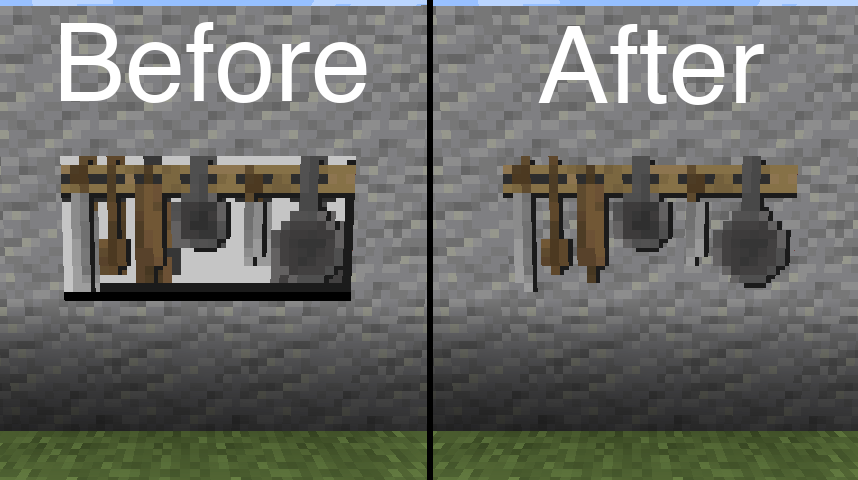
Resource pack used in the above image: BwW Texturepack.
Officially supports Paintings++ Mod!
| Entity | Enabled By Default | Reason | Versions |
|---|---|---|---|
| Armor Stand | true | 1.19.4+ | |
| End Crystal | true | ||
| End Crystal Beam | true | 1.21+ | |
| Item Frame | true | ||
| Painting | true | ||
| Player Cape | true | 1.21+ | |
| Player Armor | true | 1.21+ | |
| Beacon Beam | false | Enabling transparency causes render layer bugs. |
If you want another entity to be supported by this mod, please let me know on Discord or GitHub Issues.
In order to change the default configuration, paste the following json file content into a file in your resource pack located at /assets/transparent/transparent.json.
{
    "armor_stand": true,
    "beacon_beam": false,
    "end_crystal": true,
    "end_crystal_beam": true,
    "item_frame": true,
    "painting": true,
    "player_cape": true,
    "player_armor": true
}
Report any issues on GitHub. Chat on Discord in the #transparent channel.
Support the development of my mods on Ko-fi.

Project description from Modrinth.
Pick your setup
Choose the version and loader you play, then open the matching release.
Showing the newest 12 of 19 game versions. Older files are in the list below.
Check the dependencies, then try the file in a copied instance before changing a world you care about.
Recent files
transparent-5.1.2+1.19-fabric.jar
16 Oct 2022
transparent-5.1.2+1.19-forge.jar
16 Oct 2022
transparent-5.1.2+1.19-quilt.jar
16 Oct 2022
transparent-5.1.0+1.19-fabric.jar
16 Jun 2022
transparent-5.1.0+1.19-forge.jar
16 Jun 2022
transparent-5.1.0+1.19-quilt.jar
16 Jun 2022
transparent-5.0.0-fabric.jar
14 Jun 2022
transparent-5.0.0-forge.jar
14 Jun 2022
transparent-5.0.0-quilt.jar
14 Jun 2022
Looking for an older file? The official Modrinth project page is in Resources.
 mod
Adds actual falling meteors from Applied Energistics 2 mod!
 mod
A Fabric and NeoForge Minecraft mod that customizes the player list (tab list) header, footer, and message of the day.
 mod
A bridge/proxy allowing you to connect to Minecraft: Java Edition servers with Minecraft: Bedrock Edition.