Vintage Story version
Back to mods 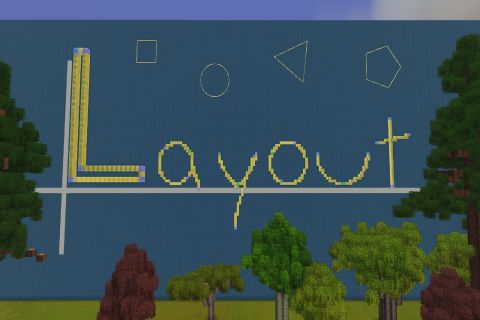
Vintage Story Mod DB · Vintage Story mod
Layout
TL;DR Summary: • Layout Mod: Inert, uninteractable 2D/3D voxel guides in various shapes. • Server/Client and Client-Only configurations; intended to run on server. • Private mode if server allows; otherwise guides are Public and visible to everyone. • Can
Choose a version Pick your version below, then grab the matching file.
Quick answer
Which Layout release should I use?
Latest stable file 0.4.81
Game version 1.22.0, 1.22.1, 1.22.2
Loader Built-in Vintage Story mod system
Layout 0.4.81 targets 1.22.0, 1.22.1, 1.22.2. It must be installed on the client. Installation on the dedicated server is optional. No extra mods listed for this file.
Where it goes
Is Layout required on the client, server, or both?
It must be installed on the client. Installation on the dedicated server is optional.
Client Required
Dedicated server Optional
Loader for this release Built-in Vintage Story mod system
Required install it here Optional supported, not mandatory Not supported do not install here Source doesn’t say do not assume
This release supports both sides, but the source does not require it on the server.
What else does Layout 0.4.81 need?
0.4.81. Change the file and its required mods may change too.
This file does not list any required mods. Do not add a library just because a different file uses it.
This file does not list any required or optional mods.
Before you install it
Add Layout without breaking your instance.
Built for Layout 0.4.81. Pick another file and the loader, install side or required mods may change.
- 01
Stick to this file
Use 0.4.81. It targets 1.22.0, 1.22.1, 1.22.2; another release may have different loader, side or dependency requirements.
- 02
Bring the mods it needs
This file does not list any required mods. Do not add a library just because a different file uses it.
- 03
Put it on the correct side
It must be installed on the client. Installation on the dedicated server is optional.
- 04
Pick the file you checked
Use the “Get this file” button beside 0.4.81. It opens that exact file at the source.
About this project
What does Layout add?
TL;DR Summary:
- Layout Mod: Inert, uninteractable 2D/3D voxel guides in various shapes.
- Server/Client and Client-Only configurations; intended to run on server.
- Private mode if server allows; otherwise guides are Public and visible to everyone.
- Can run on servers without the mod installed.
- Others cannot see guides if server does not have mod installed.
- The Chalking Kit and Chalking Powder are Layout Tools for the mod.
- Hammer + Flax Twine serve as the Layout Tools when you are on a server without the mod installed.
- Guides respect claims.
- Full command list including measures to deal with griefers.
This is a server-side and client-side mod that produces 2D/3D inert, uninteractable guides that are useful for chiseling and building. These guides are visible to everyone on the server and can serve for collaborative building/chiseling. If you have this mod installed and join a server that does not have this mod installed, there is a Client-Only mode that this mod will fallback to, allowing you to place private guides visible only to you. These guides can be placed volumetrically (actual cubes) or merely on the surface (flat like paper). These guides are merely visual and do nothing to actually place any blocks. These guides can be manipulated, pulled, stretched, etc. after they have been placed.
On a server with this mod installed, you can still place private guides that are visible to only you, if the server allows. The server is authoritative and defaults to restricting private guides. If the server allows private guides, then you can swap between a private and public mode. Public guides are stored in the world save file. Private guides are stored locally on each player's machine. In singleplayer, you can force this mod to default to "ClientOnlyMode" in the config files to force the mod to save the guides externally and leave the world save file alone.
The Layout Tool:
- Chalking Kit - This item is the layout tool. Use F to open the GUI. This item is the tool required on servers with Layout installed, even if you are set to Private/ClientOnlyMode.
- Chalking Powder is used to refill your chalking kit. The recipe is yellow dye surrounded by any flour/powder.
- To refill: Place your Chalking Kit on the ground and Shift+Right-click Chalking Powder into the kit to refill it.
- Chalking Powder is used to refill your chalking kit. The recipe is yellow dye surrounded by any flour/powder.
- Hammer + Flax Twine - Hammer in off-hand and flax twine in the main hand mimics the regular Layout tool when you are in ClientOnlyMode on a server without Layout installed. Use F to open the GUI.
Color Guide:
- Blue/indigo - These are the initial anchor voxels when you place your shape in Public mode (or in ClientOnlyMode on a server without Layout installed). When both anchors are co-planar (lined up), they are the same color. If they are not lined up, the second anchor becomes off-hue.
- Orange/Burnt Orange - These are the initial anchor voxels when you place your shape in Private mode. When both anchors are co-planar (lined up), they are the same color. If they are not lined up, the second anchor becomes off-hue.
- Red - This is a lock/constraint point. You have locked/constrained the guide to this point and the guide will have to adapt/move around this point.
- Green - This indicates the mid-point on the shape.
- Violet - These are division marks. You entered a division number and the guide is split into that many equal parts.
- Cyan - This indicates voxels that have solid material inside them. This coloration aids in chiseling.
- Yellow - This is the standard guide color, silly!
Server/Client Configurations:
Spoiler!
| Setup | Layout Tool | Guide Authority | Guide Storage |
| Server lacks Layout | Hammer + Flax Twine | Client | Local, separate from world save. |
| Server has Layout; Private mode prohibited. | Chalking Kit | Server | Server World Save |
| Server has Layout; Private mode allowed. | Chalking Kit | Server/Client | Server World Save for Public Guides; Local player storage for private guides. |
Controls:
Spoiler!
- NOTE: The following controls description seems more complicated than it is. Play with it ingame and it should be fairly intuitive.
- Drafting a new guide:
- Left-Click to place first anchor; left-click to place/complete subsequent anchors.
- Before placing the first anchor:
- Hold CTRL to ignore other guides (to prevent grabbing them by mistake).
- Hold SHIFT to embed your new guide within the material you are targeting.
- Before placing the first anchor:
- While drafting a guide:
- Right-click to backtrack or cancel the current operation.
- While drafting a guide, CTRL and SHIFT constrain and invert shapes in different ways appropriate to each shape. Tooltips appear on screen with keybind notes for each phase of the draft.
- Left-Click to place first anchor; left-click to place/complete subsequent anchors.
- Grabbing a guide:
- Left-click any point on a guide to grab that point. You may move it anywhere. Left-click again to place.
- Right-click while grabbing a guide releases the guide to its initial placement before the grab.
- Constrain/Locking
- Right-click a voxel of an already-placed guide to lock/constrain that voxel. That voxel should turn red.
- Right-click an already-constrained/locked voxel to unlock it.
- Undo/Redo
- CTRL+ Z - Undo. This undoes your previous action related to guides, including restoring one you deleted, stretched, dragged, etc.
- CTRL+ Y - Redo. This redoes the actions you took away with Undo.
- NOTE: Undo/Redo is guide specific - you will cycle through all history of one guide until you select a different guide.
- Reset Shape
- SHIFT+ Left-Click - Performing this action will reset the guide to the shape it had upon initial placement.
Command List:
Spoiler!
(Most of these commands are accessible through the GUI in the settings page - click the "Gear" icon at the top right)
Regular Commands:
- /layout off - Turns off rendering of all guides to the player.
- /layout on - Turns on rendering of all guides to the player.
- /layout public - Sets you to public mode where everyone can see the guides you place. On a server with Layout installed, anchors in public mode are blue/indigo.
- /layout private - Sets you to private mode where the guides placed while in this mode are visible to only you. Guides created in this mode are saved to a local file independent of the world save file. On a server with Layout installed, anchors in private mode are orange/burnt orange. On a server without Layout installed, your anchors will default to the blue/indigo color, even though you're technically in "private" mode and storing guides locally.
- /layout client push all - Pushes all your private guides to public for everyone else to see.
- /layout who - Returns creator and last sculptor information for the currently selected guide.
Client-Only Mode Commands Please note these commands use "." and not a slash:
- .layout off - Turns off rendering of all guides to the player.
- .layout on - Turns on rendering of all guides to the player.
- .layout dispel all | <n> - Dispels all guides or within the chunk radius of the player when you are on a server without Layout
Admin Commands:
- /layout dispel all | <n> - Dispels all guides on the server, or within the chunk radius of the player.
- /layout dispel player <player> - Dispels all public guides on the server from the named player.
- /layout dispel guide <id> - Dispels a specific guide. Use this in conjunction with "/layout top guides" to identify and remove problematic huge guides.
- /layout jail <player> - Restricts a player in every way from placing, modifying, deleting, or anything else to do with public guides.
- /layout free <player> - Removes the jail restriction.
- /layout limit <player> <number> - Sets a personal limit on the number of public guides the specified player can have in the world. You can increase this number for your good and trustworthy builders!
- /layout voxelcap <player> <number> - Sets a personal voxels-per-guide cap for the specified player. Want your trustworthy builders to be able to draft giant guides for grand structures? Increase this cap for them!
- /layout totalvoxelcap <player> <number> - Sets the cumulative-total voxel cap for all guides for a specific player. You can increase this number for your good and trustworthy builders!
- /layout info - Returns server-wide guide utilization and other metrics.
- /layout info <player> - Returns information regarding a player's modified limits.
- /layout top guides - Displays the top guides on the server by voxel-count.
- /layout top players - Displays the top players by number of guides and voxel-count.
Recipes:
Spoiler!
Chalking Kit Recipe:
| Chalking Powder (8) | ||
| Flax Twine | Linen Bag | Coil of Rope |
| Copper Nails |
Chalking Powder Recipe:
| Any powder/flour | Any powder/flour | Any powder/flour |
| Any powder/flour | Yellow Dye (0.1L) | Any powder/flour |
| Any powder/flour | Any powder/flour | Any powder/flour |
Shapes:
Spoiler!
- 2D:
- Arch
- Half-Circle Arch
- Circle
- Ellipse
- Triangles (Isoceles, Equilateral, Right-Angle)
- Rectangle
- Square
- Polygon (up to 24 sides)
- Free-Shape (You make your own shape)
- 3D
- Sphere
- Dome (Half-sphere)
- Cone
- Box
- Cylinder
- Tapered Cylinder (For windmill bases!)
- Polygonal Prism
- Tapered Polygonal Prism
- Fillet (Roundover - can be exterior or interior)
Config:
- Pending.
- Almost all config options can be accessed through the ingame settings page. Click the "Gear" icon in the GUI.
Known Issues:
- None.
Development:
- A sweep path for 2D shapes.
- A Companion Mod named "Build" that will allow players to build the guides into real blocks/structures.
Disclosure:
Spoiler!
This mod was coded using Claude's Fable 5 and Opus 4.8 models, GPT 5.6 Sol, and optimizations analyzed by nVidia's Nemotron 3 Ultra.
The models for this mod were created 100% personally by me reusing all vanilla assets. I learned how to use Blender specifically for this mod.
This mod was posted preliminarily on Reddit for community feedback, including full disclosure of AI use. Reddit post received 1.1k upvotes with an 89.2% upvote ratio.
Negative comments regarding AI use: the community, as far as Reddit is considered, distinctly endorsed and encouraged the release of this mod, as indicated by near 90% upvote ratio. That is why this mod is here now.
Underlying code is pending human-review.
This mod has been tested extensively by me on new test worlds along with my multi-hundred hour personal "forever world". That world runs on a dedicated computer/server with approximately 162 mods. I could not detect a single conflict or problem, even with my console window in view at all times, currently at dozens of hours played.
Feedback:
Many measures and specific design choices were made to optimize performance, especially around large guides. With that said, this was developed on a high-end machine and it's not easy to gauge what will bog down a lower-end machine. For those of you on potatoes, please share your feedback and if there is a need for further performance optimizations.
Project description from Vintage Story Mod DB.
Pick your setup
Layout releases for each Vintage Story version.
Choose the version and loader you play, then open the matching release.
Vintage Story version
1.22.5
1 loader buildVintage Story version
1.22.4
1 loader buildVintage Story version
1.22.3
1 loader buildVintage Story version
1.22.2
1 loader buildVintage Story version
1.22.1
1 loader buildVintage Story version
1.22.0
1 loader buildCheck the dependencies, then try the file in a copied instance before changing a world you care about.
Recent files
Layout versions and loaders
0.4.81
Layout0.4.81.zip
5 Aug 2026
Client Required Server Optional Dependencies No extras listed Listed on Release listing
Check the 1.22.6 setup 1.22.01.22.11.22.21.22.3 release
0.4.33
Layout0.4.33.zip
31 Jul 2026
Client Source doesn’t say Server Source doesn’t say Dependencies No extras listed Listed on Release listing
Check the 1.22.5 setup 1.22.01.22.11.22.21.22.3 release
0.3.69
Layout0.3.69.zip
26 Jul 2026
Client Source doesn’t say Server Source doesn’t say Dependencies No extras listed Listed on Release listing
Check the 1.22.5 setup 1.22.01.22.11.22.21.22.3 release
0.3.54
Layout0.3.54.zip
24 Jul 2026
Client Source doesn’t say Server Source doesn’t say Dependencies No extras listed Listed on Release listing
Check the 1.22.5 setup 1.22.01.22.11.22.21.22.3 release
0.3.53
Layout0.3.53.zip
23 Jul 2026
Client Source doesn’t say Server Source doesn’t say Dependencies No extras listed Listed on Release listing
Check the 1.22.5 setup 1.22.01.22.11.22.21.22.3 release
Looking for an older file? The official Vintage Story Mod DB project page is in Resources.
 mod
mod Vintage Story
RespawnInfo
Adds a command and a small GUI to check your respawn count and coordinates.
 mod
mod Vintage Story
Lumos
Reworking the game's lighting system and fixing related bugs
 mod
mod Vintage Story
NDL Villagers
Adds Villagers/Guards/Clerics to populate your builds and also a way to get traders in your builds!