Vintage Story version
Back to mods 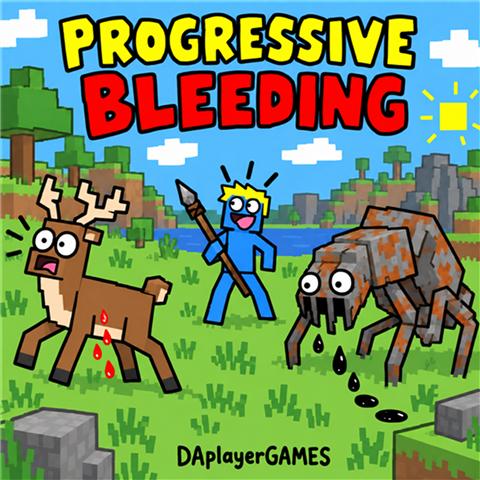
Vintage Story Mod DB · Vintage Story mod
Progressive Bleeding
VINTAGE STORY / A HUNTER'S FIELD GUIDE Progressive Bleeding Wound your prey. Follow the trail. Finish the hunt. Make fast animals easier to hunt while keeping dangerous enemies threatening. Stack wounds, track blood and oil trails, and slow injured crea
Choose a version Pick your version below, then grab the matching file.
Quick answer
Which Progressive Bleeding release should I use?
Latest stable file 1.6.0
Game version 1.22.7
Loader Built-in Vintage Story mod system
Progressive Bleeding 1.6.0 targets 1.22.7. It must be installed on the client. Installation on the dedicated server is optional. No extra mods listed for this file.
Where it goes
Is Progressive Bleeding required on the client, server, or both?
It must be installed on the client. Installation on the dedicated server is optional.
Client Required
Dedicated server Optional
Loader for this release Built-in Vintage Story mod system
Required install it here Optional supported, not mandatory Not supported do not install here Source doesn’t say do not assume
This release supports both sides, but the source does not require it on the server.
What else does Progressive Bleeding 1.6.0 need?
1.6.0. Change the file and its required mods may change too.
This file does not list any required mods. Do not add a library just because a different file uses it.
This file does not list any required or optional mods.
Before you install it
Add Progressive Bleeding without breaking your instance.
Built for Progressive Bleeding 1.6.0. Pick another file and the loader, install side or required mods may change.
- 01
Stick to this file
Use 1.6.0. It targets 1.22.7; another release may have different loader, side or dependency requirements.
- 02
Bring the mods it needs
This file does not list any required mods. Do not add a library just because a different file uses it.
- 03
Put it on the correct side
It must be installed on the client. Installation on the dedicated server is optional.
- 04
Pick the file you checked
Use the “Get this file” button beside 1.6.0. It opens that exact file at the source.
About this project
What does Progressive Bleeding add?
VINTAGE STORY / A HUNTER'S FIELD GUIDE
Progressive
Bleeding
Wound your prey. Follow the trail.
Finish the hunt.
Make fast animals easier to hunt while keeping dangerous enemies threatening. Stack wounds, track blood and oil trails, and slow injured creatures as the fight unfolds.
BY DAPLAYERGAMES • VERSION 1.6.0
| 3 MAXIMUM STACKS |
30s BLEED DURATION |
5s SILENT PULSES |
Built for the hunt. Wounded prey becomes easier to catch. Large enemies receive smaller penalties.
| Blood of the wild Red trails from wounded animals. |
Oil of the Rust World Dark trails from supported Rust creatures. |
FIELD NOTES / 01
How bleeding works
The first successful hit with a supported weapon immediately applies one bleeding stack.
Further hits build up additional wounds instead of instantly adding more stacks. With default settings and base-quality spears, swords, or axes:
| Successful hit | Result |
|---|---|
| First | Applies one stack |
| Second and third | Build toward the next stack |
| Fourth | Reaches two stacks |
| Seventh | Reaches three stacks—the maximum |
Each valid hit refreshes the bleeding duration to 30 seconds, without delaying the next damage pulse.
Bleeding deals damage every five seconds. Ticks are silent by default and do not trigger the health behavior’s hurt animation or apply knockback. Normal weapon impacts and death sounds remain audible.
When bleeding expires, its stacks and unfinished buildup are cleared.
FIELD NOTES / 02
Hunting slowdown
Wounded creatures slow down according to their current missing-health percentage and target profile.
For example:
- A deer missing 20% of its health moves 30% slower.
- A bear missing the same percentage moves only 5% slower.
Slowdown remains after bleeding expires while the creature is still wounded. Healing gradually restores its movement speed; full health removes the penalty. Death or revival clears the wound effect.
The movement penalty applies during fleeing as well as ordinary movement.
| Target profile | Maximum slowdown | 1 stack / 30s | 3 stacks / 30s |
|---|---|---|---|
| Fast prey | 40% | 3% maximum HP | 9% maximum HP |
| Ordinary animals | 20% | 3% maximum HP | 9% maximum HP |
| Dangerous animals | 10% | 1.5% maximum HP | 4.5% maximum HP |
| Rust creatures | 10% | 1.5% maximum HP | 4.5% maximum HP |
| Bosses | 5% | 0.75% maximum HP | 2.25% maximum HP |
These damage totals assume constant stacks and no duration refresh. They exclude direct weapon damage. Continued attacks extend the bleeding duration.
Default creature profiles
- Fast prey: deer—including guemals—gazelles, and hares.
- Dangerous animals: bears, moose, wolves, hyenas, and mammoths.
- Rust creatures: drifters, shivers, bowtorns, locusts, bells, mini bells, and mechanical helpers.
- Bosses: eidolon and erel.
- Ordinary: creatures without another matching profile.
Mammoth-prefixed entity codes receive the dangerous profile across mod namespaces. Other modded creatures can be assigned profiles through configuration.
FIELD NOTES / 03
Supported weapons
| Weapon category | Buildup multiplier |
|---|---|
| Spear | 1.00 |
| Thrown spear | 1.00 |
| Sword / falx | 1.00 |
| Axe | 1.00 |
| Arrow | 0.60 |
| Knife | 0.75 |
| Hammer / club / mace / warhammer | 1.00 |
Blunt weapons receive 1.5× buildup against profiles marked mechanical. Axes retain their own category and do not receive this bonus.
Weapon quality increases buildup by 10% per tier above the first, up to a maximum multiplier of 1.5×. Quality affects subsequent wound buildup, not bleed damage or the initial one-stack application.
Weapon support follows the item’s tool classification and supported projectile identification. Custom weapons using unrelated classifications may require additional compatibility support.
FIELD NOTES / 04
Blood and oil trails
- Organic animals produce red blood.
- Supported vanilla Rust and mechanical families produce near-black oil.
- Both impact particles and trails use the appropriate color.
- Particle quantity increases with active bleeding stacks.
- Trails stop when bleeding expires or the creature dies.
- Particle emission is separate from the five-second damage interval.
FIELD NOTES / 05
Configuration
The configuration file is created automatically in your Vintage Story data directory:
ModConfig/progressivebleeding.jsonEdit it while the world/server is closed, then restart to apply changes.
Bleeding and buildup settings
| Variable | Default | What it controls |
|---|---|---|
BleedDurationSeconds |
30 |
Bleeding duration, refreshed by valid hits. |
TickIntervalSeconds |
5 |
Seconds between damage pulses. Changing this changes pulse frequency, not the configured damage rate. |
DamagePercentPerStackPerSecond |
0.1 |
Percentage of maximum HP dealt per stack per second, before the target’s damage multiplier. |
MaximumStacks |
3 |
Maximum active bleeding stacks. |
BuildupThreshold |
100 |
Buildup required to gain each additional stack. |
BuildupPerHit |
34 |
Base buildup from subsequent valid hits, before weapon and quality multipliers. |
QualityBuildupBonusPerTier |
0.1 |
Additional buildup multiplier per quality tier above the first. |
MaximumQualityMultiplier |
1.5 |
Maximum quality multiplier. |
BluntMechanicalBuildupMultiplier |
1.5 |
Extra buildup multiplier for blunt weapons against mechanical profiles. |
SilentBleedTicks |
true |
Silences bleed hurt sounds while preserving normal hit and death sounds. |
Damage calculation:
Damage per second =
Maximum HP × (DamagePercentPerStackPerSecond / 100)
× Active stacks × Target DamageMultiplier
Damage accumulates between pulses. Stack increases only affect the time after they are applied, and any remaining partial interval is paid once when bleeding expires.
Buildup calculation for subsequent hits:
Buildup gained =
BuildupPerHit × Weapon multiplier × Quality multiplier
× Mechanical blunt multiplier, when applicable
Weapon settings
Edit WeaponBuildupMultipliers to change how quickly each category creates additional wounds:
"WeaponBuildupMultipliers": {
  "spear": 1.0,
  "thrownspear": 1.0,
  "sword": 1.0,
  "arrow": 0.6,
  "axe": 1.0,
  "knife": 0.75,
  "blunt": 1.0
}
A value of 0 disables bleeding application and duration refresh for that category. Direct weapon damage remains unaffected.
Creature profile settings
Each profile exposes four variables:
| Variable | Meaning |
|---|---|
DamageMultiplier |
Multiplies bleed damage taken. 0.5 means half damage. |
SlowdownMultiplier |
Multiplies the creature’s missing-health fraction to calculate slowdown. |
MaximumSlowdown |
Maximum movement reduction. 0.4 means a 40% reduction. |
Mechanical |
Enables the additional blunt-weapon buildup multiplier against this profile. |
Default profiles:
"Ordinary": {
  "DamageMultiplier": 1.0,
  "SlowdownMultiplier": 1.0,
  "MaximumSlowdown": 0.2,
  "Mechanical": false
},
"FastPrey": {
  "DamageMultiplier": 1.0,
  "SlowdownMultiplier": 1.5,
  "MaximumSlowdown": 0.4,
  "Mechanical": false
},
"Dangerous": {
  "DamageMultiplier": 0.5,
  "SlowdownMultiplier": 0.25,
  "MaximumSlowdown": 0.1,
  "Mechanical": false
},
"Rust": {
  "DamageMultiplier": 0.5,
  "SlowdownMultiplier": 0.25,
  "MaximumSlowdown": 0.1,
  "Mechanical": true
},
"Boss": {
  "DamageMultiplier": 0.25,
  "SlowdownMultiplier": 0.25,
  "MaximumSlowdown": 0.05,
  "Mechanical": true
}
Slowdown calculation:
Missing-health fraction = 1 − (Current HP / Maximum HP)

Slowdown =
minimum(MaximumSlowdown, Missing-health fraction × SlowdownMultiplier)
Mechanical affects weapon buildup. It does not change blood particle color.
Assigning creature profiles
Use EntityProfiles to assign a namespaced entity-code family to a profile.
Available profile names:
ordinary
fastprey
dangerous
rust
boss
Example entries:
"EntityProfiles": {
  "game:deer": "fastprey",
  "game:bear": "dangerous",
  "game:drifter": "rust",
  "game:eidolon": "boss",
  "yourmod:mammoth": "dangerous"
}
Merge your additions into the existing dictionary. Replace yourmod:mammoth with the creature’s actual entity code.
Family entries also match hyphen-separated variants. For example, game:deer matches deer variants, but not game:deerlookalike. If multiple entries match, the longest matching entry takes priority.
Particle settings
| Variable | Default | What it controls |
|---|---|---|
EnableBloodTrail |
true |
Enables blood/oil effects, including impact particles. |
BloodTrailLifetimeSeconds |
60 |
Particle lifetime. |
BloodTrailIntervalSeconds |
0.5 |
Seconds between trail emissions. Higher values produce less frequent trails. |
Particle colors and particle quantity per stack are currently built into the mod rather than exposed as configuration variables.
Quick tuning examples
- Make wounded deer easier to catch: raise
FastPrey.MaximumSlowdownfrom0.4to0.5. - Reduce bleeding damage globally: lower
DamagePercentPerStackPerSecondfrom0.1to0.05. - Require more hits for additional stacks: raise
BuildupThresholdfrom100to150. - Protect large enemies further: lower
Dangerous.DamageMultiplierfrom0.5to0.25. - Reduce trail frequency: raise
BloodTrailIntervalSecondsfrom0.5to1.0.
FIELD NOTES / 06
Requirements
- Built and tested against Vintage Story 1.22.7.
- Works in single-player and on dedicated servers.
- Server-side installation; multiplayer clients do not need a separate installation.
- No additional mod dependencies.
Created by DAplayerGAMES • Progressive Bleeding 1.6.0
Project description from Vintage Story Mod DB.
Pick your setup
Progressive Bleeding releases for each Vintage Story version.
Choose the version and loader you play, then open the matching release.
Check the dependencies, then try the file in a copied instance before changing a world you care about.
Recent files
Progressive Bleeding versions and loaders
1.6.0
ProgressiveBleeding-1.6.0.zip
17 Sept 2026
Client Required Server Optional Dependencies No extras listed Listed on Release listing
Check the 1.22.7 setup 1.22.7 release
1.5.6
ProgressiveBleeding-1.5.6.zip
17 Sept 2026
Client Required Server Optional Dependencies No extras listed Listed on Release listing
Check the 1.22.7 setup 1.22.7 release
1.5.5
ProgressiveBleeding-1.5.5.zip
16 Sept 2026
Client Required Server Optional Dependencies No extras listed Listed on Release listing
Check the 1.22.7 setup 1.22.7 release
1.5.4
ProgressiveBleeding-1.5.4.zip
16 Sept 2026
Client Required Server Optional Dependencies No extras listed Listed on Release listing
Check the 1.22.7 setup 1.22.7 release
Looking for an older file? The official Vintage Story Mod DB project page is in Resources.
 mod
mod Vintage Story
Traditional Livestock
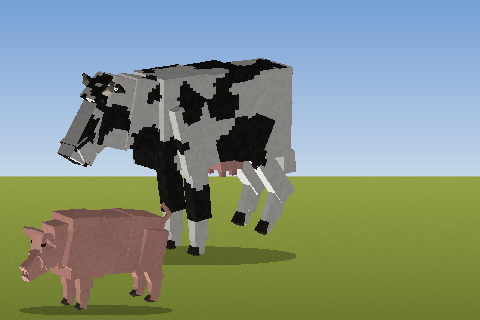
Pink domestic pigs and milkable cattle that spawn in temperate grasslands. Butchering support.
 mod
mod Vintage Story
Immersive Woodworking
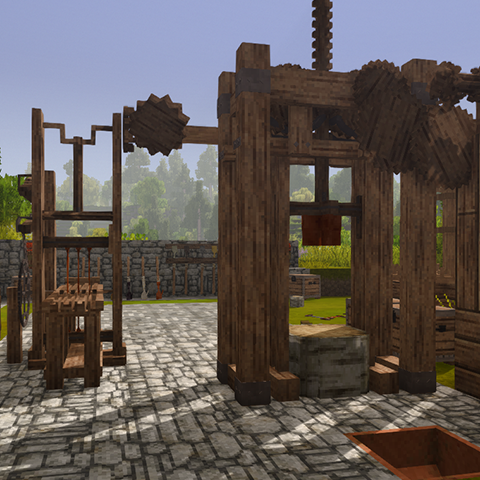
Focused immersion mod that makes processing timber feel like work, not paperwork.
 mod
mod Vintage Story
Vanilla armory
Implements unused vanilla weapons and some armor in vanilla style