
Vintage Story version
Back to mods 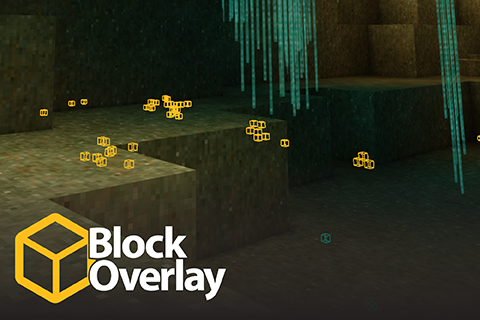
Vintage Story Mod DB · Vintage Story mod
Block Overlay
For modders to test their worldgen, and for people who don't have 8 hours a day to search for iron. It's xray! This mod allows you to pick any block or entity to scan all loaded chunks for and display on the hud. Search by either block name, block code, or w
Choose a version Pick your version below, then grab the matching file.
Quick answer
Which Block Overlay release should I use?
Latest stable file 4.15.0
Game version 1.22.0, 1.22.1, 1.22.2
Loader Built-in Vintage Story mod system
Block Overlay 4.15.0 targets 1.22.0, 1.22.1, 1.22.2. It must be installed on the client. Do not install it on the dedicated server. No extra mods listed for this file.
Where it goes
Is Block Overlay required on the client, server, or both?
It must be installed on the client. Do not install it on the dedicated server.
Client Required
Dedicated server Not supported
Loader for this release Built-in Vintage Story mod system
Required install it here Optional supported, not mandatory Not supported do not install here Source doesn’t say do not assume
This Vintage Story file is marked client-only.
What else does Block Overlay 4.15.0 need?
4.15.0. Change the file and its required mods may change too.
This file does not list any required mods. Do not add a library just because a different file uses it.
This file does not list any required or optional mods.
Before you install it
Add Block Overlay without breaking your instance.
Built for Block Overlay 4.15.0. Pick another file and the loader, install side or required mods may change.
- 01
Stick to this file
Use 4.15.0. It targets 1.22.0, 1.22.1, 1.22.2; another release may have different loader, side or dependency requirements.
- 02
Bring the mods it needs
This file does not list any required mods. Do not add a library just because a different file uses it.
- 03
Put it on the correct side
It must be installed on the client. Do not install it on the dedicated server.
- 04
Pick the file you checked
Use the “Get this file” button beside 4.15.0. It opens that exact file at the source.
About this project
What does Block Overlay add?
For modders to test their worldgen, and for people who don't have 8 hours a day to search for iron.
It's xray!
This mod allows you to pick any block or entity to scan all loaded chunks for and display on the hud. Search by either block name, block code, or wildcard to find blocks and entities. The entity search range is less than the block search range - entities get unloaded when you aren't near them.
The default GUI hotkey is ctrl+]. The default overlay hotkey is ].

How to search:
| Example | Match type | Supports | |
| Display name | copper ore |
Partial match | Blocks, Entities |
| Asset code | game:ore-medium-nativecopper |
Partial match | Blocks, Entities |
| Block asset code with wildcard | game:ore-*-nativecopper-* |
Exact match |
Blocks |
Left click the color swatch on an active search item to change its color. Right click to reset the color.
If you are having issues with the mod not loading in singleplayer, delete your mod cache at VintagestoryData/Cache/ and try again.
This mod works in both singleplayer and multiplayer.
Config options
| Name | Type | Default | Description |
MaxSearchRadius |
integer |
120 |
Max distance away a block will be highlighted, in blocks. The maximum value is your chunk load distance. |
MaxLabelRadius |
integer |
16 |
Max distance away a block will have a "nametag" label shown, in blocks |
ScanDelay |
integer |
20000 |
How often to rescan for blocks, in milliseconds. |
ShouldShowDebugText |
boolean |
true |
Whether to display extra info about the scan on the overlay. |
ShouldShowEntityLines |
boolean |
false |
Whether to draw lines from the reticle to scanned entities. |
LabelScale |
number |
1 |
How big to scale the labels. |
DebugOverlayPosition |
|
|
X and Y screen position to draw the overlay text. |
SearchDebounceMs |
integer |
500 |
How long to wait after you stop typing to begin the search. |
SearchAutomatically |
boolean |
true |
Whether to begin the search without needing to press the "go" button. |
|
boolean |
false |
Whether to scan container inventories during the search. |
|
|
|
How many characters to require in the search bar before searching. |
|
boolean |
true |
Whether to focus the search bar immediately upon opening the search dialog. |
LargeBlockGroupThreshold |
integer |
500000 |
If there are more than this many blocks in a single group, only the outermost layer of blocks will be highlighted. |
Parallelism |
integer |
50% of cpus |
How many parallel processes to use. |
LineWeight |
number |
1 |
How much to scale line thickness. |
Project description from Vintage Story Mod DB.
Pick your setup
Block Overlay releases for each Vintage Story version.
Choose the version and loader you play, then open the matching release.
Vintage Story version
1.22.6
1 loader buildVintage Story version
1.22.5
1 loader buildVintage Story version
1.22.4
1 loader buildVintage Story version
1.22.3
1 loader buildVintage Story version
1.22.2
1 loader buildVintage Story version
1.22.1
1 loader buildVintage Story version
1.22.0-rc.10
1 loader buildVintage Story version
1.22.0-rc.9
1 loader buildVintage Story version
1.22.0-rc.8
1 loader buildVintage Story version
1.22.0-rc.7
1 loader buildVintage Story version
1.22.0-rc.6
1 loader buildShowing the newest 12 of 64 game versions. Older files are in the list below.
Check the dependencies, then try the file in a copied instance before changing a world you care about.
Recent files
Block Overlay versions and loaders
4.15.0
blockoverlay-4.15.0.zip
25 Sept 2026
Client Required Server Not supported Dependencies No extras listed Listed on Release listing
Check the 1.22.7 setup 1.22.01.22.11.22.21.22.3 release
4.14.1
blockoverlay-4.14.1.zip
20 Sept 2026
Client Required Server Not supported Dependencies No extras listed Listed on Release listing
Check the 1.22.7 setup 1.22.01.22.11.22.21.22.3 release
4.14.0
blockoverlay-4.14.0.zip
13 Sept 2026
Client Required Server Not supported Dependencies No extras listed Listed on Release listing
Check the 1.22.7 setup 1.22.01.22.11.22.21.22.3 release
4.13.1
blockoverlay-4.13.1.zip
7 Sept 2026
Client Required Server Not supported Dependencies No extras listed Listed on Release listing
Check the 1.22.7 setup 1.22.01.22.11.22.21.22.3 release
4.12.0
blockoverlay-4.12.0.zip
5 Sept 2026
Client Required Server Not supported Dependencies No extras listed Listed on Release listing
Check the 1.22.7 setup 1.22.01.22.11.22.21.22.3 release
4.11.6
blockoverlay-4.11.6.zip
15 Jul 2026
Client Required Server Not supported Dependencies No extras listed Listed on Release listing
Check the 1.22.3 setup 1.22.01.22.11.22.21.22.3 release
4.11.5
blockoverlay-4.11.5.zip
2 Jul 2026
Client Required Server Not supported Dependencies No extras listed Listed on Release listing
Check the 1.22.3 setup 1.22.01.22.11.22.21.22.3 release
4.11.4
blockoverlay-4.11.4.zip
2 Jul 2026
Client Required Server Not supported Dependencies No extras listed Listed on Release listing
Check the 1.22.3 setup 1.22.01.22.11.22.21.22.3 release
4.11.3
blockoverlay-4.11.3.zip
14 Jun 2026
Client Required Server Not supported Dependencies No extras listed Listed on Release listing
Check the 1.22.3 setup 1.22.01.22.11.22.21.22.3 release
4.11.2
blockoverlay-4.11.2.zip
8 Jun 2026
Client Required Server Not supported Dependencies No extras listed Listed on Release listing
Check the 1.22.3 setup 1.22.01.22.11.22.21.22.3 release
4.11.1
blockoverlay-4.11.1.zip
8 Jun 2026
Client Required Server Not supported Dependencies No extras listed Listed on Release listing
Check the 1.22.3 setup 1.22.01.22.11.22.21.22.3 release
4.10.4
blockoverlay-4.10.4.zip
27 Apr 2026
Client Required Server Not supported Dependencies No extras listed Listed on Release listing
Check the 1.22.2 setup 1.22.0-rc.11.22.0-rc.21.22.0-rc.31.22.0-rc.4 release
Looking for an older file? The official Vintage Story Mod DB project page is in Resources.
 mod
mod Vintage Story
Alegacy Quest Framework
Alegacy Quest Framework is a full-featured quest and boss combat engine for Vintage Story.
 mod
mod Vintage Story
Arcanum Lib
A shared utility library for Vintage Story: HUD, particles, effects, persistence, and more.
 mod
mod Vintage Story
Aegis Claims
Chunk claims for civilization servers, with nations, player towns, capitals and an admin painter on