Vintage Story version
Back to mods 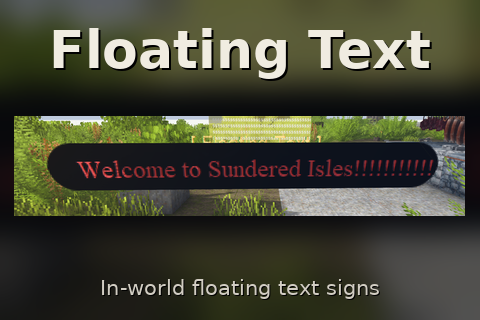
Vintage Story Mod DB · Vintage Story mod
Floating Text Images and Gifs
Floating Text Place invisible signs that display floating text and images anywhere in the world. Floating Text adds an invisible anchor block that shows customizable in-world text and pictures — welcome banners, rules, zone markers, live server info, te
Choose a version Pick your version below, then grab the matching file.
Quick answer
Which Floating Text Images and Gifs release should I use?
Latest stable file 1.26.0
Game version 1.22.6, 1.22.7
Loader Built-in Vintage Story mod system
Floating Text Images and Gifs 1.26.0 targets 1.22.6, 1.22.7. It must be installed on the client. Installation on the dedicated server is optional. No extra mods listed for this file.
Where it goes
Is Floating Text Images and Gifs required on the client, server, or both?
It must be installed on the client. Installation on the dedicated server is optional.
Client Required
Dedicated server Optional
Loader for this release Built-in Vintage Story mod system
Required install it here Optional supported, not mandatory Not supported do not install here Source doesn’t say do not assume
This release supports both sides, but the source does not require it on the server.
What else does Floating Text Images and Gifs 1.26.0 need?
1.26.0. Change the file and its required mods may change too.
This file does not list any required mods. Do not add a library just because a different file uses it.
This file does not list any required or optional mods.
Before you install it
Add Floating Text Images and Gifs without breaking your instance.
Built for Floating Text Images and Gifs 1.26.0. Pick another file and the loader, install side or required mods may change.
- 01
Stick to this file
Use 1.26.0. It targets 1.22.6, 1.22.7; another release may have different loader, side or dependency requirements.
- 02
Bring the mods it needs
This file does not list any required mods. Do not add a library just because a different file uses it.
- 03
Put it on the correct side
It must be installed on the client. Installation on the dedicated server is optional.
- 04
Pick the file you checked
Use the “Get this file” button beside 1.26.0. It opens that exact file at the source.
About this project
What does Floating Text Images and Gifs add?
Floating Text
Place invisible signs that display floating text and images anywhere in the world.
Floating Text adds an invisible anchor block that shows customizable in-world text and
pictures — welcome banners, rules, zone markers, live server info, teleport pads,
animated logos and more. The block itself can't be seen and players walk right through it. Only
your content shows, floating right where you place it, and every player sees it with nothing
extra to install.
Features
Custom text — 17 fonts (Standard, Bold, Italic, Decorative, Monospace, Impact, Serif,
Handwritten, Comic and more), a 24-color palette, and adjustable size.
Images & animated GIFs — drag & drop a PNG, JPEG or animated GIF onto the editor and
it shows on the board. GIFs animate. Pictures can be sized from small up to 1000%, and up
to 10 MB / 4096px each. A "Text over image" toggle lays your text right on top of the
picture — perfect for a bordered postcard, a framed notice or a captioned banner — or leave it
off to stack the image above the text.
Background panel — optional panel behind the text with its own color, opacity, and
a toggle for rounded or square corners.
Glow mode so text stays readable in the dark, with its own selectable glow color — and an
optional glow light level that casts real colored light into the area around the board,
like a lantern. The lighting survives relogs. -this one is a work in progress at the moment, having some lighting issues.
Live placeholders — drop these into your text and they update on their own:
`{players}` `{time}` `{date}` `{season}` `{x}` `{y}` `{z}` `{coords}` `{restart}`, plus
per-player ones that show each viewer their own values — `{playername}` `{deaths}`
`{playtime}` — and `{blank}` for no text at all (handy for image-only boards).
Adjustable placement — set the view distance and how high the content floats, and
fine-tune its position in-world.
Facing & wrench control — boards billboard to always face the player by default, or flip
Face player off to lock a fixed facing you rotate with the wrench (left-click, 22.5°
steps). The wrench also nudges a board one voxel at a time (N/S, E/W, Up/Down) so you can
center it perfectly over a 2x2. The hitbox stays a flat, invisible marker on the ground while
the content floats above it.
Safe zone — flip it on and any player within 100 blocks gets complete immunity to
damage, temperature, temporal-stability loss and hunger while inside the radius. Great for
spawn, markets and event areas. Self-contained — no other mods required.
Command boards — run a command when a player right-clicks the board or steps onto
it, with an optional delay and a particle burst when it fires. Commands run with server
authority, so even non-admins can trigger teleports, kits and other effects. Perfect for spawn
pads, kit givers or info popups.
Admin-only editing through an in-game GUI — regular players just see the boards and can
trigger any commands you set up, but can't place, edit, or move them.
Management commands — `/floatingtext list` (alias `/ft`) lists every placed board with its
coordinates and a text preview, and `/ft tp <index>` teleports you to one.
Server-friendly — no new recipes, no crafting changes. Images live in a server-side store
and download to each client once on demand (identical pictures are stored and sent only once),
so boards stay light and sync automatically, and everything persists across restarts.
Requires
(Optional) RestartTimer — powers the `{restart}` countdown token. Floating Text reads its
schedule automatically; if it isn't installed, the token simply shows nothing.
Notes
Universal (client + server), and required on clients since the content is drawn client-side —
players joining a server with it will be prompted to install it. Only staff with the
`controlserver` privilege can place, edit, or move boards. A few fonts (the system ones like
Impact or Comic) depend on the player's OS; Standard and Decorative are bundled with the game and
look identical for everyone. For the "text over image" leave the background panel
off so the picture shows through behind the text.
Project description from Vintage Story Mod DB.
Pick your setup
Floating Text Images and Gifs releases for each Vintage Story version.
Choose the version and loader you play, then open the matching release.
Vintage Story version
1.22.6
1 loader buildCheck the dependencies, then try the file in a copied instance before changing a world you care about.
Recent files
Floating Text Images and Gifs versions and loaders
1.26.0
floatingtext_v1.26.0.zip
16 Oct 2026
Client Required Server Optional Dependencies No extras listed Listed on Release listing
Check the 1.22.7 setup 1.22.61.22.7 release
1.25.0
floatingtext_v1.25.0.zip
8 Oct 2026
Client Required Server Optional Dependencies No extras listed Listed on Release listing
Check the 1.22.7 setup 1.22.61.22.7 release
1.24.0
floatingtext_v1.24.0.zip
4 Oct 2026
Client Required Server Optional Dependencies No extras listed Listed on Release listing
Check the 1.22.7 setup 1.22.61.22.7 release
1.23.1
floatingtext_v1.23.1.zip
2 Oct 2026
Client Required Server Optional Dependencies No extras listed Listed on Release listing
Check the 1.22.7 setup 1.22.61.22.7 release
1.12.2
floatingtext_v1.12.2.zip
22 Sept 2026
Client Required Server Optional Dependencies No extras listed Listed on Release listing
Check the 1.22.7 setup 1.22.61.22.7 release
1.9.0
floatingtext_v1.9.0.zip
21 Sept 2026
Client Required Server Optional Dependencies No extras listed Listed on Release listing
Check the 1.22.7 setup 1.22.61.22.7 release
Looking for an older file? The official Vintage Story Mod DB project page is in Resources.