Vintage Story version
Back to mods 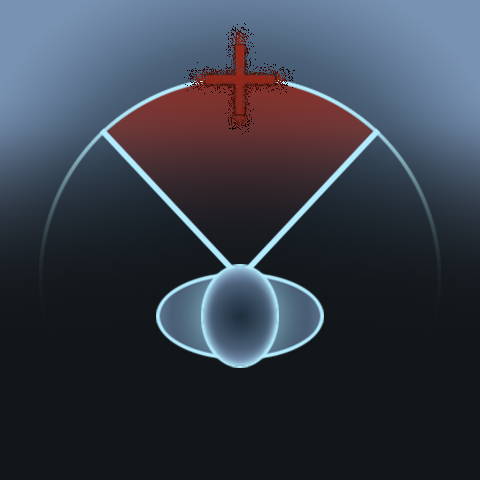
Vintage Story Mod DB · Vintage Story mod
Better Attack
Tired of hunting down enemy pixels while they fly around? This mod helps with that, though you still need to at least see the enemy to land a hit. I created this mod for myself and my friends so we could play comfortably without feeling like we were playing a
Choose a version Pick your version below, then grab the matching file.
Quick answer
Which Better Attack release should I use?
Latest stable file 1.2.3
Game version 1.22.7
Loader Built-in Vintage Story mod system
Better Attack 1.2.3 targets 1.22.7. It must be installed on the client. Do not install it on the dedicated server. No extra mods listed for this file.
Where it goes
Is Better Attack required on the client, server, or both?
It must be installed on the client. Do not install it on the dedicated server.
Client Required
Dedicated server Not supported
Loader for this release Built-in Vintage Story mod system
Required install it here Optional supported, not mandatory Not supported do not install here Source doesn’t say do not assume
This Vintage Story file is marked client-only.
What else does Better Attack 1.2.3 need?
1.2.3. Change the file and its required mods may change too.
This file does not list any required mods. Do not add a library just because a different file uses it.
This file does not list any required or optional mods.
Before you install it
Add Better Attack without breaking your instance.
Built for Better Attack 1.2.3. Pick another file and the loader, install side or required mods may change.
- 01
Stick to this file
Use 1.2.3. It targets 1.22.7; another release may have different loader, side or dependency requirements.
- 02
Bring the mods it needs
This file does not list any required mods. Do not add a library just because a different file uses it.
- 03
Put it on the correct side
It must be installed on the client. Do not install it on the dedicated server.
- 04
Pick the file you checked
Use the “Get this file” button beside 1.2.3. It opens that exact file at the source.
About this project
What does Better Attack add?
Tired of hunting down enemy pixels while they fly around?
This mod helps with that, though you still need to at least see the enemy to land a hit.
I created this mod for myself and my friends so we could play comfortably without feeling like we were playing an FPS.
Now you can too!
Description
Hits are now registered within a cone-shaped area in front of you.
Priority is given to the enemy closest to the crosshair within that area.
By default, the detection angle is 45 degrees from your crosshair.
If the crosshair turns red, it means you can hit the target.
The character also turns toward the target of the attack.
By default it's ON
Version 1.2.3 You can now strike and interact with enemies through any passable blocks, such as grass, plants, and foliage.
How to change
100%
To change the angle, simply type the command ".betterattack #" into the chat. Replace "#" with any value from 0 to 45 degrees.
If you enter the command without a number, the current angle will be displayed.
"0" means playing as if the mod were disabled, while "45" covers practically the entire visible area, so there is no point in going any wider. It's just a slight aiming assist.
The specified angle will be saved only for the current world.
To turn off/onn rotation, enter ".barotate #" and replace "#" with 0 or 1.
0 – OFF, 1 – ON.
If you enter it without a number, the current state will be displayed.
As with the angle, the value is preserved only for current world.
Config
After first launch you can find the config file at "C:\Users\[your user name]\AppData\Roaming\VintagestoryData\ModConfig\betterattack.json"
"setDefaultAngle": 45,
"setDefaultRotating": 1
The values are set as previously described.
Please note that targeting does not apply to tamed animals, animals of the first generation or higher, or players.
If you discover any issues or bugs, please let me know
Project description from Vintage Story Mod DB.
Pick your setup
Better Attack releases for each Vintage Story version.
Choose the version and loader you play, then open the matching release.
Check the dependencies, then try the file in a copied instance before changing a world you care about.
Recent files
Better Attack versions and loaders
1.2.3
betterattack_1.2.3.zip
12 Oct 2026
Client Required Server Not supported Dependencies No extras listed Listed on Release listing
Check the 1.22.7 setup 1.22.7 release
1.2.2
betterattack_1.2.2.zip
10 Oct 2026
Client Required Server Not supported Dependencies No extras listed Listed on Release listing
Check the 1.22.7 setup 1.22.7 release
1.2.1
betterattack_1.2.1.zip
4 Oct 2026
Client Required Server Not supported Dependencies No extras listed Listed on Release listing
Check the 1.22.7 setup 1.22.7 release
1.2.0
betterattack_1.2.0.zip
3 Oct 2026
Client Required Server Not supported Dependencies No extras listed Listed on Release listing
Check the 1.22.7 setup 1.22.7 release
1.1.0
betterattack_1.1.0.zip
29 Sept 2026
Client Required Server Not supported Dependencies No extras listed Listed on Release listing
Check the 1.22.7 setup 1.22.7 release
1.0.0
betterattack_1.0.0.zip
27 Sept 2026
Client Required Server Not supported Dependencies No extras listed Listed on Release listing
Check the 1.22.7 setup 1.22.7 release
Looking for an older file? The official Vintage Story Mod DB project page is in Resources.
 mod
mod Vintage Story
Null Claims
Land claiming without commands: one hotkey opens a window that drives vanilla's own claim system.
 mod
mod Vintage Story
NationGuard
Stationary archer guards that auto-shoot players based on a whitelist or blacklist.
 mod
mod Vintage Story
Coloured windmills and sails
Ctrl+Shift+K and select a texture! Coloured linen and more strange options for sails :/ Clientside.