Vintage Story version
Back to mods 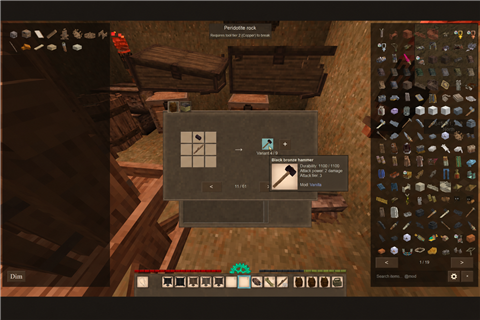
Vintage Story Mod DB · Vintage Story mod
XRB
Xlebka’s Recipe Browser — XRB A JEI-inspired recipe browser for Vintage Story with search, filters, favorites, crafting autofill and inventory sorting. Controls • R / Left-click: Show recipes. • U / Right-click: Show uses. • Mouse wheel: Cycle
Choose a version Pick your version below, then grab the matching file.
Quick answer
Which XRB release should I use?
Latest stable file 2.8.10
Game version 1.22.0, 1.22.1, 1.22.2
Loader Built-in Vintage Story mod system
XRB 2.8.10 targets 1.22.0, 1.22.1, 1.22.2. It must be installed on the client. Do not install it on the dedicated server. No extra mods listed for this file.
Where it goes
Is XRB required on the client, server, or both?
It must be installed on the client. Do not install it on the dedicated server.
Client Required
Dedicated server Not supported
Loader for this release Built-in Vintage Story mod system
Required install it here Optional supported, not mandatory Not supported do not install here Source doesn’t say do not assume
This Vintage Story file is marked client-only.
What else does XRB 2.8.10 need?
2.8.10. Change the file and its required mods may change too.
This file does not list any required mods. Do not add a library just because a different file uses it.
This file does not list any required or optional mods.
Before you install it
Add XRB without breaking your instance.
Built for XRB 2.8.10. Pick another file and the loader, install side or required mods may change.
- 01
Stick to this file
Use 2.8.10. It targets 1.22.0, 1.22.1, 1.22.2; another release may have different loader, side or dependency requirements.
- 02
Bring the mods it needs
This file does not list any required mods. Do not add a library just because a different file uses it.
- 03
Put it on the correct side
It must be installed on the client. Do not install it on the dedicated server.
- 04
Pick the file you checked
Use the “Get this file” button beside 2.8.10. It opens that exact file at the source.
About this project
What does XRB add?
Xlebka’s Recipe Browser — XRB
A JEI-inspired recipe browser for Vintage Story with search, filters, favorites, crafting autofill and inventory sorting.
Controls
- R / Left-click: Show recipes.
- U / Right-click: Show uses.
- Mouse wheel: Cycle recipe variants anywhere inside the recipe window.
- Backspace: Return to the previous recipe and page.
- Middle mouse button (MMB): Sort the inventory or container under your cursor.
- +: Place available ingredients into the crafting grid.
- Shift + +: Place ingredients for the maximum number of crafts.
- F: Toggle favorites.
- Ctrl + O: Show or hide XRB.
- Two-arrow button: Choose between conflicting crafting results.
Includes English/Russian text, recipe previews in favorites and support for multiple open containers.
Works locally in singleplayer. In multiplayer, crafting-result selection requires XRB on the server as well.
Linked Inventories and XRB Recipe Choice are now included—remove their separate mods.
Please report bugs or incorrect recipes in the comments.
Developed with the help of AI — GPT-6.1 Sol.
Project description from Vintage Story Mod DB.
Pick your setup
XRB releases for each Vintage Story version.
Choose the version and loader you play, then open the matching release.
Vintage Story version
1.22.6
1 loader buildVintage Story version
1.22.5
1 loader buildVintage Story version
1.22.4
1 loader buildVintage Story version
1.22.3
1 loader buildVintage Story version
1.22.2
1 loader buildVintage Story version
1.22.1
1 loader buildVintage Story version
1.22.0
1 loader buildCheck the dependencies, then try the file in a copied instance before changing a world you care about.
Recent files
XRB versions and loaders
2.8.10
xrb-2.8.10.zip
8 Oct 2026
Client Required Server Not supported Dependencies No extras listed Listed on Release listing
Check the 1.22.7 setup 1.22.01.22.11.22.21.22.3 release
2.5.1
xrb-2.5.1.zip
7 Oct 2026
Client Required Server Not supported Dependencies No extras listed Listed on Release listing
Check the 1.22.7 setup 1.22.01.22.11.22.21.22.3 release
2.0.9
xrb-2.0.9.zip
6 Oct 2026
Client Required Server Not supported Dependencies No extras listed Listed on Release listing
Check the 1.22.7 setup 1.22.01.22.11.22.21.22.3 release
2.0.6
xrb-2.0.6.zip
6 Oct 2026
Client Required Server Not supported Dependencies No extras listed Listed on Release listing
Check the 1.22.7 setup 1.22.01.22.11.22.21.22.3 release
1.1.0
xrb-1.1.0.zip
4 Oct 2026
Client Required Server Not supported Dependencies No extras listed Listed on Release listing
Check the 1.22.7 setup 1.22.01.22.11.22.21.22.3 release
1.0.0
xrb-1.0.0.zip
4 Oct 2026
Client Required Server Not supported Dependencies No extras listed Listed on Release listing
Check the 1.22.7 setup 1.22.7 release
Looking for an older file? The official Vintage Story Mod DB project page is in Resources.
mod
Vintage Story
Packrat + MoreInventorys Compat
Makes MoreInventorys contents show up in Packrat's hotkey window, and adds quick stack and sorting.
 mod
mod Vintage Story
Nf3t - Water Sponge
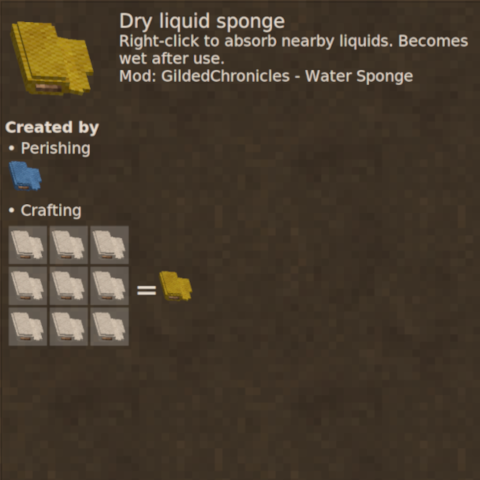
Adds a sponge for soaking up water in a configurable distance from the selected block
mod
Vintage Story
GamepadCompanionVS
Native gamepad support for Vintage Story 1.22+ — 12-slot radial menu, virtual cursor for GUI, etc.