Vintage Story version
Back to mods 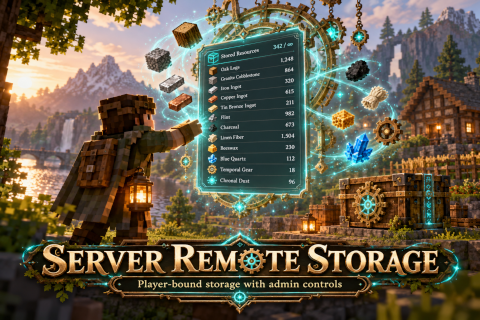
Vintage Story Mod DB · Vintage Story mod
Server Remote Storage
Server Remote Storage Personal, player-bound storage with customizable capacity, bulk item management, and powerful server administration controls. Overview Server Remote Storage provides players with their own personal storage system that can be accessed f
Choose a version Pick your version below, then grab the matching file.
Quick answer
Which Server Remote Storage release should I use?
Latest stable file 0.1.5
Game version 1.22.7
Loader Built-in Vintage Story mod system
Server Remote Storage 0.1.5 targets 1.22.7. It must be installed on the client. Installation on the dedicated server is optional. No extra mods listed for this file.
Where it goes
Is Server Remote Storage required on the client, server, or both?
It must be installed on the client. Installation on the dedicated server is optional.
Client Required
Dedicated server Optional
Loader for this release Built-in Vintage Story mod system
Required install it here Optional supported, not mandatory Not supported do not install here Source doesn’t say do not assume
This release supports both sides, but the source does not require it on the server.
What else does Server Remote Storage 0.1.5 need?
0.1.5. Change the file and its required mods may change too.
This file does not list any required mods. Do not add a library just because a different file uses it.
This file does not list any required or optional mods.
Before you install it
Add Server Remote Storage without breaking your instance.
Built for Server Remote Storage 0.1.5. Pick another file and the loader, install side or required mods may change.
- 01
Stick to this file
Use 0.1.5. It targets 1.22.7; another release may have different loader, side or dependency requirements.
- 02
Bring the mods it needs
This file does not list any required mods. Do not add a library just because a different file uses it.
- 03
Put it on the correct side
It must be installed on the client. Installation on the dedicated server is optional.
- 04
Pick the file you checked
Use the “Get this file” button beside 0.1.5. It opens that exact file at the source.
About this project
What does Server Remote Storage add?
Server Remote Storage
Personal, player-bound storage with customizable capacity, bulk item management, and powerful server administration controls.
Overview
Server Remote Storage provides players with their own personal storage system that can be accessed from anywhere in the world without needing to place or interact with a physical chest.
Designed with multiplayer servers in mind, the mod gives administrators control over storage capacities, item quantity limits, and individual player access.
Each player receives independent storage, with items managed and saved server-side.
Features
Personal Remote Storage
-
Access personal storage from anywhere using Shift+U.
-
No physical storage blocks required.
-
Each player receives their own independent storage.
-
Matching items are grouped together.
-
View stored items and their quantities in a custom GUI.
-
Deposit items directly from your inventory.
-
Withdraw specific quantities using the custom amount field.
-
Storage remains associated with the player's account between sessions.
Customizable Storage Capacity
Administrators can configure how many unique item types players may store.
-
Set a server-wide default storage capacity.
-
Default capacity starts at 20 unique item types.
-
Adjust individual player limits.
-
Add personal capacity adjustments.
-
Lock individual storage capacities.
-
Reset players to the current server default.
-
Configure different storage limits when needed.
Players using the default capacity automatically follow changes to the server-wide limit. Custom or locked capacities remain unchanged until an administrator modifies them.
Item Quantity Limits
Administrators can control how many items of each type players may store.
-
Configure a server-wide maximum quantity per item type.
-
Set limits such as 100, 200, 500, or higher.
-
Enable unlimited item quantities server-wide.
-
Configure individual unlimited-quantity overrides.
-
Remove overrides to restore the server limit.
For example, a server limit of 200 allows storage of 200 dirt, 200 stone, and 200 logs, provided sufficient item-type capacity is available.
Administrative Storage Management
Server Remote Storage includes a dedicated administrative interface.
Administrators can:
-
View individual player storage inventories.
-
Inspect stored items and quantities.
-
Permanently delete stored item entries.
-
Change individual storage limits.
-
Adjust personal capacities.
-
Lock or reset storage capacities.
-
Disable or restore individual player access.
-
Set server-wide storage defaults.
-
Configure maximum item quantities.
-
Manage individual quantity-limit overrides.
These controls allow server owners to manage storage without manually editing configuration files.
Storage Protection
-
Reducing storage limits does not automatically delete stored items.
-
Players exceeding their capacity cannot deposit additional items until enough space is freed.
-
Existing items remain available for withdrawal.
-
Disabling player access preserves their stored contents.
-
Administrative item deletion is separate from normal withdrawals.
Server Configuration
Example settings:
| Setting | Example Value |
|---|---|
| Default storage capacity | 20 unique item types |
| Server maximum quantity | 200 per item type |
| Individual storage capacity | Administrator-configurable |
| Unlimited item quantities | Optional |
| Storage capacity lock | Optional |
| Player access control | Enable / Disable |
| Administrative item removal | Available |
All storage limits and adjustments are managed by server administrators.
Performance and Design
Server Remote Storage uses virtual storage rather than requiring players to build additional physical chests.
Matching items are grouped into storage entries, providing an alternative to large collections of traditional storage containers.
The system is designed to keep personal item storage organized while reducing the need for extensive physical storage rooms.
Performance Note: The mod has not yet been independently benchmarked for server performance improvements. Actual results may vary depending on player activity, stored items, and server configuration.
Compatibility
-
Vintage Story: 1.22.7
-
Singleplayer: Supported
-
Multiplayer: Supported
-
Storage Type: Player-bound, server-managed
-
Default Keybind: Shift+U
-
Author: ForsakenAbyss
Additional Information
Server Remote Storage is a standalone mod and does not require the original Temporal Storage chest mod.
Both mods can be installed together and operate independently.
Storage is managed server-side, allowing administrators to maintain control over storage capacities, item limits, and player access.
Server Remote Storage — Your items, your storage, anywhere in the world.
Project description from Vintage Story Mod DB.
Pick your setup
Server Remote Storage releases for each Vintage Story version.
Choose the version and loader you play, then open the matching release.
Check the dependencies, then try the file in a copied instance before changing a world you care about.
Recent files
Server Remote Storage versions and loaders
0.1.5
ServerRemoteStorage.zip
20 Oct 2026
Client Required Server Optional Dependencies No extras listed Listed on Release listing
Check the 1.22.7 setup 1.22.7 release
Looking for an older file? The official Vintage Story Mod DB project page is in Resources.