Vintage Story version
Back to mods 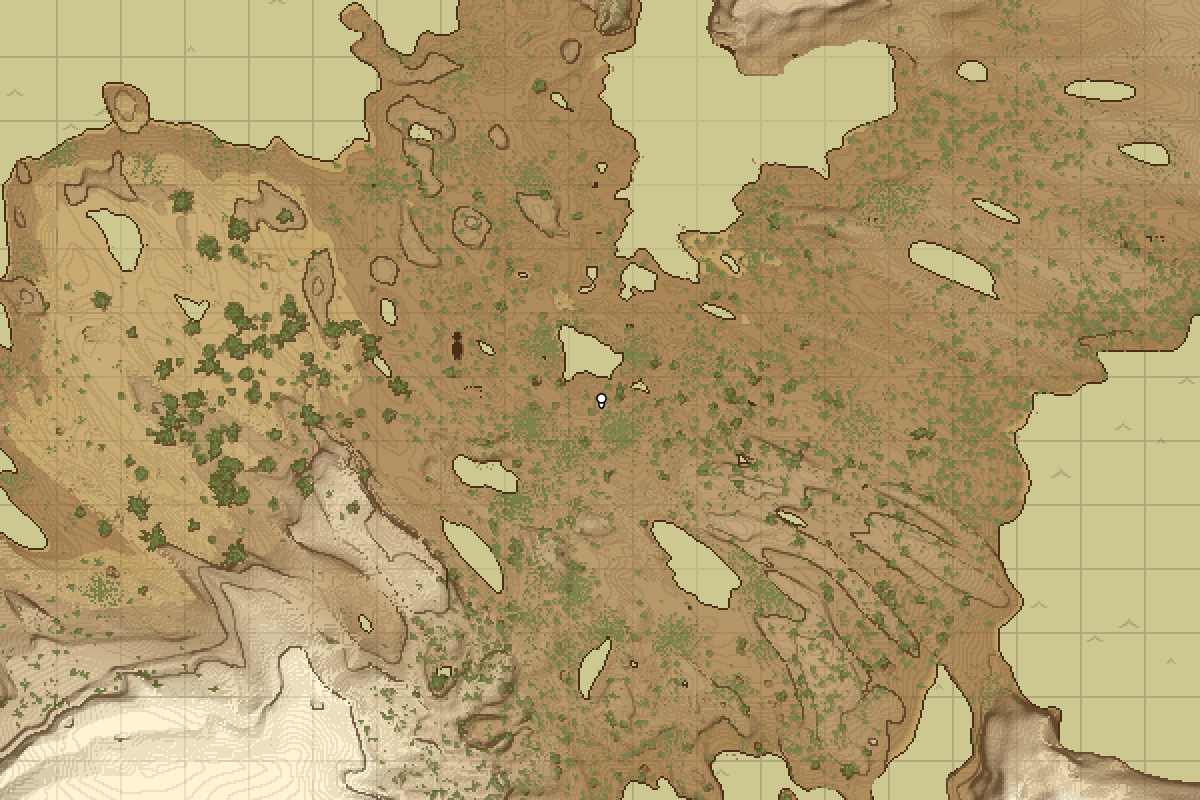
Vintage Story Mod DB · Vintage Story mod
Medieval Map
This is a simple mod with the objective of simplifying the world map. It is not helpful in any way. Note: The author is on indefinite break. If you would like to continue this mod, feel free to use the included source code. WARNING: Read carefully before con
Choose a version Pick your version below, then grab the matching file.
Quick answer
Which Medieval Map release should I use?
Latest stable file 1.4.1
Game version 1.18.8
Loader Built-in Vintage Story mod system
Medieval Map 1.4.1 targets 1.18.8. It must be installed on the client. Do not install it on the dedicated server. No extra mods listed for this file.
Where it goes
Is Medieval Map required on the client, server, or both?
It must be installed on the client. Do not install it on the dedicated server.
Client Required
Dedicated server Not supported
Loader for this release Built-in Vintage Story mod system
Required install it here Optional supported, not mandatory Not supported do not install here Source doesn’t say do not assume
This Vintage Story file is marked client-only.
What else does Medieval Map 1.4.1 need?
1.4.1. Change the file and its required mods may change too.
This file does not list any required mods. Do not add a library just because a different file uses it.
This file does not list any required or optional mods.
Before you install it
Add Medieval Map without breaking your instance.
Built for Medieval Map 1.4.1. Pick another file and the loader, install side or required mods may change.
- 01
Stick to this file
Use 1.4.1. It targets 1.18.8; another release may have different loader, side or dependency requirements.
- 02
Bring the mods it needs
This file does not list any required mods. Do not add a library just because a different file uses it.
- 03
Put it on the correct side
It must be installed on the client. Do not install it on the dedicated server.
- 04
Pick the file you checked
Use the “Get this file” button beside 1.4.1. It opens that exact file at the source.
About this project
What does Medieval Map add?
This is a simple mod with the objective of simplifying the world map. It is not helpful in any way.
Note: The author is on indefinite break. If you would like to continue this mod, feel free to use the included source code.
WARNING: Read carefully before considering installing this mod.
This mod replaces the way world maps are drawn. It does not stylize your existing world maps entirely. Only chunks that are loaded while this mod is active will be drawn in the new style. Inversely, if you disable this mod, the chunks will not be reverted to their original version until they are loaded again.
Before using this mod, it is highly recommended that you create a backup of your maps (.../VintagestoryData/Maps/).
Upon running the mod, a medievalmap.json config file will be created or updated in the game's ModConfig directory. The available options are:
ink_colour: hex colour code for most non-natural blocks and outlines.land_colour: hex colour code for land.desert_colour: hex colour code for sand and gravel.forest_colour: hex colour code for forest floor.road_colour: hex colour code for roads and farmland.plant_colour: hex colour code for most plants.water_colour: hex colour code for water.ice_colour: hex colour code for permanent ice, such as glaciers.lava_colour: hex colour code for lava (currently unused).high_colour: hex colour code to denote high altitude, such as mountains.low_colour: hex colour code to denote low altitude, such as holes.water_edge_colour: hex colour code for the water edges.generic_shadow_colour: hex colour code for most shading.plant_shadow_colour: hex colour code for plant shading.generic_grid_colour: hex colour code for the grid.water_grid_colour: hex colour code for the grid over water.generic_grid_opacity: opacity of the grid (between0and1).ocean_grid_opacity: opacity of the grid over oceans (between0and1).ocean_textured:trueto enable ocean texture, otherwisefalse.
Project description from Vintage Story Mod DB.
Pick your setup
Medieval Map releases for each Vintage Story version.
Choose the version and loader you play, then open the matching release.
Vintage Story version
1.18.6
1 loader buildVintage Story version
1.18.0
1 loader buildCheck the dependencies, then try the file in a copied instance before changing a world you care about.
Recent files
Medieval Map versions and loaders
1.4.1
medievalmap.zip
15 Aug 2023
Client Required Server Not supported Dependencies No extras listed Listed on Release listing
Check the 1.18.8 setup 1.18.8 release
1.4.0
medievalmap.zip
9 Aug 2023
Client Required Server Not supported Dependencies No extras listed Listed on Release listing
Check the 1.18.8 setup 1.18.8 release
1.3.3
medievalmap.zip
6 Jul 2023
Client Required Server Not supported Dependencies No extras listed Listed on Release listing
Check the 1.18.6 setup 1.18.6 release
1.3.2
medievalmap.zip
29 Jun 2023
Client Required Server Not supported Dependencies No extras listed Listed on Release listing
Check the 1.18.6 setup 1.18.6 release
1.3.1
medievalmap.zip
17 Jun 2023
Client Required Server Not supported Dependencies No extras listed Listed on Release listing
Check the 1.18.0 setup 1.18.0 release
1.3.0
medievalmap.zip
5 Jun 2023
Client Required Server Not supported Dependencies No extras listed Listed on Release listing
Check the 1.18.0 setup 1.18.0 release
1.2.0
medievalmap.zip
30 May 2023
Client Required Server Not supported Dependencies No extras listed Listed on Release listing
Check the 1.18.0 setup 1.18.0 release
1.1.1
medievalmap.zip
29 May 2023
Client Required Server Not supported Dependencies No extras listed Listed on Release listing
Check the 1.18.0 setup 1.18.0 release
1.1.0
medievalmap.zip
27 May 2023
Client Required Server Not supported Dependencies No extras listed Listed on Release listing
Check the 1.18.0 setup 1.18.0 release
1.0.0
medievalmap.zip
27 May 2023
Client Required Server Not supported Dependencies No extras listed Listed on Release listing
Check the 1.18.0 setup 1.18.0 release
Looking for an older file? The official Vintage Story Mod DB project page is in Resources.
 mod
mod Vintage Story
War without reason
PvP has consequences. Even in safe zones.
 mod
mod Vintage Story
Eternal Seraph: Patch
Патч для серверу Вічний Серафим. Patch for the server Eternal Seraph.
 mod
mod Vintage Story
Forlorn Additions - Zlip'd
Modification to the forlorn addition mod to add updated forging mechanics