Vintage Story version
Back to mods 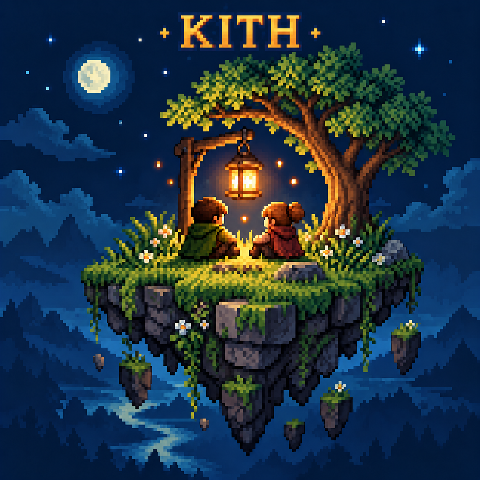
Vintage Story Mod DB · Vintage Story mod
Kith
A SOCIAL MOD FOR VINTAGE STORY KITH your world, shared Open your singleplayer world to friends with no port forwarding. Meet in a floating hub, build your own island, dress up, emote and chat, all without leaving the game. ◉ NO PORT FORWARDING ⇄ DIRECT P2P
Choose a version Pick your version below, then grab the matching file.
Quick answer
Which Kith release should I use?
Latest stable file 0.1.15
Game version 1.22.0-pre.1, 1.22.0-pre.2, 1.22.0-pre.3
Loader Built-in Vintage Story mod system
Kith 0.1.15 targets 1.22.0-pre.1, 1.22.0-pre.2, 1.22.0-pre.3. It must be installed on the client. Installation on the dedicated server is optional. No extra mods listed for this file.
Where it goes
Is Kith required on the client, server, or both?
It must be installed on the client. Installation on the dedicated server is optional.
Client Required
Dedicated server Optional
Loader for this release Built-in Vintage Story mod system
Required install it here Optional supported, not mandatory Not supported do not install here Source doesn’t say do not assume
This release supports both sides, but the source does not require it on the server.
What else does Kith 0.1.15 need?
0.1.15. Change the file and its required mods may change too.
This file does not list any required mods. Do not add a library just because a different file uses it.
This file does not list any required or optional mods.
Before you install it
Add Kith without breaking your instance.
Built for Kith 0.1.15. Pick another file and the loader, install side or required mods may change.
- 01
Stick to this file
Use 0.1.15. It targets 1.22.0-pre.1, 1.22.0-pre.2, 1.22.0-pre.3; another release may have different loader, side or dependency requirements.
- 02
Bring the mods it needs
This file does not list any required mods. Do not add a library just because a different file uses it.
- 03
Put it on the correct side
It must be installed on the client. Installation on the dedicated server is optional.
- 04
Pick the file you checked
Use the “Get this file” button beside 0.1.15. It opens that exact file at the source.
About this project
What does Kith add?
A SOCIAL MOD FOR VINTAGE STORY
KITH
your world, shared
Open your singleplayer world to friends with no port forwarding. Meet in a floating hub, build your own island, dress up, emote and chat, all without leaving the game.
◉ NO PORT FORWARDING ⇄ DIRECT P2P + RELAY FALLBACK ✦ CLIENT-SIDE ⚙ VS 1.22
— WHAT'S IN THE MOD —
|
🏠
Host with friends
One click opens your world. Kith tries a direct connection first and quietly falls back to its relay if your network won't allow one.
|
🏝
A hub and an island
A floating lobby with your own plot to build on, in creative or survival, with the hub's time, season and mood set by you.
|
|
🎩
Cosmetics and emotes
Hats, masks, capes and backpacks, saved outfits, per-slot vanity, and an emote wheel on R. Other Kith players see your look anywhere.
|
💬
Friends and chat
Friend list with presence, direct and group chats, screenshot sharing, and invites you accept with J.
|
✎ QUICK KEYS
| K | Kith menu (full menu in the hub, quick menu everywhere else) |
| R | Hold for the emote wheel |
| J | Join a friend's world when an invite arrives |
All keys can be rebound in Vintage Story's controls. Type /kith help in chat for commands.
— THE SHELVES — click one to open it
I · Hosting your world
Choose Open world to friends from the pause menu or the Kith quick menu, then invite a friend. Your world keeps running on your own computer; friends join it like a normal server.
|
1
You open your world and invite a friend |
2
Kith tries a direct connection between you |
3
If that's blocked, it uses the relay instead |
No port forwarding, no server rental. Your friend needs Kith installed, and both of you need the Kith online service to be reachable.
II · The hub and your island
Create a new world with the Kith Hub playstyle to get your floating lobby. Press K there for the full Kith menu.
- Build on your personal island in creative or survival.
- Set the hub's time of day, season and atmosphere.
- Turn on Island backup to keep your island with your Kith account and restore it on another install.
- Your island is its own space, separate from the worlds you host for friends.
III · Wardrobe, vanity and emotes
- Cosmetic hats, masks, capes and backpacks.
- Save whole outfits and switch between them.
- Real clothing in the same spot normally wins. Turn on Vanity for a category to show the cosmetic instead, or pick Nothing to hide that layer. Your gear still protects you.
- Hold R for the emote wheel.
- Other Kith players see your cosmetics even on servers without Kith. Players without Kith see your normal gear.
IV · Friends, groups and screenshots
- Add friends and see who's online and what they're playing.
- Direct messages and group chats with up to 10 people.
- Send a screenshot straight into a chat.
- Get world invites and join a friend's hosted world from the Kith menu.
- Block anyone to cut contact both ways.
- Choose whether friends can see the multiplayer server you're on.
V · For server admins
Kith isn't required on a server. Install it there to set cosmetic and emote rules for that world:
/kith cosmetics status |
Show the current rules |
/kith cosmetics on|off |
Allow or disable cosmetics |
/kith cosmetics mode open|adventure |
Adventure: unlock a cosmetic by finding the matching vanilla clothing item |
/kith cosmetics allow|deny <code> |
Allow or ban a single cosmetic |
/kith emotes on|off |
Allow or disable emotes |
/kith collection |
Any player: see what you've found in this world |
Use /kith help in-game for the exact syntax and permissions.
VI · Questions people ask
Do my friends need Kith?
Yes, to join a world you host and to see your cosmetics.
Does a multiplayer server need Kith?
No. Friends, chat, cosmetics and emotes all work client-side. A server only needs Kith if its admins want to set rules.
Do I need to forward ports or rent a server?
No. Kith connects you directly when it can and uses its relay when it can't.
Can I play without the online features?
Yes. Turn off Online features in Kith Settings.
How do updates work?
Auto-update Kith is off by default. When a new version is out, Kith tells you in chat as you join your hub. Turn it on in Settings and Kith installs new compatible versions for your next game start.
Can I delete my Kith account?
Yes. Use Delete Kith account in Settings to remove your account and what the Kith server stores for it.
VII · Online features and privacy
Kith's online features use the Kith service at kith.nullspace.gg. Sign-in uses Vintage Story's own multiplayer-token check; Kith never asks for your game password.
To run its features, the service handles your account name and ID, game version, friends and groups, messages, presence, your cosmetic loadout, screenshots you share, and island backups if you turn them on. For a direct connection, it passes the network addresses needed to reach your friend. Shared screenshots are kept for 30 days.
No ads, no analytics, no selling data. You can turn online features off, or delete your account, in Kith Settings.
VIII · Known limits
- Players need Kith installed to see Kith cosmetics or use its social and hosting features.
- Hosting and online features need the Kith service to be reachable.
- Whether a direct connection works depends on both players' networks. When it doesn't, Kith uses the relay.
- Only servers running Kith can enforce cosmetic and emote rules.
- Kith is in active development. Back up worlds and islands you care about before trying a new version.
★ Get started in a minute
- Install Kith. It only needs to be on your computer.
- Make a world with the Kith Hub playstyle and press K.
- Add a friend, then choose Open world to friends and send an invite.
- Your friend presses J and walks in.
Obviously AI coding assistants were used during development. The Kith pixel-art icon and this page was generated with AI.
Project description from Vintage Story Mod DB.
Pick your setup
Kith releases for each Vintage Story version.
Choose the version and loader you play, then open the matching release.
Vintage Story version
1.22.6
1 loader buildVintage Story version
1.22.5
1 loader buildVintage Story version
1.22.4
1 loader buildVintage Story version
1.22.3
1 loader buildVintage Story version
1.22.2
1 loader buildVintage Story version
1.22.1
1 loader buildVintage Story version
1.22.0-rc.10
1 loader buildVintage Story version
1.22.0-rc.9
1 loader buildVintage Story version
1.22.0-rc.8
1 loader buildVintage Story version
1.22.0-rc.7
1 loader buildVintage Story version
1.22.0-rc.6
1 loader buildShowing the newest 12 of 23 game versions. Older files are in the list below.
Check the dependencies, then try the file in a copied instance before changing a world you care about.
Recent files
Kith versions and loaders
0.1.15
Kith-0.1.15.zip
25 Oct 2026
Client Required Server Optional Dependencies No extras listed Listed on Release listing
Check the 1.22.7 setup 1.22.0-pre.11.22.0-pre.21.22.0-pre.31.22.0-pre.4 release
0.1.14
Kith-0.1.14.zip
25 Oct 2026
Client Required Server Optional Dependencies No extras listed Listed on Release listing
Check the 1.22.7 setup 1.22.0-pre.11.22.0-pre.21.22.0-pre.31.22.0-pre.4 release
0.1.13
Kith-0.1.13.zip
25 Oct 2026
Client Required Server Optional Dependencies No extras listed Listed on Release listing
Check the 1.22.7 setup 1.22.0-pre.11.22.0-pre.21.22.0-pre.31.22.0-pre.4 release
0.1.12
Kith-0.1.12.zip
24 Oct 2026
Client Required Server Optional Dependencies No extras listed Listed on Release listing
Check the 1.22.7 setup 1.22.0-pre.11.22.0-pre.21.22.0-pre.31.22.0-pre.4 release
0.1.11
Kith-0.1.11.zip
24 Oct 2026
Client Required Server Optional Dependencies No extras listed Listed on Release listing
Check the 1.22.7 setup 1.22.0-pre.11.22.0-pre.21.22.0-pre.31.22.0-pre.4 release
0.1.10
Kith-0.1.10.zip
24 Oct 2026
Client Required Server Optional Dependencies No extras listed Listed on Release listing
Check the 1.22.7 setup 1.22.0-pre.11.22.0-pre.21.22.0-pre.31.22.0-pre.4 release
0.1.9
Kith-0.1.9.zip
24 Oct 2026
Client Required Server Optional Dependencies No extras listed Listed on Release listing
Check the 1.22.7 setup 1.22.0-pre.11.22.0-pre.21.22.0-pre.31.22.0-pre.4 release
0.1.8
Kith-0.1.8.zip
24 Oct 2026
Client Required Server Optional Dependencies No extras listed Listed on Release listing
Check the 1.22.7 setup 1.22.0-pre.11.22.0-pre.21.22.0-pre.31.22.0-pre.4 release
0.1.7
Kith-0.1.7.zip
24 Oct 2026
Client Required Server Optional Dependencies No extras listed Listed on Release listing
Check the 1.22.7 setup 1.22.0-pre.11.22.0-pre.21.22.0-pre.31.22.0-pre.4 release
Looking for an older file? The official Vintage Story Mod DB project page is in Resources.