Vintage Story version
Back to mods 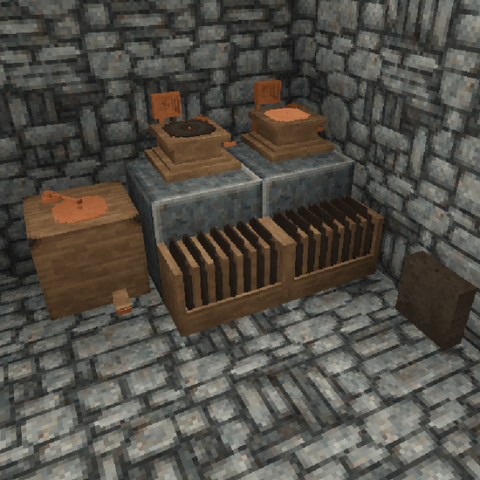
Vintage Story Mod DB · Vintage Story mod
VynilMod
Español VinylMod es un marco para Vintage Story que agrega un sistema completo para crear y reproducir discos de vinilo dentro del juego. El mod añade: • Un gramófono para reproducir discos de vinilo. • Un torno para discos utilizado para grabar la música q
Choose a version Pick your version below, then grab the matching file.
Quick answer
Which VynilMod release should I use?
Latest stable file 1.0.2
Game version 1.22.3
Loader Built-in Vintage Story mod system
VynilMod 1.0.2 targets 1.22.3. It must be installed on the client. Installation on the dedicated server is optional. No extra mods listed for this file.
Where it goes
Is VynilMod required on the client, server, or both?
It must be installed on the client. Installation on the dedicated server is optional.
Client Required
Dedicated server Optional
Loader for this release Built-in Vintage Story mod system
Required install it here Optional supported, not mandatory Not supported do not install here Source doesn’t say do not assume
This release supports both sides, but the source does not require it on the server.
What else does VynilMod 1.0.2 need?
1.0.2. Change the file and its required mods may change too.
This file does not list any required mods. Do not add a library just because a different file uses it.
This file does not list any required or optional mods.
Before you install it
Add VynilMod without breaking your instance.
Built for VynilMod 1.0.2. Pick another file and the loader, install side or required mods may change.
- 01
Stick to this file
Use 1.0.2. It targets 1.22.3; another release may have different loader, side or dependency requirements.
- 02
Bring the mods it needs
This file does not list any required mods. Do not add a library just because a different file uses it.
- 03
Put it on the correct side
It must be installed on the client. Installation on the dedicated server is optional.
- 04
Pick the file you checked
Use the “Get this file” button beside 1.0.2. It opens that exact file at the source.
About this project
What does VynilMod add?
Español
VinylMod es un marco para Vintage Story que agrega un sistema completo para crear y reproducir discos de vinilo dentro del juego.
El mod añade:
- Un gramófono para reproducir discos de vinilo.
- Un torno para discos utilizado para grabar la música que hayas puesto.
- Discos de vinilo que pueden contener diferentes canciones hasta un límite de 5.
- Un sistema de catálogos de música que permite a otros mods y addons añadir sus propias canciones.
El framework está pensado para que otros mods puedan utilizarlo para agregar música personalizada.
Cómo agregar tu música
Lo primero es crear un mod de contenido y, en activos/tu-mod, solo será necesario tener 2 carpetas. La primera es la carpeta config, con otra carpeta llamada musiccatalog donde se ingresa su configuración en JSON.
Tendría que terminar viendo algo como config/musiccatalog/(ejemplo-catalogo.json)
Cada catálogo puede contener varias canciones y puede tener múltiples catálogos en un solo archivo JSON. Cada canción tiene que apuntar a su propio archivo de audio (mismo nombre del archivo).
Ahora la segunda carpeta tendrá que llamarse sounds, con otra carpeta llamada music dentro (sounds/music/(ejemplo.ogg)). Es en donde tendrás que dejar tu música en formato .ogg.
Será necesario adquirir tu propia música de la forma que prefieras. Seguramente la obtendrás en .mp3 o .mp4. Puedes utilizar sitios web para transformarla a .ogg o aplicaciones gratuitas.
Y eso sería todo. Así es como tendría que verse el catálogo:
English
VinylMod is a framework for Vintage Story that adds a complete system to create and play vinyl records in-game.
The mod adds:
- A gramophone to play vinyl records.
- A record lathe used to record the music you choose.
- Vinyl records that can hold up to 5 different songs.
- A music catalog system that allows other mods and addons to add their own songs.
The framework is designed so that other mods can use it to add custom music.
How to add your music
The first step is to create a content mod. Inside assets/your-mod, you will only need 2 folders. The first one is the config folder, containing another folder called musiccatalog, where you place your JSON configuration.
It should end up looking like config/musiccatalog/(example-catalog.json)
Each catalog can contain multiple songs, and you can have multiple catalogs within a single JSON file. Each song must point to its corresponding audio file (using the exact filename).
The second folder must be named sounds, with another folder called music inside (sounds/music/(example.ogg)). This is where you place your music files in .ogg format.
You will need to obtain your music in whichever way you prefer (usually as .mp3 or .mp4). You can use websites or free desktop tools to convert them to .ogg.
And that's all! Here is how the catalog should look:
Catalog JSON
[
  {
    "id": "catalog-name",
    "songs": [
      {
        "id": "song-01",
        "title": "Song title",
        "sound": "music/song-01.ogg"
      },
      {
        "id": "song-02",
        "title": "Song title 2",
        "sound": "music/song-02.ogg"
      },
      {
        "id": "song-03",
        "title": "Song title 3",
        "sound": "music/song-03.ogg"
      },
      {
        "id": "song-04",
        "title": "Song title 4",
        "sound": "music/song-04.ogg"
      },
      {
        "id": "song-05",
        "title": "Song title 5",
        "sound": "music/song-05.ogg"
      }
    ]
  },
  {
    "id": "nombre catalogo",
    "songs": [
      {
        "id": "cancion-01",
        "title": "Título de la canción",
        "sound": "music/cancion-01.ogg"
      },
      {
        "id": "cancion-02",
        "title": "Título de la canción 2",
        "sound": "music/cancion-02.ogg"
      },
      {
        "id": "cancion-03",
        "title": "Título de la canción 3",
        "sound": "music/cancion-03.ogg"
      },
      {
        "id": "cancion-04",
        "title": "Título de la canción 4",
        "sound": "music/cancion-04.ogg"
      },
      {
        "id": "cancion-05",
        "title": "Título de la canción 5",
        "sound": "music/cancion-05.ogg"
      }
    ]
  }
]
Planned Code Modifications
- es posible agregar canciones al catalogo sin corromper los discos ya creados siempre que no se borren las canciones que ya tenia ese catalogo, pero si creas otro archivo .json donde dentro le pones el mismo nombre a un catalogo( ejemplo tienes dos archivos .json con catalogos llamados Imagine Dragons) el que cargue antes sera el que se mostrara el segundo se ignorara es algo que vere para cambiar y que no se ignoren pero por ahora sigue asi. Si tienen alguna sugerencia ya sea en el rango de la musica o algun error pueden escribirme a discord (juanph) o dejen un comentario.
- It is possible to add songs to the catalog without corrupting the previously created records, as long as the songs that the catalog already had are not deleted. However, if you create another
.jsonfile and give a catalog inside it the same name (for example, you have two.jsonfiles with catalogs named "Imagine Dragons"), the one that loads first will be the one displayed, and the second one will be ignored. This is something I will look into changing so that it isn't ignored, but for now, it remains this way. If you have any suggestions, whether in the range of the music or any bug, you can write to me on Discord (juanph) or leave a comment.
Project description from Vintage Story Mod DB.
Pick your setup
VynilMod releases for each Vintage Story version.
Choose the version and loader you play, then open the matching release.
Check the dependencies, then try the file in a copied instance before changing a world you care about.
Recent files
VynilMod versions and loaders
1.0.2
VynilMod-1.0.2.zip
29 Oct 2026
Client Required Server Optional Dependencies No extras listed Listed on Release listing
Check the 1.22.3 setup 1.22.3 release
1.0.1
VynilMod-1.0.1.zip
26 Oct 2026
Client Required Server Optional Dependencies No extras listed Listed on Release listing
Check the 1.22.3 setup 1.22.3 release
1.0.0
VynilMod-1.0.0.zip
26 Oct 2026
Client Required Server Optional Dependencies No extras listed Listed on Release listing
Check the 1.22.3 setup 1.22.3 release
Looking for an older file? The official Vintage Story Mod DB project page is in Resources.
 mod
mod Vintage Story
All Helve Workable
All items can be worked by the helve hammer.
 mod
mod Vintage Story
Null Smithy
Makes the smith load-bearing: every metal tool needs a seasoned haft and a forged rivet.
 mod
mod Vintage Story
Ponder
Hover an item and hold P to ponder it: animated 3D guides showing how it's used.