Vintage Story version
Back to mods 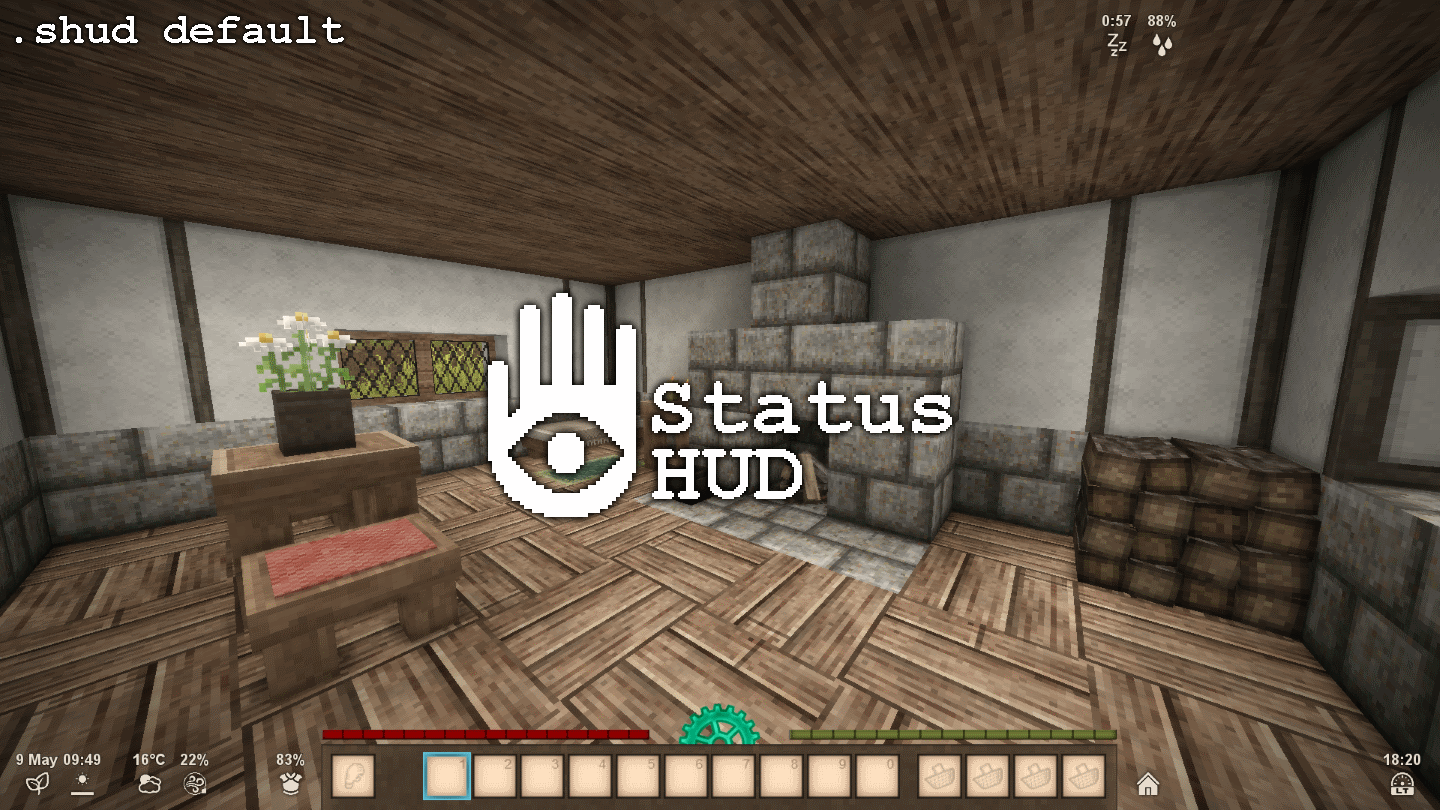
Vintage Story Mod DB · Vintage Story mod
Status HUD
This is a not-so-simple mod with the objective of relaying information to the player. If your character can feel it, then you should see it. Note: The author is on indefinite break. If you would like to continue this mod, feel free to use the included source
Choose a version Pick your version below, then grab the matching file.
Quick answer
Which Status HUD release should I use?
Latest stable file 1.4.3
Game version 1.18.8
Loader Built-in Vintage Story mod system
Status HUD 1.4.3 targets 1.18.8. It must be installed on the client. Do not install it on the dedicated server. No extra mods listed for this file.
Where it goes
Is Status HUD required on the client, server, or both?
It must be installed on the client. Do not install it on the dedicated server.
Client Required
Dedicated server Not supported
Loader for this release Built-in Vintage Story mod system
Required install it here Optional supported, not mandatory Not supported do not install here Source doesn’t say do not assume
This Vintage Story file is marked client-only.
What else does Status HUD 1.4.3 need?
1.4.3. Change the file and its required mods may change too.
This file does not list any required mods. Do not add a library just because a different file uses it.
This file does not list any required or optional mods.
Before you install it
Add Status HUD without breaking your instance.
Built for Status HUD 1.4.3. Pick another file and the loader, install side or required mods may change.
- 01
Stick to this file
Use 1.4.3. It targets 1.18.8; another release may have different loader, side or dependency requirements.
- 02
Bring the mods it needs
This file does not list any required mods. Do not add a library just because a different file uses it.
- 03
Put it on the correct side
It must be installed on the client. Do not install it on the dedicated server.
- 04
Pick the file you checked
Use the “Get this file” button beside 1.4.3. It opens that exact file at the source.
About this project
What does Status HUD add?
This is a not-so-simple mod with the objective of relaying information to the player. If your character can feel it, then you should see it.
Note: The author is on indefinite break. If you would like to continue this mod, feel free to use the included source code.
Description
Status HUD offers a collection of various elements to display on the HUD. The available elements are:
altitude: displays the player's current height (in meters) in relation to sea level;armour: displays the equipped armour durability average (in %). If there is no armour equipped, this element is hidden;bodyheat: displays the player's current body heat (in %). If it is at 100%, this element is hidden;compass: displays the player's current facing direction (in degrees) in relation to the north;date: displays the current date (e.g.1 Jul) and an icon for the current season (sprout for spring, sun for summer, leaf for autumn, and snowflake for winter);durability: displays the currently selected item's remaining durability. If there is no durability, this element is hidden;latitude: displays the player's current latitude (in degrees);light: displays the light level at the currently selected block. If no block is selected, this element is hidden;players: displays the number of players currently online;room: displays a house icon when the player is inside a room (house for large room, cabin for small room or cellar), and a sun icon above when inside a greenhouse. If the player is outside, this element is hidden;sleep: displays a countdown until the next time the player is able to sleep. If the player can sleep, this element is hidden;speed: displays the player's current speed (in m/s);stability: displays the temporal stability (e.g.76%) at the player's position if it is below 150%. If the temporal stability is 150%, this element is hidden;tempstorm: displays a timer when a temporal storm is approaching or in progress. Otherwise, this element is hidden (★ New in v1.4.2!);time: displays the current time (e.g.19:43) and an icon for the position of the sun relative to the horizon;time-local: displays the system's local time;weather: displays the current temperature (e.g.24°C) and an icon for the current condition (clear, fair skies, cloudy, rain, snow or hail);weather-f: same asweather, but uses the Fahrenheit scale;wet: displays how wet (e.g.72%) the player is. If the player is dry, this element is hidden;wind: displays the current wind speed (e.g.20%) and direction at the player's position.
Active elements are bound to an identifier #. This number can be between -16 and 16 (inclusively), except 0. Only one element can be bound to an identifier at a time, and only one instance of an element can be active at a time.
Note: A default layout is installed on first run. Use the commands listed below to customize the elements to your liking.
Commands
The available commands are:
-
.shud defaultReverts to the default layout.
-
.shud set [#] [element]Activates the element
[element]and sets its identifier to[#].Variable Description Values [#]Identifier. Non-zero integer between -16and16[element]Element name. See Description section for list of possible values -
.shud unset [#]Deactivates the element with the identifier
[#].Variable Description Values [#]Identifier. Non-zero integer between -16and16 -
.shud clearDeactivates all elements from all identifiers at once.
-
.shud pos [#] [halign] [x] [valign] [y]Sets the position of the element with the identifier
[#].Variable Description Values [#]Identifier. Non-zero integer between -16and16[halign]Horizontal alignment. left,centerorright[x]Offset from horizontal alignment. Any number [valign]Vertical alignment. top,middleorbottom[y]Offset from vertical alignment. Any number -
.shud repos [#]Resets the position of the element with the identifier
[#].Variable Description Values [#]Identifier. Non-zero integer between -16and16 -
.shud listLists all currently active elements and their identifier.
-
.shud info [element]Displays the element
[element]'s description.Variable Description Values [element]Element name. See Description section for list of possible values -
.shud hidden [value]Shows or hides hidden elements.
Variable Description Values [value]Visibility value. showorhide -
.shud helpDisplays a summary of these instructions and the list of available elements.
Configuration
Upon running the mod, a statushud.json config file will be created or updated in the game's ModConfig directory. The available options are:
| Variable | Description | Values | Default value |
|---|---|---|---|
iconSize |
Icon size (in px). | Any number | 32 |
showHidden |
Show hidden elements. | true to show, false to hide |
false |
text/colour/r |
Text colour's red value. | Between 0.0 and 1.0 |
0.91 |
text/colour/g |
Text colour's green value. | Between 0.0 and 1.0 |
0.87 |
text/colour/b |
Text colour's blue value. | Between 0.0 and 1.0 |
0.81 |
text/colour/a |
Text colour's alpha value. | Between 0.0 and 1.0 |
1.0 |
text/size |
Text font size (in pt). | Any number | 16.0 |
text/bold |
Text boldness. | true for bold, false for normal |
true |
text/offsetX |
Text horizontal offset (in px). | Any number | 0.0 |
text/offsetY |
Text vertical offset (in px). | Any number | -19.0 |
text/align |
Text alignment. | 0 for left, 1 for right, 2 for center |
2 |
months |
Month names. | 12 strings (3 chars max recommended) | "Jan", "Feb", "Mar", "Apr", "May", "Jun", "Jul", "Aug", "Sep", "Oct", "Nov", "Dec" |
compassAbsolute |
Make compass element's needle point to the player's absolute direction. |
true for absolute direction, false for relative north |
false |
elements |
Element save data. | - | - |
installed |
Whether or not mod has been run at least once. | true if installed, otherwise false |
false |
Resources
Creating your own icon pack
- In your Mods folder (
.../VintagestoryData/Mods/), create a new folder with the name of your choice. In this example, it will be calledmyiconpack; - In this new
myiconpackfolder, create a file calledmodinfo.json, and open it in the text editor of your choice; - In this new
modinfo.jsonfile, enter the following:{ "type": "theme", "name": "My Icon Pack", "modid": "myiconpack", "version": "1.0.0", "authors": ["Your name here"], "description": "This is my icon pack!", "side": "Client", "dependencies": { "statushud": "1.0.0" } }Note: You can edit thename,modid,authorsanddescriptionfields to your liking in accordance with the Vintage Story Wiki. - Save the changes and close the
modinfo.jsonfile; - Open this mod's
statushud.zipfile, copy theassetsfolder into yourmyiconpackfolder, then close thestatushud.zipfile; - You should now have all texture files available in
.../myiconpack/assets/statushud/textures/ready to be modified. Edit one of them to your liking; - When you next launch Vintage Story, make sure that your mod is enabled in the Mod Manager. Your edited icon should now replace the default one. Congratulations, you have created an icon pack!
- Notes:
- While you can create icons of any size, they will utlimately be resized to squares matching the specified size in the configuration file.
- If an icon is missing from your pack, then the default will be used instead.
Examples
These examples all use the identifier 1 for simplicity's sake, but you can use another identifier of your choice.
-
To remove all default elements and start from scratch, use:
.shud clear -
To restore the default layout, use:
.shud default -
To recreate the Room Indicator mod with no changes, use:
.shud clear.shud set 1 room -
To display your computer's time in the bottom-right corner of the screen, use:
.shud set 1 time-local.shud pos 1 right 24 bottom 12
Project description from Vintage Story Mod DB.
Pick your setup
Status HUD releases for each Vintage Story version.
Choose the version and loader you play, then open the matching release.
Vintage Story version
1.18.7
1 loader buildVintage Story version
1.18.6
1 loader buildVintage Story version
1.18.5
1 loader buildVintage Story version
1.18.0
1 loader buildCheck the dependencies, then try the file in a copied instance before changing a world you care about.
Recent files
Status HUD versions and loaders
1.4.3
statushud.zip
15 Aug 2023
Client Required Server Not supported Dependencies No extras listed Listed on Release listing
Check the 1.18.8 setup 1.18.8 release
1.4.2
statushud.zip
5 Aug 2023
Client Source doesn’t say Server Source doesn’t say Dependencies No extras listed Listed on Release listing
Check the 1.18.7 setup 1.18.01.18.7 release
1.4.1
statushud.zip
21 Jul 2023
Client Source doesn’t say Server Source doesn’t say Dependencies No extras listed Listed on Release listing
Check the 1.18.6 setup 1.18.01.18.6 release
1.4.0
statushud.zip
17 Jul 2023
Client Source doesn’t say Server Source doesn’t say Dependencies No extras listed Listed on Release listing
Check the 1.18.6 setup 1.18.01.18.6 release
1.3.2
statushud.zip
11 Jul 2023
Client Source doesn’t say Server Source doesn’t say Dependencies No extras listed Listed on Release listing
Check the 1.18.6 setup 1.18.6 release
1.3.1
statushud.zip
21 Jun 2023
Client Source doesn’t say Server Source doesn’t say Dependencies No extras listed Listed on Release listing
Check the 1.18.5 setup 1.18.5 release
1.3.0
statushud.zip
21 Jun 2023
Client Source doesn’t say Server Source doesn’t say Dependencies No extras listed Listed on Release listing
Check the 1.18.5 setup 1.18.5 release
1.2.3
statushud.zip
19 Jun 2023
Client Source doesn’t say Server Source doesn’t say Dependencies No extras listed Listed on Release listing
Check the 1.18.0 setup 1.18.0 release
1.2.2
statushud.zip
17 Jun 2023
Client Source doesn’t say Server Source doesn’t say Dependencies No extras listed Listed on Release listing
Check the 1.18.0 setup 1.18.0 release
1.2.1
statushud.zip
16 Jun 2023
Client Source doesn’t say Server Source doesn’t say Dependencies No extras listed Listed on Release listing
Check the 1.18.0 setup 1.18.0 release
1.2.0
statushud.zip
16 Jun 2023
Client Source doesn’t say Server Source doesn’t say Dependencies No extras listed Listed on Release listing
Check the 1.18.0 setup 1.18.0 release
1.1.1
statushud.zip
16 Jun 2023
Client Source doesn’t say Server Source doesn’t say Dependencies No extras listed Listed on Release listing
Check the 1.18.0 setup 1.18.0 release
Looking for an older file? The official Vintage Story Mod DB project page is in Resources.