Vintage Story version
Back to mods 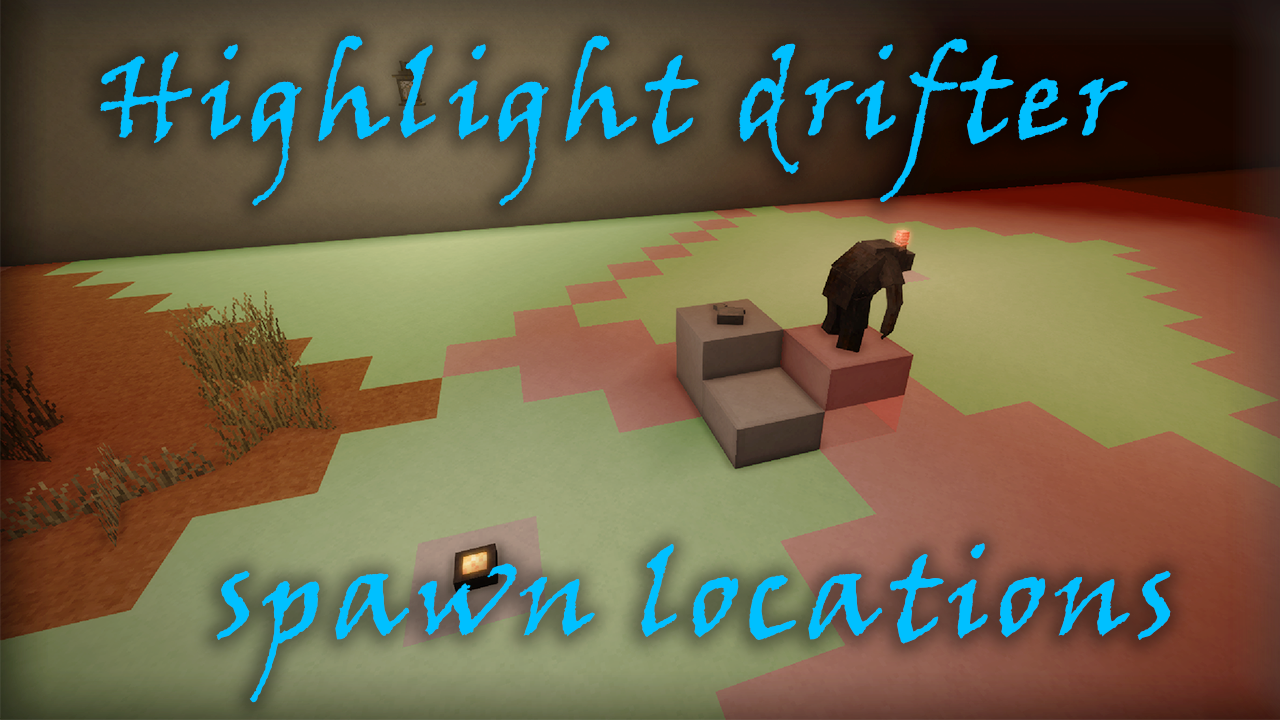
Vintage Story Mod DB · Vintage Story mod
Spawn Highlight
Spawn Highlight Allows to highlight blocks where drifters can spawn. Ever tired of drifter-proofing your base? This mod is for you! Press Ctrl+L to show/hide highlights. Keybinding can be changed in the settings. Default colors: Red - drifters can spawn on
Choose a version Pick your version below, then grab the matching file.
Quick answer
Which Spawn Highlight release should I use?
Latest stable file 1.2.0
Game version 1.19.3
Loader Built-in Vintage Story mod system
Spawn Highlight 1.2.0 targets 1.19.3. It must be installed on the client. Do not install it on the dedicated server. No extra mods listed for this file.
Where it goes
Is Spawn Highlight required on the client, server, or both?
It must be installed on the client. Do not install it on the dedicated server.
Client Required
Dedicated server Not supported
Loader for this release Built-in Vintage Story mod system
Required install it here Optional supported, not mandatory Not supported do not install here Source doesn’t say do not assume
This Vintage Story file is marked client-only.
What else does Spawn Highlight 1.2.0 need?
1.2.0. Change the file and its required mods may change too.
This file does not list any required mods. Do not add a library just because a different file uses it.
This file does not list any required or optional mods.
Before you install it
Add Spawn Highlight without breaking your instance.
Built for Spawn Highlight 1.2.0. Pick another file and the loader, install side or required mods may change.
- 01
Stick to this file
Use 1.2.0. It targets 1.19.3; another release may have different loader, side or dependency requirements.
- 02
Bring the mods it needs
This file does not list any required mods. Do not add a library just because a different file uses it.
- 03
Put it on the correct side
It must be installed on the client. Do not install it on the dedicated server.
- 04
Pick the file you checked
Use the “Get this file” button beside 1.2.0. It opens that exact file at the source.
About this project
What does Spawn Highlight add?
Spawn Highlight
Allows to highlight blocks where drifters can spawn.
Ever tired of drifter-proofing your base? This mod is for you!
Press Ctrl+L to show/hide highlights. Keybinding can be changed in the settings.
Default colors:
Red - drifters can spawn on this block
Green - drifters cannot spawn on this block because it is sufficiently lit
Not highlighted - drifter will never spawn on this block. Examples are lower slabs, stones and chiseled blocks
Remember that drifters will not spawn under sunlight, and will spawn anywhere they want while temporal storm is in progress.
To be more specific, the mod checks this rules for each block in radius:
- Block has solid upper side
- Upper block is air, tall grass or loose stones
- Non-natural light level is greater than 6
This mod is quite similar to Easy Light Levels. You may check it too if you want wider configuration options.
Commands
.sphi - Show/Hide highlights. Does exactly the same as Ctrl+L.sphi radius <number> - Change size of cube around you, where mod will scan and highlight blocks. Default is 20.sphi litcolor #RRGGBBAA - Set color for sufficiently lit zones. Default is #00FF0020.sphi spawncolor #RRGGBBAA - Set color for zones where mobs can spawn. Default is #FF000020
Config
If you prefer json instead of commands, you can change the values in the spawnhighlight-config.json which can be found in VintagestoryData/ModConfig folder
{
  "Radius": 20,
  "SafeColor": "#00FF0020",
  "SpawnableColor": "#FF000020"
}
Project description from Vintage Story Mod DB.
Pick your setup
Spawn Highlight releases for each Vintage Story version.
Choose the version and loader you play, then open the matching release.
Vintage Story version
1.18.10
1 loader buildVintage Story version
1.18.8
1 loader buildCheck the dependencies, then try the file in a copied instance before changing a world you care about.
Recent files
Spawn Highlight versions and loaders
1.2.0
spawnhighlight_1.2.0.zip
28 Jan 2024
Client Required Server Not supported Dependencies No extras listed Listed on Release listing
Check the 1.19.3 setup 1.19.3 release
1.1.0
spawnhighlight_1.1.0.zip
3 Sept 2023
Client Source doesn’t say Server Source doesn’t say Dependencies No extras listed Listed on Release listing
Check the 1.18.10 setup 1.18.10 release
1.0.0
spawnhighlight_1.0.0.zip
23 Aug 2023
Client Source doesn’t say Server Source doesn’t say Dependencies No extras listed Listed on Release listing
Check the 1.18.8 setup 1.18.8 release
Looking for an older file? The official Vintage Story Mod DB project page is in Resources.
 mod
mod Vintage Story
GiMap
Ultimative map for your Vintage Story
 mod
mod Vintage Story
Scribe: Notes & Tasks
Take notes and track tasks in-world. Pin tasks to a persistent HUD. Multiplayer-ready.
 mod
mod Vintage Story
Requiem of Rust UI (RoRUI)
A redo of the background for the UI and sliders dots etc for in game this is an earthy rusty tone.