Vintage Story version
Back to mods 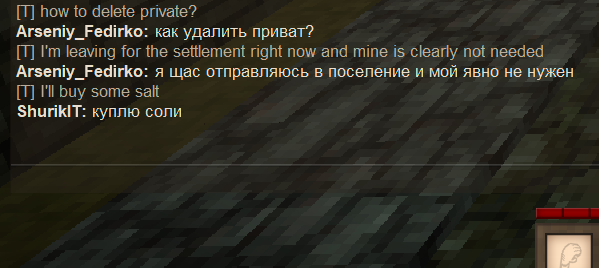
Vintage Story Mod DB · Vintage Story mod
Chat Translator
Usage Mod translates incoming chat messages by default. You can send translated version of your message using chat command. Commands .t (.translate) <message> - Translate your text into the target language and send it to the chat. .ct (.chattranslator; .t
Choose a version Pick your version below, then grab the matching file.
Quick answer
Which Chat Translator release should I use?
Latest stable file 1.1.0
Game version 1.18.15, 1.19.8, 1.20.0
Loader Built-in Vintage Story mod system
Chat Translator 1.1.0 targets 1.18.15, 1.19.8, 1.20.0. It must be installed on the client. Do not install it on the dedicated server. No extra mods listed for this file.
Where it goes
Is Chat Translator required on the client, server, or both?
It must be installed on the client. Do not install it on the dedicated server.
Client Required
Dedicated server Not supported
Loader for this release Built-in Vintage Story mod system
Required install it here Optional supported, not mandatory Not supported do not install here Source doesn’t say do not assume
This Vintage Story file is marked client-only.
What else does Chat Translator 1.1.0 need?
1.1.0. Change the file and its required mods may change too.
This file does not list any required mods. Do not add a library just because a different file uses it.
This file does not list any required or optional mods.
Before you install it
Add Chat Translator without breaking your instance.
Built for Chat Translator 1.1.0. Pick another file and the loader, install side or required mods may change.
- 01
Stick to this file
Use 1.1.0. It targets 1.18.15, 1.19.8, 1.20.0; another release may have different loader, side or dependency requirements.
- 02
Bring the mods it needs
This file does not list any required mods. Do not add a library just because a different file uses it.
- 03
Put it on the correct side
It must be installed on the client. Do not install it on the dedicated server.
- 04
Pick the file you checked
Use the “Get this file” button beside 1.1.0. It opens that exact file at the source.
About this project
What does Chat Translator add?
Usage
Mod translates incoming chat messages by default.
You can send translated version of your message using chat command.
Commands
.t (.translate) <message> - Translate your text into the target language and send it to the chat.
.ct (.chattranslator; .translator):
.ct toggle - Switch incoming messages translator on and off.
.ct lang list - List supported languages.
.ct lang <lang type> [lang code] - View or edit your language preferences.
.ct lang own [lang code] - Change the language in which you prefer to read and write your message if it differs from your game locale.
.ct lang source [lang code] - Change the language you expext most of the chat uses. Default is 'auto'. By changing you can improve translation quality bypassing the detection stage, but now translator could fail to translate from other languages.
.ct lang target [lang code] - Your messages in .t command will be translate to the target language. Most of the time matches with source language, but cannot be 'auto'. Default is English.
Examples:
.ct lang own - See your language.
.ct lang target zh-cn and .t Hello - Translate your message to Chinese (Simplified) and send it to the chat.
.ct lang source pl - Trying to translate all chat messages from Polish to your own language.
Future ideas:
- Option to hide the original untranslated messages (proposed by Eluce).
- Option to filter out messages in foreign languages / scripts.
- Translation of foreign scripts to other scripts (Cyrillic to Latin, Chinese to Pinyin).
- Server-side version of the mod.
- Support for other translation services/engines.
- Non-standard languages support, e.g. pirate speak. (proposed by RoadKill).
- In-game sign translation (separate mod?).
Project description from Vintage Story Mod DB.
Pick your setup
Chat Translator releases for each Vintage Story version.
Choose the version and loader you play, then open the matching release.
Vintage Story version
1.22.6
1 loader buildVintage Story version
1.22.5
1 loader buildVintage Story version
1.22.4
1 loader buildVintage Story version
1.22.3
1 loader buildVintage Story version
1.22.2
1 loader buildVintage Story version
1.22.1
1 loader buildVintage Story version
1.22.0
1 loader buildVintage Story version
1.21.6
1 loader buildVintage Story version
1.21.0
1 loader buildVintage Story version
1.20.12
1 loader buildVintage Story version
1.20.11
1 loader buildShowing the newest 12 of 24 game versions. Older files are in the list below.
Check the dependencies, then try the file in a copied instance before changing a world you care about.
Recent files
Chat Translator versions and loaders
1.1.0
ChatTranslator_v1.1.0.zip
27 Nov 2024
Client Required Server Not supported Dependencies No extras listed Listed on Release listing
Check the 1.22.7 setup 1.18.151.19.81.20.01.20.1 release
1.0.0-dev.0
ChatTranslator_v1.0.0-autodl.zip
26 Mar 2024
Client Required Server Not supported Dependencies No extras listed Listed on Release listing
Check the 1.19.7 setup 1.19.51.19.7 release
1.0.0
ChatTranslator_v1.0.0.zip
22 Oct 2023
Client Required Server Not supported Dependencies No extras listed Listed on Release listing
Check the 1.19.8 setup 1.18.151.19.8 release
Looking for an older file? The official Vintage Story Mod DB project page is in Resources.
 mod
mod Vintage Story
VS Siding Mod
Layered wall building: framing, infill, and finish materials for thinner, more realistic walls
 mod
mod Vintage Story
Vintage Fantasy
Whole buncha random shit to make the 194+ mods of the server not murder each other in their sleep
 mod
mod Vintage Story
Contrats & Gages
Player-made RôlePlay contracts