Vintage Story version
Back to mods 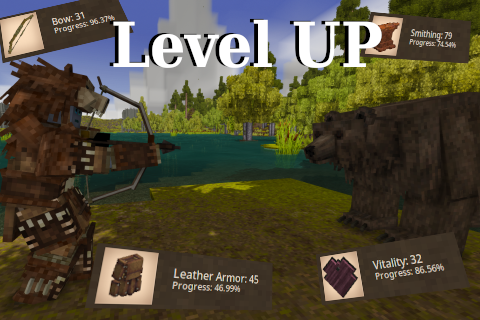
Vintage Story Mod DB · Vintage Story mod
Level UP
Level UP Brand new levels for your character in Vintage Story, earn levels by doing actions, become stronger and efficient during the gameplay. Makes you feels progress through the gameplay. IMPORTANT • Consider always making backup for your world ESPECIALL
Choose a version Pick your version below, then grab the matching file.
Quick answer
Which Level UP release should I use?
Latest stable file 3.1.1
Game version 1.22.0, 1.22.1, 1.22.2
Loader Built-in Vintage Story mod system
Level UP 3.1.1 targets 1.22.0, 1.22.1, 1.22.2. It must be installed on the client. Installation on the dedicated server is optional. No extra mods listed for this file.
Where it goes
Is Level UP required on the client, server, or both?
It must be installed on the client. Installation on the dedicated server is optional.
Client Required
Dedicated server Optional
Loader for this release Built-in Vintage Story mod system
Required install it here Optional supported, not mandatory Not supported do not install here Source doesn’t say do not assume
This release supports both sides, but the source does not require it on the server.
What else does Level UP 3.1.1 need?
3.1.1. Change the file and its required mods may change too.
This file does not list any required mods. Do not add a library just because a different file uses it.
This file does not list any required or optional mods.
Before you install it
Add Level UP without breaking your instance.
Built for Level UP 3.1.1. Pick another file and the loader, install side or required mods may change.
- 01
Stick to this file
Use 3.1.1. It targets 1.22.0, 1.22.1, 1.22.2; another release may have different loader, side or dependency requirements.
- 02
Bring the mods it needs
This file does not list any required mods. Do not add a library just because a different file uses it.
- 03
Put it on the correct side
It must be installed on the client. Installation on the dedicated server is optional.
- 04
Pick the file you checked
Use the “Get this file” button beside 3.1.1. It opens that exact file at the source.
About this project
What does Level UP add?
Level UP
Brand new levels for your character in Vintage Story, earn levels by doing actions, become stronger and efficient during the gameplay. Makes you feels progress through the gameplay.
- Consider always making backup for your world ESPECIALLY IF YOU ARE UPDATING THE MOD, level up is a mod that changes a lot of stats and mechanics that might crash your world/player.
- Is not safe to remove levelup after installation, full player wipe is required
- Strongly recommended to backup your world on level up major updates
- If you don't change the configurations manually consider deleting it in every update sometimes the updates comes with balance changes you can find the configuration in
C:\Users\username\AppData\Roaming\VintagestoryData\ModConfig\LevelUPor linux:/home/user/.config/VintagestoryData/ModConfig/LevelUP
Features:
- Fully configurable
- GUI Level in character view
- Hardcore mode
- Commands for administration manipulation
- Class experience manipulation
- Custom classes and items from other mods (in ModConfig)
- Survival Guide, for undestanding what each level will do
- Multi Language support
- API for modders wiki
Not all item codes is added to the json configurations files, some armors/items/meats/entities/blocks can be missing, if you think something is missing from vanilla you can contact me or make a pull request in the github.
Resume
The mods simple increase your status, use a lot of shovel? then your dig speed will be increased, you love bows and only use them? become a ranged killing machine increasing accuracy/damage and increasing chance to keep arrow after hit, you prefer to be a smithing and only smiths items? well other players will love you because your craftings now will have increased damage/durability and stats.
You can view what each level will do ingame docs H
Observations
Configurations will be located in the folder ModConfig/LevelUP, if you want more informations you can see the wiki to know what each configuration does, if any update from levelup add new configuration you will need to manually added them to fix logs errors, otherwises will have the default value.
Level UP Stores datas with the player UID, changing the player name will persist all levels.
This mod changes a lot of native codes and usage of transpilers and can break easily throught updates.
Level UP is a mod that adds several types of events to player actions, don't expect the mod to be lightweight (for big servers).
The experience data is saved everytime the world is saved or the player disconnect from the server, if the server dies unexpectedly, experiences may be lost for a few minutes since the last save.
LevelUP was built to work on large dedicated servers, experiences will be saved in the "ModData" folder separately for each user within the game, you can manually edit it or do whatever you want. (Edit while server is running will be overwrited by LevelUP, close server first)
English is not my main language, if you encounter any translation problems, please let me know.
| Mod | Compatibility |
|---|---|
| Item Rarity | Not compatible with Smithing Level |
| XSkills | Not compatible with Cooking Level |
| CombatOverhaul | Not compatible with Bow Level and some custom weapons |
"My custom weapon from my mod does not work with level up!!", check your weapon json, find the "tool" section:
{
    "tool": "axe"
}
If the weapon doesn't have "tool", add it to fix the problem, levelup support only: shovel,axe,spear,sword,pickaxe,hammer,knife, "but my weapon uses a custom type that levelup does not support what i need to do?" in that case is more complicated, you need to edit your mod and use the mod api to listen for levelup event (OnPlayerMeleeDoDamageStart and OnPlayerRangedDoDamageStart). full example can be found in Sword Level Source Code
"But my custom armor also don't work...", if your armor is made of: leather/chain/brigandine/plate/scale then you are lucky, open the configurations from one of the armor type in ModConfig/LevelUP/config/levelstats and put the item id inside it, if not..., well you will need to integrate a custom level in your mod, in that case the api will help you. full example can be found in Leather Armor Level Source Code
"None of my food mods work with levelup!!!!", is very simple to fix that, manually edit ModConfig/LevelUP/config/levelstats/cookingsingles.json for singular foods and ModConfig/LevelUP/config/levelstats/cookingpots.json for custom pots.
"I have custom classes and a lot of warning is called in my console", this is because you need to add your custom classes inside ModConfig/LevelUP/config/classexp. Examples in the Wiki
Vitality will overwrite the health system, you need manually change configurations in levelstats/vitality.json changing in default game configuration will have no effects, if you don't want this feature consider disabling in configuration before generating or joining in the world
Metabolism works as the same as vitality, changing base saturation ingame will have no effect you need to change in levelstats/metabolism.json
Debug logs is by default disabled, if you need to send logs you can send logs to issues, you can enable it in base.json: enableExtendedLog.
I strongly recommend to send game breaking bugs to issues, i don't receive notifications in vsmoddb
This is just an estimate of what can affect a server's performance, if you are having lag problems try disabling what consumes more cpu first.
| Level | CPU Consume |
|---|---|
| Axe | Medium |
| Bow | Medium |
| Pickaxe | Medium |
| Brigandine Armor | High |
| Chain Armor | High |
| Cooking | Player Count Depends |
| Farming | Low |
| Hammer | Low |
| Hunter | Low |
| Knife | Medium |
| Lamellar Armor | High |
| Leather Armor | High |
| Metabolism | Low |
| Panning | Low |
| Pickaxe | Medium |
| Plate Armor | High |
| Scale Armor | High |
| Shield | High |
| Shovel | Medium |
| Slingshot | High |
| Smithing | High |
| Spear | Medium |
| Sword | Medium |
| Vitality | Low |
About Level UP
Level UP is open source project and can easily be accessed on the github, all contents from this mod is completly free.
If you want to contribute into the project you can access the project github and make your pull request.
You are free to fork the project and make your own version of Level UP, as long the name is changed.
Inspirations:
- Valheim Level UP System
- Runescape Level UP System
- Minecraft LevelZ mod
- Project Zomboid Level UP System
Project description from Vintage Story Mod DB.
Pick your setup
Level UP releases for each Vintage Story version.
Choose the version and loader you play, then open the matching release.
Vintage Story version
1.22.6
1 loader buildVintage Story version
1.22.5
1 loader buildVintage Story version
1.22.4
1 loader buildVintage Story version
1.22.3
1 loader buildVintage Story version
1.22.2
1 loader buildVintage Story version
1.22.1
1 loader buildVintage Story version
1.22.0
1 loader buildVintage Story version
1.21.6-rc.1
1 loader buildVintage Story version
1.21.6
1 loader buildVintage Story version
1.21.5
1 loader buildVintage Story version
1.21.4
1 loader buildShowing the newest 12 of 54 game versions. Older files are in the list below.
Check the dependencies, then try the file in a copied instance before changing a world you care about.
Recent files
Level UP versions and loaders
3.1.1
levelup_3.1.1.zip
22 Aug 2026
Client Required Server Optional Dependencies No extras listed Listed on Release listing
Check the 1.22.7 setup 1.22.01.22.11.22.21.22.3 release
3.1.0
levelup_3.1.0.zip
19 Jul 2026
Client Required Server Optional Dependencies No extras listed Listed on Release listing
Check the 1.22.3 setup 1.22.3 release
3.0.9
levelup_3.0.9.zip
16 Jul 2026
Client Required Server Optional Dependencies No extras listed Listed on Release listing
Check the 1.22.3 setup 1.22.3 release
3.0.8
levelup_3.0.8.zip
14 Jul 2026
Client Required Server Optional Dependencies No extras listed Listed on Release listing
Check the 1.22.3 setup 1.22.3 release
3.0.7
levelup_3.0.7.zip
12 Jul 2026
Client Required Server Optional Dependencies No extras listed Listed on Release listing
Check the 1.22.3 setup 1.22.3 release
3.0.6
levelup_3.0.6.zip
22 Feb 2026
Client Required Server Optional Dependencies No extras listed Listed on Release listing
Check the 1.21.6-rc.1 setup 1.21.0-pre.11.21.0-pre.21.21.0-pre.31.21.0-rc.1 release
3.0.5
levelup_3.0.5.zip
20 Feb 2026
Client Required Server Optional Dependencies No extras listed Listed on Release listing
Check the 1.21.6-rc.1 setup 1.21.0-pre.11.21.0-pre.21.21.0-pre.31.21.0-rc.1 release
3.0.4
levelup_3.0.4.zip
11 Feb 2026
Client Required Server Optional Dependencies No extras listed Listed on Release listing
Check the 1.21.6-rc.1 setup 1.21.0-pre.11.21.0-pre.21.21.0-pre.31.21.0-rc.1 release
3.0.2
levelup_3.0.2.zip
25 Jan 2026
Client Required Server Optional Dependencies No extras listed Listed on Release listing
Check the 1.21.6-rc.1 setup 1.21.0-pre.11.21.0-pre.21.21.0-pre.31.21.0-rc.1 release
3.0.1
levelup_3.0.1.zip
24 Jan 2026
Client Required Server Optional Dependencies No extras listed Listed on Release listing
Check the 1.21.6-rc.1 setup 1.21.0-pre.11.21.0-pre.21.21.0-pre.31.21.0-rc.1 release
3.0.0
levelup_3.0.0.zip
24 Jan 2026
Client Required Server Optional Dependencies No extras listed Listed on Release listing
Check the 1.21.6-rc.1 setup 1.21.0-pre.11.21.0-pre.21.21.0-pre.31.21.0-rc.1 release
2.1.4
levelup_2.1.4.zip
23 Nov 2025
Client Required Server Optional Dependencies No extras listed Listed on Release listing
Check the 1.21.5 setup 1.21.01.21.11.21.21.21.3 release
Looking for an older file? The official Vintage Story Mod DB project page is in Resources.
 mod
mod Vintage Story
Antique Harmony | Music Additions / Alternative Soundtrack
Adds to/replaces soundtrack with original orchestral one, composed from scratch
 mod
mod Vintage Story
Music Volume Balancer
Makes Vanilla music match the volume of Antique Harmony's music
 mod
mod Vintage Story
Quartered Logs to Firewood
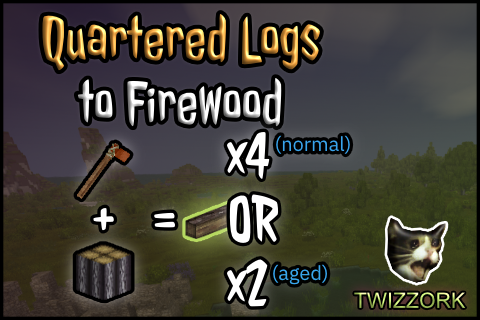
Chop ya quartered logs into 4 pieces of firewood, as nature intended.