Vintage Story version
Back to mods 
Vintage Story Mod DB · Vintage Story mod
LibATex
LibAnimatedTextures Introduction LibATex provides functionality to allow mod developers to add animated textures to Vintage Story. Does nothing if no other mods make use of this functionality. By replacing the animated textures at runtime, your mod is guara
Choose a version Pick your version below, then grab the matching file.
Quick answer
Which LibATex release should I use?
Latest stable file 0.8.0
Game version 1.22.0
Loader Built-in Vintage Story mod system
LibATex 0.8.0 targets 1.22.0. It must be installed on the client. Do not install it on the dedicated server. No extra mods listed for this file.
Where it goes
Is LibATex required on the client, server, or both?
It must be installed on the client. Do not install it on the dedicated server.
Client Required
Dedicated server Not supported
Loader for this release Built-in Vintage Story mod system
Required install it here Optional supported, not mandatory Not supported do not install here Source doesn’t say do not assume
This Vintage Story file is marked client-only.
What else does LibATex 0.8.0 need?
0.8.0. Change the file and its required mods may change too.
This file does not list any required mods. Do not add a library just because a different file uses it.
This file does not list any required or optional mods.
Before you install it
Add LibATex without breaking your instance.
Built for LibATex 0.8.0. Pick another file and the loader, install side or required mods may change.
- 01
Stick to this file
Use 0.8.0. It targets 1.22.0; another release may have different loader, side or dependency requirements.
- 02
Bring the mods it needs
This file does not list any required mods. Do not add a library just because a different file uses it.
- 03
Put it on the correct side
It must be installed on the client. Do not install it on the dedicated server.
- 04
Pick the file you checked
Use the “Get this file” button beside 0.8.0. It opens that exact file at the source.
About this project
What does LibATex add?
LibAnimatedTextures
Introduction
LibATex provides functionality to allow mod developers to add animated textures to Vintage Story. Does nothing if no other mods make use of this functionality.
By replacing the animated textures at runtime, your mod is guaranteed to keep displaying the correct textures if this mod fails or is not installed.
Currently untested on GNU+Linux and MacOS, but should work
To get started:
- Just make blocks / models / textures as you would otherwise
- Add animated versions of the textures you want to animate
- Create a configuration file to define your animations
- Enjoy!
Features (WIP)
Currently implemented:
These features are currently implemented and working
- Animated textures (O tested - functional)
- Replace any texture with an animated version
- Support for blocks, entities and items
- Partial animations (O tested - functional)
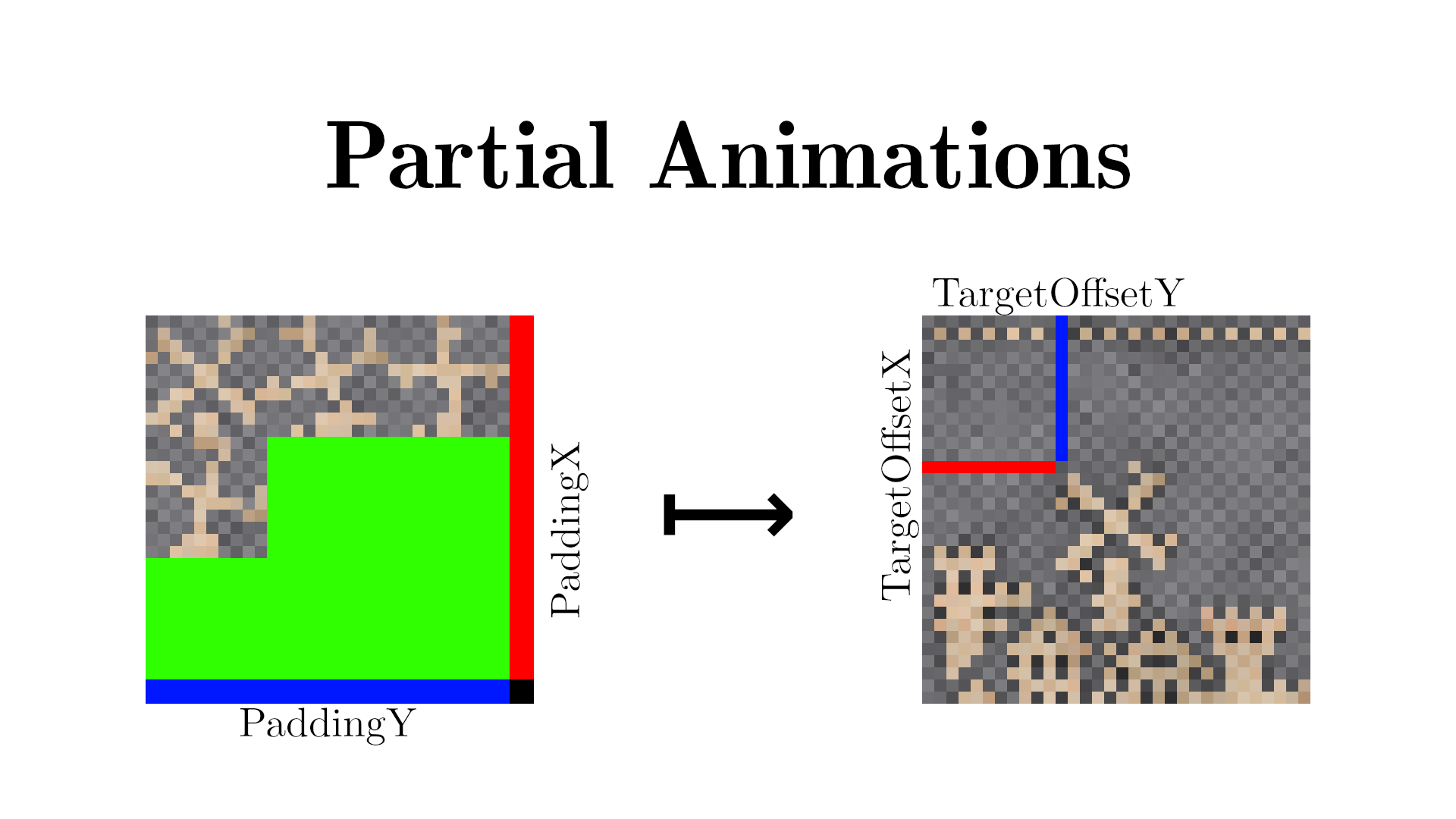
- Apply small animation frames to only part of a texture, instead of the entire texture
- Allows for smaller animations for accent animations
- Examples: eyes blinking, candles flickering
- No-code JSON configuration (O tested - functional)
- Add animations by simply adding textures and a config file to your own mod
- Allows for non-programmers to use animated textures
- Time-based Animations (O tested - functional)
- Sets the animation frame based on the current time of day
Planned features
These features are planned to be implemented in a future update
- Animation manipulation through C#
- provide custom textures that are rendered onto by the caller
- allow the starting, stopping, and general configuration at runtime through code
- sample renderer / shader combo for shader-based animations
- Github repo coming
- feature requests welcome!
Potential features
These features might be implemented, or may stay as ideas
- Periodic animations
- Wait for a specified amount of time in between animation loops
- Periodic random animations:
- Same as periodic animations, but waits a random time between tmin and tmax between loops
Configuration
To enable animations in your mod, add an animatedtextures.json to your assets/config/ folder (the name has to be exact) with a configuration object supporting the following options:
Global Options
These options apply to the animations of this mod as a whole
AllowsOverriding:Determines whether or not other mods are allowed to overwrite your textures (animated or otherwise) with their own animated textures. Defaults totrueAnimations:An optional array of individual animation configuration objects. See the required, alternate and optional options below for valid options.
Notes:
- Mods that don't use animated textures but also don't want their textures to be animated by other mods can set the "AllowsOverriding" option to false, and then leave the "Animations" option blank to disable other mods animating their textures
Animations: an array of configuration items containing the following options:
Required options
These options are required to create an animated texture
string AnimationPath:The assetlocation path to the animated texturestring TargetPath:The assetlocation path to the texture to animateint NumColumns:The number of frame columns the animation hasint NumRows:The number of frame rows the animation has
Alternate options
These options can be used as replacements for some of the required options.
string AnimationQualifiedPath:The qualified path to the animated texture, including domain and starting from thetextures/folder (supersedesAnimationModDomainandAnimationPath)string TargetQualifiedPath:The qualified path to the texture to animate, including domain and starting from thetextures/folder (supersedesTargetModDomainandTargetPath)
Optional options
These options can be left out if not used
string AnimationModDomain:The domain of the mod that has the animated texture. Defaults to the domain of the mod defining this configstring TargetModDomain:The domain of the mod that has the texture to animate. Defaults to the domain of the mod defining this configstring AtlasType:The type of atlas the texture to animate belongs to ["block" | "item" | "entity"]. Defaults to "block"int NumFrames:The number of frames in the texture. Defaults toNumColumns * NumRowsint Priority:The priority this animation configuration takes over other animations targeting the same texture. Defaults to 0int PaddingX:The animated texture padding on the right side. Decreases the space used by the frames. Defaults to 0int PaddingY:The animated texture padding on the bottom side. Decreases the space used by the frames. Defaults to 0int TargetOffsetX:The partial animation X-offset within the target texture. Indicates the animation is a partial texture if not 0. Defaults to 0int TargetOffsetY:The partial animation Y-offset within the target texture. Indicates the animation is a partial texture if not 0. Defaults to 0float SecondsPerFrame:The time each frame should be displayed for (note: animations tick every game tick). Defaults to 1.0bool IsPartial:Indicates the animation is a partial animation. Useful if the target offsets are both 0. Defaults to falseTimeConfig TimeOptions:An object containing options for time-of-day based animations. If this object is present the animation will be treated as a time-based animation. See specific options below.
TimeConfig options
To make an animation time-based, add an object called "TimeOptions" to the root of that animation object with the following optional options:
float TimeMultiplier:A positive number the current time of day is multiplied with before being used for frame calculations. Defaults to 1.0float TimeOffset:A number from that is added after the multiplier, but before the frame calculations, used to offset the final time. Defaults to 0.0
Notes:
- As should be best practice, only textures with dimensions of a power of 2 are supported (e.g. 16x16, 32x32, ...)
- The animation manager 'ticks' at most every game tick
- Configuration assetlocation paths default to the domain of the mod defining the configuration file being read (e.g. "game:", "libatex:")
- Multiple animated textures cannot write to the same target texture, with the exception of partial animations. Use the Priority option to set animation precedence
Sample Configurations
Minimum config with common options and variations
{
  "Animations": [
    {
      // a 2x2 animation with all files within this mod
      "AnimationPath": "block/animation1",
      "TargetPath": "block/target1",
      "NumColumns": 2,
      "NumRows": 2
    },
    {
      // a 2x2 animation targeting a game texture that changes 2 times per second
      "AnimationPath": "block/animation2",
      "TargetPath": "block/soil/blueclay",
      "TargetModDomain": "game"
      "NumColumns": 2,
      "NumRows": 2,
      "SecondsPerFrame": 0.5
    },
    {
      // a 4x4 animation with 10 frames
      "AnimationQualifiedPath": "animatedmod:block/animation3",
      "TargetQualifiedPath": "game:block/soil/fireclay",
      "NumColumns": 4,
      "NumRows": 4,
      "NumFrames": 10
    },
  ]
}
Configuration with partial animations and global options
{
  "AllowsOverriding": false,
  "Animations": [
    {
      // a partial animation replacing the windmill of the banner texture with 4 frames
      // the target region is 10x10 pixels with an offset of (11,12)
      // we need to use a 32x32 texture, so 2px leftover at the right and bottom
      "AnimationPath": "block/animation1",
      "TargetPath": "game:block/cloth/banner/hansa/keys-top"
      "NumColumns": 3,
      "NumRows": 3,
      "NumFrames": 4,
      "PaddingX": 2,
      "PaddingY": 2,
      "TargetOffsetX": 11,
      "TargetOffsetY": 12
    }
  ]
}
Configuration targeting a different texture atlas
{
  "Animations": [
    {
      "AnimationQualifiedPath": "animatedmod:animated/blinking_face",
      "TargetQualifiedPath": "game:entity/humanoid/trader",
      "NumColumns": 3,
      "NumRows": 3,
      "PaddingX": 2,
      "PaddingY": 2,
      "TargetOffsetX": 10,
      "TargetOffsetY": 14,
      "AtlasType": "entity"
    }
  ]
}
Time-based animation with 1 frame every 2 hours
{
  "Animations": [
    {
      "AnimationQualifiedPath": "libatexexamples:block/clock_animated",
      "TargetQualifiedPath": "libatexexamples:block/clock",
      "NumColumns": 4,
      "NumRows": 4,
      "NumFrames": 12,
      "TimeOptions": {
      }
    }
  ]
}
Note about time-based animations; the time of day is represented as a percentage, i.e. a number from 0.0 to 1.0, in order to accomodate different hours per day configurations.
Each frame is spaced evenly across the day, so an animation with 4 frames would receive 6 hours per frame, or 3 hours per frame with a multiplier of 2.0 for example.
Project description from Vintage Story Mod DB.
Pick your setup
LibATex releases for each Vintage Story version.
Choose the version and loader you play, then open the matching release.
Vintage Story version
1.21.6-rc.1
1 loader buildVintage Story version
1.21.6
1 loader buildVintage Story version
1.21.5
1 loader buildVintage Story version
1.21.4
1 loader buildVintage Story version
1.21.3
1 loader buildVintage Story version
1.21.2-rc.3
1 loader buildVintage Story version
1.21.2-rc.2
1 loader buildVintage Story version
1.21.2-rc.1
1 loader buildVintage Story version
1.21.2
1 loader buildVintage Story version
1.21.1-rc.2
1 loader buildVintage Story version
1.21.1-rc.1
1 loader buildShowing the newest 12 of 37 game versions. Older files are in the list below.
Check the dependencies, then try the file in a copied instance before changing a world you care about.
Recent files
LibATex versions and loaders
0.8.0
libatex_0.8.0.zip
21 Apr 2026
Client Required Server Not supported Dependencies No extras listed Listed on Release listing
Check the 1.22.0 setup 1.22.0 release
0.7.0
libatex_0.7.0.zip
25 Aug 2025
Client Required Server Not supported Dependencies No extras listed Listed on Release listing
Check the 1.21.6-rc.1 setup 1.21.0-pre.11.21.0-pre.21.21.0-pre.31.21.0-rc.1 release
0.6.0
libatex_0.6.0.zip
25 May 2025
Client Required Server Not supported Dependencies No extras listed Listed on Release listing
Check the 1.20.11-rc.1 setup 1.20.01.20.11.20.21.20.3 release
0.5.1
libatex_0.5.1.zip
30 Mar 2025
Client Required Server Not supported Dependencies No extras listed Listed on Release listing
Check the 1.20.7 setup 1.20.01.20.11.20.21.20.3 release
0.5.0
libatex_0.5.0.zip
27 Jul 2024
Client Required Server Not supported Dependencies No extras listed Listed on Release listing
Check the 1.20.7 setup 1.19.81.20.01.20.11.20.2 release
Looking for an older file? The official Vintage Story Mod DB project page is in Resources.
 mod
mod Vintage Story
Improved Handbook Recipe Helper
Makes recipes easier to complete by adding auto-population, conflict cycling, and missing component
 mod
mod Vintage Story
Newfies Block Logger
A Robust block, entity, and item logging server utility designed for Newfies Community
 mod
mod Vintage Story
Buildwright
Client-side blueprints, ghost projections and build progress tools