Vintage Story version
Back to mods 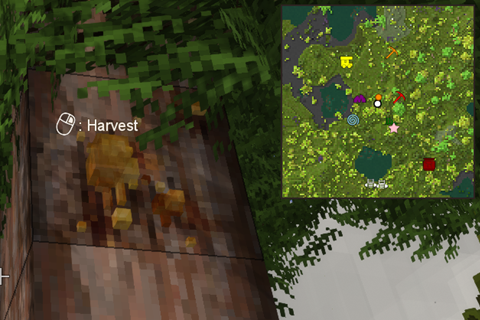
Vintage Story Mod DB · Vintage Story mod
Auto Map Markers
Overview Automatically adds map markers to your map when you interact with certain objects. Works both in singleplayer mode and on multiplayer servers. The mod includes three modes for marking objects - you can use one mode (or multiple): either mark the map
Choose a version Pick your version below, then grab the matching file.
Quick answer
Which Auto Map Markers release should I use?
Latest stable file 5.0.3
Game version 1.22.0, 1.22.1, 1.22.2
Loader Built-in Vintage Story mod system
Auto Map Markers 5.0.3 targets 1.22.0, 1.22.1, 1.22.2. It must be installed on the client. Installation on the dedicated server is optional. No extra mods listed for this file.
Where it goes
Is Auto Map Markers required on the client, server, or both?
It must be installed on the client. Installation on the dedicated server is optional.
Client Required
Dedicated server Optional
Loader for this release Built-in Vintage Story mod system
Required install it here Optional supported, not mandatory Not supported do not install here Source doesn’t say do not assume
This release supports both sides, but the source does not require it on the server.
What else does Auto Map Markers 5.0.3 need?
5.0.3. Change the file and its required mods may change too.
This file does not list any required mods. Do not add a library just because a different file uses it.
This file does not list any required or optional mods.
Before you install it
Add Auto Map Markers without breaking your instance.
Built for Auto Map Markers 5.0.3. Pick another file and the loader, install side or required mods may change.
- 01
Stick to this file
Use 5.0.3. It targets 1.22.0, 1.22.1, 1.22.2; another release may have different loader, side or dependency requirements.
- 02
Bring the mods it needs
This file does not list any required mods. Do not add a library just because a different file uses it.
- 03
Put it on the correct side
It must be installed on the client. Installation on the dedicated server is optional.
- 04
Pick the file you checked
Use the “Get this file” button beside 5.0.3. It opens that exact file at the source.
About this project
What does Auto Map Markers add?
Overview
Automatically adds map markers to your map when you interact with certain objects. Works both in singleplayer mode and on multiplayer servers. The mod includes three modes for marking objects - you can use one mode (or multiple): either mark the map when you interact with the object (begin to harvest or break it), mark the map by sneaking while looking at the object, or mark the map when you press a customizable hotkey.
Fully configurable to add only the map markers you are interested in. Current options include:
- Flora: resin, berries, mushrooms, flowers, fruit trees, wild crops, reeds
- Surface ore: 14 varieties of surface ore bits, including copper, gold, silver, and others
- Deep ore: 19 varieties including iron, bismuth, tin, zinc, and others
- Misc: boats, beehives, translocators, red clay, blue clay, fire clay, peat, high fertility soil, meteoric iron, saltpeter
- Traders: all 9 varieties of trader
Makes it easier to remember locations and return to those locations later, and eliminates the tedium of manually opening the map and creating map markers. Can also help to ensure you don't miss out on gold or silver surface ore, which are sometimes difficult to spot!
The mod also supports additional hotkeys:
- Up to 3 custom, configurable map markers linked to hotkeys.
- A hotkey to delete the nearest map marker.
The mod is disabled by default when first installed. To enable the mod, open the configuration menu (Ctrl+Shift+M by default, adjustable keybind), and click the Enable button. You can also configure all of your preferences from this menu, including the icons, colors, and names that should be used for each type of automatically created map marker.
Translations
The mod currently includes localizations for Belarusian, Brazilian Portuguese, Chinese, Czech, Dutch, English, French, German, Italian, Japanese, Korean, Polish, Russian, Spanish, Turkish, and Ukranian. Thanks to those who have helped to provide these translations!
Interested in adding or improving a translation for the mod? Check out the mod's crowdin or GitHub page, and thank you!
FAQ
- Auto Map Markers works automatically with custom map icons and colors added by other mods.
- Auto Map Markers supports patch files to make it compatible with other mods. Instructions are on the mod wiki.
- For multiplayer, must be installed both on the client side and the server side to work.
- If you press the hotkey (Ctrl+Shift+M by default) and it just opens the in-game map instead of the mod menu, it means that the mod has failed to load. Check your logs to understand why, and share your log errors if you would like assistance. Some common reasons include:
- Using the wrong version of the mod for your version of Vintage Story
- Using the mod on a server where the mod is not installed server-side
Project description from Vintage Story Mod DB.
Pick your setup
Auto Map Markers releases for each Vintage Story version.
Choose the version and loader you play, then open the matching release.
Vintage Story version
1.22.2
1 loader buildVintage Story version
1.22.1
1 loader buildVintage Story version
1.22.0-rc.10
1 loader buildVintage Story version
1.22.0-rc.9
1 loader buildVintage Story version
1.22.0-rc.8
1 loader buildVintage Story version
1.22.0-rc.7
1 loader buildVintage Story version
1.22.0-rc.6
1 loader buildVintage Story version
1.22.0-rc.5
1 loader buildVintage Story version
1.22.0-rc.4
1 loader buildVintage Story version
1.22.0-rc.3
1 loader buildVintage Story version
1.22.0-rc.2
1 loader buildShowing the newest 12 of 97 game versions. Older files are in the list below.
Check the dependencies, then try the file in a copied instance before changing a world you care about.
Recent files
Auto Map Markers versions and loaders
5.0.3
Auto Map Markers 5.0.3 - Vintage Story 1.22.zip
4 May 2026
Client Required Server Optional Dependencies No extras listed Listed on Release listing
Check the 1.22.3 setup 1.22.01.22.11.22.21.22.3 release
5.0.2
Auto Map Markers 5.0.2 - Vintage Story 1.22.zip
27 Apr 2026
Client Required Server Optional Dependencies No extras listed Listed on Release listing
Check the 1.22.3 setup 1.22.01.22.11.22.21.22.3 release
5.0.1
Auto Map Markers 5.0.1 - Vintage Story 1.22.zip
9 Apr 2026
Client Required Server Optional Dependencies No extras listed Listed on Release listing
Check the 1.22.0-rc.10 setup 1.22.0-rc.11.22.0-rc.21.22.0-rc.31.22.0-rc.4 release
4.1.0
Auto Map Markers 4.1.0 - Vintagestory 1.22.zip
14 Mar 2026
Client Required Server Optional Dependencies No extras listed Listed on Release listing
Check the 1.22.0-rc.6 setup 1.22.0-rc.11.22.0-rc.21.22.0-rc.31.22.0-rc.4 release
4.0.4
Auto Map Markers 4.0.4 - Vintagestory 1.21.zip
14 Mar 2026
Client Required Server Optional Dependencies No extras listed Listed on Release listing
Check the 1.21.7 setup 1.21.01.21.1-rc.11.21.1-rc.21.21.1 release
4.0.3
Auto Map Markers 4.0.3 - Vintagestory 1.21-rc.zip
31 Jul 2025
Client Required Server Optional Dependencies No extras listed Listed on Release listing
Check the 1.21.7 setup 1.21.01.21.1-rc.11.21.1-rc.21.21.1 release
4.0.2
Auto Map Markers 4.0.2 (Vintagestory 1.20).zip
25 Apr 2025
Client Required Server Optional Dependencies No extras listed Listed on Release listing
Check the 1.20.12 setup 1.20.01.20.11.20.21.20.3 release
4.0.1
Auto Map Markers 4.0.1 (Vintagestory 1.20).zip
18 Jan 2025
Client Required Server Optional Dependencies No extras listed Listed on Release listing
Check the 1.20.1 setup 1.20.01.20.1 release
4.0.0
Auto Map Markers 4.0.0 (Vintagestory 1.20).zip
22 Sept 2024
Client Required Server Optional Dependencies No extras listed Listed on Release listing
Check the 1.20.0-pre.0 setup 1.20.0-pre.0 release
3.1.0
Auto Map Markers (1.19).zip
21 Jan 2024
Client Required Server Optional Dependencies No extras listed Listed on Release listing
Check the 1.19.8 setup 1.19.01.19.11.19.21.19.3 release
3.0.2
egocaribautomapmarkers_3.0.2.zip
17 Jan 2024
Client Required Server Optional Dependencies No extras listed Listed on Release listing
Check the 1.19.1 setup 1.19.01.19.1 release
2.9.10
egocaribautomapmarkers_2.9.10.zip
17 Jan 2024
Client Required Server Optional Dependencies No extras listed Listed on Release listing
Check the 1.18.15 setup 1.18.15 release
Looking for an older file? The official Vintage Story Mod DB project page is in Resources.
mod
Vintage Story
TekTools
Adds a dedicated Tools tab to the Vintage Story character window, providing a clean home for TekTool
 mod
mod Vintage Story
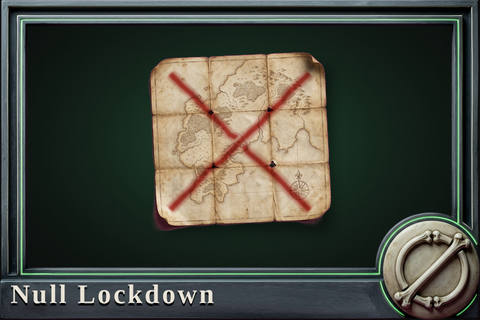
Null Lockdown
Hardcore navigation: no world map, no coordinate readouts, and the server-side leaks closed too.
mod
Vintage Story
RecipesUseClearParchments
Makes recipes only accept parchments and books that have nothing written on them